Hiddeneye-legacy: Hiddeneye (Ngrok) error - how to fix this..?
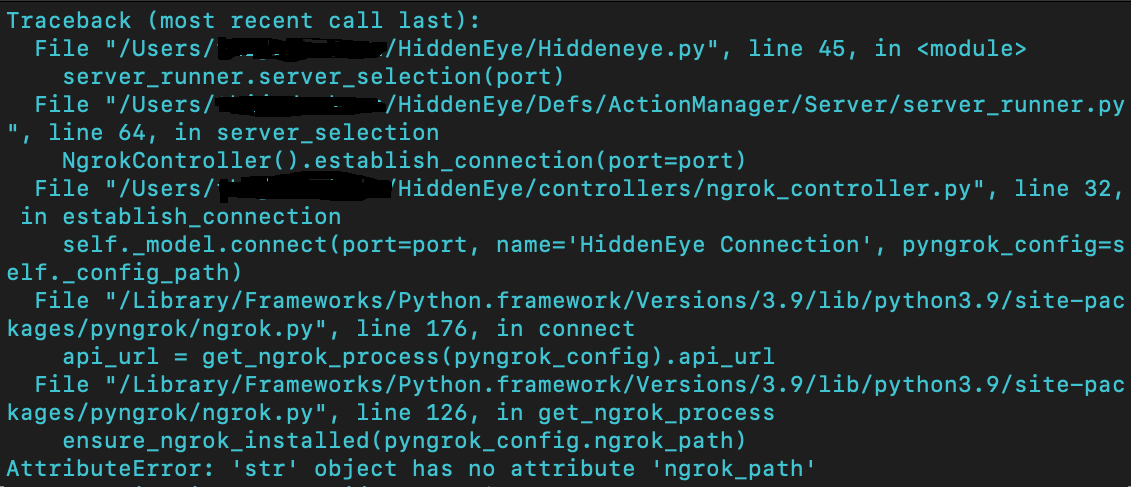
I'm getting this certain error when I try to run Hiddeneye using "python3 hiddeneye.py". How do I fix this? I tried running the hiddeneyereborn version too, but I have no clue how to run that version. Any suggestions? I have 0 experience with coding, so it would be really helpful if someone could write down the exact coding for me to fix this. I've been looking for solutions on the internet, but nothing seems to work. Thanks in advance!
 CortesWasTaken
All 12 comments
Issue-Label Bot is automatically applying the label question to this issue, with a confidence of 0.75. Please mark this comment with :thumbsup: or :thumbsdown: to give our bot feedback!
Links: app homepage, dashboard and code for this bot.
![issue-label-bot[bot] picture](https://avatars.githubusercontent.com/in/27079?v=4&s=40) issue-label-bot[bot]
on 7 Oct 2020
issue-label-bot[bot]
on 7 Oct 2020
Request pull for hiddeneye py. ///
 Vanillacxz26
on 8 Oct 2020
Vanillacxz26
on 8 Oct 2020
Python. DDR. hdd 256 bitxxx
Vanillacxz26
on 8 Oct 2020
Request pulll
Vanillacxz26
on 8 Oct 2020
Use open source linux for coding. Javadcript.
Vanillacxz26
on 8 Oct 2020
Beep me up.
Vanillacxz26
on 8 Oct 2020
- Root: pkg install root-repo
- Unstable: pkg install unstable-repo
- X11: pkg install x11-repo
Report issues at https://termux.com/issues
$ hiddenpyhiddem.
hiddenpyhiddem.: command not found
$ y/m
bash: y/m: No such file or directory
Vanillacxz26
on 8 Oct 2020
I'm having the same issue on HIDDEN EYE, once I try using it with ngrok I get this error
HOW DO I SOLVE IT
Traceback (most recent call last): File "/data/data/com.termux/files/home/HiddenEye-Legacy/HiddenEye.py", line 45, in
AttributeError: 'str' object has no attribute 'config_path'
 kaleb119
on 1 Nov 2020
kaleb119
on 1 Nov 2020
please i also have the same issue tell me the solution for that
 himanshumehla
on 5 Nov 2020
himanshumehla
on 5 Nov 2020
i also have the same issue
 Rashed07c
on 13 Nov 2020
Rashed07c
on 13 Nov 2020
I also have same issue
 brian77-git
on 16 Nov 2020
brian77-git
on 16 Nov 2020
Hi, Im getting this issue while working on hiddeneye. No hands down experience in coding, It would be great if one of you could help me solve this issue completely.
Thanks.
File "HiddenEye.py", line 45, in
server_runner.server_selection(port)
File "/root/HiddenEye/Defs/ActionManager/Server/server_runner.py", line 64, in server_selection
NgrokController().establish_connection(port=port)
File "/root/HiddenEye/controllers/ngrok_controller.py", line 32, in establish_connection
self._model.connect(port=port, name='HiddenEye Connection', pyngrok_config=self._config_path)
File "/usr/local/lib/python3.8/dist-packages/pyngrok/ngrok.py", line 176, in connect
api_url = get_ngrok_process(pyngrok_config).api_url
File "/usr/local/lib/python3.8/dist-packages/pyngrok/ngrok.py", line 126, in get_ngrok_process
ensure_ngrok_installed(pyngrok_config.ngrok_path)
AttributeError: 'str' object has no attribute 'ngrok_path'
 shaddy1976
on 20 Nov 2020
shaddy1976
on 20 Nov 2020
Related issues
 Hanzo96
·
6Comments
Hanzo96
·
6Comments
 sTiKyt
·
3Comments
sTiKyt
·
3Comments
 malikhamza302
·
4Comments
malikhamza302
·
4Comments
 jigsaw678
·
3Comments
jigsaw678
·
3Comments
 souriens253
·
7Comments
souriens253
·
7Comments
Most helpful comment
Issue-Label Bot is automatically applying the label
questionto this issue, with a confidence of 0.75. Please mark this comment with :thumbsup: or :thumbsdown: to give our bot feedback!Links: app homepage, dashboard and code for this bot.