Hiddeneye-legacy: Login.php refactorings
login.php files are the same throughout the project, so we can just copy them into server root during initiation process from the root of web pages, not each folder separately, such that changes to login.php file will be consistent. A location header and target headers could probably be passed by appending last lines during initiation. (I could work on it, just wanna know what you think). Also, I've just noticed protect.html is also contained in most folders. Should we keep it?
 alexmozzhakov
All 33 comments
@alexmozzhakov Yeah delete those protect.html files from all folders
 usama7628674
on 3 Jun 2018
usama7628674
on 3 Jun 2018
@usama7628674 ok, I will do it as soon as #33 and my updated Snapchat will be merged not to mess the changes up and make them revertable step by step
alexmozzhakov
on 3 Jun 2018
@alexmozzhakov Twitch has two php files.I put one for facebook and the other one for twitch to keep track of which method victim will use to sign-in.For facebook it's fb_email and fb_pass (post.php) and for twitch it's twitch_user and twitch_pass (login.php)
usama7628674
on 3 Jun 2018
@usama7628674 another idea: we subtract all the logic to base.php, then include it in each post/login file. Makes sense?
alexmozzhakov
on 3 Jun 2018
@alexmozzhakov Yeah makes sense.You could open a new PR so we can merge it.
usama7628674
on 3 Jun 2018
@usama7628674 and by 'we' you refer to An0nUD4Y who is the only one with a right to merge? 😄
alexmozzhakov
on 3 Jun 2018
@usama7628674 okay, I will postpone Snapchat update and submit a PR for this issue first
alexmozzhakov
on 3 Jun 2018
@alexmozzhakov What change you've for snapchat?Isn't it working correctly?
You and I both have not permission to merge any PR.Do we have to request from @An0nUD4Y
usama7628674
on 3 Jun 2018
@usama7628674 some scripts aren't loaded. There was no folder for assets and no favicon, but unless #33 is merged added assets folder isn't copied into the server root. 🤔
alexmozzhakov
on 3 Jun 2018
@alexmozzhakov Okay sounds good.I forgot to upload those files.I uploaded live_web can you review it?Will test #33 and report it
usama7628674
on 3 Jun 2018
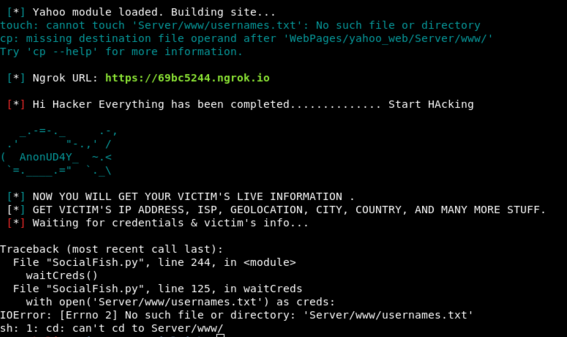
@alexmozzhakov #33 Not working on kali linux
usama7628674
on 3 Jun 2018
@usama7628674 strange... could you test cp -R ?
alexmozzhakov
on 3 Jun 2018
@alexmozzhakov you mean without rm -rf
usama7628674
on 3 Jun 2018
@usama7628674 ok, I've tested your PR and i get
The requested resource
/%3EMicrosoft%20account%20requires%20JavaScript%20to%20sign%20in.%20This%20web%20browser%20either%20does%20not%20support%20JavaScript,%20or%20scripts%20are%20being%20blocked.%3Cbr%20/%3E%3Cbr%20/%3ETo%20find%20out%20whether%20your%20browser%20supports%20JavaScript,%20or%20to%20allow%20scripts,%20see%20the%20browser's%20online%20help.%3C/noscript%3E%3Ctitle%3ESign%20in%20to%20your%20Microsoft%20account%3C/title%3E%3Cmeta%20name=
was not found on this server.
Seems like macOS and linux differences in cp command
alexmozzhakov
on 3 Jun 2018
@alexmozzhakov Should we revert things back to default?
usama7628674
on 3 Jun 2018
@usama7628674 no, can you post your man cp on kali?
alexmozzhakov
on 3 Jun 2018
here's the output of man cp
CP(1) User Commands CP(1)
NAME
cp - copy files and directories
SYNOPSIS
cp [OPTION]... [-T] SOURCE DEST
cp [OPTION]... SOURCE... DIRECTORY
cp [OPTION]... -t DIRECTORY SOURCE...
DESCRIPTION
Copy SOURCE to DEST, or multiple SOURCE(s) to DIRECTORY.
   Mandatory arguments to long options are mandatory for short options too.

   -a, --archive
          same as -dR --preserve=all

   --attributes-only
          don't copy the file data, just the attributes

   --backup[=CONTROL]
          make a backup of each existing destination file

   -b     like --backup but does not accept an argument

   --copy-contents
          copy contents of special files when recursive

   -d     same as --no-dereference --preserve=links

   -f, --force
          if an existing destination file cannot be opened, remove it and try again (this option is ignored when the -n option is also used)

   -i, --interactive
          prompt before overwrite (overrides a previous -n option)

   -H     follow command-line symbolic links in SOURCE

   -l, --link
          hard link files instead of copying

   -L, --dereference
          always follow symbolic links in SOURCE

   -n, --no-clobber
          do not overwrite an existing file (overrides a previous -i option)

   -P, --no-dereference
          never follow symbolic links in SOURCE

   -p     same as --preserve=mode,ownership,timestamps

   --preserve[=ATTR_LIST]
          preserve  the  specified  attributes (default: mode,ownership,timestamps), if possible additional attributes: context, links, xattr,
          all

   --no-preserve=ATTR_LIST
          don't preserve the specified attributes

   --parents
          use full source file name under DIRECTORY

   -R, -r, --recursive
          copy directories recursively

   --reflink[=WHEN]
          control clone/CoW copies. See below

   --remove-destination
          remove each existing destination file before attempting to open it (contrast with --force)

   --sparse=WHEN
          control creation of sparse files. See below

   --strip-trailing-slashes
          remove any trailing slashes from each SOURCE argument

   -s, --symbolic-link
          make symbolic links instead of copying

   -S, --suffix=SUFFIX
          override the usual backup suffix

   -t, --target-directory=DIRECTORY
          copy all SOURCE arguments into DIRECTORY

   -T, --no-target-directory
          treat DEST as a normal file

   -u, --update
          copy only when the SOURCE file is newer than the destination file or when the destination file is missing

   -v, --verbose
          explain what is being done

   -x, --one-file-system
          stay on this file system

   -Z     set SELinux security context of destination file to default type

   --context[=CTX]
          like -Z, or if CTX is specified then set the SELinux or SMACK security context to CTX

   --help display this help and exit

   --version
          output version information and exit

   By default, sparse SOURCE files are detected by a crude heuristic and the corresponding DEST file is made sparse  as  well.   That  is  the
   behavior  selected  by --sparse=auto.  Specify --sparse=always to create a sparse DEST file whenever the SOURCE file contains a long enough
   sequence of zero bytes.  Use --sparse=never to inhibit creation of sparse files.

   When --reflink[=always] is specified, perform a lightweight copy, where the data blocks are copied only when modified.  If this is not pos‐
   sible the copy fails, or if --reflink=auto is specified, fall back to a standard copy.

   The  backup  suffix  is '~', unless set with --suffix or SIMPLE_BACKUP_SUFFIX.  The version control method may be selected via the --backup
   option or through the VERSION_CONTROL environment variable.  Here are the values:

   none, off
          never make backups (even if --backup is given)

   numbered, t
          make numbered backups

   existing, nil
          numbered if numbered backups exist, simple otherwise

   simple, never
          always make simple backups

   As a special case, cp makes a backup of SOURCE when the force and backup options are given and SOURCE and DEST are the  same  name  for  an
   existing, regular file.
AUTHOR
Written by Torbjorn Granlund, David MacKenzie, and Jim Meyering.
REPORTING BUGS
GNU coreutils online help: http://www.gnu.org/software/coreutils/
Report cp translation bugs to http://translationproject.org/team/
usama7628674
on 3 Jun 2018
@usama7628674 ty. the thing is
macOS -R is:
     -R    If source_file designates a directory, cp copies the directory and
           the entire subtree connected at that point.  If the source_file
           ends in a /, the contents of the directory are copied rather than
           the directory itself.  This option also causes symbolic links to be
           copied, rather than indirected through, and for cp to create spe-
           cial files rather than copying them as normal files.  Created
           directories have the same mode as the corresponding source direc-
           tory, unmodified by the process' umask.
and kali is simply:
   -R, -r, --recursive
          copy directories recursively
@alexmozzhakov So there is difference.
usama7628674
on 3 Jun 2018
@usama7628674 we can use Python to handle folder copy
alexmozzhakov
on 3 Jun 2018
@usama7628674 please test #35
P.S. we should really write tests and do a CI
alexmozzhakov
on 3 Jun 2018
@alexmozzhakov I'll test it tomorrow.You could work on php PR and I'll test it as well.
usama7628674
on 3 Jun 2018
@usama7628674 ok, u can check out this branch
I will wait for #35 with a PR
alexmozzhakov
on 4 Jun 2018
@alexmozzhakov Just checked out the branch and everything is fine.Why not close #35 as the branch has both python copy handler and php refactored and submit that branch as new PR?Nevemind @An0nUD4Y just merged it.You can now submit php refactored branch as PR
usama7628674
on 4 Jun 2018
@An0nUD4Y Many thanks for push access
usama7628674
on 4 Jun 2018
@An0nUD4Y same here 😄
alexmozzhakov
on 4 Jun 2018
@alexmozzhakov Ok submit the branch so that I can resubmit live_web page.
usama7628674
on 4 Jun 2018
Hey guys you are the real Hero's......
 An0nUD4Y
on 4 Jun 2018
An0nUD4Y
on 4 Jun 2018
@usama7628674 just a sec, I'm on it
alexmozzhakov
on 4 Jun 2018
@usama7628674 my commits are a complete mess... sorry
alexmozzhakov
on 4 Jun 2018
@alexmozzhakov Yeah but it's okay now.
usama7628674
on 4 Jun 2018
Guys Please Test & Update the Termux Version Also..
@alexmozzhakov @usama7628674
Guys I hope you will update it..
An0nUD4Y
on 4 Jun 2018
Currently, I am Busy in Studies.
An0nUD4Y
on 4 Jun 2018
Related issues
 sTiKyt
·
3Comments
sTiKyt
·
3Comments
 KaleyLenux
·
3Comments
KaleyLenux
·
3Comments
 Archie-456
·
6Comments
Archie-456
·
6Comments
 souriens253
·
7Comments
souriens253
·
7Comments
 malikhamza302
·
4Comments
malikhamza302
·
4Comments
Most helpful comment
@alexmozzhakov Just checked out the branch and everything is fine.Why not close #35 as the branch has both python copy handler and php refactored and submit that branch as new PR?Nevemind @An0nUD4Y just merged it.You can now submit php refactored branch as PR