Hiddeneye-legacy: HiddenEye Termux NGROK issue with architecture.
Traceback (most recent call last):
File "SocialFishTermux.py", line 214, in
runNgrok()
File "SocialFishTermux.py", line 205, in runNgrok
print('\n {0}[{1}*{0}]{1} Ngrok URL: {2}' + url.readlines()[0] + '{1}').format(CYAN, END, GREEN) IndexError:
list index out of range
 Ublimjo
All 39 comments
@Ublimjo This isn't a issue.I guess you're trying to use termux version in linux.Actually you can't cuz termux use arm version of ngrok (not amd64 or i386) which won't run in linux machine so you have to run it in your android device.If you want to run it in your linux os simply execute python SocialFish.py .Here is the screenshot of termux version running in my android device.

 usama7628674
on 25 Apr 2018
usama7628674
on 25 Apr 2018
No, I use termux
Ublimjo
on 25 Apr 2018

Ublimjo
on 25 Apr 2018
@Ublimjo Did you execute python2 SocialFishTermux.py in your device?.It's working fine on my side.Reinstall termux and try again.
Ok here's what you can do to debug this problem navigate to servertermux folder and run ./ngrok http 80.If it starts then you're good otherwise there is problem with your ngrok.Make sure you're running arm version and check your device architecture and post here.
usama7628674
on 25 Apr 2018
What!! Is it possible?!?
$ ./ngrok 80
NAME:
   ngrok - tunnel local ports to public URLs and inspect traffic

DESCRIPTION:
    ngrok exposes local networked services behinds NATs and firewalls to the
    public internet over a secure tunnel. Share local websites, build/test
    webhook consumers and self-host personal services.
    Detailed help for each command is available with 'ngrok help <command>'.
    Open http://localhost:4040 for ngrok's web interface to inspect traffic.

EXAMPLES:
    ngrok http 80                    # secure public URL for port 80 web server
    ngrok http -subdomain=baz 8080   # port 8080 available at baz.ngrok.io
    ngrok http foo.dev:80            # tunnel to host:port instead of localhost
    ngrok tcp 22                     # tunnel arbitrary TCP traffic to port 22
    ngrok tls -hostname=foo.com 443  # TLS traffic for foo.com to port 443
    ngrok start foo bar baz          # start tunnels from the configuration file

VERSION:
   2.2.8

AUTHOR:
  inconshreveable - <[email protected]>

COMMANDS:
   authtoken    save authtoken to configuration file
   credits      prints author and licensing information
   http         start an HTTP tunnel
   start        start tunnels by name from the configuration file
   tcp          start a TCP tunnel
   tls          start a TLS tunnel
   update       update ngrok to the latest version
   version      print the version string
   help         Shows a list of commands or help for one command

ERROR:  Unrecognized command: ./ngrok
$
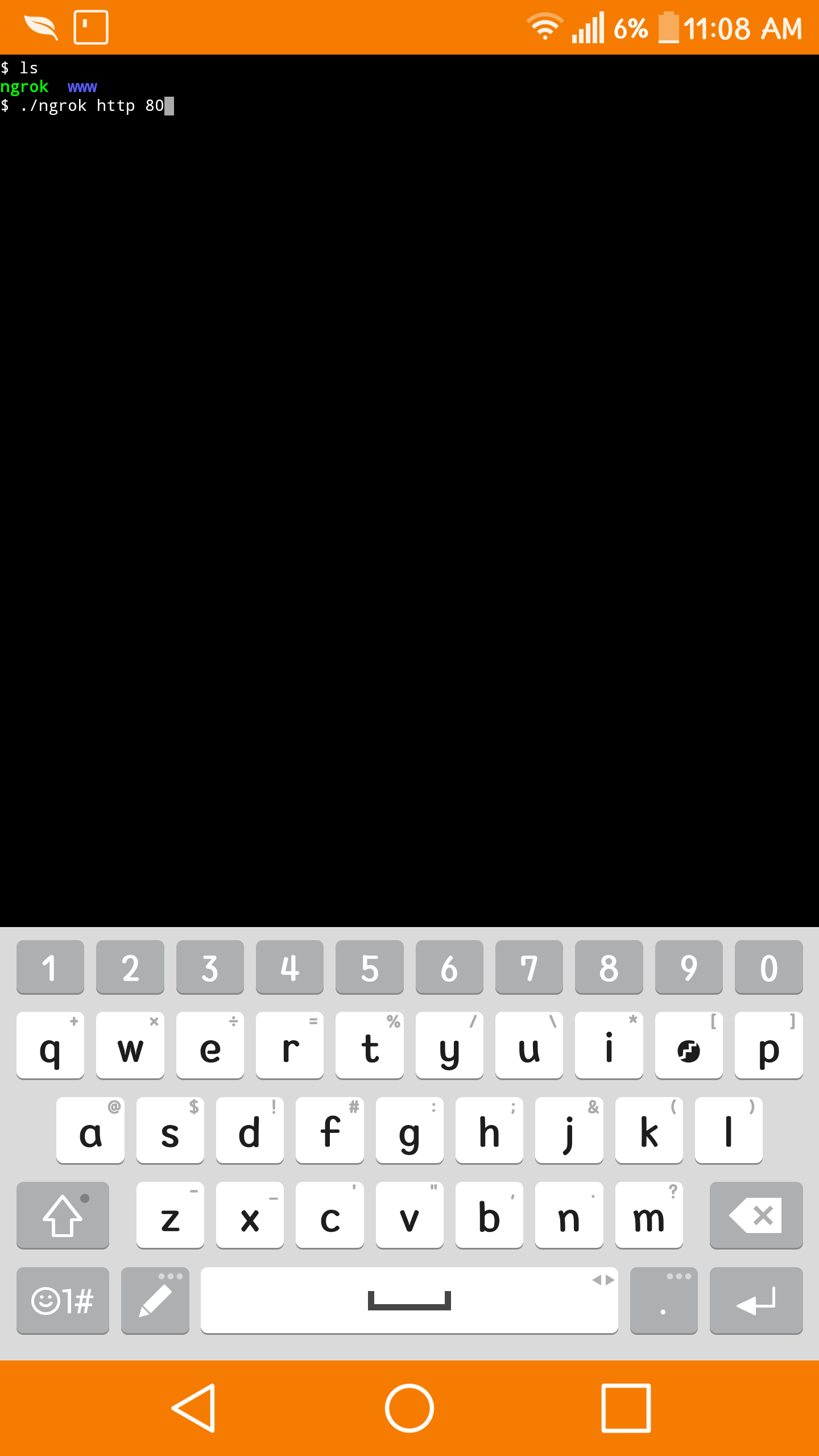
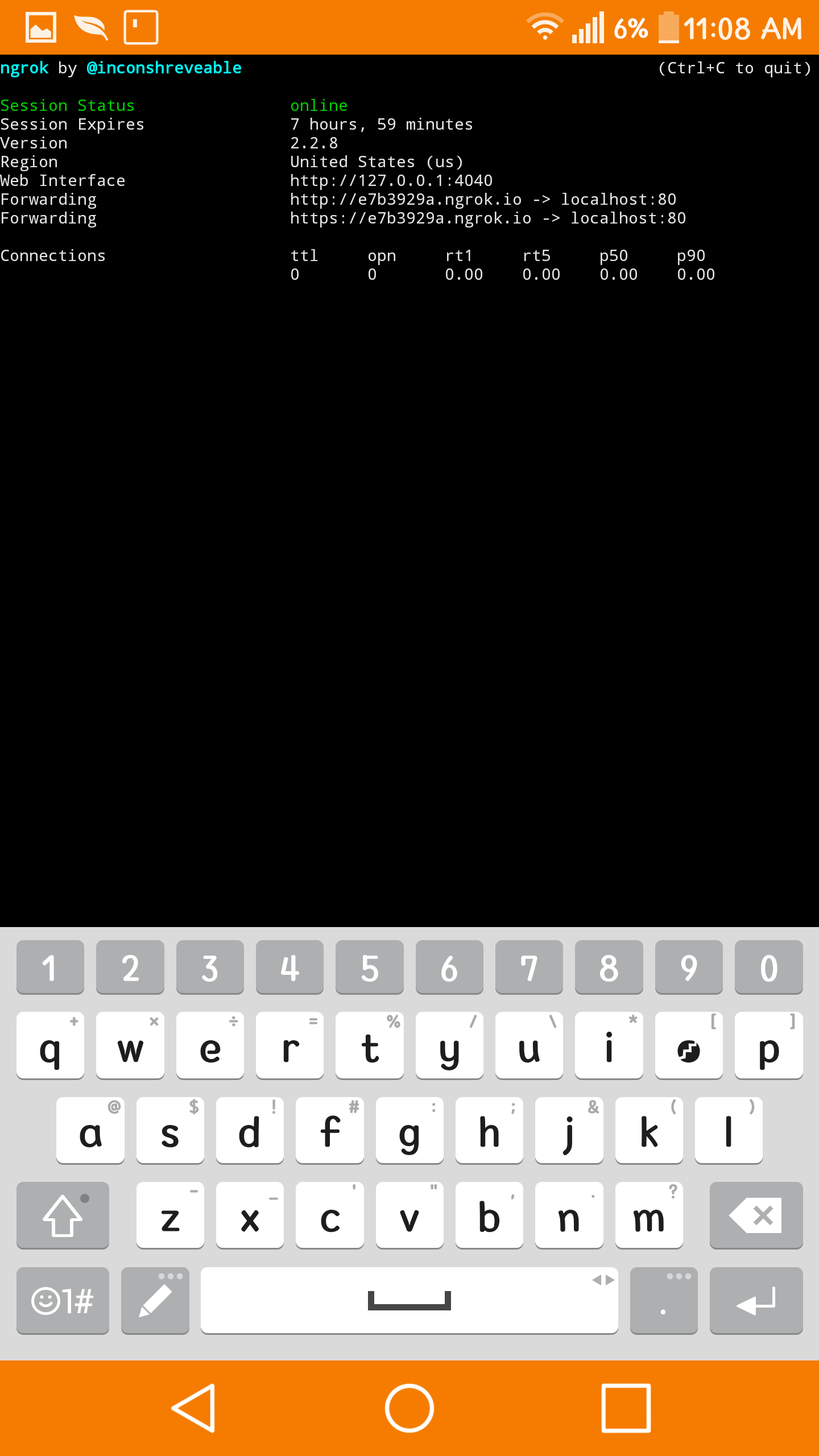
type ./ngrok http 80
Yes it is possible.Ngrok running fine in my android
usama7628674
on 25 Apr 2018
No!, look
   update       update ngrok to the latest version
   version      print the version string
   help         Shows a list of commands or help for one command

ERROR:  Unrecognized command: ./ngrok
$
Unrecognized command: ./ngrok
Ublimjo
on 25 Apr 2018
@Ublimjo Try to run ngrok with this command..
./ngrok http 8080
 An0nUD4Y
on 25 Apr 2018
An0nUD4Y
on 25 Apr 2018
Same error
$ ./ngrok http 8080
NAME:
   ngrok - tunnel local ports to public URLs and inspect traffic

DESCRIPTION:
    ngrok exposes local networked services behinds NATs and firewalls to the
    public internet over a secure tunnel. Share local websites, build/test
    webhook consumers and self-host personal services.
    Detailed help for each command is available with 'ngrok help <command>'.
    Open http://localhost:4040 for ngrok's web interface to inspect traffic.

EXAMPLES:
    ngrok http 80                    # secure public URL for port 80 web server
    ngrok http -subdomain=baz 8080   # port 8080 available at baz.ngrok.io
    ngrok http foo.dev:80            # tunnel to host:port instead of localhost
    ngrok tcp 22                     # tunnel arbitrary TCP traffic to port 22
    ngrok tls -hostname=foo.com 443  # TLS traffic for foo.com to port 443
    ngrok start foo bar baz          # start tunnels from the configuration file

VERSION:
   2.2.8

AUTHOR:
  inconshreveable - <[email protected]>

COMMANDS:
   authtoken    save authtoken to configuration file
   credits      prints author and licensing information
   http         start an HTTP tunnel
   start        start tunnels by name from the configuration file
   tcp          start a TCP tunnel
   tls          start a TLS tunnel
   update       update ngrok to the latest version
   version      print the version string
   help         Shows a list of commands or help for one command

ERROR:  Unrecognized command: ./ngrok
$
@Ublimjo Go to official ngrok website download ngrok for your architecture and rerun it
usama7628674
on 25 Apr 2018
arm or i686 ?
Because my device is i686
Ublimjo
on 25 Apr 2018
@Ublimjo Please verify your architecture .... use this command ..
dpkg --print-architecture
An0nUD4Y
on 25 Apr 2018
@Ublimjo That's what I'm trying to say your device isn't arm
usama7628674
on 25 Apr 2018
i686
Ublimjo
on 25 Apr 2018
Then download the appropriate ngrok ...
https://ngrok.com/download
First try to run it .
Then replace it with the ServerTermux/ngrok to new one downloaded....
An0nUD4Y
on 25 Apr 2018
You can't use it cuz ngrok isn't available for i686.Only arm version check website
usama7628674
on 25 Apr 2018
I hope it will solve your issue...
An0nUD4Y
on 25 Apr 2018
post the output of
dpkg --print-architecture
usama7628674
on 25 Apr 2018
He already did it ....
An0nUD4Y
on 25 Apr 2018
@Ublimjo ..
Your bad luck.
Try to find ngrok for your architecture.....
OR
Use another Android Device.
An0nUD4Y
on 25 Apr 2018
@Ublimjo Yeah find arm based device.
usama7628674
on 25 Apr 2018
- download ngrok-stable-linux-arm.zip
- unzip it
- copy ngrok to socialFish/ServerTermux/
- cd socialFish/ServerTermux/
Same error
 $ ./ngrok
NAME:
   ngrok - tunnel local ports to public URLs and inspect traffic

DESCRIPTION:
    ngrok exposes local networked services behinds NATs and firewalls to the
    public internet over a secure tunnel. Share local websites, build/test
    webhook consumers and self-host personal services.
    Detailed help for each command is available with 'ngrok help <command>'.
    Open http://localhost:4040 for ngrok's web interface to inspect traffic.

EXAMPLES:
    ngrok http 80                    # secure public URL for port 80 web server
    ngrok http -subdomain=baz 8080   # port 8080 available at baz.ngrok.io
    ngrok http foo.dev:80            # tunnel to host:port instead of localhost
    ngrok tcp 22                     # tunnel arbitrary TCP traffic to port 22
    ngrok tls -hostname=foo.com 443  # TLS traffic for foo.com to port 443
    ngrok start foo bar baz          # start tunnels from the configuration file

VERSION:
   2.2.8

AUTHOR:
  inconshreveable - <[email protected]>

COMMANDS:
   authtoken    save authtoken to configuration file
   credits      prints author and licensing information
   http         start an HTTP tunnel
   start        start tunnels by name from the configuration file
   tcp          start a TCP tunnel
   tls          start a TLS tunnel
   update       update ngrok to the latest version
   version      print the version string
   help         Shows a list of commands or help for one command

ERROR:  Unrecognized command: ./ngrok
$
@Ublimjo
What is the difference between i686 and x86_64
Short answer:
i686 = 32-bit Intel x86 arch
x86_64 = 64-bit Intel x86 arch
I think this one will work for you....
https://bin.equinox.io/a/iVLSfdAz1X4/ngrok-2.2.8-linux-amd64.tar.gz --> (x86_64)
https://bin.equinox.io/a/bAxP1reZDmJ/ngrok-2.2.8-linux-386.tar.gz ----> (i686)
Please recomment if it doesn't help you ...
An0nUD4Y
on 25 Apr 2018
ngrok is working
What's the next step
Ublimjo
on 25 Apr 2018
- Replace the ServerTermux/ngrok with the downloaded one.
- Then try to rerun the ./SocialFishTermux.py.
An0nUD4Y
on 25 Apr 2018
And please verify the newly downloaded ngrok. If it is working or not.
Try to run this command..
./ngrok http 8080
An0nUD4Y
on 25 Apr 2018
Looks like I can not connect
I already did
$ ./ngrok authtoken ...
but
ngrok by @inconshreveable                                            (Ctrl+C to quit)
Session Status                reconnecting (Get https://s3.amazonaws.com/dns.ngrok.co
Version                       2.2.8                                                  Region                        United States (us)
Web Interface                 http://127.0.0.1:4041

Connections                   ttl     opn     rt1     rt5     p50     p90
                              0       0       0.00    0.00    0.00    0.00
@Ublimjo Please try to run this ...
$ ./ngrok http 8080
AND GIVE THE OUTPUT
An0nUD4Y
on 25 Apr 2018

Ublimjo
on 25 Apr 2018
Ngrok working correctly...
Their is some issue with your network
connection...
Please check your network connection..
Please run ..
$ ping google.com
AND GIVE ME THE OUTPUT....
An0nUD4Y
on 25 Apr 2018

Ublimjo
on 25 Apr 2018
Now try to rerun the ngrok...
./ngrok http 80
& Give me the output.
An0nUD4Y
on 25 Apr 2018

Ublimjo
on 25 Apr 2018
@Ublimjo
Try to put this ngrok into the ServerTermux/ngrok .
Then rerun the SocialFishTermux script.
An0nUD4Y
on 25 Apr 2018
Traceback (most recent call last):
  File "SocialFishTermux.py", line 214, in <module>
    runNgrok()
  File "SocialFishTermux.py", line 205, in runNgrok
    print('\n {0}[{1}*{0}]{1} Ngrok URL: {2}' + url.readlines()[0] + '{1}').format(CYAN, END, GREEN)
IndexError: list index out of range
Please give me the Output.... I am waiting...
An0nUD4Y
on 25 Apr 2018

Ublimjo
on 25 Apr 2018
@Ublimjo THIS IS NOT THE REPO ISSUE.
I think you should clone this repo.
https://github.com/Lexiie/SocialFish.git
And Do the same ... move your own ngrok in the server/ngrok place...
And try to run the script...
And if it work...
I will provide you another method to run any of the webpage.
An0nUD4Y
on 25 Apr 2018
And share your output......
An0nUD4Y
on 25 Apr 2018
Related issues
usama7628674
·
4Comments
 Micrafast
·
7Comments
Micrafast
·
7Comments
 Archie-456
·
6Comments
Archie-456
·
6Comments
 sTiKyt
·
3Comments
sTiKyt
·
3Comments
 realpixelcode
·
3Comments
realpixelcode
·
3Comments
Most helpful comment
Ngrok working correctly...
Their is some issue with your network
connection...
Please check your network connection..
Please run ..
$ ping google.com
AND GIVE ME THE OUTPUT....