Hexo: JS files are wrongly processed as HTML files
Environment Info
Node version(node -v): v8.9.4
Hexo and Plugin version(npm ls --depth 0):
[email protected] /home/yushijinhun/repos/hexo-test
├── [email protected]
├── [email protected]
├── [email protected]
├── [email protected]
├── [email protected]
├── [email protected]
├── [email protected]
├── [email protected]
└── [email protected]
For BUG
I initialized a fresh Hexo site with hexo init. Then I created a JavaScript file source/js/test.js, whose content is:
console.log("<test string>");
Then I executed hexo generate. I expect the rendered JS file to be same as the source. However, the content of the rendered file public/js/test.js is:
console.log("<test string="">");
</test>
Also, I did some research about this and found that, if I directly call hexo render source/js/test.js, the output is the same as expected.
 yushijinhun
All 5 comments
Successfully reproduced.
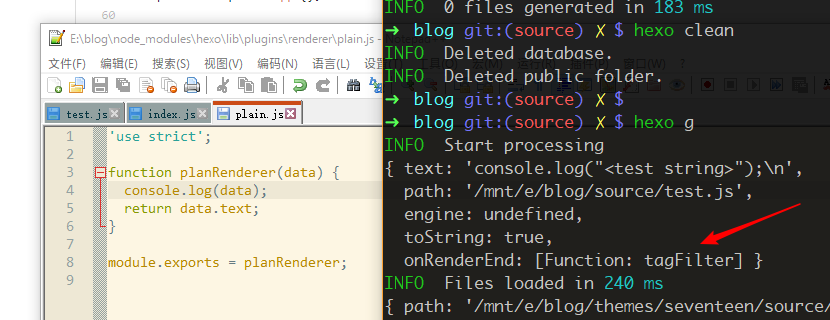
May the problem be caused by filtering HTML tags on JavaScript files?
 printempw
on 11 Feb 2018
printempw
on 11 Feb 2018
use skip_render if you simply want to copy files from source to destination, see #1633.
 JLHwung
on 11 Feb 2018
JLHwung
on 11 Feb 2018
Why the output of hexo generate is different from that of hexo render? Shouldn't they be the same?
yushijinhun
on 13 Feb 2018
@yushijinhun this is a know issue which we haven't figure out the fix yet.
 NoahDragon
on 15 Mar 2018
NoahDragon
on 15 Mar 2018
This issue has been automatically marked as stale because lack of recent activity. It will be closed if no further activity occurs. Thank you for your contributions.
![stale[bot] picture](https://avatars3.githubusercontent.com/in/1724?v=4&s=40) stale[bot]
on 14 May 2018
stale[bot]
on 14 May 2018
Related issues
 ghost
·
3Comments
ghost
·
3Comments
 awulkan
·
3Comments
awulkan
·
3Comments
 enterhuiche
·
3Comments
enterhuiche
·
3Comments
 hgDendi
·
3Comments
hgDendi
·
3Comments
 mengLLLL
·
3Comments
mengLLLL
·
3Comments
Most helpful comment
use
skip_renderif you simply want to copy files from source to destination, see #1633.