Hexo: my <style> element in markdown is parsed unexpectedly.
Environment Info
Node version(node -v): v8.9.1
Your site _config.yml (Optional):
Your theme _config.yml (Optional):
Hexo and Plugin version(npm ls --depth 0):
[email protected] C:\Richard\Project\lzl124631x.github.io
+-- [email protected]
+-- [email protected]
+-- [email protected]
+-- [email protected]
+-- [email protected]
+-- [email protected]
+-- [email protected]
+-- [email protected]
`-- [email protected]
For question
I have some <style> elements in side of my markdown. They are parsed by hexo which results in broken page:
<style><br>.droplet {<br> display: inline-block;<br> width: 4em;<br> height: 4em;<br>
Can I disable this behavior?
 lzl124631x
All 13 comments
Not sure how this happened. Does it happen recently?
 NoahDragon
on 5 Dec 2017
NoahDragon
on 5 Dec 2017
@NoahDragon Yes, it just happened last week. This is not by design? I'll verify this again later.
lzl124631x
on 5 Dec 2017
@lzl124631x Would you be able to see if you have any of the marked: options set in your _config.yml please? https://github.com/hexojs/hexo-renderer-marked#options
Thanks!
 tcrowe
on 6 Dec 2017
tcrowe
on 6 Dec 2017
@tcrowe
There is no maked field in my _config.yml.
I downgraded my node version. This is my updated environment.
$ npm -v
2.15.11
$ node -v
v4.8.6
$ npm ls --depth 0 | grep hexo
[email protected] C:\Richard\Project\lzl124631x.github.io
├── [email protected]
├── [email protected]
├── [email protected]
├── [email protected]
├── [email protected]
├── [email protected]
├── [email protected]
├── [email protected]
├── [email protected]
├── [email protected]
├── [email protected]
├── [email protected]
├── [email protected]
├── [email protected]
├── [email protected]
├── [email protected]
And the problem is automatically gone. Not sure if it's caused by the latest version of node (at least it caused me some error in gulp)
lzl124631x
on 7 Dec 2017
Hi, @NoahDragon @tcrowe Sorry, I met this same problem again.
There is no marked config in my _config.yml.
Broken post examples:
First one: The first <style> is intact, but the second <style> styling .heart is translated to <style><br>.heart {<br> display: block;<br>. What is expected
Second one: I got <style></p><p>#table1 {<br> border-co. What is expected
Note that I'm migrating from jekyll to hexo, so my blog is still jekyll now.
lzl124631x
on 24 Dec 2017
This issue has been automatically marked as stale because lack of recent activity. It will be closed if no further activity occurs. Thank you for your contributions.
![stale[bot] picture](https://avatars3.githubusercontent.com/in/1724?v=4&s=40) stale[bot]
on 22 Feb 2018
stale[bot]
on 22 Feb 2018
@NoahDragon @tcrowe soft ping.
lzl124631x
on 23 Feb 2018
Hey @lzl124631x I did a quick test:
mkdir style-test
cd style-test
hexo init
# add style code
hexo clean && hexo serve --debug
Style code:
<style>
.droplet {
  display: inline-block;
  width: 4em;
  height: 4em;
}
</style>

<div class="droplet">
  droplet class example
</div>
This did not yield the result you mentioned.
style-test›npm ls --depth 0
├── [email protected]
├── [email protected]
├── [email protected]
├── [email protected]
├── [email protected]
├── [email protected]
├── [email protected]
├── [email protected]
└── [email protected]
style-test›node -v && npm -v
v8.9.4
5.6.0

tcrowe
on 23 Feb 2018
Landscape theme ⬆️
tcrowe
on 23 Feb 2018
This issue has been automatically marked as stale because lack of recent activity. It will be closed if no further activity occurs. Thank you for your contributions.
stale[bot]
on 24 Apr 2018
@tcrowe Thanks for your update. I just had a try and still had problem. This post can repro this problem. The droplet part worked fine now but the heart part still doesn't work.
This is what I got with Jekyll. You can see the heart is beating.
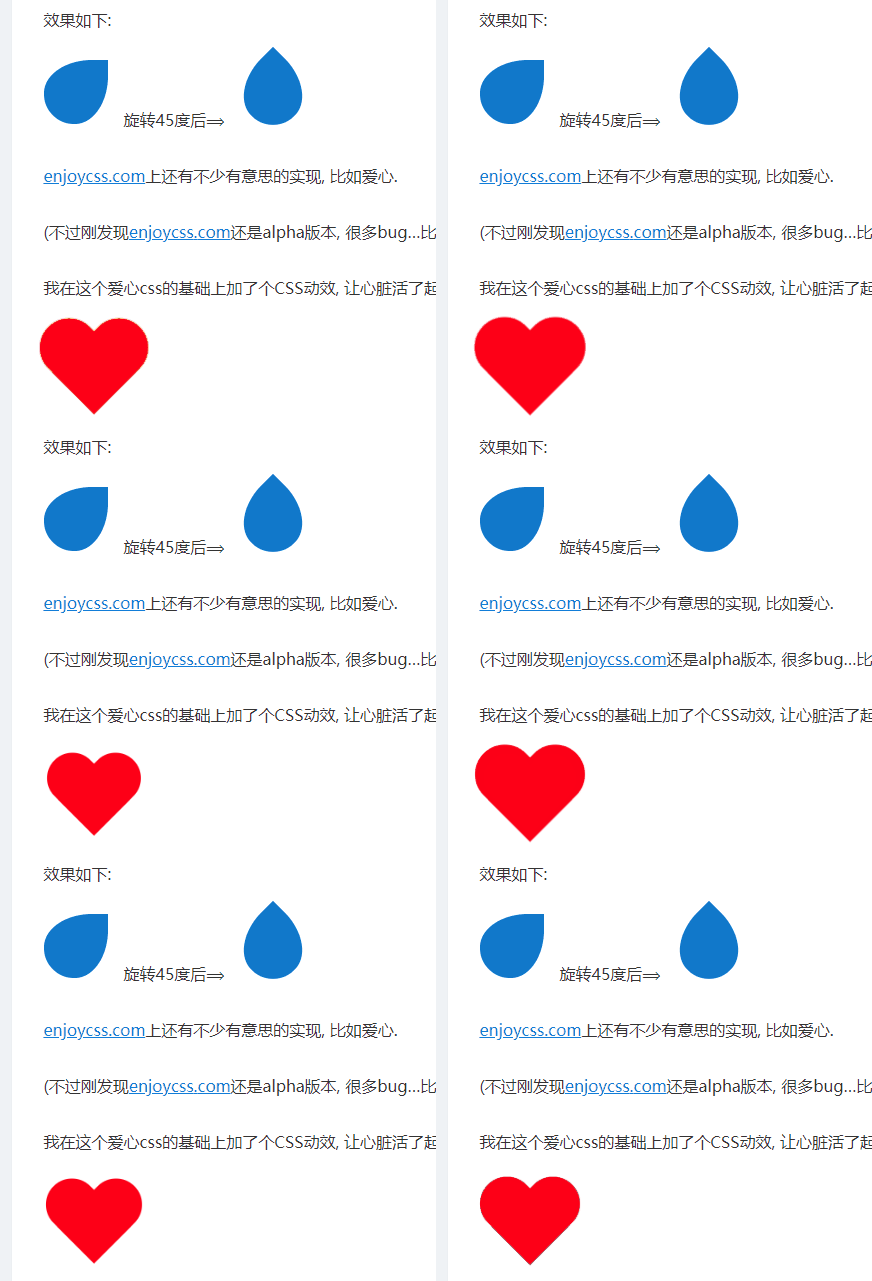
But in hexo I got
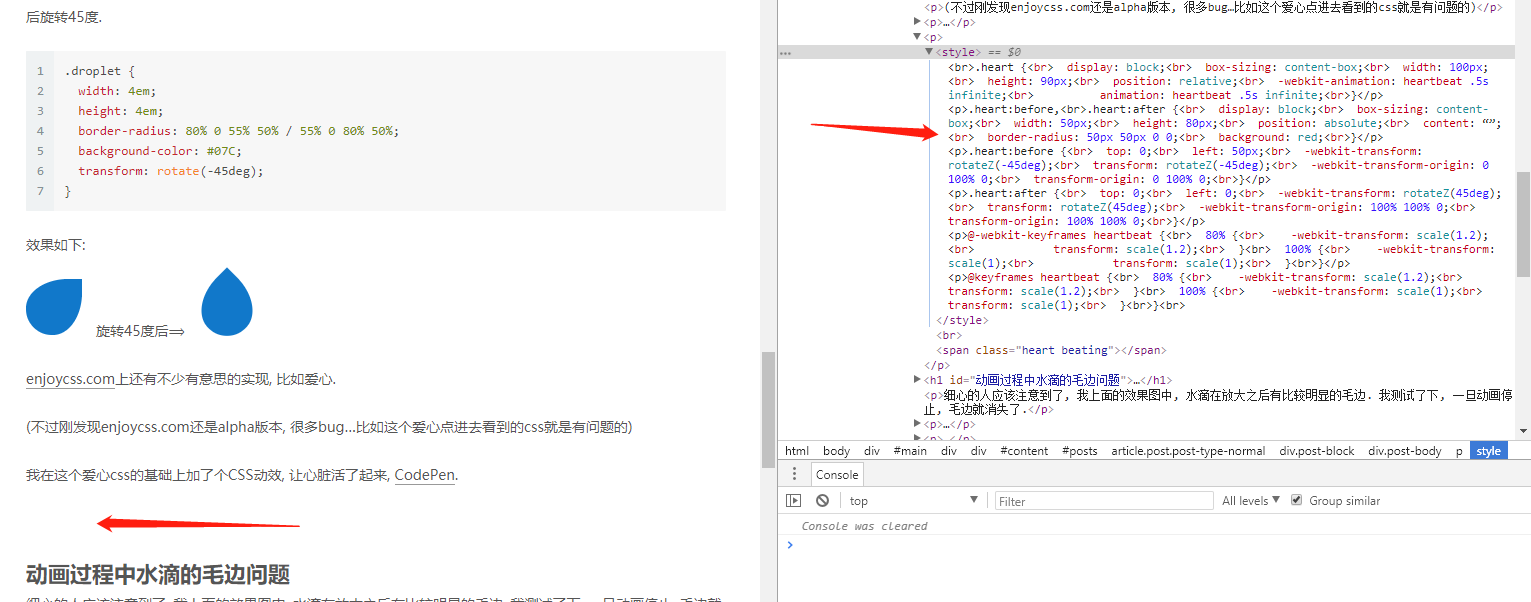
Oh wait. I found that I have to put an empty line after <style>...</style> and before <span class="heart beating"></span> in hexo. But in jekyll I don't have to do it. Do you know why?
lzl124631x
on 24 Apr 2018
This issue has been automatically marked as stale because lack of recent activity. It will be closed if no further activity occurs. Thank you for your contributions.
stale[bot]
on 23 Jun 2018
Related issues
 hgDendi
·
3Comments
hgDendi
·
3Comments
 cxgreat2014
·
3Comments
cxgreat2014
·
3Comments
 enterhuiche
·
3Comments
enterhuiche
·
3Comments
 leoli-dev
·
3Comments
leoli-dev
·
3Comments
 lushijie
·
3Comments
lushijie
·
3Comments
Most helpful comment
@NoahDragon @tcrowe soft ping.