Hexo: Does not show correctly when code block in list.
Environment Info
Node version(node -v): v7.2.0
Theme: Next.Muse
Hexo and Plugin version(npm ls --depth 0):
[email protected] /Users/wang/Documents/wang/blog
├── [email protected]
├── [email protected]
├── [email protected]
├── [email protected]
├── [email protected]
├── [email protected]
├── [email protected]
├── [email protected]
├── [email protected]
└── [email protected]
For BUG
It should show as:
Title 1
some text here
step 1
sudo dpkg -i chrome.deb
sudo apt-get install -f
step 2
ruby
 sudo apt-get install gdebi
Install with gdebi
Title 2
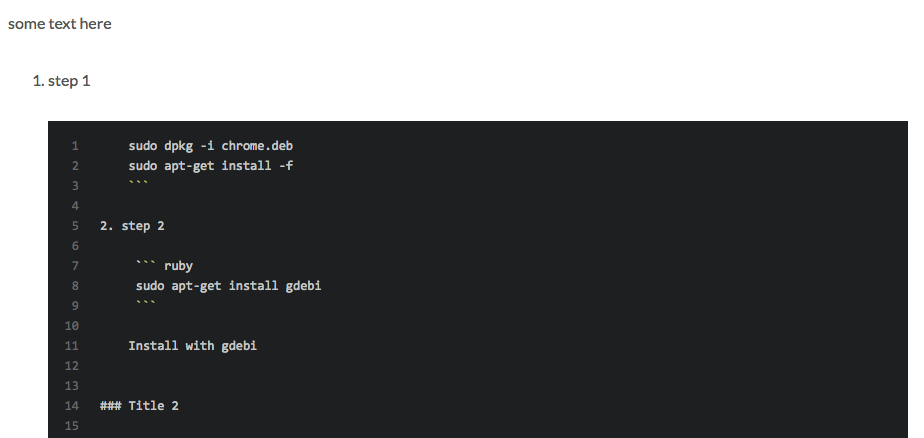
but it was
 magic3584
All 12 comments
@magic3584
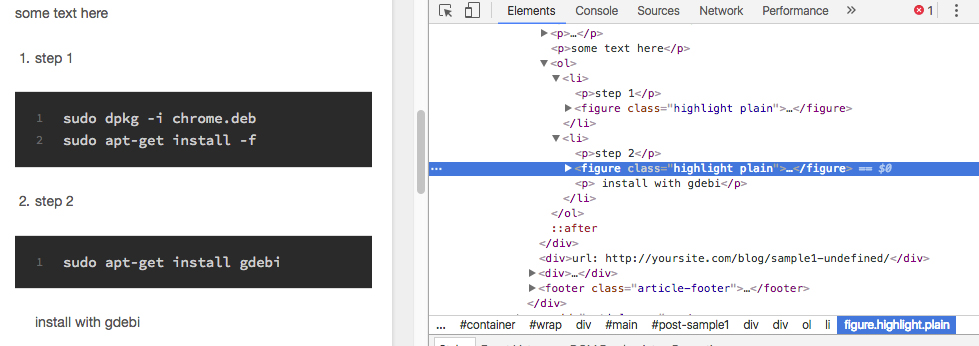
When I tried, no particular problems occurred. Do your code same with the following code?
some text here

1. step 1

    ```
    sudo dpkg -i chrome.deb
    sudo apt-get install -f
    ```

2. step 2

    ```
    sudo apt-get install gdebi
    ```
    install with gdebi
 tea3
on 23 Jun 2017
tea3
on 23 Jun 2017
yeah, I did. Please see the source markdown source_md and the result page result_page.
It does not show correctly between Google Chrome and dropbox title.
magic3584
on 24 Jun 2017
@magic3584
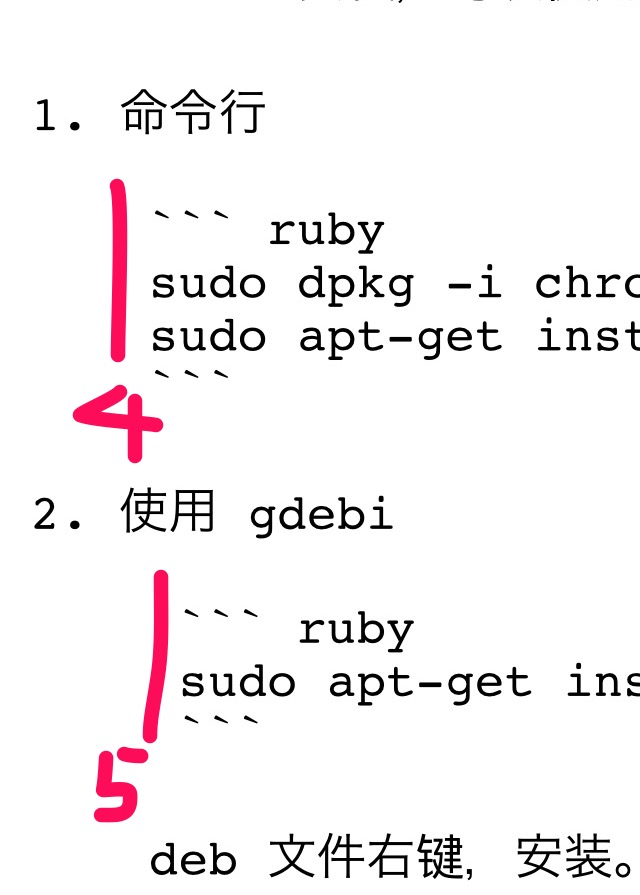
I am watching the code with iphone. Probably the cause of the problem is that there are 5 spaces in your source_md . Please check your markdown file.
tea3
on 24 Jun 2017
@tea3
Sorry to say, the same result.
magic3584
on 26 Jun 2017
@magic3584
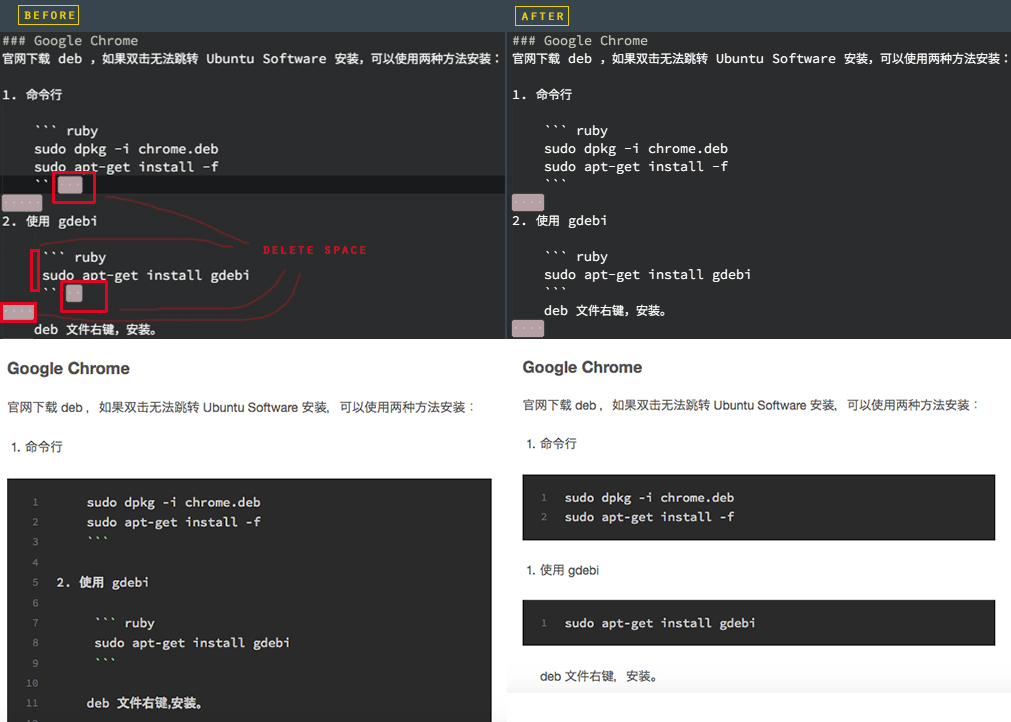
I checked it with my PC. Delete the space as shown in the image below.
tea3
on 26 Jun 2017
@NoahDragon
If you put a blank line break after the code block, it seems that it can not render well.
Perhaps it is a bug in hexo-renderer-marked.
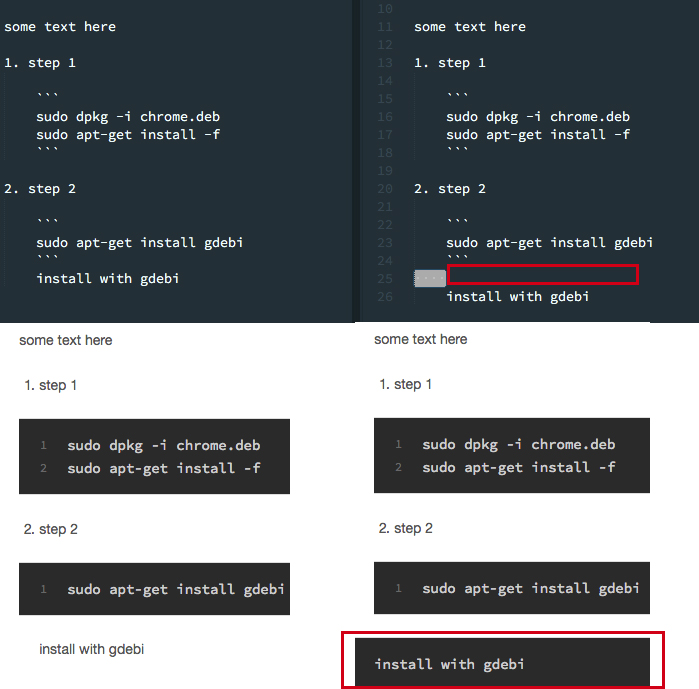
Code that goes well
some text here

1. step 1

    ```
    sudo dpkg -i chrome.deb
    sudo apt-get install -f
    ```

2. step 2

    ```
    sudo apt-get install gdebi
    ```
    install with gdebi
Code that can not be displayed as expected
some text here

1. step 1

    ```
    sudo dpkg -i chrome.deb
    sudo apt-get install -f
    ```

2. step 2

    ```
    sudo apt-get install gdebi
    ```

    install with gdebi
@tea3
Code block shows well, but the list doesn't now.
magic3584
on 26 Jun 2017
@magic3584
If possible, please display me the updated source_md and result_page .
tea3
on 26 Jun 2017
@tea3
I updated the source_md and result_page.
magic3584
on 26 Jun 2017
@magic3584
It seems that you can successfully display it by deleting all the space in the last line below.
1. 命令行

    ``` ruby
    sudo dpkg -i chrome.deb
    sudo apt-get install -f
    ```
This is a rare way of writing, so plug-ins may not be assuming it.
tea3
on 26 Jun 2017
@tea3
Thanks for your patient and detailed help!
magic3584
on 26 Jun 2017
@tea3 Thanks for pointing it out, I will check.
 NoahDragon
on 26 Jun 2017
NoahDragon
on 26 Jun 2017
Related issues
 hgDendi
·
3Comments
hgDendi
·
3Comments
 enterhuiche
·
3Comments
enterhuiche
·
3Comments
 leoli-dev
·
3Comments
leoli-dev
·
3Comments
 jasoncheng911
·
3Comments
jasoncheng911
·
3Comments
 yunTerry
·
3Comments
yunTerry
·
3Comments