Hexo-theme-next: auto_excerpt not working as expected
I agree and want to create new issue
- [x] I have confirmed that this bug only appears in theme NexT, but cannot be reproduced in other themes (e.g. default theme landscape). In other words, prove that this is a NexT bug, not a bug from Hexo.
- [x] I have already viewed Hexo Docs page, especially Templates, Variables, Helpers and Troubleshooting.
- [x] I have already viewed NexT Documentation Site.
- [x] I have searched for current issues which does not help me.
I'm unable to use auto_excerpt even setted to true I don't want to use <!-- more --> in my article
Expected behavior
Should auto excerpt but not
Actual behavior
Just print out all content at homepage
Steps to reproduce the behavior
- N/A
- N/A
- N/A
- Link to demo site with this bug: N/A
- Link(s) to source code or any usefull link(s): N/A
Node.js and NPM Information
v10.15.1
6.4.1
Package dependencies Information
{
  "name": "hexo-site",
  "version": "0.0.0",
  "private": true,
  "hexo": {
    "version": "3.8.0"
  },
  "dependencies": {
    "fs-extra": "^8.1.0",
    "glob": "^7.1.4",
    "hexo": "khoint0210/hexo#master",
    "hexo-algolia": "^1.3.1",
    "hexo-all-minifier": "^0.5.3",
    "hexo-command-gzip": "^0.1.0",
    "hexo-deployer-git": "^1.0.0",
    "hexo-filter-optimize": "^0.2.5",
    "hexo-generator-archive": "^0.1.5",
    "hexo-generator-category": "^0.1.3",
    "hexo-generator-index2": "^0.2.0",
    "hexo-generator-search-zip": "^0.0.1",
    "hexo-generator-searchdb": "^1.0.8",
    "hexo-generator-sitemap": "^1.2.0",
    "hexo-generator-tag": "^0.2.0",
    "hexo-img-optimization": "^2.0.1",
    "hexo-renderer-ejs": "^0.3.1",
    "hexo-renderer-marked": "^0.3.2",
    "hexo-renderer-stylus": "^0.3.3",
    "hexo-server": "^0.3.3",
    "hexo-symbols-count-time": "^0.6.1",
    "imagemin-pngquant": "^8.0.0",
    "sharp": "^0.22.1"
  }
}%
Hexo Information
Hexo version
INFO  index2 generators:
INFO  [ { path: '',
    per_page: 10,
    order_by: '-date',
    layout: 'index',
    index: true },
  { path: '',
    per_page: 5,
    order_by: '-date',
    layout: 'index',
    index: true,
    exclude: [ 'category Gallary' ] } ]
hexo: 3.8.0
hexo-cli: 1.1.0
os: Darwin 18.7.0 darwin x64
http_parser: 2.8.0
node: 10.15.1
v8: 6.8.275.32-node.12
uv: 1.23.2
zlib: 1.2.11
ares: 1.15.0
modules: 64
nghttp2: 1.34.0
napi: 3
openssl: 1.1.0j
icu: 62.1
unicode: 11.0
cldr: 33.1
tz: 2018e
Hexo Configuration
# Hexo Configuration
## Docs: https://hexo.io/docs/configuration.html
## Source: https://github.com/hexojs/hexo/
# Site
title: Nguyễn Trường Khôi
subtitle: DevOps, Technical Assistant , System Administrator
description: >-
Yêu Nô, Xêkô 🐈, Yêu Ân 🙎
<br/>
==========================
<br/>
Hello, Mình là Nguyễn Trường Khôi chào mừng các bạn đã đến với blog của mình 🏝
<br/>
Nếu các bạn có thời gian hãy ghé thăm Instagram của mình luôn nhé 👇👇👇
keywords: NTK
author: NTK
language: vi
timezone:
# URL
## If your site is put in a subdirectory, set url as 'http://yoursite.com/child' and root as '/child/'
url: https://nguyentruongkhoi.com
root: /
permalink: :year/:month/:day/:title/
permalink_defaults:
# Directory
source_dir: source
public_dir: public
tag_dir: tags
archive_dir: archives
category_dir: categories
code_dir: downloads/code
i18n_dir: :lang
skip_render:
# Writing
new_post_name: :title.md # File name of new posts
default_layout: post
titlecase: false # Transform title into titlecase
external_link: true # Open external links in new tab
filename_case: 0
render_drafts: false
post_asset_folder: false
relative_link: false
future: true
highlight:
enable: true
line_number: true
auto_detect: false
tab_replace:
# Home page setting
# path: Root path for your blogs index page. (default = '')
# per_page: Posts displayed per page. (0 = disable pagination)
# order_by: Posts order. (Order by date descending by default)
# Category & Tag
default_category: uncategorized
category_map:
tag_map:
# Date / Time format
## Hexo uses Moment.js to parse and display date
## You can customize the date format as defined in
## http://momentjs.com/docs/#/displaying/format/
date_format: YYYY-MM-DD
time_format: HH:mm:ss
# Pagination
## Set per_page to 0 to disable pagination
per_page: 10
pagination_dir: page
# Extensions
## Plugins: https://hexo.io/plugins/
## Themes: https://hexo.io/themes/
theme: next
# Deployment
## Docs: https://hexo.io/docs/deployment.html
deploy:
type: git
repo: https://[email protected]/imkhoi/imkhoi.github.io.git
branch: master
# algolia:
# applicationID: 60A0T4SPQ5
# apiKey: 0bc00fe215ed283db9e9dee38d134ec9
# indexName: nguyentruongkhoi
# chunkSize: 5000
symbols_count_time:
symbols: false
time: true
total_symbols: false
total_time: false
exclude_codeblock: true
sitemap:
path: sitemap.xml
# template: ./sitemap_template.xml
all_minifier: false
index2_generator:
- layout: 'index' # use existing index layout
exclude:
- category Gallary # exclude article which tag is Hexo
index: true
per_page: 5
order_by: -date
img_optimization: # root of configuration for image optimization
exclude: # exclude takes an array of file names or directories to ignore from the public folder. Defaults to no exclusions.
- css/ # anything that ends with a forward slash will be considered a directory
- fancybox/
- banner.jpg # anything else is a file
jpg:
enabled: true # if false, jpgs will get ignored. Defaults to true
params: -resize 760000@ # parameter string to pass to imagemagick's convert function
png: # jpg/png/jpeg all have the same fields and can be configured independently
enabled: true
thumb: -resize 700x680> -strip -quality 82 -alpha Remove
jpeg:
enabled: true
# these parameters will be used for any file types that do not have a params parameter defined in config. You can override these to your own preferred defaults.
default_params: -resize 760000@ -filter Triangle -define filter:support=2 -unsharp 0.25x0.25+8+0.065 -dither None -posterize 136 -quality 85 -define jpeg:fancy-upsampling=off -interlace none -colorspace sRGB -strip -define png:compression-filter=5 -define png:compression-level=9 -define png:compression-strategy=1 -define png:exclude-chunk=all
default_thumb: -resize 680x680> -sampling-factor 4:2:0 -strip -quality 85 -interlace JPEG -colorspace RGB
NexT Information
NexT Version:
- [x] Latest Master branch
- [ ] Latest Release version
- [ ] Old version
NexT Scheme:
- [x] All schemes
- [ ] Muse
- [ ] Mist
- [ ] Pisces
- [ ] Gemini
NexT Configuration:
# Automatically scroll page to section which is under <!-- more --> mark.
scroll_to_more: true

# Automatically excerpt description in homepage as preamble text.
excerpt_description: true

# Automatically excerpt (Not recommend).
# Use <!-- more --> in the post to control excerpt accurately.
auto_excerpt:
  enable: true
  length: 150
Other Information
 khoint0210
All 8 comments
Thanks for opening this issue, maintainers will get back to you as soon as possible!
![welcome[bot] picture](https://avatars.githubusercontent.com/in/4141?v=4&s=40) welcome[bot]
on 10 Sep 2019
welcome[bot]
on 10 Sep 2019
Issue-Label Bot is automatically applying the label Bug to this issue, with a confidence of 0.87. Please mark this comment with :thumbsup: or :thumbsdown: to give our bot feedback!
Links: app homepage, dashboard and code for this bot.
![issue-label-bot[bot] picture](https://avatars.githubusercontent.com/in/27079?v=4&s=40) issue-label-bot[bot]
on 10 Sep 2019
issue-label-bot[bot]
on 10 Sep 2019
Source code? Have you tried hexo clean?
 stevenjoezhang
on 10 Sep 2019
stevenjoezhang
on 10 Sep 2019
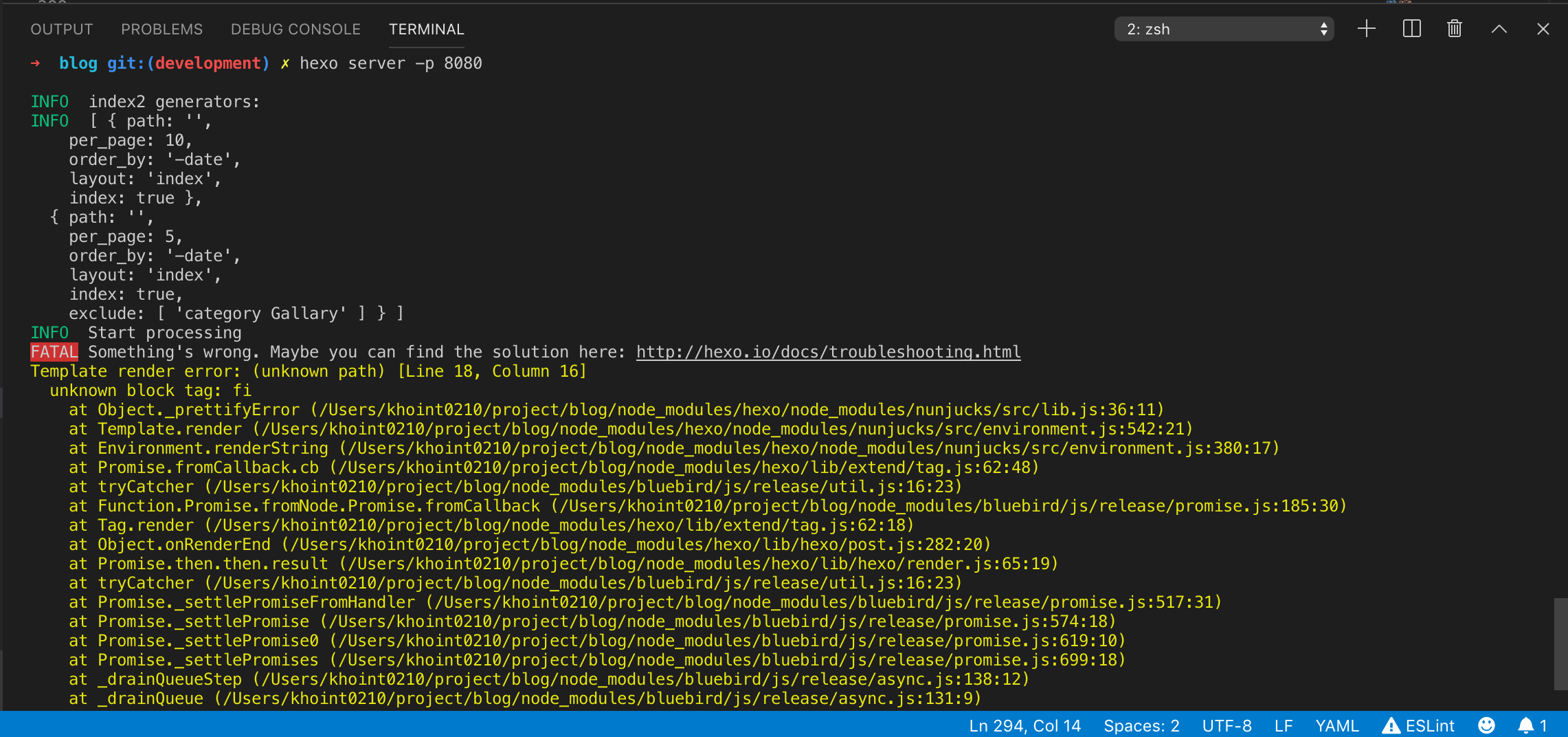
after using hexo clean it generates output like this
khoint0210
on 10 Sep 2019
OH GOSH !!!
My bad I use the fi tag at my post and I completely forgot about it after hexo clean it work like a charm thanks for your support <3
khoint0210
on 10 Sep 2019
If you are using NexT 7.6.0 and later, please install the plugin: https://github.com/chekun/hexo-excerpt
GitHub
Automatic excerpt generator for Hexo. Contribute to chekun/hexo-excerpt development by creating an account on GitHub.
 stevenjoezhang
on 26 Nov 2019
stevenjoezhang
on 26 Nov 2019
@stevenjoezhang thanks a lot, that plugin works.
I'm using Latest Master branch, i'm sure it is 7.5.0, not 7.6.0.
auto_excerpt seems to be removed from next/_config.yml, certainly add these configuration below to _data/next.yml not works.
auto_excerpt:
  enable: true
  length: 150
 Icatream
on 29 Nov 2019
Icatream
on 29 Nov 2019
I'm sure it is 7.5.0, not 7.6.0.
Because the master branch is the development branch. We update the version number with each release. So after December 1st you will find this is the 7.6.0 version 🤪
stevenjoezhang
on 29 Nov 2019
Related issues
 jiapei100
·
3Comments
jiapei100
·
3Comments
 dslztx
·
7Comments
dslztx
·
7Comments
 imcco
·
5Comments
imcco
·
5Comments
 yidasanqian
·
5Comments
yidasanqian
·
5Comments
 ivan-nginx
·
5Comments
ivan-nginx
·
5Comments
Most helpful comment
If you are using NexT 7.6.0 and later, please install the plugin: https://github.com/chekun/hexo-excerpt