I agree and want to create new issue
- [X] Yes, I was on Hexo Docs page, especially on Templates, Variables, Helpers and Troubleshooting.
- [X] Yes, I was on NexT Documentation Site.
- [X] And yes, I already searched for current issues and this is not help to me.
Expected behavior
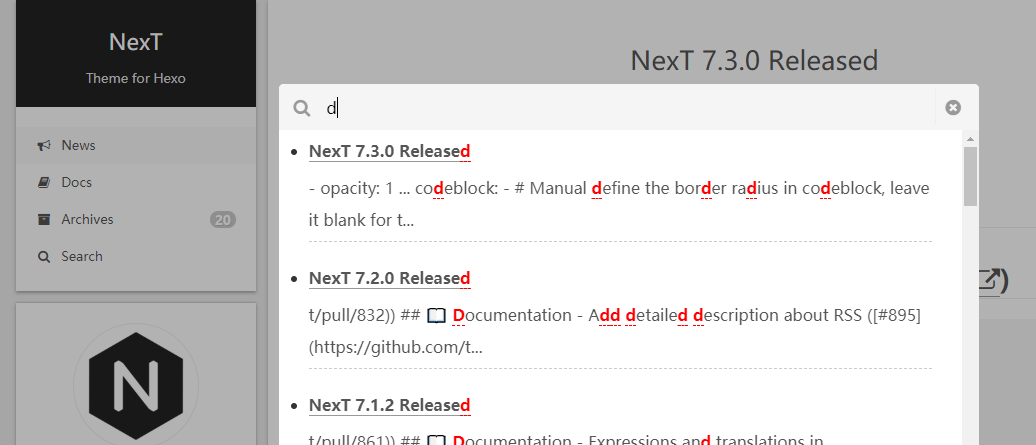
能够正常使用搜索功能
Actual behavior
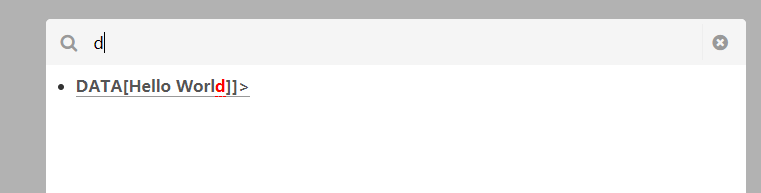
搜索功能显示异常
Steps to reproduce the behavior
hexo initgit clone https://github.com/theme-next/hexo-theme-next themes/nextnpm install hexo-generator-searchdb --save
hexo/_config.yml
search:
  path: search.xml
  field: post
  format: html
  limit: 10000
next/_config.yml
# Local search
# Dependencies: https://github.com/theme-next/hexo-generator-searchdb
local_search:
  enable: true
  # If auto, trigger search by changing input.
  # If manual, trigger search by pressing enter key or search button.
  trigger: auto
  # Show top n results per article, show all results by setting to -1
  top_n_per_article: 1
  # Unescape html strings to the readable one.
  unescape: false
  # Preload the search data when the page loads.
  preload: false
- Link to demo site with this bug: N/A
- Link(s) to source code or any usefull link(s): N/A
Node.js and NPM Information
v10.15.3
Package dependencies Information
{
  "name": "hexo-site",
  "version": "0.0.0",
  "private": true,
  "hexo": {
    "version": "3.9.0"
  },
  "dependencies": {
    "hexo": "^3.9.0",
    "hexo-generator-archive": "^0.1.5",
    "hexo-generator-category": "^0.1.3",
    "hexo-generator-index": "^0.2.1",
    "hexo-generator-searchdb": "^1.0.8",
    "hexo-generator-tag": "^0.2.0",
    "hexo-renderer-ejs": "^0.3.1",
    "hexo-renderer-marked": "^1.0.1",
    "hexo-renderer-stylus": "^0.3.3",
    "hexo-server": "^0.3.3"
  }
}
Hexo Information
Hexo version
hexo: 3.9.0
hexo-cli: 2.0.0
os: Windows_NT 10.0.17763 win32 x64
http_parser: 2.8.0
node: 10.15.3
v8: 6.8.275.32-node.51
uv: 1.23.2
zlib: 1.2.11
ares: 1.15.0
modules: 64
nghttp2: 1.34.0
napi: 3
openssl: 1.1.0j
icu: 62.1
unicode: 11.0
cldr: 33.1
tz: 2018e
Hexo Configuration
# Hexo Configuration
## Docs: https://hexo.io/docs/configuration.html
## Source: https://github.com/hexojs/hexo/

# Site
title: Hexo
subtitle:
description:
keywords:
author: John Doe
language: en
timezone:

# URL
## If your site is put in a subdirectory, set url as 'http://yoursite.com/child' and root as '/child/'
url: http://yoursite.com
root: /
permalink: :year/:month/:day/:title/
permalink_defaults:

# Directory
source_dir: source
public_dir: public
tag_dir: tags
archive_dir: archives
category_dir: categories
code_dir: downloads/code
i18n_dir: :lang
skip_render:

# Writing
new_post_name: :title.md # File name of new posts
default_layout: post
titlecase: false # Transform title into titlecase
external_link: true # Open external links in new tab
filename_case: 0
render_drafts: false
post_asset_folder: false
relative_link: false
future: true
highlight:
  enable: true
  line_number: true
  auto_detect: false
  tab_replace:

# Home page setting
# path: Root path for your blogs index page. (default = '')
# per_page: Posts displayed per page. (0 = disable pagination)
# order_by: Posts order. (Order by date descending by default)
index_generator:
  path: ''
  per_page: 10
  order_by: -date

# Category & Tag
default_category: uncategorized
category_map:
tag_map:

# Date / Time format
## Hexo uses Moment.js to parse and display date
## You can customize the date format as defined in
## http://momentjs.com/docs/#/displaying/format/
date_format: YYYY-MM-DD
time_format: HH:mm:ss

# Pagination
## Set per_page to 0 to disable pagination
per_page: 10
pagination_dir: page

# Extensions
## Plugins: https://hexo.io/plugins/
## Themes: https://hexo.io/themes/
theme: next

# Deployment
## Docs: https://hexo.io/docs/deployment.html
deploy:
  type:

search:
  path: search.xml
  field: post
  format: html
  limit: 10000
NexT Information
NexT Version:
- [X] Latest Master branch
- [ ] Latest Release version
- [ ] Old version
NexT Scheme:
- [ ] All schemes
- [ ] Muse
- [X] Mist
- [ ] Pisces
- [ ] Gemini
NexT Configuration:
# Local Search
# Dependencies: https://github.com/wzpan/hexo-generator-search
local_search:
  enable: true
  # If auto, trigger search by changing input.
  # If manual, trigger search by pressing enter key or search button.
  trigger: auto
  # Show top n results per article, show all results by setting to -1
  top_n_per_article: 1
  # Unescape html strings to the readable one.
  unescape: false
  # Preload the search data when the page loads.
  preload: false
Other Information
 mtrucc
All 10 comments
Thanks for opening this issue, maintainers will get back to you as soon as possible!
![welcome[bot] picture](https://avatars.githubusercontent.com/in/4141?v=4&s=40) welcome[bot]
on 21 Aug 2019
welcome[bot]
on 21 Aug 2019
Issue Label Bot is not confident enough to auto-label this issue. See dashboard for more details.
![issue-label-bot[bot] picture](https://avatars.githubusercontent.com/in/27079?v=4&s=40) issue-label-bot[bot]
on 21 Aug 2019
issue-label-bot[bot]
on 21 Aug 2019
更换为 hexo-generator-search
 1v9
on 21 Aug 2019
1v9
on 21 Aug 2019
👍1
非常感谢,文档中可能存在(也许是错误),更新一下~
https://theme-next.org/docs/third-party-services/search-services
NexT
NexT User Docs – Third-party Service Integration – Search Services
mtrucc
on 21 Aug 2019
该问题已经得到解决,我先关闭了
mtrucc
on 21 Aug 2019
安装hexo-generator-search(非searchdb)
 stevenjoezhang
on 21 Aug 2019
stevenjoezhang
on 21 Aug 2019
😄1
安装hexo-generator-search(非searchdb)
谢谢~
mtrucc
on 21 Aug 2019
stevenjoezhang
on 21 Aug 2019
@stevenjoezhang 更新了一处
1v9
on 21 Aug 2019
hexo-generator-searchdb已更新,可以使用了:https://github.com/theme-next/hexo-generator-searchdb
GitHub
A plugin to generate the site's search data. Contribute to theme-next/hexo-generator-searchdb development by creating an account on GitHub.
 stevenjoezhang
on 10 Oct 2019
stevenjoezhang
on 10 Oct 2019
Was this page helpful?
0 / 5 - 0 ratings
Related issues
 cong
·
5Comments
cong
·
5Comments
 dandyxu
·
5Comments
dandyxu
·
5Comments
 D-zilch
·
7Comments
D-zilch
·
7Comments
 AnkiKong
·
6Comments
AnkiKong
·
6Comments
 yidasanqian
·
5Comments
yidasanqian
·
5Comments