Hexo-theme-next: Search for HTML?
I agree and want to create new issue
- [x] Yes, I was on Hexo Docs page, especially on Templates, Variables, Helpers and Troubleshooting.
- [X] Yes, I was on NexT Documentation Site.
- [X] And yes, I already searched for current issues and this is not help to me.
Expected behavior
Normal search
Actual behavior

Steps to reproduce the behavior
click search

enter 1


- Link to demo site with this bug: N/A
- Link(s) to source code or any usefull link(s): N/A
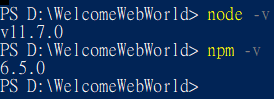
Node.js and NPM Information
node: v11.7.0
npm: 6.5.0
Package dependencies Information
{
  "name": "hexo-site",
  "version": "0.0.0",
  "private": true,
  "hexo": {
    "version": "3.8.0"
  },
  "dependencies": {
    "hexo": "^3.8.0",
    "hexo-abbrlink": "^2.0.5",
    "hexo-autonofollow": "^1.0.1",
    "hexo-deployer-git": "^1.0.0",
    "hexo-generator-archive": "^0.1.5",
    "hexo-generator-baidu-sitemap": "^0.1.6",
    "hexo-generator-category": "^0.1.3",
    "hexo-generator-feed": "^1.2.2",
    "hexo-generator-index": "^0.2.1",
    "hexo-generator-search": "^2.4.0",
    "hexo-generator-sitemap": "^1.2.0",
    "hexo-generator-tag": "^0.2.0",
    "hexo-neat": "^1.0.4",
    "hexo-renderer-ejs": "^0.3.1",
    "hexo-renderer-marked": "^0.3.2",
    "hexo-renderer-stylus": "^0.3.3",
    "hexo-server": "^0.3.3"
  }
}
Hexo Information
Hexo version
hexo: 3.8.0
hexo-cli: 1.1.0
os: Windows_NT 10.0.17763 win32 x64
node: 11.7.0
v8: 7.0.276.38-node.16
uv: 1.24.1
zlib: 1.2.11
brotli: 1.0.7
ares: 1.15.0
modules: 67
nghttp2: 1.34.0
napi: 3
llhttp: 1.0.1
http_parser: 2.8.0
openssl: 1.1.0j
cldr: 34.0
icu: 63.1
tz: 2018e
unicode: 11.0
Hexo Configuration
# Hexo Configuration
## Docs: https://hexo.io/docs/configuration.html
## Source: https://github.com/hexojs/hexo/
# Site
title: Welcome.Web.World
subtitle: 歡迎來到網路世界。
description: 👨💻F2E-Font End Engineer <br/> 歡迎來到網頁世界
keywords: 前端,後端,全端,網頁,技術,網頁開發,前端開發,後端開發,JavaScript,HTML,CSS,SCSS
author: Ray
language: zh-TW
timezone:
# URL
## If your site is put in a subdirectory, set url as 'http://yoursite.com/child' and root as '/child/'
url: https://hsiangfeng.github.io
root: /
permalink: :category/:year:month:day/:abbrlink/
permalink_defaults:
# Directory
source_dir: source
public_dir: public
tag_dir: tags
archive_dir: archives
category_dir: categories
code_dir: downloads/code
i18n_dir: :lang
skip_render:
# Writing
new_post_name: :title.md # File name of new posts
default_layout: post
titlecase: false # Transform title into titlecase
external_link: true # Open external links in new tab
filename_case: 0
render_drafts: false
post_asset_folder: false
relative_link: false
future: true
highlight:
enable: true
line_number: true
auto_detect: false
tab_replace:
# Home page setting
# path: Root path for your blogs index page. (default = '')
# per_page: Posts displayed per page. (0 = disable pagination)
# order_by: Posts order. (Order by date descending by default)
index_generator:
path: ''
per_page: 10
order_by: -date
# Category & Tag
default_category: uncategorized
category_map:
Analytics: analytics
CSS: css
HTML: html
Hexo: hexo
JavaScript: javascript
Nodejs: node
SCS5: scss
Vue: vue
克服JS奇怪的部分系列: jsweirdworld
學習經驗: learnexp
PHP: php
C#: c#
VSCode: vscode
雜談: other
Python: python
firebase: firebase
Webpack: webpack
Gulp: gulp
Git: git
tag_map:
# Date / Time format
## Hexo uses Moment.js to parse and display date
## You can customize the date format as defined in
## http://momentjs.com/docs/#/displaying/format/
date_format: YYYY-MM-DD
time_format: HH:mm:ss
# Pagination
## Set per_page to 0 to disable pagination
per_page: 10
pagination_dir: page
# Extensions
## Plugins: https://hexo.io/plugins/
## Themes: https://hexo.io/themes/
theme: hexo-theme-next-master
# Deployment
## Docs: https://hexo.io/docs/deployment.html
deploy:
type: git
repo: https://github.com/hsiangfeng/hsiangfeng.github.io.git
branch: master
# 搜尋功能
search:
path: search.xml
field: post
format: html
limit: 100
# autonofollow
nofollow:
enable: true
exclude:
- pvt5r486.github.io
# RSS 訂閱
plugin: hexo-generator-feed
#Feed Atom
feed:
type: atom
path: atom.xml
limit: 20
# abbrlink config
abbrlink:
alg: crc32 # 演算法:crc16(default) and crc32
rep: dec # 進位制:dec(default) and hex
## hexo-neat
# 壓縮
neat_enable: true
# 壓縮HTML
neat_html:
enable: true
exclude:
# 壓縮CSS
neat_css:
enable: true
exclude:
- '**/*.min.css'
# 壓縮JS
neat_js:
enable: true
mangle: true
output:
compress:
exclude:
- '**/*.min.js'
- '**/jquery.fancybox.pack.js'
- '**/index.js'
NexT Information
NexT Version:
- [ ] Latest Master branch
- [X] Latest Release version
- [ ] Old version
NexT Scheme:
- [ ] All schemes
- [ ] Muse
- [ ] Mist
- [X] Pisces
- [ ] Gemini
NexT Configuration:
no edit
Other Information
 hsiangfeng
All 5 comments
Thanks for opening this issue, maintainers will get back to you as soon as possible!
![welcome[bot] picture](https://avatars.githubusercontent.com/in/4141?v=4&s=40) welcome[bot]
on 15 Jun 2019
welcome[bot]
on 15 Jun 2019
This has nothing to do with NexT. Please ask hexo-generator-search for help: https://github.com/wzpan/hexo-generator-search/issues
GitHub
A plugin to generate search data for Hexo. Contribute to wzpan/hexo-generator-search development by creating an account on GitHub.

 stevenjoezhang
on 16 Jun 2019
stevenjoezhang
on 16 Jun 2019
😄1
ok. Thx : )
hsiangfeng
on 16 Jun 2019
@hsiangfeng solution:
Use
search:
  path: search.json
  field: all
  content: true
instead of
search:
  path: search.xml
  field: all
  content: true
👍1
I now not use "hexo-generator-search"
Now use our own "hexo-generator-searchdb"
But still thank you for providing the method 👍
hsiangfeng
on 26 Jun 2019
Was this page helpful?
0 / 5 - 0 ratings
Related issues
 utkuufuk
·
6Comments
utkuufuk
·
6Comments
 xuan512
·
4Comments
xuan512
·
4Comments
 codenoobforreal
·
3Comments
codenoobforreal
·
3Comments
 MakiseVon
·
7Comments
MakiseVon
·
7Comments
 jiapei100
·
3Comments
jiapei100
·
3Comments