Hexo-theme-next: RTL Language Support for Specific Article
Expected behavior
First of all, thank you so much for your theme, I really like it.
I want to write some posts, articles by the right to left languages, such as Arabic, Uyghur, etc. And I have found some solutions, like this Hexo Theme Icarus Arabic Test (you could find the source code below), Hebrew Post.
I tried to use this solution in Next theme by myself, but the theme files are .swig, not .ejs, I couldn't find a way to change it. So I really hope that you could help me this out.
I even put CSS code in single post, but this affects all the articles. T_T
It would be great if I can specify the language setting in front-matter, for example
title: اختبار اللغة العربية
date: 2016-01-30 10:15:01
...
language-direction: rtl
Also, I want to set a different font size and font family for RTL languages. I think this part would be easy, just specify it in CSS file for RTL LANGUAGE {direction:rtl; font-size: 16px; font-family: ...;}
Steps to reproduce the behavior
Link to demo site with this issue:
http://blog.zhangruipeng.me/hexo-theme-icarus/2016/01/30/Arabic-Test/
Link to source code to generate this site:
https://github.com/ppoffice/hexo-theme-icarus/issues/234
https://github.com/ppoffice/hexo-theme-icarus/commit/d961446f3fa2990a4924e6df0e767a65159f6ab8
NexT Information
NexT Version:
[ ] Master
[x] Latest Release
[ ] Old version -
NexT Scheme:
[x] All schemes
[ ] Muse
[ ] Mist
[ ] Pisces
 shohret
All 26 comments
I think this part would be easy, just specify it in CSS file for RTL LANGUAGE {direction:rtl; font-size: 16px; font-family: ...;}
U think right! So, u need just to add in next/source/css/_custom/custom.styl any u want, but this will be for all posts and pages. In this state, this must be:
p { direction:rtl; font-size: 16px; }
But u right, need to add option for this. Thank's!
 ivan-nginx
on 23 Jul 2017
ivan-nginx
on 23 Jul 2017
@shohret ok, i add this option. See PART 4 in #1697.
ivan-nginx
on 24 Jul 2017
Hey, great, thank you!
And I saw your test demo and CSS modification.
.post-body {
  font-family: $font-family-posts;
  +mobile() {
    word-break: break-word;
  }
  &.rtl p { direction: rtl; }
}
Just additionaly, it is better to add h1, h2, h3, h4, and li tags rtl as well, since in RTL language these all should start from right to left.
If I want to change rtl articles/pages font-size and font-family I can just add CSS code in post.styl like this right?
.post-body {
  font-family: $font-family-posts;
  +mobile() {
    word-break: break-word;
  }
  &.rtl p, h1, h2, h3, h4, li, ul, ol { direction: rtl;
               font-size: 16px;
               font-family: blablabla;
}
}
shohret
on 24 Jul 2017
@shohret
- If u want to add h1-h6, li or any additional tags, u can change
&.rtl pto&.rtl p, h1, h2, li, etc..
If u want to add all tags, not only selected, u may just change&.rtl pto&.rtl- this will like wildcard (*). - U no need to modify original repositories files. If u do it, in future your update from master branch will by hard. If u want to add your own custom styles, as i say before, u can add any custom styles in
_custom.styland this styles will rewrite basic styles, e.g.:
Add tonext/source/css/_custom/custom.styl
.post-body {

  &.rtl p {
    direction: rtl;
    font-size: 16px;
    font-family: blablabla;
    ...
  }

}
And this styles will rewrite all basic styles. No need to add mobile style if u don't wan't rewrite they. If want, u can add something like:
.post-body {

  +mobile() {
    word-break: initial;
    bla bla bla;
  }

  &.rtl p {
    direction: rtl;
    font-size: 16px;
    font-family: blablabla;
  }

}
Next use scss and style can directly support variables, wich u can find in next/source/css/_variables. Also, there is custom.styl too, so, u may rewrite basic variables too. That's why Next is so good theme, but no all know it.
P.S. If u know any rtl language and know wich tags where must placed - u always may do pull request into master branch, welcome.
ivan-nginx
on 24 Jul 2017
The code below can solve most of the problem, but that post-title font family is not changing, the post title is still in the default font family.
And one thing is &.rtl p, h1, h2, h3, h4, h5, h6, li, ol, ul, this did not work, except p tag, h1~h6 and list tags affect all other posts. I had to change it like: &.rtl p, .post-title, .rtl a, .rtl h1, .rtl h2, .rtl h3, .rtl h4, .rtl h5, .rtl h6, .rtl li, .rtl ul, .rtl ol
Question is, how can I change RTL language posts/articles' title font family? only RTL language posts, not all. The below code couldn't change title font.
Looks like we don't have a post-title.rtl css class & refactor. Could you please help me this out?
In post.styl
.post-body {
  font-family: $font-family-posts;
  +mobile() {
    word-break: break-word;
  }
  &.rtl p, .rtl a, .rtl h1, .rtl h2, .rtl h3, .rtl h4, .rtl h5, .rtl h6, .rtl li, .rtl ul, .rtl ol {
    direction: rtl;
    font-family: UKIJ Ekran;
  }
  &.rtl p {
    font-size: 16px;
  }
}

.post-title.rtl a, h1 {
    direction: rtl;
    font-family: UKIJ Ekran;
}
In custom.styl
@font-face {
  font-family: UKIJ Ekran;
  src: url("/fonts/ukij-ekran.ttf");
}
&.rtl p, h1, h2, h3, h4, h5, h6, li, ol, ul
Sorry, i mistake. Need to do like that:
&.rtl p, .rtl a, .rtl h1...
Or like that:
 &.rtl {
  & p, a, h1...
Try to write 'UKIJ Ekran' or "UKIJ Ekran". Also, font option was buggy, as i remember.
ivan-nginx
on 26 Jul 2017
The font UKIJ Ekran is working perfectly for post body, for the title, post-title.rtl selector is not working.
Here is the website: https://shohret.github.io/
shohret
on 26 Jul 2017
Live demo?
ivan-nginx
on 26 Jul 2017
Sorry, forgot in the last comment.
Here is the webpage: https://shohret.github.io/
shohret
on 26 Jul 2017
post-title.rtl
Don't understand, where is this selector? This:
.post-title.rtl a, h1 {
    direction: rtl;
    font-family: UKIJ Ekran;
}
As i see, font working. What u want can u explain?
```diff
.post-body {
font-family: $font-family-posts;
+mobile() {
word-break: break-word;
}
&.rtl p, .rtl a, .rtl h1, .rtl h2, .rtl h3, .rtl h4, .rtl h5, .rtl h6, .rtl li, .rtl ul, .rtl ol {
direction: rtl;
font-family: UKIJ Ekran;
}
&.rtl p {
font-size: 16px;
}
}
-.post-title.rtl a, h1 {
- direction: rtl;
- font-family: UKIJ Ekran;
-}
+.post-title { - &.rtl a, .rtl h1 {
- direction: rtl;
- font-family: UKIJ Ekran;
- }
+}
ivan-nginx
on 26 Jul 2017
The font in the title is not UKIJ Ekran, I want to make that RTL language post's title to be UKIJ Ekran, just like body text.
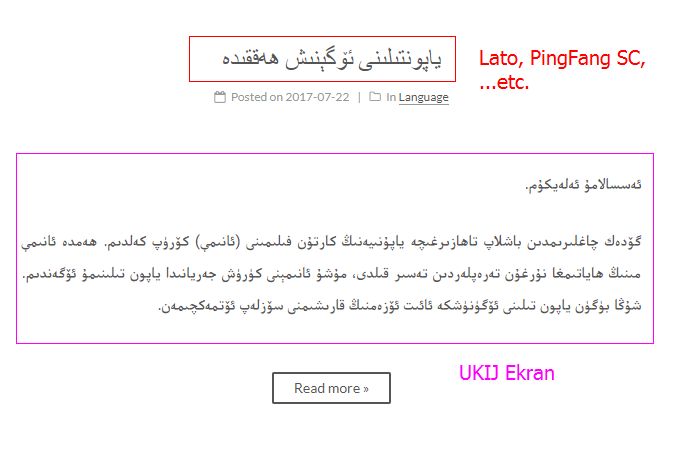
shohret
on 26 Jul 2017
See above.
ivan-nginx
on 26 Jul 2017
I tried that code, it will affect that Hello World post's title. I want to keep left to right language posts normal. Only RTL post title to be in UKIJ Ekran
shohret
on 26 Jul 2017
@shohret ok, then u need to modify like above post-title.styl. There are 2 sections - for expanded post and for homepage.
post.styl:
.post-body {
  font-family: $font-family-posts;
  +mobile() {
    word-break: break-word;
  }
+  &.rtl p, .rtl a, .rtl h1, .rtl h2, .rtl h3, .rtl h4, .rtl h5, .rtl h6, .rtl li, .rtl ul, .rtl ol {
+    direction: rtl;
+    font-family: UKIJ Ekran;
+  }
+  &.rtl p {
+    font-size: 16px;
+  }
}
post-title.styl:
.posts-expand .post-title {
  font-size: 26px;
  text-align: center;
  word-break: break-word;
  font-weight: $posts-expand-title-font-weight

+  &.rtl a, .rtl h1, .rtl h2 {
+    font-family: UKIJ Ekran;
+  }

  +mobile() {
    font-size: 22px;
  }
}
.posts-expand .post-title-link {
  display: inline-block;
  position: relative;
  color: $black-light;
  border-bottom: none;
  line-height: 1.2;
  vertical-align: top;

+  &.rtl a, .rtl h1, .rtl h2 {
+    font-family: UKIJ Ekran;
+  }
@shohret a can make separated post-rtl.styl for this. How u think, this is needed?
ivan-nginx
on 26 Jul 2017
@shohret hand's up! I find why this not work. Take a moment, need to fix this.
ivan-nginx
on 26 Jul 2017
@shohret check for this: 9673657.
ivan-nginx
on 26 Jul 2017
Yeah, I think if we have post-rtl, it is easier to control. Then we don't have to change post-title-rtl, post-body-rtl separately.
For RTL language post, text should be direction: rtl, but programming code in any post should be always normal.
shohret
on 26 Jul 2017
check for this: 9673657.
Thank you, this is gonna work. Haha, that is why I was saying post-title.rtl isn't working.
shohret
on 26 Jul 2017
@shohret yep, .rtl class was added in post-body only. So, i add it in post-title and if need, you also can add it to anyway (in sidebar, for example).
Ok, i will make post-rtl.styl. Need a test this from you. Wait for response.
ivan-nginx
on 26 Jul 2017
Sure, thank you!
shohret
on 26 Jul 2017
@shohret ok, check last 3 commits in #1697 PART 4.
ivan-nginx
on 26 Jul 2017
It is working great, demo, thank you a lot!
shohret
on 26 Jul 2017
U are welcome! But there is some problem: readmore button caption have rtl direction too. Or this is fine? how u think?
ivan-nginx
on 26 Jul 2017
I don't think this is a big problem, it is fine~~~ ^_^
shohret
on 26 Jul 2017
Good.
ivan-nginx
on 26 Jul 2017
Related issues
 Nirvanada
·
4Comments
Nirvanada
·
4Comments
 LionWY
·
3Comments
LionWY
·
3Comments
 keltoy
·
3Comments
keltoy
·
3Comments
 zhgcao
·
3Comments
zhgcao
·
3Comments
 payne4handsome
·
4Comments
payne4handsome
·
4Comments
Most helpful comment
Good.