Expected behavior (预期行为)
当一行代码超过页面显示长度以后可以自动换行。
Actual behavior (实际行为)
当一行代码超过页面显示长度以后不会换行,而是出现横向的滚动条。

Steps to reproduce the behavior (重现步骤)
在文章中写入以下内容
static struct sock_diag_handler *sock_diag_handlers[AF_MAX]; //可以看出,这个指针数组最大为AF_MAX AF_MAX = 40.
NexT Informations
Add the ✔ sign before an item which is affected by this behavior.
NexT Version:
- Master
- ✔Latest Release
- Old version -
NexT Scheme:
- All schemes
- Muse
- Mist
- ✔Pisces
Other Informations (Like Browser, System, Screenshots)
 fengguoqing
All 18 comments
同求 解决方案,滚动条看着实在难受
 whynotyes
on 5 Sep 2016
whynotyes
on 5 Sep 2016
我也想知道
 flaski
on 6 Sep 2016
flaski
on 6 Sep 2016
同求方案。。
 aixiu
on 7 Sep 2016
aixiu
on 7 Sep 2016
... 代码块本身的处理方式就是这个样子。如果需要自动换行,可以自行修改代码的css样式。
white-space: normal;
这样子操作会使得某些代码高亮工具的行号发生错乱
 xovel
on 13 Sep 2016
xovel
on 13 Sep 2016
可以自动修改换行但是觉得这个应该放到官方文件中比较好。
 wangerniu
on 30 Sep 2016
wangerniu
on 30 Sep 2016
希望 @iissnan 能够瞧瞧,帮忙实现一下代码换行
 ehlxr
on 24 Nov 2016
ehlxr
on 24 Nov 2016
@fengguoqing dont understand u, write in English if not solved. If solved, close it please. Thank's!
 ivan-nginx
on 20 Jul 2017
ivan-nginx
on 20 Jul 2017
@fengguoqing 嗨,您有找到什么解决方案了吗?谢谢您!我也被这个问题困扰了很久呢~
 maoshengyang
on 18 Nov 2017
maoshengyang
on 18 Nov 2017
@maoshengyang 上面说到的修改CSS样式你可以试试。
white-space: normal;
fengguoqing
on 18 Nov 2017
这样子操作会使得某些代码高亮工具的行号发生错乱
That's right! Are u crazy, guys? This is code, code always copy from blog and paste into console, for example. And if it will be line breaking, code probally will not work. This is too easy to do. This will have nice vision, yes, but this will kick out your users from your blogs after copying this code by they. Just think about it, what is better: beauty or stability?
There is simple example.
Standart code block:
net/core/sock_diag.c View file @ 6e601a5
@@ -121,6 +121,9 @@ static int __sock_diag_rcv_msg(struct sk_buff *skb, struct nlmsghdr *nlh)
   if (nlmsg_len(nlh) < sizeof(*req))
     return -EINVAL;

+  if (req->sdiag_family >= AF_MAX)
+    return -EINVAL;
+
   hndl = sock_diag_lock_handler(req->sdiag_family);
   if (hndl == NULL)
     err = -ENOENT;
Code block with white-space: normal;:
net/core/sock_diag.c View file @ 6e601a5
@@ -121,6 +121,9 @@ static int __sock_diag_rcv_msg(struct sk_buff *skb, struct nlmsghdr *nlh)
if (nlmsg_len(nlh) < sizeof(*req))
return -EINVAL;
+ if (req->sdiag_family >= AF_MAX)
+ return -EINVAL;
+
hndl = sock_diag_lock_handler(req->sdiag_family);
if (hndl == NULL)
err = -ENOENT;
@ivan-nginx Understand. Also with 'white-space: normal' in line style directly will cancel the line indention indeed. I may try to give up my proposals. Thanks a lot!
maoshengyang
on 19 Nov 2017
you can see this style, create a scroll that folat in code area bottom always !
open this blog, then double click second code block and scroll change !
 zhuzhuyule
on 22 Nov 2017
zhuzhuyule
on 22 Nov 2017
@zhuzhuyule wow! This is pretty close to fix this problem. Can u do pull with this feature?
ivan-nginx
on 22 Nov 2017
@ivan-nginx OK, wait me to sort out !
zhuzhuyule
on 24 Nov 2017
@zhuzhuyule
非常美观!!!
但是我按照您的blog中“HEXO下的语法高亮拓展修改”的文章进行修改之后发现并没有达到您博客中的效果。如图所示,可以正确加入代码的标题,但是行号和代码分别占用了一整行。

以下是我生成的代码
<figure class="highlight python">
  <figcaption><span class="caption">Python code</span></figcaption>
  <div class="figcode">
    <div class="gutter">
      <pre>
        <div class="line">1</div>
        <div class="line">2</div>
        <div class="line">3</div>
        <div class="line">4</div>
        <div class="line">5</div>
      </pre>
    </div>
    <div class="code">
      <pre>
        <div class="line"><span class="keyword">import</span> numpy <span class="keyword">as</span> np</div>
        <div class="line"><span class="keyword">import</span> keras</div>
        <div class="line">...</div>
        <div class="line"><span class="keyword">import</span> keras.backend <span class="keyword">as</span> K  <span class="comment"># backend is Tensorflow</span></div>
        <div class="line">K.set_image_data_format(<span class="string">'channels_last'</span>)</div>
      </pre>
    </div>
  </div>
</figure>
我查看了以下您博客中代码段的html代码和这个应该是一样的,但是显示出来的效果完全不一样。我是不是漏掉了什么东西呀!最近刚开始搞自己的博客,问的问题比较傻,见谅哈!
maoshengyang
on 25 Nov 2017
@zhuzhuyule
原来的代码是生成了一个一行两列的<table>。但是看更新的代码是生成了两个<div>,然后两个<div>分别占据了一整行的空间。
maoshengyang
on 25 Nov 2017
@maoshengyang 样式没有引用进来。
不要意思,'HEXO下的语法高亮拓展修改'教程一步,需要在 .\themes\next\source\css\_custom\highlight.styl 中添加
@import highlight;
@zhuzhuyule 感谢!我也发现了需要import这个样式。
我看了您的blog,文章中的code block非常酷炫。我按照您的方法实现到了如下图的程度:可以加标题,底部有固定的scrollbar等等。
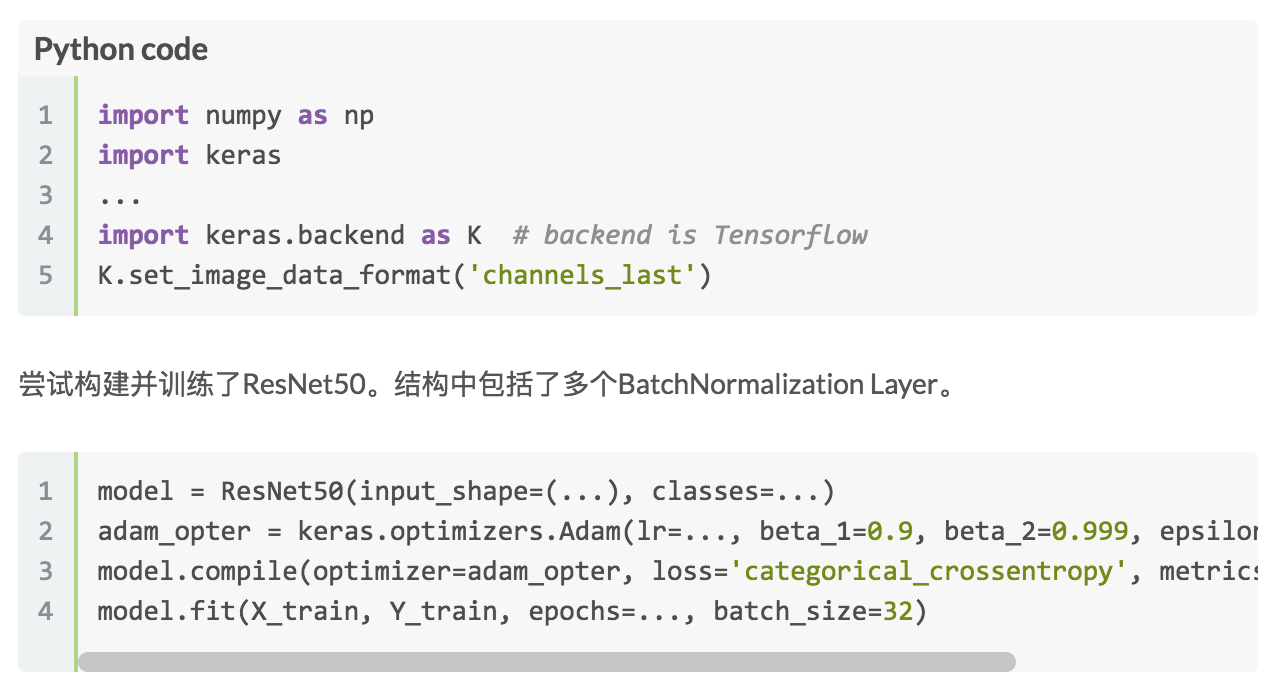
我注意到您的博客中,将鼠标移到code block中时,这个block可以自动变长,把以前显示不完全的代码行显示完整。我觉得这个太漂亮了。能否教我一下实现这个功能啊。
另外我有下载你的repo,hexo-blog-modify。我有尝试把themes_modify/next下的layout,source和scripts复制合并到我的博客文件夹下,但是发现会改变我原有的一些排版。我只想要实现您博客中的code block的功能。
万分感谢啦!
maoshengyang
on 25 Nov 2017
Related issues
 liyuan989
·
3Comments
liyuan989
·
3Comments
 chy9002
·
3Comments
chy9002
·
3Comments
 LionWY
·
3Comments
LionWY
·
3Comments
 blueyi
·
5Comments
blueyi
·
5Comments
 ifyour
·
4Comments
ifyour
·
4Comments
Most helpful comment
you can see this style, create a scroll that folat in code area bottom always !
open this blog, then double click
second codeblock and scroll change !