Hero: How can I from A UILabel to B UILabel with different colors?
Hi
How can I from A Label to B Label with different colors?
For example
A Label with red color in VC1, and B Label with blue color in VC2, how can I translate them by Hero.
Thanks and best regards
 pxwinter
All 3 comments
Not sure if I understand your question clearly. But setting the heroId to be the same for both label should do it right?
 lkzhao
on 2 Mar 2018
lkzhao
on 2 Mar 2018
@lkzhao Thanks for your feedback, could you please look at this attach file, I record a demo video.
In the progress the animation, the red label didn't fade away. How can I add a fade animation on red label (opacity from 1 to 0)
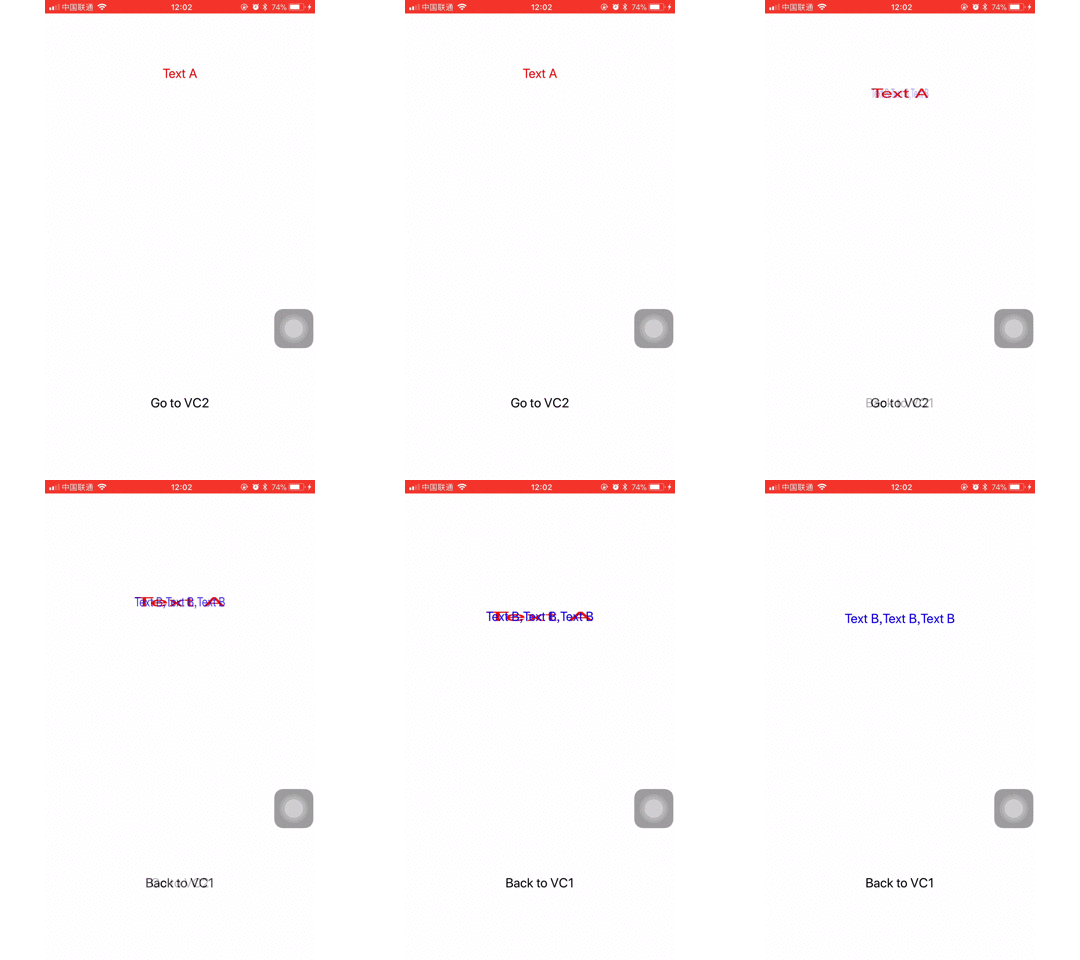
Thanks and best regards
pxwinter
on 2 Mar 2018
@pxwinter I came across a similar issue whereby:
- if my destination ViewController is instantiated via Storyboard, this scenario of old text artifact being visible throughout duration is not present
- however, if I recreate the same ViewController manually, and set it up in code the same way it is setup in storyboard, then I would get the same result you posted.
After some debugging, the solution I found is simple. In Storyboard when you add a UILabel, Xcode by default set's it's isOpaque property to false.
However, if you create a UILabel in code, it's isOpaque property for some reason is set to true.
In Hero's MatchPreprocessor is appears to behave differently depending on whether the view is opaque or not, on line 44:
let isNonOpaque = !fv.isOpaque || fv.alpha < 1 || !tv.isOpaque || tv.alpha < 1
So to solve my problem it was enough to simply set label.isOpaque = false on the destination label.
 alex-yushchenko
on 31 Oct 2018
alex-yushchenko
on 31 Oct 2018
Related issues
 brendan-guegan-orange
·
4Comments
brendan-guegan-orange
·
4Comments
 patchthecode
·
4Comments
patchthecode
·
4Comments
 Tibb
·
3Comments
Tibb
·
3Comments
 cristinaITdeveloper
·
4Comments
cristinaITdeveloper
·
4Comments
 bencallis
·
4Comments
bencallis
·
4Comments
Most helpful comment
@pxwinter I came across a similar issue whereby:
After some debugging, the solution I found is simple. In Storyboard when you add a UILabel, Xcode by default set's it's
isOpaqueproperty tofalse.However, if you create a UILabel in code, it's
isOpaqueproperty for some reason is set totrue.In Hero's
MatchPreprocessoris appears to behave differently depending on whether the view is opaque or not, on line44:So to solve my problem it was enough to simply set
label.isOpaque = falseon the destination label.