Hermes: Invalid MinimumOSVersion. Apps that only support 64-bit devices must specify a deployment target of 8.0 or later. MinimumOSVersion in '[My App].app/Frameworks/hermes.framework' is ''."
Bug Description
When using Hermes on iOS (react-native 0.64-rc0) you cannot publish the archived application to the AppStore/Testflight, because it doesn't specifiy a minimum OS version but requires 64-bit architectures.
Hermes version: 7.0.1
React Native version (if any): 0.64-rc0
Android version (if any): /
Platform (most likely one of arm64-v8a, armeabi-v7a, x86, x86_64): iOS, arm64
Steps To Reproduce
- Create react-native 0.64-rc0 project
- Enable hermes in Podfile
- Clean everything
- Archive app (I've used the
fastlane betacommand for this) - Upload archive to AppStore/Testflight (
fastlane betadid that for me)
Logs
Fastlane logs
[11:13:59]: Going to upload updated app to App Store Connect
[11:13:59]: This might take a few minutes. Please don't interrupt the script.
[11:14:46]: [Transporter Error Output]: ERROR ITMS-90530: "Invalid MinimumOSVersion. Apps that only support 64-bit devices must specify a deployment target of 8.0 or later. MinimumOSVersion in '[My App].app/Frameworks/hermes.framework' is ''."
[11:14:46]: [Transporter Error Output]: ERROR ITMS-90360: "Missing Info.plist value. A value for the key 'MinimumOSVersion' in bundle [My App].app/Frameworks/hermes.framework is required."
[11:14:46]: [Transporter Error Output]: ERROR ITMS-90208: "Invalid Bundle. The bundle [My App].app/Frameworks/hermes.framework does not support the minimum OS Version specified in the Info.plist."
[11:14:46]: Transporter transfer failed.
[11:14:46]:
[11:14:46]: ERROR ITMS-90530: "Invalid MinimumOSVersion. Apps that only support 64-bit devices must specify a deployment target of 8.0 or later. MinimumOSVersion in '[My App].app/Frameworks/hermes.framework' is ''."
ERROR ITMS-90360: "Missing Info.plist value. A value for the key 'MinimumOSVersion' in bundle [My App].app/Frameworks/hermes.framework is required."
ERROR ITMS-90208: "Invalid Bundle. The bundle [My App].app/Frameworks/hermes.framework does not support the minimum OS Version specified in the Info.plist."
[11:14:46]: [iTMSTransporter] [2020-11-24 11:14:46 CET] <main> ERROR: ERROR ITMS-90360: "Missing Info.plist value. A value for the key 'MinimumOSVersion' in bundle [My App].app/Frameworks/hermes.framework is required."

[11:14:46]: [iTMSTransporter] [2020-11-24 11:14:46 CET] <main> ERROR: ERROR ITMS-90208: "Invalid Bundle. The bundle [My App].app/Frameworks/hermes.framework does not support the minimum OS Version specified in the Info.plist."

[11:14:46]: [iTMSTransporter] [2020-11-24 11:14:46 CET] <main> DBG-X: The error code is: 1102

[11:14:46]: [iTMSTransporter] [2020-11-24 11:14:46 CET] <main>  INFO: Done performing authentication.

[11:14:46]: [iTMSTransporter]

[11:14:46]: [iTMSTransporter]

[11:14:46]: [iTMSTransporter]

[11:14:46]: [iTMSTransporter] Package Summary:

[11:14:46]: [iTMSTransporter]

[11:14:46]: [iTMSTransporter] 1 package(s) were not uploaded because they had problems:

[11:14:46]: [iTMSTransporter]   /var/folders/3r/gxn72hgj7vl59jrshs0wxh600000gn/T/d20201124-44941-z1gelj/1535370501.itmsp - Error Messages:

[11:14:46]: [iTMSTransporter]       ERROR ITMS-90530: "Invalid MinimumOSVersion. Apps that only support 64-bit devices must specify a deployment target of 8.0 or later. MinimumOSVersion in '[My App].app/Frameworks/hermes.framework' is ''."

[11:14:46]: [iTMSTransporter]       ERROR ITMS-90360: "Missing Info.plist value. A value for the key 'MinimumOSVersion' in bundle [My App].app/Frameworks/hermes.framework is required."

[11:14:46]: [iTMSTransporter]       ERROR ITMS-90208: "Invalid Bundle. The bundle [My App].app/Frameworks/hermes.framework does not support the minimum OS Version specified in the Info.plist."

[11:14:46]: [iTMSTransporter] [2020-11-24 11:14:46 CET] <main> DBG-X: Returning 1

[11:14:46]: iTunes Transporter output above ^
[11:14:46]: ERROR ITMS-90530: "Invalid MinimumOSVersion. Apps that only support 64-bit devices must specify a deployment target of 8.0 or later. MinimumOSVersion in '[My App].app/Frameworks/hermes.framework' is ''."
ERROR ITMS-90360: "Missing Info.plist value. A value for the key 'MinimumOSVersion' in bundle [My App].app/Frameworks/hermes.framework is required."
ERROR ITMS-90208: "Invalid Bundle. The bundle [My App].app/Frameworks/hermes.framework does not support the minimum OS Version specified in the Info.plist."
Return status of iTunes Transporter was 1: ERROR ITMS-90530: "Invalid MinimumOSVersion. Apps that only support 64-bit devices must specify a deployment target of 8.0 or later. MinimumOSVersion in '[My App].app/Frameworks/hermes.framework' is \nERROR ITMS-90208: "Invalid Bundle. The bundle [My App].app/Frameworks/hermes.framework does not support the minimum OS Version specified in the Info.plist."
The call to the iTMSTransporter completed with a non-zero exit status: 1. This indicates a failure.
According to Apple's official documentation, specifying MinimumOSVersion in Info.plist is not recommended, so I'm not sure what the right solution for this would be. I've checked my Xcode project settings, and noticed that hermes-engine has a deployment target of iOS 10, which means it theoretically has a MinimumOSVersion set to 10. 🤔
I assume a quick and dirty fix would be setting the MinimumOSVersion in Info.plist, although I'm not sure how I can try this out for myself.
 mrousavy
All 18 comments
@grabbou @alloy any ideas here?
 tmikov
on 1 Dec 2020
tmikov
on 1 Dec 2020
Using this script in xcode build phases to fix it automatically for now if that can help someone before a proper fix is available.
set -e

## Delete entry if it already exists
/usr/libexec/PlistBuddy -c "Delete :MinimumOSVersion" "${TARGET_BUILD_DIR}/${FRAMEWORKS_FOLDER_PATH}/hermes.framework/Info.plist" || true

/usr/libexec/PlistBuddy -c "Add :MinimumOSVersion string 10.0" "${TARGET_BUILD_DIR}/${FRAMEWORKS_FOLDER_PATH}/hermes.framework/Info.plist"
 janicduplessis
on 2 Dec 2020
janicduplessis
on 2 Dec 2020
Thanks for that workaround, @janicduplessis 🙏
As for the actual issue, I’m confused. The binary we distribute includes a slice for armv7 and armv7s, which are 32-bit architectures. Are those slices being stripped from your release build? You can verify with the file tool by pointing it to your build:
file /Users/eloy/Downloads/hermes-runtime-darwin-v0.7.1/destroot/Library/Frameworks/iphoneos/hermes.framework/hermes
/Users/eloy/Downloads/hermes-runtime-darwin-v0.7.1/destroot/Library/Frameworks/iphoneos/hermes.framework/hermes: Mach-O universal binary with 5 architectures: [arm_v7:Mach-O dynamically linked shared library arm_v7] [arm_v7s] [i386] [x86_64] [arm64]
/Users/eloy/Downloads/hermes-runtime-darwin-v0.7.1/destroot/Library/Frameworks/iphoneos/hermes.framework/hermes (for architecture armv7):   Mach-O dynamically linked shared library arm_v7
/Users/eloy/Downloads/hermes-runtime-darwin-v0.7.1/destroot/Library/Frameworks/iphoneos/hermes.framework/hermes (for architecture armv7s):  Mach-O dynamically linked shared library arm_v7s
/Users/eloy/Downloads/hermes-runtime-darwin-v0.7.1/destroot/Library/Frameworks/iphoneos/hermes.framework/hermes (for architecture i386):    Mach-O dynamically linked shared library i386
/Users/eloy/Downloads/hermes-runtime-darwin-v0.7.1/destroot/Library/Frameworks/iphoneos/hermes.framework/hermes (for architecture x86_64):  Mach-O 64-bit dynamically linked shared library x86_64
/Users/eloy/Downloads/hermes-runtime-darwin-v0.7.1/destroot/Library/Frameworks/iphoneos/hermes.framework/hermes (for architecture arm64):   Mach-O 64-bit dynamically linked shared library arm64
 alloy
on 2 Dec 2020
alloy
on 2 Dec 2020
@alloy in the archive I've built it seems like it only contains arm64:
hermes: Mach-O universal binary with 1 architecture: [arm64:Mach-O 64-bit dynamically linked shared library arm64]
hermes (for architecture arm64):    Mach-O 64-bit dynamically linked shared library arm64
I've also run the command for the actual app executable, and that also gave me only arm64:
AppName: Mach-O 64-bit executable arm64
Just to test, the dylibs inside Frameworks contain multiple architectures, here's libswiftos.dylib:
libswiftos.dylib: Mach-O universal binary with 4 architectures: [arm_v7:Mach-O dynamically linked shared library arm_v7] [arm_v7s:Mach-O dynamically linked shared library arm_v7s] [arm64:Mach-O 64-bit dynamically linked shared library arm64] [arm64e:Mach-O 64-bit dynamically linked shared library arm64e]
libswiftos.dylib (for architecture armv7):  Mach-O dynamically linked shared library arm_v7
libswiftos.dylib (for architecture armv7s): Mach-O dynamically linked shared library arm_v7s
libswiftos.dylib (for architecture arm64):  Mach-O 64-bit dynamically linked shared library arm64
libswiftos.dylib (for architecture arm64e): Mach-O 64-bit dynamically linked shared library arm64e
Ok, so it looks like you’re only building your app for arm64, is that not on purpose? In any case, this is a legit use-case, but seeing as we do support older versions I think that, for now at least, the onus will be on you to perform the step that @janicduplessis outlined.
Having said that, it might be worthwhile to discuss with the CocoaPods maintainers if there’s a possibility for the CocoaPods frameworks installation script, which is likely stripping these archs to align with your app settings, if it can also update the Info.plist to avoid this issue.
alloy
on 3 Dec 2020
(Btw, seems unfortunate that the Swift dylib includes arch slices your app doesn’t support, that’s wasted bundle size. Perhaps something to dig into more as well.)
alloy
on 3 Dec 2020
@alloy No, my intention is to also build for other architectures.
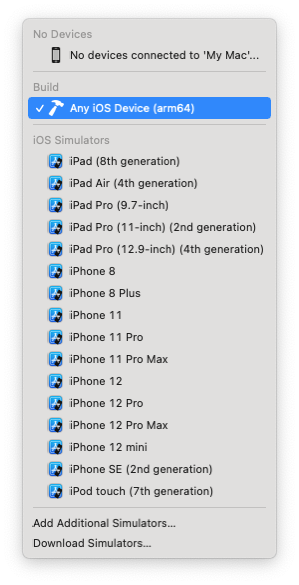
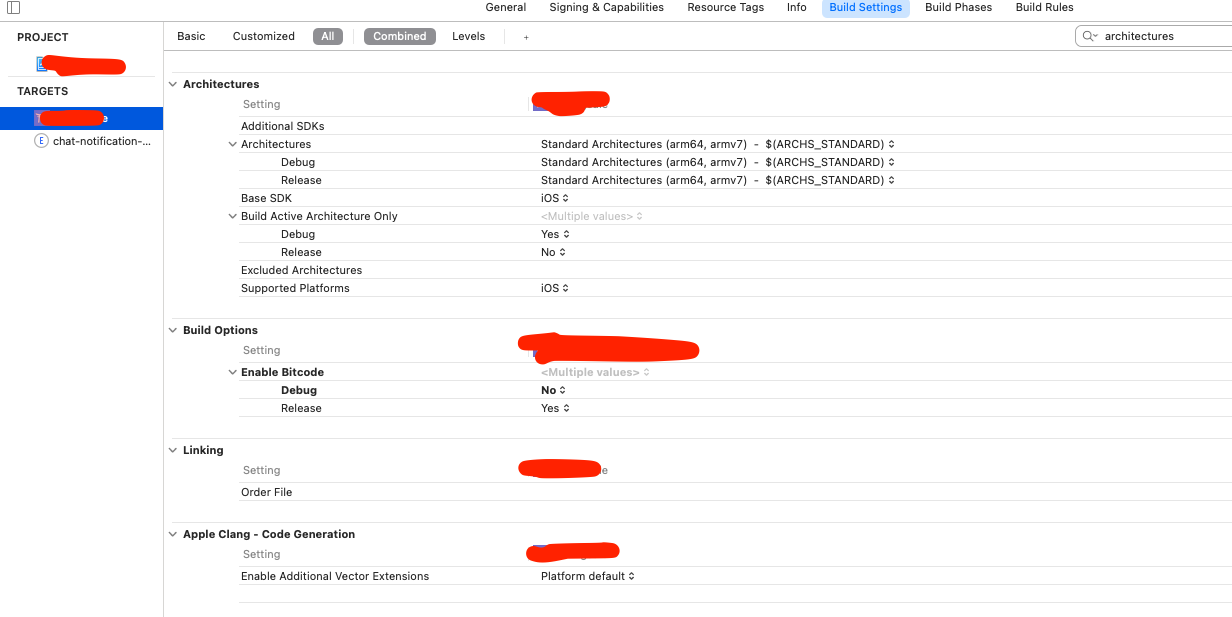
Did I do something wrong? Why can I only select arm64 when my architectures are set to ARCHS_STANDARD?
mrousavy
on 3 Dec 2020
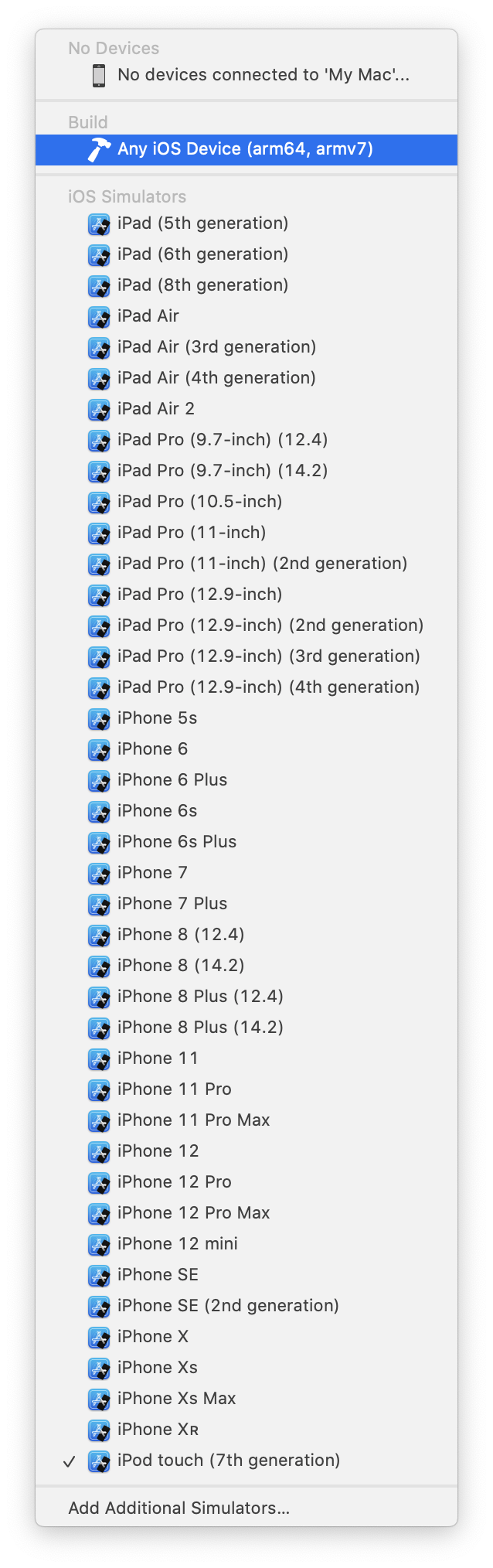
I’m unsure what might be happening in your case, but with a newly generated RN 0.64.0-rc.1 project I see the following options:
alloy
on 3 Dec 2020
I just bumped the deployment target of the app in my test to iOS 11 and now I can only target arm64, which makes sense as there are no 32-bit devices that support iOS 11 or above. Could that be the issue?
alloy
on 3 Dec 2020
Oh yeah, that seems to be the issue, as libraries such as react-native-navigation only support iOS 11 and above. I thought iOS 11 still had armv7 devices, iOS 12 didn't? Either way, it's probably a good idea I only build for arm64 and exclude the other architectures in my pods, not sure how I can do that though.
This doesn't seem related to the original issue though. 🤔
mrousavy
on 3 Dec 2020
It looks like CocoaPods is already doing that for you, as the hermes framework in your archive only contains arm64, right? Are you otherwise using static or dynamic builds of pods? If static, then your app binary only containing a arm64 arch slice means you’re all set. If you use dynamic builds you can verify those similarly using the file tool.
alloy
on 3 Dec 2020
I have checked a dynamic lib, see my comment above - it included 4 architectures. So my app and hermes only include arm64, but dylibs also include armv7 and the two subsets.
I just noticed that UIRequiredDeviceCapabilities in my Info.plist was set to armv7, I'll change that to arm64 and see if that fixes anything in a sec.
mrousavy
on 3 Dec 2020
That’s Apple’s Swift dylib, which lies outside of CocoaPods’ responsibility. Are there others?
alloy
on 3 Dec 2020
Oh I see, my bad. No, there are only Apple dylibs and the hermes framework.
mrousavy
on 3 Dec 2020
Ok, so, to avoid people in the future having to do this, I think it’s fine if we add the MinimumOSVersion key to the Info.plist file of the iOS artefact and set it to the deployment target that we built it for (which is iOS 10 at the time of writing). It's not something that needs to block the RN 0.64 release imo, though, as this can be set by the user as per @janicduplessis' example. We might also want to set LSMinimumSystemVersion for the macOS artefact.
alloy
on 3 Dec 2020
Would be good to follow-up at some point with this cmake issue https://gitlab.kitware.com/cmake/cmake/-/issues/18507
alloy
on 4 Dec 2020
@mrousavy @janicduplessis Could you try the npm artefact of #428 please with App Store validation/uploads?
alloy
on 7 Dec 2020
The fix onto 0.7 branch (https://github.com/facebook/hermes/pull/428) has been merged so RN 0.64 should be fine now.
Assigned to myself to remind me merging https://github.com/facebook/hermes/pull/425 to the trunk to close this.
 Huxpro
on 8 Dec 2020
Huxpro
on 8 Dec 2020
Related issues
 haozhun
·
6Comments
haozhun
·
6Comments
 WilliamParks
·
3Comments
WilliamParks
·
3Comments
 akrger
·
6Comments
akrger
·
6Comments
 AMorgaut
·
6Comments
AMorgaut
·
6Comments
 willholen
·
4Comments
willholen
·
4Comments
Most helpful comment
Ok, so, to avoid people in the future having to do this, I think it’s fine if we add the
MinimumOSVersionkey to theInfo.plistfile of the iOS artefact and set it to the deployment target that we built it for (which is iOS 10 at the time of writing). It's not something that needs to block the RN 0.64 release imo, though, as this can be set by the user as per @janicduplessis' example. We might also want to setLSMinimumSystemVersionfor the macOS artefact.