Hermes: Enabling hermes for an existing native app with React Native integration
The docs (https://facebook.github.io/react-native/docs/hermes) do not mention anything about how to enable hermes for an existing native Android app which has RN integrated using a JS bundle.
 prempalsingh
All 24 comments
The documentation has now been improved and published. Thanks!
 willholen
on 20 Sep 2019
willholen
on 20 Sep 2019
@willholen I am still not sure how to enable Hermes for a hybrid Android app (native + RN). Even if I create a release JS bundle with Hermes enabled, the size of the RN .so libs that gets packaged in my native app is still roughly the same. How can I take advantage of the APK size reduction?
prempalsingh
on 23 Sep 2019
@prempalsingh Could you extract your APK and check which .so files are being bundled up?
In a release build you should have libhermes-executor-release.so and libhermes.so, and notably no libjsc.so or libhermes-executor-debug.so.
For reference, here is the part of the RN build responsible for excluding libraries based on project settings.
willholen
on 23 Sep 2019
@prempalsingh there is multiple things if you want to do the hermes integration by yourself
- RN now don't include any JS engine, so you will decide to include it at the app level
- if you want to use JSC, include jsc.aar, if you want to use hermes, add the hermes.aar
- you may need to modify the app
build.gradleto exclude thelibhermes-executor-debug.soorlibhermes-executor-reslease.soorjscexecutor.sodepends on which JS engine you are using - you may need to set
ReactInstanceManagerBuilder.setJavaScriptExecutorFactory(new HermesExecutorFactory());if you are using hermes - export the jsbundle as normal, then run it through hermes cli with the following command
./hermes -emit-binary -out outputfile inputfile -output-source-map
- about the app size, you may benefit from changing the JS engine from JSC to Hermes, but the binary jsbundle (hermes's output) is slightly bigger than the normal text bundle, then maybe you won't see the decreasing apk size
 tsengvn
on 26 Sep 2019
tsengvn
on 26 Sep 2019
@tsengvn we universally see bytecode bundles up to 30% smaller than text bundles. I am surprised that in your case it is larger. I noticed that in your example command you are missing the optimization option "-O". Can you try it with that option?
 tmikov
on 27 Sep 2019
tmikov
on 27 Sep 2019
@tmikov thanks a lot for pointing out my missing, i see the binary-bundle is smaller now
tsengvn
on 27 Sep 2019
@tmikov I also noticed that the Hermes engine still work with the text bundle. Is this an expected behavior (to provide backward compatibility) ?
tsengvn
on 27 Sep 2019
Yes, Hermes transparently recognizes both text and bytecode in most contexts. This makes it easier to adapt existing builds and pipelines since you can simply drop in a bytecode file without other code changes.
You should always make sure you're using bytecode in releases though, since it's significantly faster to both load and execute, and uses much less memory.
willholen
on 27 Sep 2019
Thanks @tsengvn for mentioning the steps for doing hermes integration on my own. Everything works fine now. How can I modify the app build.gradle to include/exclude the correct libhermes-executor depending upon the build type?
I was able to exclude jsc by adding exclude "**/libjsc*.so" in my packagingOptions.
prempalsingh
on 1 Oct 2019
react.gradle should already be doing this, though if you've just modified your project settings you may need to ./gradlew clean once. See https://github.com/facebook/react-native/blob/b21a9419236175a1d7f93189a7aa33e143536f9a/react.gradle#L282
willholen
on 1 Oct 2019
True but my project is setup in a different way. It is an Android app that depends on the packaged aar file of React Native. Another team works on the JS bundle which is downloaded in the app via an OTA update. The .so files are already packaged in the aar. Need to exclude them from getting packaged in my apk.
prempalsingh
on 1 Oct 2019
That snippet is intended to include the whole RN .aar with all the undesired .so files, and then delete some of them right before the APK is packaged.
willholen
on 1 Oct 2019
Got it. My project doesn't include the react.gradle file so I copied the particular snippet and placed it in my build.gradle file. It still doesn't work.
I dug a little deeper and found that the .so files are never created in the transforms folder.
They are only created in build/intermediates/merged_native_libs and build/intermediates/stripped_native_libs. I guess this is why the snippet never works. Any idea why this might be happening?
EDIT : I think the task transformNativeLibsWithIntermediateJniLibsForDebug is responsible for creating the transformed .so files. This particular task does not exist for my app. 😕
prempalsingh
on 3 Oct 2019
I'm not sure why this would be. This is valuable feedback, and means we should bump the priority of the correct fix as described in the snippet comment. As a temporary workaround, you could try adjusting the path.
willholen
on 3 Oct 2019
More info in case it helps -
Here are the last 4 tasks when I run the dry run for assembling my app's internal debug variant -
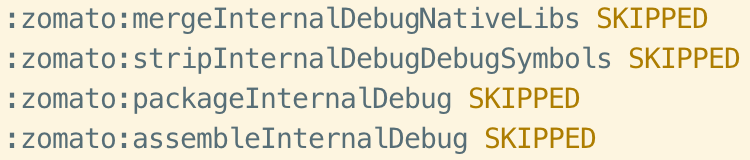
The transform task is missing.
I will try modifying the script to delete the .so files after the merge or strip task and let you know if that works.
prempalsingh
on 3 Oct 2019
Please do. Make sure to clean before each new attempt, since Gradle understandably doesn't realize that changes to build.gradle means changes to intermediate output directories.
willholen
on 3 Oct 2019
I modified the script to delete the .so files from the stripped_native_libs folder before the packaging task. The files got deleted but my package task failed with a FileNotFoundException -

Looks like the package task still expects the deleted files to be there.
I came across a gradle plugin to exclude/include specific .so files. Using it also throws the same exception. 😕
prempalsingh
on 4 Oct 2019
Update for those facing a similar issue. I am using the following workaround -
def taskName = getGradle().getStartParameter().getTaskRequests().toString()

packagingOptions {
        // For Hermes, delete all the libjsc* files
        exclude "**/libjsc*.so"
        if (taskName.contains("InternalDebug")) {
            // Release libs take precedence and must be removed
            // to allow debugging
            exclude '**/libhermes-executor-release.so'
        } else {
            // Reduce size by deleting the debugger/inspector
            exclude '**/libhermes-inspector.so'
            exclude '**/libhermes-executor-debug.so'
        }
}
Hope an official fix is released soon.
prempalsingh
on 11 Nov 2019
my issue currently using react-native in an integrated app: couldn't find DSO to load: libhermes.so
 tvelev92
on 5 May 2020
tvelev92
on 5 May 2020
@tvelev92 This can happen if you exclude both libjsc and libhermes in an application. Can you inspect the APK and make sure that you include the JSVM you wanted to use?
willholen
on 19 May 2020
@tvelev92 @willholen I am facing the same issue. But I am using jsc.
Error on Android is couldn't find DSO to load: libhermes.so, but mostly on rooted devices (94% rooted)
 ObidosDev
on 20 May 2020
ObidosDev
on 20 May 2020
@ObidosDev cd android && ./gradlew clean will fix that error
 JeremiahUL
on 20 Oct 2020
JeremiahUL
on 20 Oct 2020
linked:
 ewfian
on 20 Oct 2020
ewfian
on 20 Oct 2020
Just created a PR to fix this: https://github.com/facebook/react-native/pull/30303
 maxammann
on 2 Nov 2020
maxammann
on 2 Nov 2020
Related issues
 jacque006
·
4Comments
jacque006
·
4Comments
 swabbass
·
3Comments
swabbass
·
3Comments
 gaodeng
·
4Comments
willholen
·
4Comments
gaodeng
·
4Comments
willholen
·
4Comments
 haozhun
·
6Comments
haozhun
·
6Comments
Most helpful comment
Update for those facing a similar issue. I am using the following workaround -
Hope an official fix is released soon.