Hekate: Blue Screen or Panic to rcm while launching on 8.1.0 and 9.0.X
I have followed the guides correctly and attempted it 2 times now. I have latest version of atmosphere and hekate. I create a partition for EmuMMC and do as the guides say. I can RCM and inject the hekate payload through Tegra and have access to the hekate menu. I created a EmuMMC in Raw1, but when trying to Launch->EmuMMC CFW, I get a blue screen crash. I have heard of someone else having this issue over at: #https://gbatemp.net/threads/switch-10-0-4-atmosphere-0-13-0-blue-screen.567840/
I can boot into custom firmware if I inject hekate through Tegra, but then go to payloads and select fusee-primary (instead of the launch option and EmuMMC).
 Dablestation
All 26 comments
Did you update the bootloader folder or you only just inject the new v5.3.0 payload?
Atmosphere 0.13.0 did some changes and the old emuMMC driver does not work on that.
It creates a blue panic screen.
The fix is easy, download the latest hekate release and drag n drop the bootloader folder to your sd card root. If asked by your OS to merge and replace files, hit yes. (no need to delete old folder.)
Have in mind that when a new hekate release is done, you should always update the bootloader folder.
EDIT:
Have in mind that the new emuMMC driver, works on both 0.13 and 0.12.
 CTCaer
on 20 Jun 2020
CTCaer
on 20 Jun 2020
I downloaded the latest hekate and dragged and dropped the bootloader as you said, but I keep getting the error. When downloading the latest hekate, what should be done with all the other folders? are they needed? Im speaking about bdk, modules, nyx, res, tools and all the other files inside the zip. Or just bootloader is needed?
I am quite confused as I understand that as things get updated, guides become old, could this be an issue? Because following the guide I just downloaded everything from SDsetup and copied to the root of the SD card. Is this enough? or is there anymore to it that the guides fail to explain?
Also, have you encountered the problem I am speaking about before?
Edit: Is it a bad creation of emuMMC perhaps?
Dablestation
on 20 Jun 2020
Good morning,
I'm facing the exact same issue:
Brand new SD card, used the SDsetup website to get all files needed, but I get the blue screen everytime I try to launch the EmuMMC CFW.
Edit: found the issue. It seems that using an EmuMMC backup with an ancient système firmware is causing the problem (mine was 9.01)
The workaround is to go back to atmosphere 0.12, update the firmware to 10.0 4 using choix du jour and then put back the 0.13 atmosphere files. That did the trick for me
 axionman
on 20 Jun 2020
axionman
on 20 Jun 2020
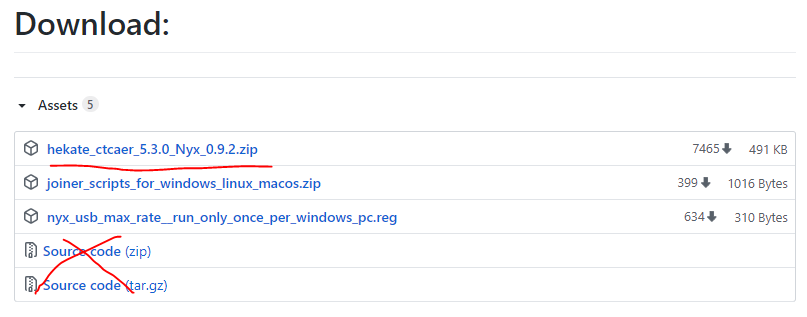
@Dablestation You downloaded the wrong zip.
The correct is this: https://github.com/CTCaer/hekate/releases/download/v5.3.0/hekate_ctcaer_5.3.0_Nyx_0.9.2.zip
What you should have pressed:
@axionman That's strange. I will still investigate though.
CTCaer
on 20 Jun 2020
I have tried with that file too and it still doesn't work.
Answering @axionman comment, I haven't tried with atmos 0.12, but my emuMMC is a clean one and not a backup. I haven't touched the switch in a long time so maybe it has to do with firmware version.
@CTCaer Is there a minimum switch firmware version for the 0.5.3 release?
Dablestation
on 20 Jun 2020
Nope it should work with every version. And v5.3.0 should support 0.12 and older AND 0.13 atmosphere files.
Can you tell me what HOS version you have on that emummc?
CTCaer
on 20 Jun 2020
I am sorry for my ignorance, could you guide me on how to look at it? sorry...
Dablestation
on 20 Jun 2020
@Dablestation The easiest way is to use Logs ON from the Launch screen (top-right). It will show some text in a very fast fashion when you select what to boot, so you might need to get a video of it.
Then tell me the pkg1 version printed there.
CTCaer
on 20 Jun 2020
Here you go.
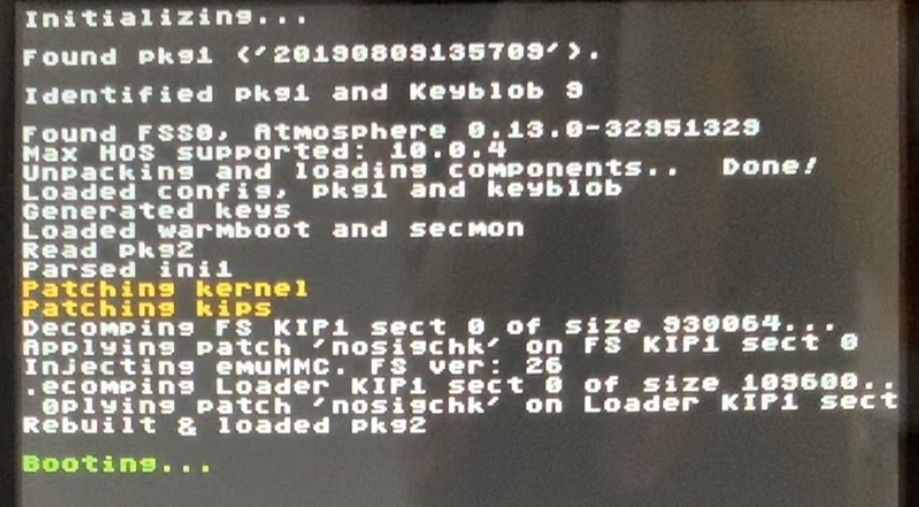
After this I got the typical blue screen.
Also, I cannot get into CFW anymore when using fusee-primary. I get another error screen (will wait and see if we can sort the previous one before bombarding you with other errors)
Dablestation
on 20 Jun 2020
Answering @axionman comment, I haven't tried with atmos 0.12, but my emuMMC is a clean one and not a backup. I haven't touched the switch in a long time so maybe it has to do with firmware version.
Actually my emuMMC was also a clean one, based my OFW system which is still on 9.01
axionman
on 20 Jun 2020
So I can confirm this on 9.0.1.
@Dablestation @axionman
Please try this:
hekate_test.zip
^ Temporary fix
CTCaer
on 20 Jun 2020
I was literally going to post an update. I have redone everything and this time manually downloaded the files needed (following this guide -> https://nh-server.github.io/switch-guide/ ). I was advised on discord to not use SDsetup as it may be outdated, and from what I could see, SDsetup didnt merge the bootloader folders. I still get the blue screen.
Will try the new file you have sent. Guide me at what exactly I need to do with the hekate.bin file inside the zip so we're on the same track please.
Dablestation
on 20 Jun 2020
You just inject it. and boot the emummc boot entry.
CTCaer
on 20 Jun 2020
Also, is it worth for me just to update the official firmware of the switch to a newer version and just starting there? Or do you advice against it?
Dablestation
on 20 Jun 2020
You just inject it. and boot the emummc boot entry.
I dont have to replace anything inside the SD card?
Dablestation
on 20 Jun 2020
It worked! What is it that changed?
Dablestation
on 20 Jun 2020
Nope you don't need to replace anything. If you want to update to 10.0.X do it, but please after testing.
CTCaer
on 20 Jun 2020
Ah nice. It's a discrepancy with keyslots and new exosphere.
CTCaer
on 20 Jun 2020
So it is just a matter of replacing the hekate 0.5.3 bin with this one you sent me and thats it? Or there will be more tweaking to this test file before release?
Thank you so much btw. I will share on discord that the bug is 'resolved'. Do you want me to keep the file private until you post an official release? or is it stable enough to share with everyone that had this issue?
Dablestation
on 20 Jun 2020
The file will be public until I push a new release.
Do not close the issue here in order to raise awareness for users with 9.0.x.
And I assume also 8.1.0.
You can use that as a daily driver until I make a new release, because it's based on v5.3.0 with only the fix added. If you want to share it, feel free. I will commit source change later.
CTCaer
on 20 Jun 2020
I will leave this open so more people can see it. I am glad it is on the right path for fixing. You do an incredible job. I will be donating shortly and others should do the same, the level of 'customer support' is unmatched. :)
Dablestation
on 20 Jun 2020
The fix: https://github.com/CTCaer/hekate/commit/9673d5524a2e6ce843cb4dd5b6ed668d6a526681
Binary: https://github.com/CTCaer/hekate/issues/460#issuecomment-647019768
CTCaer
on 20 Jun 2020
CTCaer, since you have been very helpful, I will ask you. If I launch hekate and go to payloads and load fusee-primary (instead of launch and FSS0 emuMMC), does it put me in emuMMC or sys? I read that theres the hekate.ini file you can edit in order to force emuMMC, but I am scared of breaking something.
Dablestation
on 20 Jun 2020
fusee-prim adheres to emummc.ini always. And any key like that in hekate ini, except icon and bootlogo, are only for hekate based launching of CFW (fss0= or kip1=) and not other payloads.
The moment hekate launches a payload, that's it. It controls nothing outside of itself.
CTCaer
on 21 Jun 2020
I had the same problem and the "temporary fix" solved it.
 i-am-the-slime
on 29 Jun 2020
i-am-the-slime
on 29 Jun 2020
Fixed and released: https://github.com/CTCaer/hekate/commit/9673d5524a2e6ce843cb4dd5b6ed668d6a526681
CTCaer
on 19 Jul 2020
Related issues
 aveao
·
6Comments
aveao
·
6Comments
 westonmyers
·
9Comments
westonmyers
·
9Comments
 Klauserus
·
4Comments
Klauserus
·
4Comments
 H4X0R46
·
7Comments
H4X0R46
·
7Comments
 SciresM
·
5Comments
SciresM
·
5Comments
Most helpful comment
So I can confirm this on 9.0.1.
@Dablestation @axionman
Please try this:
hekate_test.zip
^ Temporary fix