Heidisql: Add Support for Windows 10's Build-In SSH Client
Steps to reproduce this issue
- Install and activate the new SSH Client & SSH Agent shipped with Windows 10 Versions >= 1803.
- Add your private key
try connecting to a database using an SSH Tunnel
Works only with pageant
Current behavior
Works only with pageant. If I try to set Windows 10's OpenSSH ssh-agent.exe as the pageant executable, I get an error message. Please add support for Windows 10's built-in SSH client, too.
Expected behavior
Connection should work out of the box if a native Windows 10 SSH Agent is running, without having to configure a pageant executable.
Environment
- HeidiSQL version:
any new version - Database system and version:
irrelevant - Operating system:
Windows 10 Versions >= 1803
 arminlinzbauer
All 14 comments
If you have the SSH client running, shouldn't you test at first whether you can start an SSH shell, then connect via TCP/IP with a user/password in HeidiSQL to it?
For my own parts I don't have any experience with the Windows 10 SSH server and client, so I may need some documentation on that.
 ansgarbecker
on 6 Oct 2018
ansgarbecker
on 6 Oct 2018
 alesvaupotic
on 7 Oct 2018
alesvaupotic
on 7 Oct 2018
That tweet looks as if Microsoft's ssh client has the same parameter names as puTTY, doesn't it?
We could make a test run and replace the path to puTTY in HeidiSQL with the one to ssh.exe : C:\Windows\System32\OpenSSH\ssh.exe
ansgarbecker
on 9 Oct 2018
Yeah, I just tested it but still use plink. I don't see a -pw option for password on ssh.exe. It does work however if using keys to authenticate.
alesvaupotic
on 9 Oct 2018
Yes, there is no -pw option with windows 10's ssh.exe. It's meant to be used either through the command line or in conjunction with the new built-in ssh-agent and keys.
It does work with manually tunneling the connection. That's a bit more complicated though if you're using more than one data base at a time.
You could maybe perform this test run. Keep in Mind though, that this built-in SSH client is still an optional feature for developers that needs to be enabled manually (at least this was the case until version 1803... I don't know about version 1809, because I upgraded with the feature already enabled).
EDIT: So maybe just add a file picker so users can select the executable they want to use?
Sorry for the late answer.
arminlinzbauer
on 10 Oct 2018
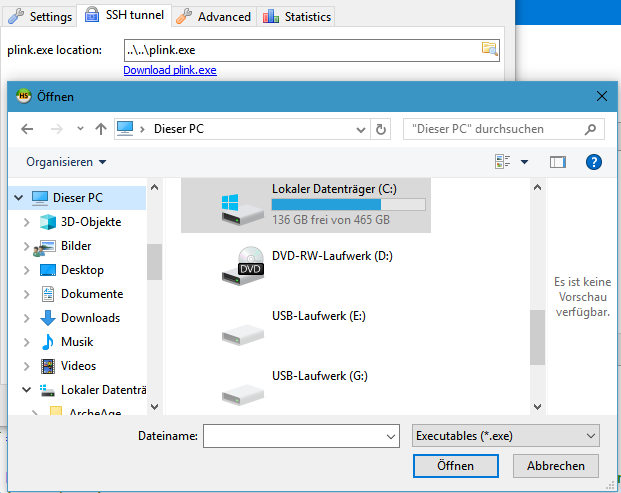
There is already a file picker, and it supports relative paths:
ansgarbecker
on 12 Oct 2018
I know. But it doesn't support the new native SSH binaries includes with Windows 10.
arminlinzbauer
on 22 Oct 2018
@ansgarbecker,
plink:
plink.exe -ssh [email protected] -P 22 -i "C:\Users\Glen\.ssh\id_rsa.ppk" -N -L 3316:172.17.0.4:3306
ssh:
ssh.exe [email protected] -p 22 -i "C:\Users\Glen\.ssh\id_rsa" -N -L 3316:172.17.0.4:3306
- Remove
-ssh. -P->-p(lowercase)
I'm not sure about passwords, but that field could perhaps be ignored or disabled when using SSH.
Maybe the plink.exe location: field could be renamed to Command:, and then you could either have a fixed set of supported commands in a drop-down menu, or allow the user to enter a template string with placeholders, like:
plink.exe -ssh {username}@{host} -P {port} -i "{keyFile}" -N -L {localPort}:{sqlHost}:{sqlPort}
... which they could edit however they wanted to. A drop-down menu with items "Plink" and "SSH" could also pre-fill the template string.
(the Private key file dialog should also not default to *.ppk files)
It would be great not to have to run plink/pageant in addition to the Windows SSH client/agent. Let me know if you need any help with testing.
 glen-84
on 4 Feb 2020
glen-84
on 4 Feb 2020
Thanks for the deeper look, @glen-84 .
I will have to create such an implementation without removing support for plink, as plink is widely used with HeidiSQL on Linux/Wine, where we have no ssh.exe. Or, as Linux mostly has a built-in ssh binary, that new implementation could replace the plink approach, but then has to be working with both, and we need some "template" based command. Phew..
ansgarbecker
on 5 Feb 2020
where we have no
ssh.exe
The .exe part is not required on Windows, you can use ssh directly. Same with plink.
glen-84
on 5 Feb 2020
At least for a file-exists check, it is yet required to have the full path to it, including its extension. However, with that new implementation, we could rely on the user to have ssh installed, displaying an error if that ssh command was not found.
A dropdown with command templates sounds good. That way plink can even stay there as a default, with an option for the Windows OpenSSH binary, and one for the Linux binary, which may differ in its command line arguments:
- plink.exe -ssh {username}@{host} -P {port} -i "{keyFile}" -N -L {localPort}:{sqlHost}:{sqlPort}
- ssh.exe {username}@{host} -p {port} -i "{keyFile}" -N -L {localPort}:{sqlHost}:{sqlPort}
For keeping support for plink without additional file path, I should probably install plink.exe via installer to the HeidiSQL directory. The plink download link can be removed then.
The user may have an SSH password set, but maybe no key file. In that case the commands need to be modified. If for that case I add an additional plink and ssh command template, would the user understand that? Or does that look too cryptic? Maybe it's better to not let the user define the whole command, but offer a simple dropdown with just
- plink.exe
- Windows OpenSSH
- Linux ssh command
... and build the command line in HeidiSQL, according to what the user has set in the SSH tunnel tab and what not.
ansgarbecker
on 5 Feb 2020
At least for a file-exists check, it is yet required to have the full path to it, including its extension. However, with that new implementation, we could rely on the user to have ssh installed, displaying an error if that ssh command was not found.
Yes, and you could do the same for any command (including plink). If the command fails, you could show a generic message like "Command failed. Please ensure that you have installed the necessary binary in your PATH, and that the arguments are correct. {command output}" (or similar).
A dropdown with command templates sounds good. That way plink can even stay there as a default, with an option for the Windows OpenSSH binary, and one for the Linux binary, which may differ in its command line arguments.
There's a good chance that the arguments would be the same, if it's based on OpenSSH.
- plink.exe -ssh {username}@{host} -P {port} -i "{keyFile}" -N -L {localPort}:{sqlHost}:{sqlPort}
- ssh.exe {username}@{host} -p {port} -i "{keyFile}" -N -L {localPort}:{sqlHost}:{sqlPort}
You should consider omitting the .exe, and requiring the user to add the used binary to their PATH. In this way, the commands would quite possibly work on Linux as well, and you wouldn't have to have more than 2 default command templates.
For keeping support for plink without additional file path, I should probably install plink.exe via installer to the HeidiSQL directory. The plink download link can be removed then.
I'm not sure if it's ideal to do this, because:
- You won't do this for SSH or other binaries.
- The versions of plink may differ.
- Potential security considerations.
I think it should remain the user's responsibility to make the binary available.
"keeping support" can mean two things:
- Make sure that it's still possible to use plink – it would still be possible, but you would need to add it to your PATH.
- Graceful upgrade process, so that things would just continue to work without changes. This is slightly more tricky, with options:
- Internally, if
commandis just "path/to/plink(.exe)?" with no arguments, then automatically add the arguments, as usual.
- You could also consider marking this functionality as deprecated with a red border around the field, or similar.
- If there's an easy cross-platform method of detecting whether a binary is in the PATH, then you could automatically replace "path/to/plink(.exe)?" with "plink -ssh ..." (but this might not be trivial).
- Just make it a breaking change with guidance on how to update the command.
- Internally, if
(i) might be the best option.
The user may have an SSH password set, but maybe no key file. In that case the commands need to be modified.
That's a good point. Another option would be to have two fixed options in the drop-down, which are managed by HeidiSQL, and a third "(Custom)" option which let's the user take full control (a text field would be added under the drop-down menu).
Tool/Binary/Executable: [PLink | SSH | (Custom)]
Custom command: [myTool -p {port}] (hidden when Plink or SSH is chosen)
The custom option might not even be needed initially.
Again you would have to consider the upgrade option. Does a non-empty legacy plink path preselect the "Plink" option (failing if the user hasn't added it to their path), or does it preselect the "(Custom)" option and fill the path into the Custom command field, which would either use option 2i above, or would just be marked in red with a message about specifying the arguments yourself, etc.
plink.exe timeout: could be renamed to just Timeout:, which could possibly be used by SSH as well (ConnectTimeout).
glen-84
on 5 Feb 2020
What's the status on this one? Windows has shipped with it's own OpenSSH client since at least early 2017 and HeidiSQL is the only reason I still have to use the 3rd party PuTTY client and specific PuTTY keys...
I'll be managing my own tunnels for now, but having it done for you using the GUI is one of the key reasons not to use the mysql CLI in the first place IMHO
arminlinzbauer
on 12 May 2020
Status is unchanged, there are more important issues most of the time.
ansgarbecker
on 12 May 2020
Related issues
 UnicornsRock420
·
4Comments
UnicornsRock420
·
4Comments
 rentalhost
·
5Comments
rentalhost
·
5Comments
 Ivan-Perez
·
3Comments
Ivan-Perez
·
3Comments
 dzintb
·
3Comments
dzintb
·
3Comments
 cammudito
·
3Comments
cammudito
·
3Comments
Most helpful comment
Thanks for the deeper look, @glen-84 .
I will have to create such an implementation without removing support for plink, as plink is widely used with HeidiSQL on Linux/Wine, where we have no
ssh.exe. Or, as Linux mostly has a built-insshbinary, that new implementation could replace the plink approach, but then has to be working with both, and we need some "template" based command. Phew..