HeidiSQL doesn't support/advertise TLS 1.1 / 1.2 with MS SQL Server connection
Steps to reproduce this issue
1) On the server side disable support TLS 1.1 and TLS 1.2 for server role in SCHANNEL(Windows Crypto) via registry:
Windows Registry Editor Version 5.00

[HKEY_LOCAL_MACHINE\SYSTEM\CurrentControlSet\Control\SecurityProviders\SCHANNEL\Protocols\TLS 1.0]

[HKEY_LOCAL_MACHINE\SYSTEM\CurrentControlSet\Control\SecurityProviders\SCHANNEL\Protocols\TLS 1.0\Server]
"Enabled"=dword:ffffffff
"DisabledByDefault"=dword:00000000

[HKEY_LOCAL_MACHINE\SYSTEM\CurrentControlSet\Control\SecurityProviders\SCHANNEL\Protocols\TLS 1.1]

[HKEY_LOCAL_MACHINE\SYSTEM\CurrentControlSet\Control\SecurityProviders\SCHANNEL\Protocols\TLS 1.1\Server]
"Enabled"=dword:00000000
"DisabledByDefault"=dword:00000001

[HKEY_LOCAL_MACHINE\SYSTEM\CurrentControlSet\Control\SecurityProviders\SCHANNEL\Protocols\TLS 1.2]

[HKEY_LOCAL_MACHINE\SYSTEM\CurrentControlSet\Control\SecurityProviders\SCHANNEL\Protocols\TLS 1.2\Server]
"Enabled"=dword:00000000
"DisabledByDefault"=dword:00000001
2) Reboot OS
3) Try to connect to MS SQL Server via HeidiSQL
Current behavior
HeidiSQL only advertiseTLS version 1.0 (0x0301) for MS SQL Server connection and therefore can't connect to SQL Server when only more secure protocol versions are supported in server side(TLS 1.1 and/or TLS 1.2).
(Can't upload files to github because of mad russian's government, which blocked 0,4% of all Internet IPs in stupid attempt to block Telegram. >>wall Sorry for links on sreenshots)
SQL Error (18): [DBNETLIB][ConnectionOpen (SECDoClientHandshake()).]SSL Security error.
Expected behavior
HeidiSQL should advertise maximum supported TLS version 1.2 (0x0303) for MS SQL Server connection.
Connection successful established when using SQL Server Management Studio 17.6 via TLS 1.2 (0x0303)
Possible solution
It is suspected that the component that HeidiSQL uses to connect to MS SQL Server only supports TLS version 1.0.
The most similar description of this error, that specifying the reasons I have found in the last message on thislink.
If this is the case, it should upgraded or replaced with component that support TLS 1.2, if it possible.
Environment
HeidiSQL version:
9.5.0.5196 (x86) & 9.5.0.5277 (x64)Database system and version:
Microsoft SQL Server 2016 (SP1-CU8) (KB4077064) - 13.0.4474.0 (X64)
Feb 24 2018 13:53:17
Express Edition (64-bit) on Windows Server 2012 R2 Standard 6.3(Build 9600: ) (Hypervisor) Operating system:
Windows 7 Professional SP1 (x64)
 SilmorSenedlen
All 24 comments
See https://support.microsoft.com/en-us/help/3135244/tls-1-2-support-for-microsoft-sql-server
The old provider is no longer supported by Microsoft - see here:
NOTE: It is not recommended to use this driver for new development. The new OLE DB provider is called the Microsoft OLE DB Driver for SQL Server (MSOLEDBSQL) which will be updated with the most recent server features going forward.
New driver is available here.
 lipnitsk
on 25 Apr 2018
lipnitsk
on 25 Apr 2018
@ansgarbecker any chance on looking at this issue? Can't use HeidiSQL at all on TLS 1.2 enabled MS SQL connections..
lipnitsk
on 4 Jul 2018
Really need this change : /
SilmorSenedlen
on 4 Jul 2018
Would like to add my 2 cents to this. HeidiSQL cannot connect to any TLS 1.2 enabled MS SQL.
Am using the latest build.
 njbelf
on 30 Oct 2018
njbelf
on 30 Oct 2018
@ansgarbecker If the issue is testing, maybe you could provide a test build with the change from #256 and we can test it in this thread?
lipnitsk
on 30 Oct 2018
Sorry for the long delay.
I just accepted your pull request. Please test after updating to the new build (will be ready in ~30 minutes)
 ansgarbecker
on 31 Oct 2018
ansgarbecker
on 31 Oct 2018
This change broke my connectivity. I now get this when attempting to connect to any MS SQL server.
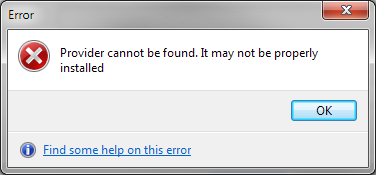
Am I supposed to install some other driver on my own?
 igitur
on 2 Nov 2018
igitur
on 2 Nov 2018
Solved this by installing https://www.microsoft.com/en-us/download/confirmation.aspx?id=56730
I suggest a friendlier error message to inform the users. I don't think it's correct to assume that everyone has this new driver pre-installed.
igitur
on 2 Nov 2018
Ok, then I need to detect that special error message, which most likely gets translated into the user's OS language. This, and the fact that there is no error number, makes it impossible to detect it, in order to show a more helpful message. But probably I can track the error down to a certain exception type. Will check that.
ansgarbecker
on 3 Nov 2018
Is there some way to detect which provider is installed and which is not, on the user's OS?
ansgarbecker
on 3 Nov 2018
@ansgarbecker Try this: https://stackoverflow.com/a/51738240/179494
igitur
on 3 Nov 2018
Alternatively you can check the registry, but you'll have to get the GUIDs for each provider. https://stackoverflow.com/a/154559/179494
igitur
on 3 Nov 2018
Just committed an automatic fallback to SQLOLEDB when MSOLEDBSQL is not available.
For such cases, I also added a notice to the log panel, with a link to the OLE DB driver.
ansgarbecker
on 3 Nov 2018
FYI this error still exists (my SQL servers are set to TLS 1.2 only) on the new 10.0 version, but https://www.microsoft.com/en-us/download/confirmation.aspx?id=56730 still fixes it.
Perhaps list this link on the HeidiSQL download page or automatically suggest it when the error occurs?
 ScottRFrost
on 24 Jan 2019
ScottRFrost
on 24 Jan 2019
Fair nuff - just placed that note on the download page.
ansgarbecker
on 26 Jan 2019
@ansgarbecker After the change to the new driver, I can't connect to SQL Express databases anymore, e.g. typically the host name is localhost\sqlexpress. Has anyone else mentioned this?
igitur
on 26 Mar 2019
@igitur
I think that, first it's need at least an error code and its description.
SilmorSenedlen
on 26 Mar 2019

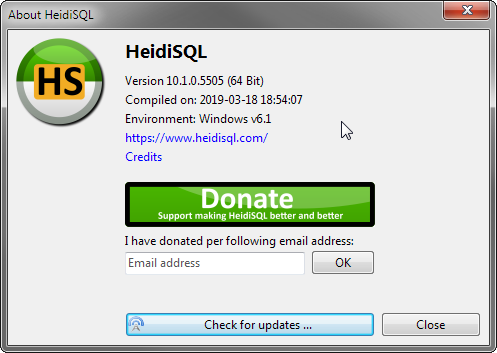
Worked perfectly up until v9.5 as far as I can tell.
igitur
on 26 Mar 2019
@ansgarbecker Let me know if I must log a full new issue.
igitur
on 26 Mar 2019
@igitur please file a new issue.
ansgarbecker
on 26 Mar 2019
I created #587 to address this.
igitur
on 29 Mar 2019
Ditto. I continue to have problems also.
 warrenlbrown
on 24 Jun 2019
warrenlbrown
on 24 Jun 2019
@warrenlbrown did you install the updated OLE DB driver for SQL Server, like stated on the download page? If yes, you should probably file a new issue so we can discuss this from the scratch.
ansgarbecker
on 24 Jun 2019
I moved the new "Library" setting up and provide available + compatible ADO providers in that dropdown box. Default is the new MSOLEDBSQL provider, but the user may also select the old one, which then issues a warning dialog when connecting:

Previously, this warning was burried in the log panel, so even I did not realize it.
ansgarbecker
on 28 Jul 2019
Related issues
 altmvogi
·
5Comments
altmvogi
·
5Comments
 chrysler5798
·
5Comments
chrysler5798
·
5Comments
 Ivan-Perez
·
3Comments
Ivan-Perez
·
3Comments
 rentalhost
·
5Comments
rentalhost
·
5Comments
 hkaraoglu
·
3Comments
hkaraoglu
·
3Comments
Most helpful comment
Solved this by installing https://www.microsoft.com/en-us/download/confirmation.aspx?id=56730
I suggest a friendlier error message to inform the users. I don't think it's correct to assume that everyone has this new driver pre-installed.