Heidisql: Dark theme for nightly coding sessions
Adding a "dark theme" would be super nice. The white skin is pretty eye straining in some conditions.
You know, for the night operators. ;)
 RAYs3T
All 30 comments
Theming is normally done in Windows design settings. And I guess just making background colors dark would make HeidiSQL really ugly. That also implies light font colors, different grey scales in borders and disabled buttons etc.
Did you try to set a dark theme in your Windows settings?
See this forum thread: https://www.heidisql.com/forum.php?t=23756
 ansgarbecker
on 10 Nov 2017
ansgarbecker
on 10 Nov 2017
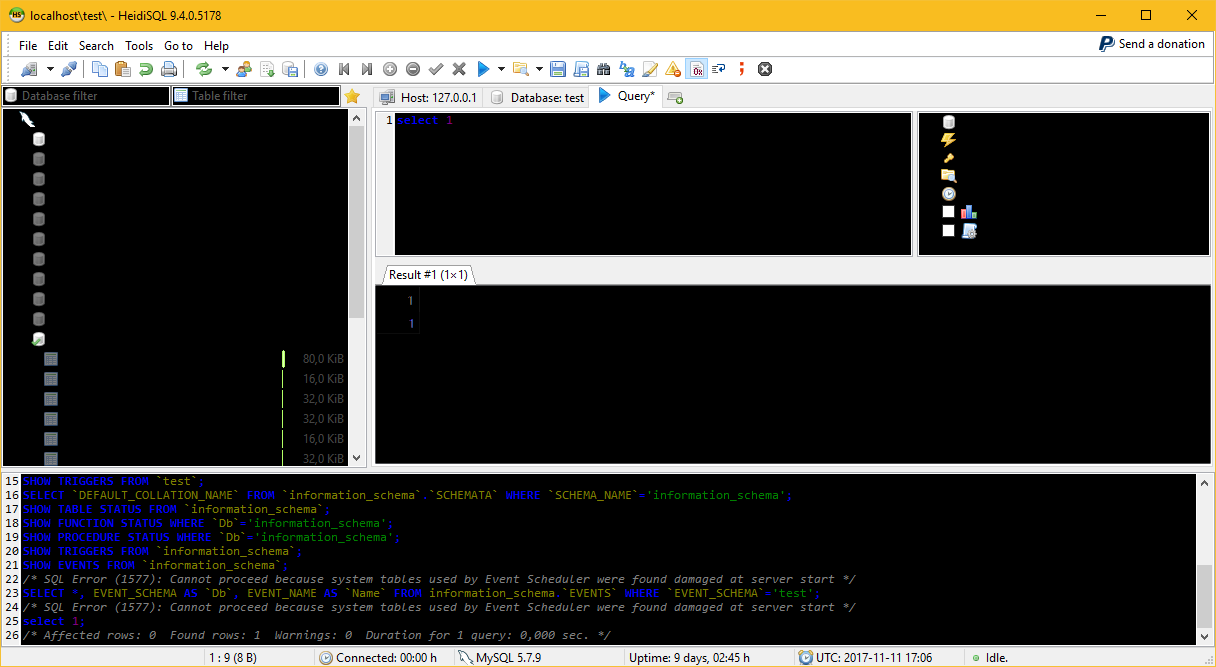
See attached screeny from a quick color assignment. Ugly. I guess real theming needs some dedicated theming component.
ansgarbecker
on 11 Nov 2017
Right - like the Jetbrains IDEs, e.g. PHPStorm and so on.
 oliveru
on 13 Nov 2017
oliveru
on 13 Nov 2017
PHPStorm is Java-based, while HeidiSQL uses the Windows API for painting dialogs and other controls.
What about changing colors in your Windows design settings?
ansgarbecker
on 13 Nov 2017
For me no problem, don't know about the thread creator, just wanted to give some input.
oliveru
on 21 Nov 2017
What about changing colors in your Windows design settings?
Is never really a valid solution.
While I've never had an issue with the colour scheme in Heidi, a simple solution to implement that gives users freedom isn't too hard.
New UI screen in settings, Have maybe 10 boxes which contain the default colours for certain components, allow changing them. Then just have BG/Borders/etc get their colours from there. Simple reset to default button and you're done. While I am not familiar with Delphi, I'd assume that it lets you do styling of windows to some basic extent.
 draknyte1
on 11 Dec 2017
draknyte1
on 11 Dec 2017
Of course with Delphi you can style some basic things, while it was never designed to implement its own style including border colors and some other minor things. You can see that in the screenshot above.
ansgarbecker
on 11 Dec 2017
Seems very complex make it possible because the Windows API, and too that there are a lot of places that need attention to make it really a full dark theme (and not only changing the white backgrounds to dark). It need change colors scheme, borders, shadows, so on. I could understand the "night operators" but I think that we could use solutions like WindowBlinds to fix it.
 rentalhost
on 12 Feb 2018
rentalhost
on 12 Feb 2018
This is a high-dpi screeny of a sample program created in Rad Studio 10 (trial), with an applied "carbon" theme. That's one from many, I guess 30 or 40, supported by RS10. Looks nice, doesn't it?

ansgarbecker
on 18 Oct 2018
@ansgarbecker Looks for sure better then the white skin. But the icons seems to be a little bit too large? (Like the icon in the title-bar).
What about tables?
RAYs3T
on 19 Oct 2018
The icons are large because my Windows was in 150% mode. That was another thing I wanted to test with the new Rad Studio.
I will try to load Heidi's sources into that trial version, compile and make a screenshot to see how many new issues I have then :)
ansgarbecker
on 19 Oct 2018
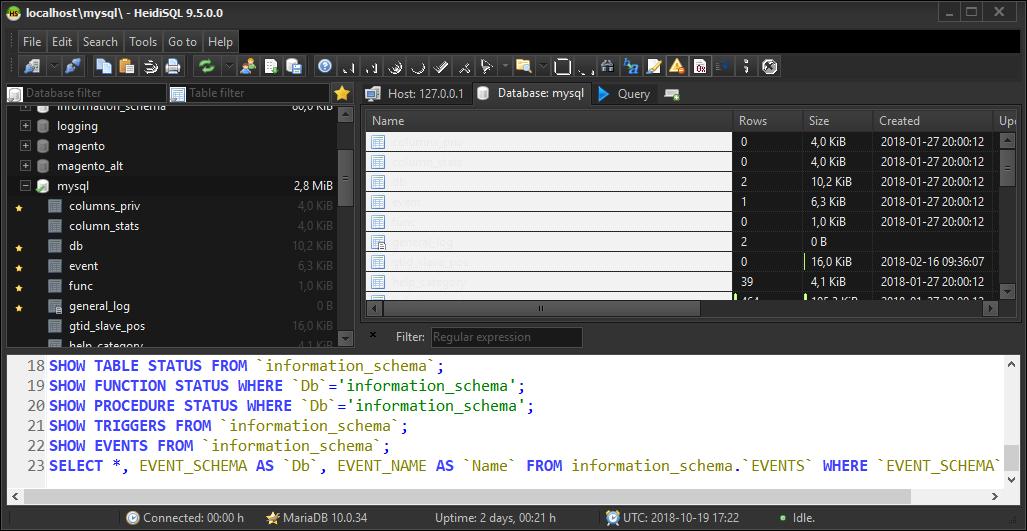
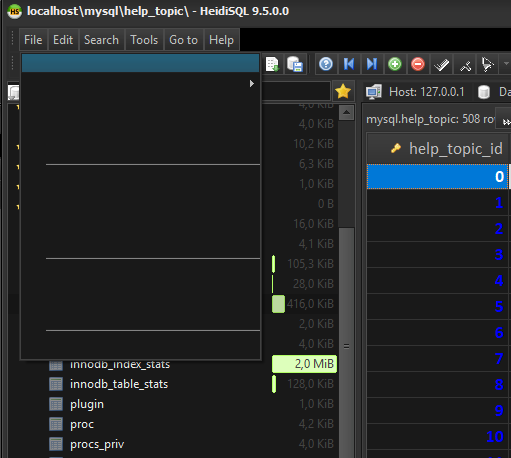
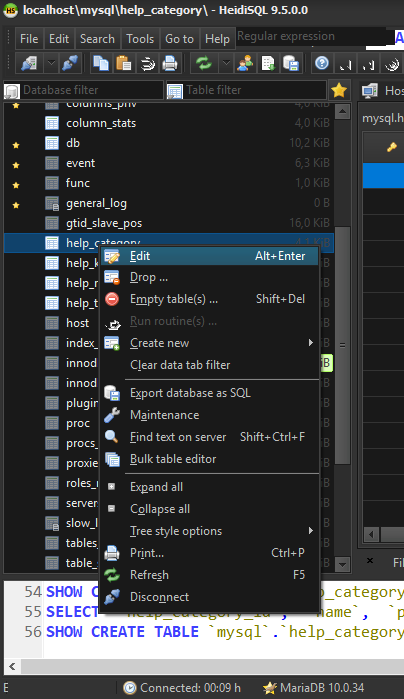
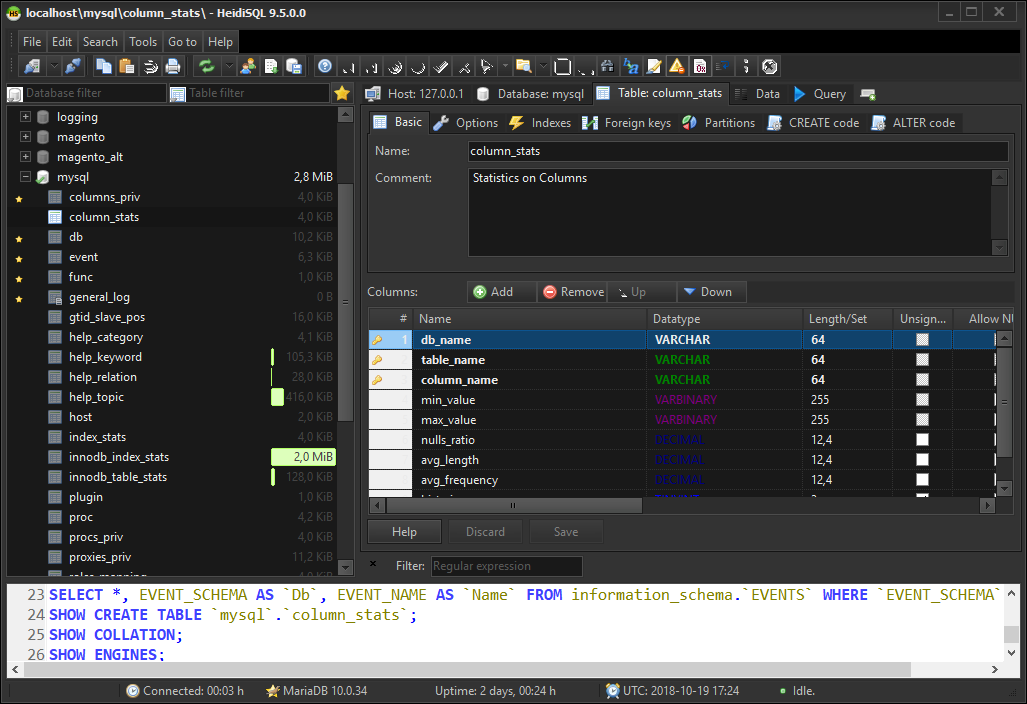
Here we go: HeidiSQL compiled with Rad Studio 10.2 and Carbon Style selected.
Glitches I can most probably fix easily:
- white SQL editors
- lightgrey column on listings
Issues which I have no idea about yet:
- broken main menu items - nothing visible, but space reserved
- white background / non transparent icons on buttoned edit controls





ansgarbecker
on 19 Oct 2018
Some code hints for myself:
Adding styles is doable via .rc file:
Carbon VCLSTYLE "Redist\Styles\Vcl\Carbon.vsf"
Listing included styles via style manager:
TStyleManager.StyleNames
Apply style to application:
TStyleManager.TrySetStyle('Carbon');
ansgarbecker
on 26 Oct 2018
Tada, here we go: The newest HeidiSQL build has 39 selectable style themes. You can set it in Tools > Preferences > General, at the very bottom.
Though there are a few new issues with this now. So be warned! We are still in the nightly builds here.
- [x] all themes I tested lead to empty text in first level of main menu
- [x] all themes show just empty or broken items in the context menu of table designer, view editor, routine editor, etc.
- [x] some listings have a light grey background in one or two columns, which is quite unreadable if the theme's font color is white (only a problem in dark themes)
- [x] SQL editors always have a hardcoded white background
- [x] two text memo's on SQL help dialog need another kick in the butt to show themed colors
- [x] various colored text does not work well with dark themes, e.g. the data types (numbers=blue, text=green, etc.) => solution: providing a dark and a light color preset, in preferences now
- [x] heidisql.exe file has grown from ~5MB to 8MB. But who cares?
- [x] new theme colors are applied to SynMemo's after Heidi restart
- [x] graphical glitches right besides main menu, showing random parts of SQL log
- [x] size grip in the bottom right corner of resizable dialogs shows unthemed colors, and does not seem to work anymore for the mouse
- [ ] minor: status bar panels with icons show unique background color, not a potential wanted color gradient
- [x] main toolbar shows broken buttons now that I moved it out of a TCoolBar -> solution: put it into a TControlBar
- [x] white background / non transparent icons on buttoned edit controls
- [x] unthemed file open/save dialogs, task dialogs and message dialogs
- [x] empty leading space on main menu items (left side has 21px space, right side has normal looking 7px)
- [x] crash when closing (cancel or ok) any grid editor per buttonclick (e.g. the default value editor on the table editor's, or the grid value SET editor)
ansgarbecker
on 26 Oct 2018
New Dark theme looks amazing! I think you alluded it to it with the other issues you noted, but is it possible to change the font colors and row background colors in lock step with the theme?
 cookieguru
on 26 Oct 2018
cookieguru
on 26 Oct 2018
Not yet. But that should probably be the way to go? But that would mean I have to go through 39 themes and watch out for fitting foreground/background colors. That sounds quite unsexy.
ansgarbecker
on 26 Oct 2018
Is there an easier way to open the vsf files besides the RAD trial?
cookieguru
on 27 Oct 2018
.vsf styles can be created and edited with the integrated BitmapStyleDesigner.exe. Not sure if that's available separately from Delphi or RAD Studio.
ansgarbecker
on 27 Oct 2018
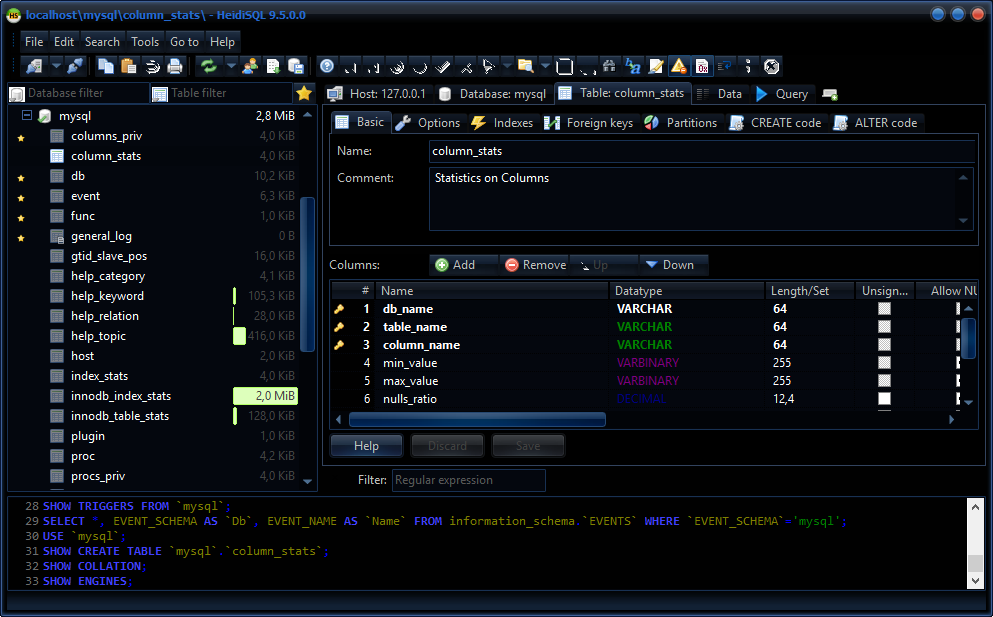
Various foreground/background colors are now "locked" to the active theme, so we don't have a light background on dark themes any more.
Though the SQL editors are still hardcoded white. They have many different font colors which are quite incompatible to dark themes, so it's not optimal to just adapt the background to the active theme. But I'll start over doing exactly that. Selecting better fitting SQL font colors may be left up to the user then.
ansgarbecker
on 27 Oct 2018
This is how it looks like, with some issues fixed:
ansgarbecker
on 27 Oct 2018
Hi,
A little display issue related to this new theme feature I think, there is an empty space on the left of main menu buttons for the default theme (Windows) :
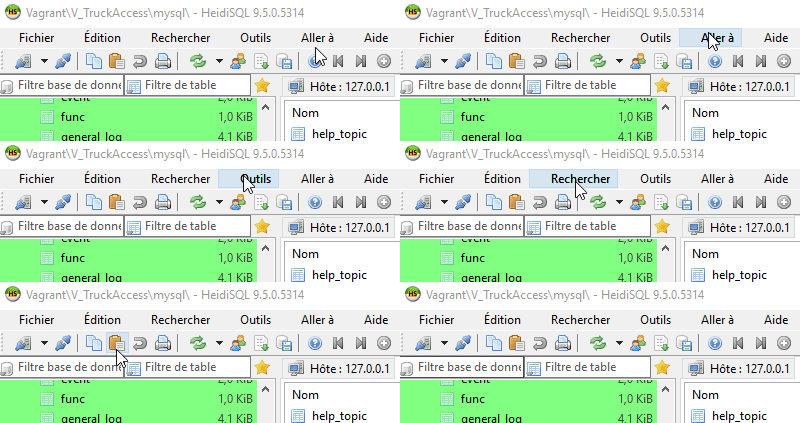
EDIT : Another issue, buttons between "SQL help" and "Load a SQL file" are transparents when you select another theme than Windows (default one).

EDIT 2 : it actually takes this transparent apparence when a button is disabled, so maybe you wanted to make it look like that ?
HeidiSQL version : 9.5.0.5314
Language : french
 chrysler5798
on 29 Oct 2018
chrysler5798
on 29 Oct 2018
A little display issue related to this new theme feature I think, there is an empty space on the left of main menu buttons for the default theme (Windows) :
Yes, I can confirm that, although sporadically only. I have no clue about the reason, and no clue how to fix that.
EDIT : Another issue, buttons between "SQL help" and "Load a SQL file" are transparents when you select another theme than Windows (default one).
Yes, these are disabled buttons. This is intentionally done by the underlying library. Ok, they could look more stylish, yes, but I have very few to no influence on that look.
ansgarbecker
on 29 Oct 2018
I think we are complete at this point with themes. At least for the obvious stuff. So I'll close this issue now.
If anyone finds more issues with theming, then please report that in a new issue. Thanks!
ansgarbecker
on 15 Nov 2018
Using version 9.5.0.5371 my left panel (database tables) still shows up with a white background
on all themes
 anselal
on 6 Dec 2018
anselal
on 6 Dec 2018
@anselal Works great for me; have you tried clearing your settings?
cookieguru
on 6 Dec 2018
@cookieguru thanks, clearing the settings did the job !!!!!
anselal
on 6 Dec 2018
@cookieguru is there a specific like I can remove from my settings file to get the work done ? Don't wanna lose all of my settings
anselal
on 6 Dec 2018
@anselal No idea. I would clear the settings, copy them, change the theme, then diff those, and go from there.
cookieguru
on 6 Dec 2018
I found that yo must set the TreeBackground option like:
Servers\Unnamed\TreeBackground<|||>3<|||>536870911
this is for the Carbon theme.
anselal
on 6 Dec 2018
It is the "Session background color", which you have probably set for your sessions. You can safely remove that TreeBackground value from your registry. Or - preferably - you just select another color, via File > Select session background color.
ansgarbecker
on 6 Dec 2018
Related issues
 mpaland
·
5Comments
mpaland
·
5Comments
 cammudito
·
3Comments
cammudito
·
3Comments
 slaFFik
·
3Comments
slaFFik
·
3Comments
 UnicornsRock420
·
4Comments
UnicornsRock420
·
4Comments
 naoma123
·
3Comments
naoma123
·
3Comments
Most helpful comment
Tada, here we go: The newest HeidiSQL build has 39 selectable style themes. You can set it in Tools > Preferences > General, at the very bottom.
Though there are a few new issues with this now. So be warned! We are still in the nightly builds here.