Expected behavior
Two possible behaviors:
1) autocomplete should sort by alphabetical order (or it should be an option in the settings)
2) autocomplete should complete the text only when I press "enter" and not when I press "space"
Current behavior
Autocomplete does not sort columns, they are displayed in the same order as you have them in the table. Therefore you might pick wrong column name from the popup in certain situations.
Failure information (for bugs)
If you have several columns with similar names, it could lead to autocomplete picking wrong item when you press space-bar.
Steps to reproduce
- create a table with two columns "column_a" and "column"
- write a query and have autocomplete to show you suggestions for the table
- type "column" and press space... your text will be changed to "column_a"
Context
- HeidiSQL version: 9.4.0.5186
- Operating system: Windows 10
Failure Logs
(pressing space at this moment will autocomplete with the "field_b" column name which was not intended)

 evilworm
All 12 comments
Ok, there are even more key strokes which trigger the completion, e.g. the Tab key does the same as Enter. Space indeed does the same + it inserts a space after the completed word. I wouldn't say this is wrong, but a matter of being used to.
For the non-alphabetical order, this is intentionally left as columns are created in the table. Typing first characters will normally find what you want.
Do issues support some voting here on GitHub? I'd like to leave this open and wait for comments from other users.
 ansgarbecker
on 9 Nov 2017
ansgarbecker
on 9 Nov 2017
It would also be OK if the autocomplete would not be triggered on Space. This is really annoying ... if you have the column names in a wrong order then you are stuck with pressing ESC key every time when you write the shortest column name to close the autocomplete popup.
evilworm
on 9 Nov 2017
Some additions:
If I'm on the data tab for a table, I can add filters which is nice without typing a whole query. Usually the columns also refer to only that table in view. Would be nice if the autocomplete triggers when typing automatically because it is obvious that I meant to type one of the columns of this table. At least if not by default, maybe per option.
Also:
I would agree with the sorting option.
For the voting: Usually people write a comment +1 to vote something up, so the issues with the most comments are like the upvotes (;
 oliveru
on 10 Nov 2017
oliveru
on 10 Nov 2017
Todos here:
- [x] sort items alphabetically
- [x] look for a way to prevent completion when user presses space
ansgarbecker
on 10 Dec 2019
@oliveru one thing: in the meantime, the filter box in the Data tab has that auto complete box. Just press Ctrl+Space to trigger it:

ansgarbecker
on 10 Dec 2019
- items are sorted alphabetically, mixing columns, tables, functions etc. together
- space no longer overtakes the focused item in the proposal
The latter one feels wrong somehow, especially because the proposal is not closed. So you need to press Esc to get rid of the now useless proposal.
Additionally, the option scoEndCharCompletion does not do the same, where I expected that. This is probably a bug in SynEdit, not sure. Anyway, my removal of space should do the same. Hopefully that does not break something else.
Please update HeidiSQL and test this well.
ansgarbecker
on 7 Feb 2020
on version 5871, still seeing the same behavior
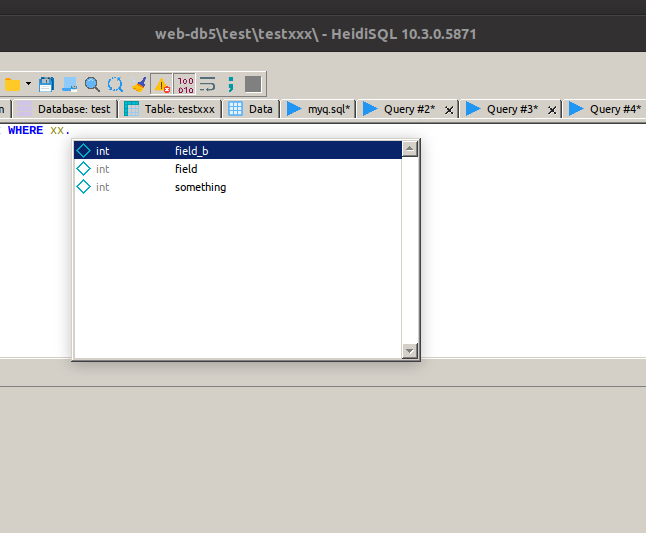
it does the same auto-complete when I type "field" and press space... the field is autocompleted to "field_b"
additionally I started to get TCustomForm.SetActiveControl error when editing table structure and trying to erase column name by backspace

I'm running this on ubuntu through wine, tho. Will test it on windows later today...
evilworm
on 7 Feb 2020
Oh you need one further update, please use build 5872.
The backspace issue has nothing to do with these changes. However, these were reported before and seem to be limited to Wine: https://www.heidisql.com/forum.php?t=34351
ansgarbecker
on 7 Feb 2020
@evilworm could you please update and test the proposal in conjunction with pressing space?
ansgarbecker
on 11 Feb 2020
Just tested version 5877. I did notice that the auto-complete popup does not close after pressing space which you already mentioned. It is kept open without any items in it. If you don't press ESC but for example type "equal" sign and the column name has a special meaning then the column is wrapped in quotes including the space.
Here is a test case:
1) start typing the query
2) after typing "rr.field" press space and then type "="
you will get something like this:
SELECT * FROM testxxx rr WHERE rr.`field `=
evilworm
on 11 Feb 2020
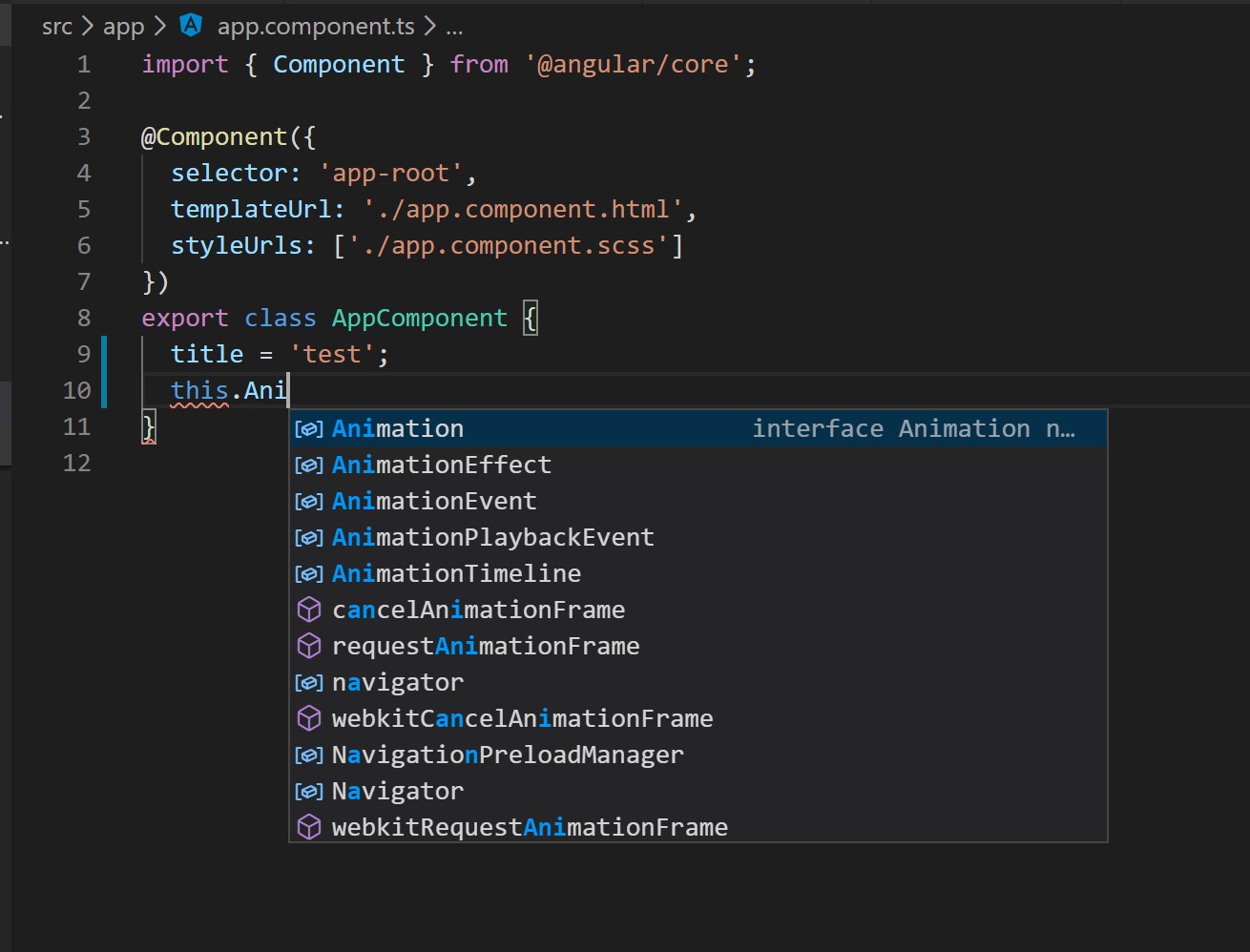
Btw another proposal is to sort the auto-complete popup entries by shortest first. I'm using VSCode for development and also PHPStorm and those editors always show shortest words first (if prefix matches). In fact I think they sort alphabetically. An example below.
1) if you press space in vscode, it doesn't autocomplete the word, the popup is closed and the typed word is left as-is
2) if you press enter, it will autocomplete the currently selected word
3) if you continue to write something after pressing enter then the auto-complete popup will show again
4) so to type AnimationEffect you can type An, press enter, type E, press enter
evilworm
on 11 Feb 2020
I think I will revert the new sorting in the completion proposal. I got negative feedback from another user in the forum and to me personally it also feels wrong somehow.
ansgarbecker
on 19 Feb 2020
Related issues
 naoma123
·
3Comments
naoma123
·
3Comments
 slaFFik
·
3Comments
slaFFik
·
3Comments
 dzintb
·
3Comments
dzintb
·
3Comments
 yz778
·
4Comments
yz778
·
4Comments
 altmvogi
·
5Comments
altmvogi
·
5Comments
Most helpful comment
It would also be OK if the autocomplete would not be triggered on Space. This is really annoying ... if you have the column names in a wrong order then you are stuck with pressing ESC key every time when you write the shortest column name to close the autocomplete popup.