Heidisql: Azure Database for MySQL connection throws error - "SSL connection error: ASN: bad other signature confirmation"
Expected behavior
Connection to the SQL server with no errors
Current behavior
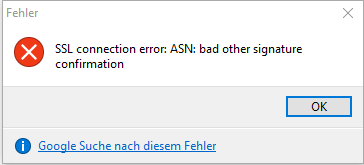
Getting error "SSL connection error: ASN: bad other signature confirmation"
Failure information (for bugs)
This is when adding a SSL CA certificate only (Under the Advanced connection settings)
Microsoft provides SSL connection documentation here:
https://docs.microsoft.com/en-us/azure/mysql/howto-configure-ssl#applications-that-require-a-local-certificate-for-ssl-connectivity
Also, there are already instructions on how to do this with MySQL Workbench:
https://docs.microsoft.com/en-us/azure/mysql/connect-workbench
Steps to reproduce
- Create a new Azure Database for MySQL database
(fully hosted/clustered db by Microsoft Azure - https://azure.microsoft.com/en-us/services/mysql/) - Download the SSL CA that Microsoft provides, here:
https://docs.microsoft.com/en-us/azure/mysql/howto-configure-ssl - Next, in HeidiSql, create a new connection and point to the new Azure database (created in step 1)
- While still creating your connection, switch to the Advanced tab to setup the SSL
- In the Advanced tab, add the SSL CA certificate that was just downloaded (only this file-field should be filled in).
- Save and Open the connection
- Get error
Context
Please provide any relevant information about your setup. This is important in case the issue is not reproducible except for under certain conditions.
- HeidiSQL version: 9.4.0.5125 (64-bit)
- Database system + version: Azure Database for MySQL
- Operating system: Windows 10 Pro 64-bit (Fall Creators Update)
Failure Logs
SSL connection error: ASN: bad other signature confirmation
 philcarbone
All 13 comments
I also ran into this.
HeidiSQL version: 9.5.0.5238 (64-bit)
I was able to verify that it works fine in MySQL Workbench.
 MystK
on 1 Mar 2018
MystK
on 1 Mar 2018
Same Problem here.
HeidiSQL 9.5.0.5196 64Bit
Also on
HeidiSQL 9.5.0.5278 64Bit
OS: Windows 10 1709 64Bit
 dannyherstell
on 25 May 2018
dannyherstell
on 25 May 2018
Same problem here:
- HeidiSQL 9.5.0.5196 (64 Bit)
- Client OS: Windows 10 1703 Pro 64 Bit
- connecting to MariaDB 10.1 (Ubuntu 16.04)
- no problems connecting using MySQL Workbench
 amitghosh-inwt
on 5 Jun 2018
amitghosh-inwt
on 5 Jun 2018
@ansgarbecker poke
philcarbone
on 8 Jun 2018
Once this works I can get the new connection instructions posted next to this document on Microsoft's site:
https://docs.microsoft.com/en-us/azure/mysql/connect-workbench
philcarbone
on 8 Jun 2018
Any solutions for this? I can't connect to my azure db because of this bug.
 nzkozar
on 12 Feb 2019
nzkozar
on 12 Feb 2019
Turn off SSL
Antoine Pham
MystK
on 12 Feb 2019
@MystK Turning off SSL is sadly not an option, due to project requirements.
nzkozar
on 12 Feb 2019
hi, is the issue solved ? because i have the same issue here.
 Irwandi1987
on 14 Mar 2019
Irwandi1987
on 14 Mar 2019
I am not sure. The report is related to v9.5. Probably this was fixed along with my update for all libraries in HeidiSQL 10.0/10.1. Could someone please verify whether this is still an issue with the latest version?
 ansgarbecker
on 14 Mar 2019
ansgarbecker
on 14 Mar 2019
We had the same problem over the last years. I just tried with 10.1.0.5464 (x64) and indeed, the problem fixed. Thank you so much!
amitghosh-inwt
on 14 Mar 2019
@amitghosh-inwt thanks for the information. Do you try to using ssl ca certificate only ?
Irwandi1987
on 14 Mar 2019
Do you try to using ssl ca certificate only ?
We are using a server with a certificate issued from a private (Windows) CA and require the clients to authenticate with client certificates from the same CA.
amitghosh-inwt
on 14 Mar 2019
Related issues
 yz778
·
4Comments
yz778
·
4Comments
 altmvogi
·
5Comments
altmvogi
·
5Comments
 jorisrobijn
·
5Comments
jorisrobijn
·
5Comments
 mpaland
·
5Comments
mpaland
·
5Comments
 dzintb
·
3Comments
dzintb
·
3Comments