Haul: HMR on Android: "TypeError: Attempting to change value of readonly property"
Current Behavior
I've followed the HMR setup guide and HMR on Android fails with TypeError: Attempting to change value of readonly property while trying to apply changes. Works totally fine on iOS.

Expected Behavior
Should just work like on iOS :)
Haul Configuration (webpack.haul.js)
const path = require('path')

module.exports = ({ platform }, defaults) => ({
  entry: path.resolve('demo/'),
  resolve: {
    ...defaults.resolve,
    alias: {
      '~': process.cwd(),
    },
  },
})
Your Environment
| software | version
| ---------------- | -------
| Haul | v1.0.0-beta.13
| react-native | both 0.52.0 and 0.53.0
| node | 8.8.1
| yarn | 1.3.2
 deepsweet
All 14 comments
We are aware of this issue, but without a reproduction repository with the same dependencies are in your project, we cannot do much, so it would really help if you could create a repo.
 zamotany
on 15 Feb 2018
zamotany
on 15 Feb 2018
Unfortunately it's a rather complicated setup and private project. I'll try to extract something reproducible.
Also I can do some debugging on my side and provide results if you can guide me.
deepsweet
on 15 Feb 2018
You can try logging type and uniqueLocalName by placing console.log here: https://github.com/callstack/haul/blob/master/src/hot/client/hotPatch.js#L59
There should be only logs of components, any other functions might be the ones breaking it, so please post them if you find any.
zamotany
on 15 Feb 2018
Current Behaviour
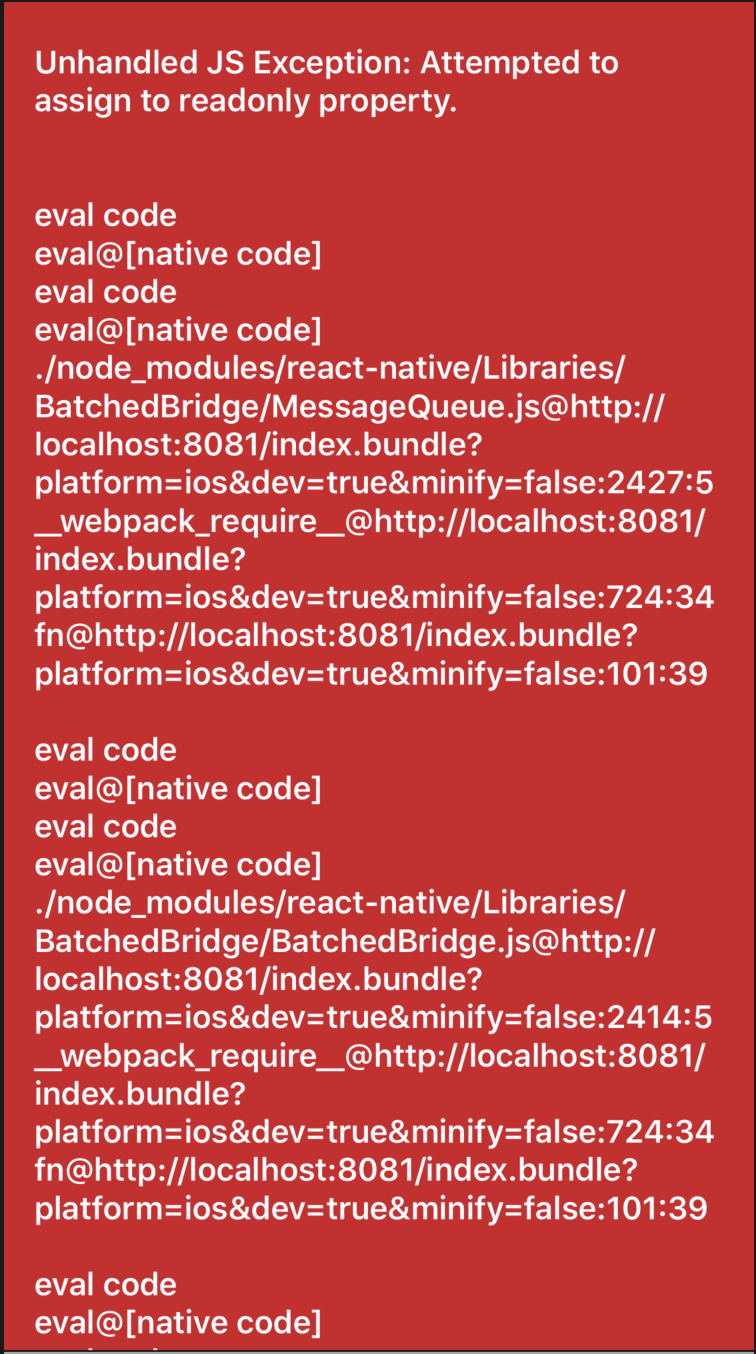
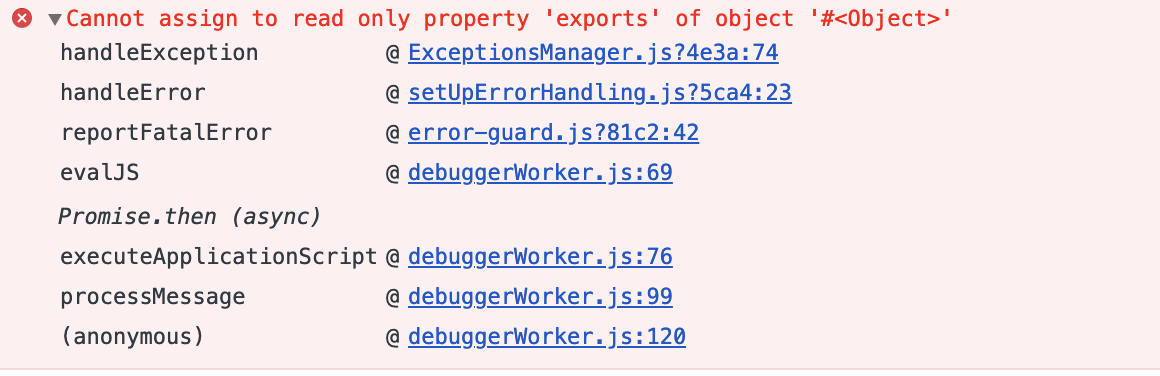
The same issue happens on both Android and iOS. Its seems like there is some issue with webpack, mixing of export default and module.exports
Below is more explainatory error when Debug JS is enabled
Expected Behaviour
The bundle should be loaded and executed properly in the app.
Metro Bundler works fine with the same code and configuration.
Haul Config (created by default by yarn haul init)
import { createWebpackConfig } from "haul";
export default {
webpack: createWebpackConfig(({ platform }) => ({
entry: `./index.js`
}))
};
Your Environment
software version
Haul ^1.0.0-rc.13
react-native 0.58.4
node v11.6.0
yarn 1.13.0
 sirajulm
on 17 Feb 2019
sirajulm
on 17 Feb 2019
Experiencing the same issue with a freshly initialized react-native project. The issue appears to exist only in 1.0.0-rc.13 and 1.0.0-rc.14, previous versions work fine.
 stackdumper
on 28 Feb 2019
stackdumper
on 28 Feb 2019
@stackdumper This is the config file I got it working after few days of debugging
import { createWebpackConfig } from "haul";
import path from "path";
export default {
webpack: (env, defaults) => {
const config = createWebpackConfig({
// ...defaults,
entry: `./index.js`,
resolve: {
// ...defaults.resolve,
alias: {
// ...defaults.resolve.alias,
react: path.join(__dirname, "node_modules/react"),
"react-native": path.join(__dirname, "node_modules/react-native")
}
}
})(env);
config.module.rules = [
{
test: /\.js?$/,
loaders: ["babel-loader"]
},
{
test: /\.tsx?$/,
loaders: ["babel-loader", "ts-loader"]
},
...config.module.rules
];
config.resolve.extensions = [
".ts",
".tsx",
`.${env.platform}.ts`,
".native.ts",
`.${env.platform}.tsx`,
".native.tsx",
...config.resolve.extensions
];
return config;
}
};
Main part in the config was the loaders, adding babel loader for js files, and ts-loader and babel-loader for tsx files fixed it for me.
sirajulm
on 28 Feb 2019
@sirajulm it doesn't help 😞
stackdumper
on 5 Mar 2019
Here's the reproduction:
https://github.com/stackdumper/haul-assign-readonly-repro.git
It is a clean react-native init -> yarn haul init setup, no typescript.
stackdumper
on 5 Mar 2019
@stackdumper
This haul.config.js should fix your issue. Have tested with the sample repo you have provided.
import { createWebpackConfig } from 'haul';
import path from 'path';

export default {
  webpack: (env, defaults) => {
    const config = createWebpackConfig({
      entry: `./index.js`
    })(env);

    config.module.rules = [
      {
        test: /\.js?$/,
        loaders: ['babel-loader']
      },
      ...config.module.rules
    ];

    return config;
  }
};
I assume the babel-loader was not properly applied.
sirajulm
on 6 Mar 2019
@sirajulm thanks, this fixed the issue.
I guess the config you proposed should be a default, because currently haul init results in a broken project out-of-box.
stackdumper
on 8 Mar 2019
Managed to narrow it down to not re-transpile entire node_modules/ with Babel:
config.module.rules = [
  {
    test: /\.js$/,
    include: [
      path.resolve('node_modules/react-native/'),
      path.resolve('node_modules/metro/'),
      path.resolve('node_modules/react-devtools-core/'),
      path.resolve('node_modules/react-hot-loader/'),
    ],
    use: [
      {
        loader: 'babel-loader',
        options: {
          babelrc: false,
          presets: ['module:metro-react-native-babel-preset'],
          cacheDirectory: true,
        },
      },
    ],
  },
  // ...
  ...config.module.rules
]
@deepsweet Thanks. but once quick doubt, why do we need to add babelrc: false and add presets: ['module:metro-react-native-babel-preset'] to the webpack config? Is there any advantage or just a personal choice ?
sirajulm
on 19 Mar 2019
@sirajulm yes, those lines are nothing but a personal choice, main idea is about include array.
deepsweet
on 19 Mar 2019
Closing since in @haul-bundler/cli we dropped support for HMR and haul package in no longer supported
zamotany
on 12 Aug 2019
Related issues
 satya164
·
7Comments
satya164
·
7Comments
 tachtevrenidis
·
3Comments
tachtevrenidis
·
3Comments
 jukben
·
6Comments
jukben
·
6Comments
 MichelDiz
·
3Comments
satya164
·
5Comments
MichelDiz
·
3Comments
satya164
·
5Comments
Most helpful comment
@stackdumper
This
haul.config.jsshould fix your issue. Have tested with the sample repo you have provided.I assume the
babel-loaderwas not properly applied.