Harbor: How to call Harbor api V2 when OIDC configured programatically (without browser login first)
What can we help you?
How do we programatically call the Harbor api V2 when OIDC is configured?. The only way we can invoke the api seems to be after we login into Harbor (via the UI) ( the api has no /login endpoint ). Once we have logged in via browser then curling the API works as expected.
However I need to invoke the api calls from within code; so logging in via the UI is not practical. Using either a robot account or personal account always results in unauthorised.
Using OIDC i need to pass the id_token; i am only able to get this if i have previously logged in ( again with a browser )
To Reproduce -
Harbor version v2.1.1-5f52168e
Configured OIDC
Create an personal_account with admin access to a project
Create a robot_account for project
Calling the v2 api with basic auth using personal_account and using cli secret [ from user profile ] results in 404.. This means we cannot do an initial login; without this initial login we can not then move on to request and "id_token".
curl -v -u personal_account:cli_secret "https://hostapi/v2.0/configurations"

auth=$(echo "personal_account:cli_secret" | base64)
curl -v  -H "authorization: Basic $auth" "https://hostapi/v2.0/configurations"
Calling the v2 api with basic auth using robot account and using cli secret results in 404
curl -v -u robot_account:cli_secret "https://hostapi/v2.0/configurations"

auth=$(echo "robot_account:cli_secret" | base64)
curl -v  -H "authorization: Basic $auth" "https://hostapi/v2.0/configurations"
^^^^ both fail with unauth
 pingcrosby
All 6 comments
I'm facing the same issue,
I saw this comment in another issue : https://github.com/goharbor/harbor/issues/10597#issuecomment-603159112
and in the FAQ : https://github.com/goharbor/harbor/wiki/Harbor-FAQs#api
but it didn't work for me.
 flbla
on 3 Dec 2020
flbla
on 3 Dec 2020
Yes the key line in the FAQ is..
_Go to Harbor URL and login with OICD_, here use the username and password for the user you have just created.
Basically you have to log in first via the browser then you can use id_token etc... Obviously this is no good for machine2machine; however I do believe the Harbor team has a fix which will be released in v2.2
pingcrosby
on 3 Dec 2020
Strictly speaking it's not a fix to this issue. And the comment in #13093 is quite inaccurate because not all permissions are going to be enabled in robot account -- you can't create a robot account and use it to call ANY API.
If you want to use a user in ID provider to access Harbor, you need something to prove you ARE the user. In this scenario, you need to authenticate against your ID provider to get the ID token and present it in your request.
 reasonerjt
on 3 Dec 2020
reasonerjt
on 3 Dec 2020
@reasonerjt so we will not be able to create some "admin" robot account?
but do we will be able to generate some static token for an admin OIDC user? or create an admin user directly in Harbor different than the admin account ?
flbla
on 3 Dec 2020
No admin robot account at least for v2.2. We are too close for FC.
For regular user, ID token is the only way. Depending on the ID provider there may be ways to get the ID token programatically.
reasonerjt
on 3 Dec 2020
Update..
I was able to achieve calling the API via Azure AD backed by OIDC like this...
1) Configure Harbor to use OIDC - ensure its all working with interactive logons etc
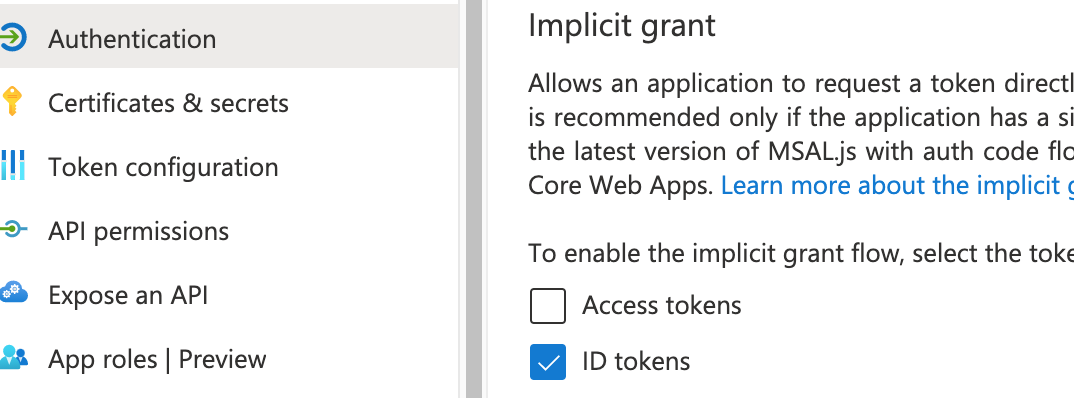
2) Update your Azure "App Registration::Authentication" for "implicit" grants to allow id_tokens to be returned
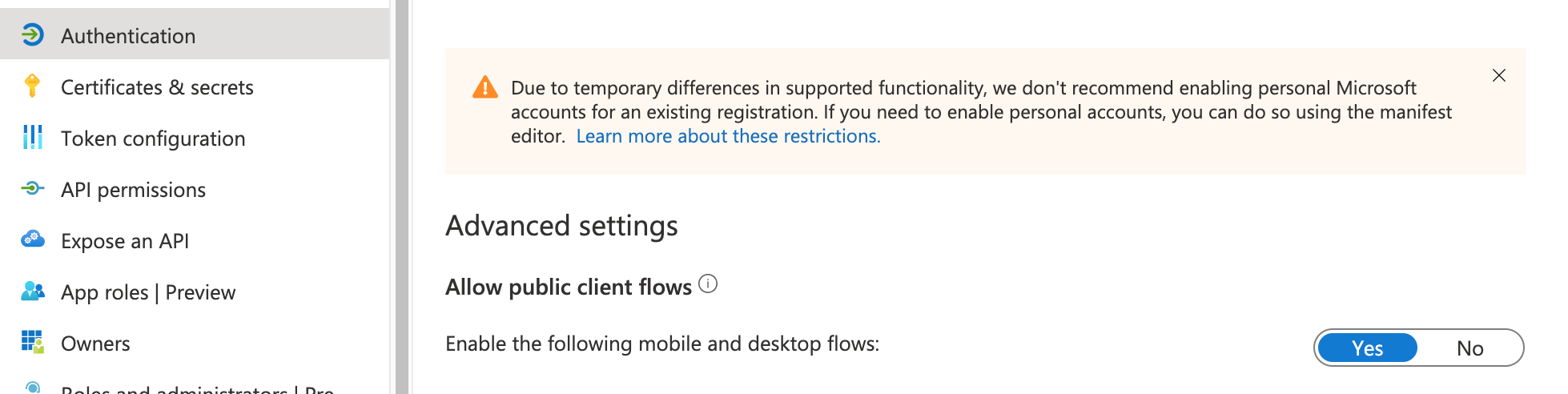
3) Update your Azure "App Registration::Authentication" advanced settings Allow Public Client Flows set to true
4) Request a token
        curl -s \
        --header "application/x-www-form-urlencoded" \
        --data-urlencode "client_id={{ app registration client id }}" \
        --data-urlencode "response_type=id_token" \
        --data-urlencode "grant_type=password" \
        --data-urlencode "scope=openid" \
        --data-urlencode "username={{ your azure Username }}" \   # NOT HARBOR USER
        --data-urlencode "password={{ your azure password }}" \.   # NOT HARBOR PASSWORD
       "https://login.microsoftonline.com/{{ tenant-id-uuid }}/oauth2/v2.0/token"
5) The above should give you a response containing an access_token and id_token
6) extract the id_token - using jq or equivalent
7) Use the token to now invoke the api
curl -v -H "authorization: Bearer {{ id_token }} "https://{{harbor-host}}/api/v2.0/configurations"
pingcrosby
on 4 Dec 2020
Related issues
 a-kinder
·
3Comments
a-kinder
·
3Comments
 Hotege
·
3Comments
Hotege
·
3Comments
 moooofly
·
3Comments
reasonerjt
·
3Comments
reasonerjt
·
3Comments
moooofly
·
3Comments
reasonerjt
·
3Comments
reasonerjt
·
3Comments
Most helpful comment
Update..
I was able to achieve calling the API via Azure AD backed by OIDC like this...


1) Configure Harbor to use OIDC - ensure its all working with interactive logons etc
2) Update your Azure "App Registration::Authentication" for "implicit" grants to allow id_tokens to be returned
3) Update your Azure "App Registration::Authentication" advanced settings
Allow Public Client Flowsset to true4) Request a token
5) The above should give you a response containing an
access_tokenandid_token6) extract the
id_token- using jq or equivalent7) Use the token to now invoke the api
curl -v -H "authorization: Bearer {{ id_token }} "https://{{harbor-host}}/api/v2.0/configurations"