Harbor: Harbor goes into read-only mode for no reason
There is no GC scheduling, no restarts on jobservice, it simply goes into read-only mode, I can't find anything in the logs that could cause this.
Does anyone know where I can look to try to find out what happens?
The only thing I see in the log when it goes into read-only mode is this.
harbor-harbor-registry-67f95bcf9f-sk99v registryctltime="2020-06-10T23:37:01.804657054Z" level=error msg="response completed with error" auth.user.name="harbor_registry_user" err.code="**blob unknown" err.detail**=sha256:838d6c43e4e8fc2b0144ac279e82aa7fc85f5b002361941fee80767147cb147f err.message="**blob unknown to registry**" go.version=go1.13.8 http.request.host=img.server.tools http.request.id=2e136441-76af-48ff-b223-222ada704664 http.request.method=HEAD http.request.remoteaddr=172.16.0.24 http.request.uri="/v2/image/risk/blobs/sha256:838d6c43e4e8fc2b0144ac279e82aa7fc85f5b002361941fee80767147cb147f" http.request.useragent="docker/19.03.8 go/go1.12.17 git-commit/afacb8b7f0 kernel/4.19.102+ os/linux arch/amd64 UpstreamClient(Docker-Client/19.03.8 \(linux\))" http.response.contenttype="application/json; charset=utf-8" http.response.duration=287.74239ms http.response.status=404 http.response.written=157 vars.digest="sha256:838d6c43e4e8fc2b0144ac279e82aa7fc85f5b002361941fee80767147cb147f" vars.name="image/risk"
I don't know if this is a consequence of harbor being in read-only mode or if this is the cause.
Harbor Version: v2.0.0-87602132
Installed by: harbor-helm 1.4.0
Repository: GCS
 klinux
All 29 comments
Is it a upgrade or fresh install? @steven-zou can you help to tell how to check the redis data whether this is GC cron job in the backend?
 wy65701436
on 11 Jun 2020
wy65701436
on 11 Jun 2020
Is it a upgrade or fresh install? @steven-zou can you help to tell how to check the redis data whether this is GC cron job in the backend?
Its a upgrade from v1.10.2, and yes, it already happened with 1.10.
_Obs.: I don't have a schedule for the GC, but it happens without a correct frequency, but when it happens it's always close to the same time, like 9:00 pm. I tried to replace Redis with an external installation, but it also caused some problems with OIDC authentication and the jobservice started to become unstable._
Thank you
klinux
on 11 Jun 2020
job schedule is using UTC timezone. Currently readonly mode only happen when GC. Maybe you schedule GC job before, but the job doesn't stop even you unschedule it.
job service info is saved in redis, some job info may be lost if directly replace it.
some command can connect redis db:
docker exec -it redis redis-cli -n 2
still need @steven-zou help on how to check the job detail.
OIDC authentication has no relationship with redis, not sure what problem you met.
 bitsf
on 11 Jun 2020
bitsf
on 11 Jun 2020
job schedule is using UTC timezone. Currently readonly mode only happen when GC. Maybe you schedule GC job before, but the job doesn't stop even you unschedule it.
job service info is saved in redis, some job info may be lost if directly replace it.
some command can connect redis db:
docker exec -it redis redis-cli -n 2
still need @steven-zou help on how to check the job detail.OIDC authentication has no relationship with redis, not sure what problem you met.
The problem with OIDC has been related in this issue:
https://github.com/goharbor/harbor/issues/10460
I reinstalled the redis to have a clean cache, but to no avail, this morning Harbor is behaving very abnormally, it just keeps going into read-only mode. I'm trying to figure out what the trigger is for that.
Thank you
klinux
on 11 Jun 2020
We are having this same issue and it is a fresh install on v1.10.1. We have deleted our GC schedules but they still appear to be running and causing the read-only issue because it is not coming out of read-only mode after GC is complete.
It seems like multiple people are having this issue, and there is no resolution to it, which is frustrating. The advice here is that there were issues with the job scheduler which were resolved in 1.10.1, but that does not appear to to be the case as we have fresh installs of v1.10.1.
So, there is two issues here which need resolved:
1) Job Schedules are not getting deleted when deleted from the UI
2) Read-only is not getting disabled after GC is complete.
This is happening in a very consistent and repeatable bases for us, causing us to have to log in to each of our Harbor registries and clear the read-only flag. I'm happy to provide any logs necessary to help resolve this issue. We love the functionality of harbor, but we are quickly losing confidence in admin aspects of Harbor, so I'd like to help get this resolved to put it behind us.
 ryan-a-baker
on 6 Jul 2020
ryan-a-baker
on 6 Jul 2020
Hi Ryan,
Thanks for your reporting. @wy65701436 @steven-zou is looking into this now.
 renmaosheng
on 8 Jul 2020
renmaosheng
on 8 Jul 2020
I'm tagging this 2.0.2 temporarily so we don't lose it in the weekly triage
 xaleeks
on 8 Jul 2020
xaleeks
on 8 Jul 2020
@klinux @ryan-a-baker:
Could you please follow the guide shown below to give us more info for troubleshooting?
Step1: enter the redis container
docker exec -it redis /bin/bash
Step2: Connect to Redis DB2 in the "reads" container
redis-cli -n 2
Step3: list all the existing schedule policies
zrange {harbor_job_service_namespace}:period:policies 0 -1
Step4: paste the output of step3 here.
NOTES: If possible, please also attach the jobservice.log.
========
A possible workaround is:
Use the Redis command to remove all the GC related schedules.
ZREMRANGEBYLEX {harbor_job_service_namespace}:period:policies [INDEX] [INDEX]
Then [INDEX] you can find by the zrange command shown in the above step3.
range command reference is here: https://redis.io/commands/zremrangebylex
 steven-zou
on 9 Jul 2020
steven-zou
on 9 Jul 2020
This is interesting. Looking at redis I don't see any scheduled jobs:
redis [ ~ ]$ redis-cli -n 2
127.0.0.1:6379[2]> zrange {harbor_job_service_namespace}:policies 0 -1
(empty list or set)
However, looking at the logs from jobservice, I definitely see a IMAGE_GC job getting kicked off:
2020-07-05T08:00:01Z [INFO] [/jobservice/worker/cworker/c_worker.go:74]: Job incoming: {"name":"IMAGE_GC","id":"721b250966fc32fcc4dffab7","t":1593936000,"args":null}
The UI doesn't show any scheduled GC's:
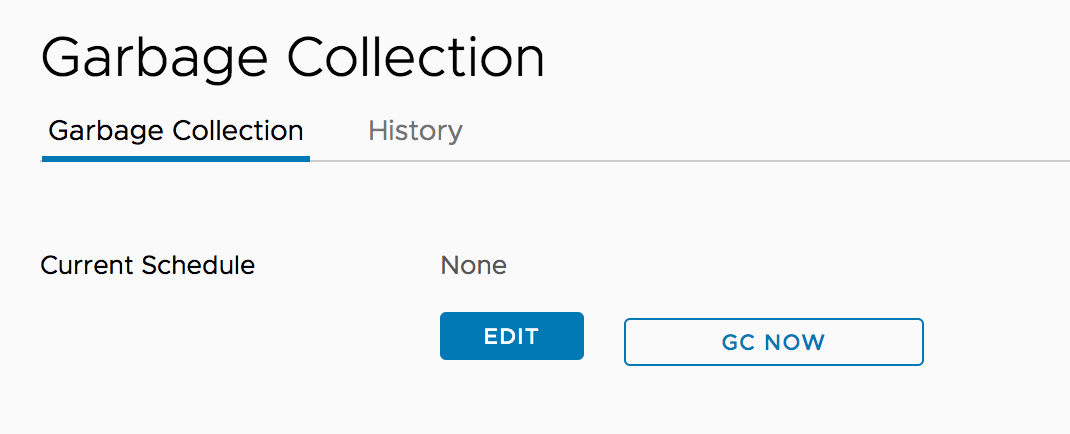
The history also doesn't show any GC's running.
ryan-a-baker
on 9 Jul 2020
@ryan-a-baker
Thanks for the verification. But the result is a little weird.
If you make sure no results brought from the following command
zrange {harbor_job_service_namespace}:policies 0 -1
A further possible way we can try is restarting the jobservice to clean the related possible mem cache (actually it should not happen but in case there might be some mem cache. The precondition is no results returned by the above zrang command).
(it always return something like the data shown below if there are policies settled:
1) "{\"id\":\"114f85db9a495b073b8414d1\",\"job_name\":\"IMAGE_GC\",\"cron_spec\":\"0 0 8 * * *\",\"job_params\":{\"admin_job_id\":\"10\",\"delete_untagged\":false,\"redis_url_reg\":\"redis://redis:6379/1\"},\"web_hook_url\":\"http://core:8080/service/notifications/jobs/adminjob/10\"}"
)
steven-zou
on 10 Jul 2020
Thanks @steven-zou for the continued help. Been very busy this week, but hoping I can dig in to it more and try to help out troubleshooting on my end next week.
I went ahead and cycled the job service across all of our Harbor instances. I'm pretty sure they have all been cycled since we deleted the GC schedule, but just to make sure I know they have all been cycled now.
ryan-a-baker
on 10 Jul 2020
@ryan-a-baker
For 1.10.x there can be issue that the job is still in the memory of jobservice even the it's not in redis. In this case if jobservice is restarted the job should not be scheduled again.
@klinux
In 2.0.x the mem of jobservice is always in-sync with Redis. Could you provide the data in Redis
 reasonerjt
on 14 Jul 2020
reasonerjt
on 14 Jul 2020
@ryan-a-baker
Sorry, I made a mistake. The policies should be under the key shown below:
zrange {harbor_job_service_namespace}:period:policies 0 -1
Please check your Redis data again.
We can also check the following key to check whether there are still pending scheduled tasks:
zrange {harbor_job_service_namespace}:scheduled 0 -1
steven-zou
on 14 Jul 2020
@ryan-a-baker
For 1.10.x there can be issue that the job is still in the memory of jobservice even the it's not in redis. In this case if jobservice is restarted the job should not be scheduled again.@klinux
In 2.0.x the mem of jobservice is always in-sync with Redis. Could you provide the data in Redis
I've cleaned redis and harbor is stable now, only one read-only situation until now.
klinux
on 14 Jul 2020
@ryan-a-baker
Sorry, I made a mistake. The policies should be under the key shown below:
zrange {harbor_job_service_namespace}:period:policies 0 -1Please check your Redis data again.
We can also check the following key to check whether there are still pending scheduled tasks:
zrange {harbor_job_service_namespace}:scheduled 0 -1
@ryan-a-baker any updates?
steven-zou
on 15 Jul 2020
Sorry @steven-zou - I'm on vacation this week and haven't had the time to check in that I thought I would.
sh-4.4$ redis-cli -n 2
127.0.0.1:6379[2]> zrange {harbor_job_service_namespace}:period:policies 0 -1
(empty list or set)
127.0.0.1:6379[2]> zrange {harbor_job_service_namespace}:scheduled 0 -1
(empty list or set)
Just out of curiosity, I tried setting the GC schedule again, and I'm still not seeing any results in the above keys, which is unexpected. I'm using the monitor redis utility to see if I can see when things are getting set, but I'm struggling to narrow it down because there is so much data being written.
I'll plan on standing up a new Harbor instance in the exact way we created our production ones that literally have nothing on it except for our testing to see if we can 1) recreate and 2) track down the data in redis.
Once I have that, I should be able to just dump the keys and look for anything out of the ordinary. I can't do that right now because of the amount of data.
ryan-a-baker
on 15 Jul 2020
Sorry @steven-zou - I'm on vacation this week and haven't had the time to check in that I thought I would.
sh-4.4$ redis-cli -n 2
127.0.0.1:6379[2]> zrange {harbor_job_service_namespace}:period:policies 0 -1
(empty list or set)
127.0.0.1:6379[2]> zrange {harbor_job_service_namespace}:scheduled 0 -1
(empty list or set)
@ryan-a-baker
It looks very weird. I'm doubting that if we find data on the right Redis server. If the server is correct and confirm no data in the Redis and you're using V1.10, a high probable cause may be the policies cached in the memory (before 2.0, job service read CRON policies from the Redis into mem list only at its starting, after that, it will use sub/pub way to modify the CRON policy list in the memory. There should be a very low probability to appear Incorrect behavior in the sub/pub mechanism). Have you ever restarted the job service after you found such an issue?
If possible, we can set up zoom to have a talk about this issue.
steven-zou
on 15 Jul 2020
@steven-zou - I've confirmed with a test environment that when a GC is scheduled, there is no difference between the keys in Redis before and after the scheduling. I have restarted the job service multiple times and still see it being scheduled. Are we sure that it's being stored in Redis? It really doesn't seem that way.
ryan-a-baker
on 20 Jul 2020
I finally found it. It looks like the schedule for GC's is actually in database #1.
With a cron set:
127.0.0.1:6379[1]> zrange {harbor_job_service_namespace}:period:policies 0 -1
1) "{\"id\":\"5019c96f3bedad575b02e97e\",\"job_name\":\"IMAGE_GC\",\"cron_spec\":\"0 0 0 * * 0\",\"job_params\":{\"admin_job_id\":\"2\",\"redis_url_reg\":\"redis://harbor-harbor-redis:6379/2\"},\"web_hook_url\":\"http://harbor-harbor-core/service/notifications/jobs/adminjob/2\"}"
After I remove it:
127.0.0.1:6379[1]> zrange {harbor_job_service_namespace}:period:policies 0 -1
(empty list or set)
And can now confirm that in our production systems, there are GC schedules remaining in Redis that are not there in the Web-UI:
redis [ ~ ]$ redis-cli -n 1
127.0.0.1:6379[1]> zrange {harbor_job_service_namespace}:period:policies 0 -1
1) "{\"id\":\"708f630362081752c5e1f0d8\",\"job_name\":\"SCHEDULER\",\"cron_spec\":\"0 0 0 * * 0\",\"job_params\":{\"callback_func\":\"SchedulerCallback\",\"params\":\"{\\\"PolicyID\\\":1,\\\"Trigger\\\":\\\"Schedule\\\"}\"},\"web_hook_url\":\"http://harbor-harbor-core/service/notifications/schedules/1\"}"
2) "{\"id\":\"b5e52280c1589aa2724fcbe3\",\"job_name\":\"IMAGE_GC\",\"cron_spec\":\"0 0 1 * * 6\",\"job_params\":{\"admin_job_id\":\"4\",\"redis_url_reg\":\"redis://harbor-harbor-redis:6379/2\"},\"web_hook_url\":\"http://harbor-harbor-core/service/notifications/jobs/adminjob/4\"}"
3) "{\"id\":\"bc7c20b1fb362ba4a81e82c9\",\"job_name\":\"IMAGE_GC\",\"cron_spec\":\"0 0 8 * * 0\",\"job_params\":{\"admin_job_id\":\"6\",\"redis_url_reg\":\"redis://harbor-harbor-redis:6379/2\"},\"web_hook_url\":\"http://harbor-harbor-core/service/notifications/jobs/adminjob/6\"}"
4) "{\"id\":\"dad6a278fc3a82819bc22368\",\"job_name\":\"SCHEDULER\",\"cron_spec\":\"0 0 0 * * 0\",\"job_params\":{\"callback_func\":\"SchedulerCallback\",\"params\":\"{\\\"PolicyID\\\":2,\\\"Trigger\\\":\\\"Schedule\\\"}\"},\"web_hook_url\":\"http://harbor-harbor-core/service/notifications/schedules/2\"}"
5) "{\"id\":\"49982c58b5cd0f0ba13f7b7d\",\"job_name\":\"IMAGE_REPLICATE\",\"cron_spec\":\"0 0 * * * *\",\"job_params\":{\"policy_id\":8,\"url\":\"http://harbor-harbor-core\"},\"web_hook_url\":\"http://harbor-harbor-core/service/notifications/jobs/replication/1\"}"
6) "{\"id\":\"ecd226416213994873d3d580\",\"job_name\":\"IMAGE_SCAN_ALL\",\"cron_spec\":\"0 0 0 * * *\",\"job_params\":{\"admin_job_id\":\"7\"},\"web_hook_url\":\"http://harbor-harbor-core/service/notifications/jobs/adminjob/7\"}"
We are having this same issue and it is a fresh install on v1.10.1. We have deleted our GC schedules but they still appear to be running and causing the read-only issue because it is not coming out of read-only mode after GC is complete.
It seems like multiple people are having this issue, and there is no resolution to it, which is frustrating. The advice here is that there were issues with the job scheduler which were resolved in 1.10.1, but that does not appear to to be the case as we have fresh installs of v1.10.1.
So, there is two issues here which need resolved:
- Job Schedules are not getting deleted when deleted from the UI
- Read-only is not getting disabled after GC is complete.
This is happening in a very consistent and repeatable bases for us, causing us to have to log in to each of our Harbor registries and clear the read-only flag. I'm happy to provide any logs necessary to help resolve this issue. We love the functionality of harbor, but we are quickly losing confidence in admin aspects of Harbor, so I'd like to help get this resolved to put it behind us.
@ryan-a-baker
Just double confirm, your environment is a fresh v1.10.1 installation, right?
For fixing the GC read-only issue as a workaround approach, you can use the command ZREMRANGEBYLEX {harbor_job_service_namespace}:period:policies [INDEX] [INDEX] to remove the schedule.
steven-zou
on 21 Jul 2020
Correct - it is a fresh 1.10.1 install. I tried a bunch of different ways to recreate the issue yesterday in my test environment, but I wasn't able to.
I was able to remove the GC's in my test environment via Redis. I'll do that across all of our production environments and see if we have the issue again this week.
The next step will be to figure out why the GC's are leaving the harbor system in read-only, but that's probably another issue.
ryan-a-baker
on 21 Jul 2020
We have done some improvements to this part in the V2.0 releases. Based on the current case(fresh 1.10.1), we can use the workaround solution to eliminate the problem. And then no strong willing and clear direction to introduce any code changes in the 2.0.2. Let's see if similar issues occurred at the V2.0 releases.
However, more deep investigations will continue to do and see if we can find some problems there. We just no need to catch up on the tight 2.0.2 timeline.
steven-zou
on 22 Jul 2020
@steven-zou Thank you so much for your help. We didn't have any GC's run once the redis keys were removed. We also upgraded to 2.0.1, so as you mentioned, we'll keep a close eye on it. I will say though, that GC's already seem to behave much better on 2.x than it did with 1.10.
ryan-a-baker
on 28 Jul 2020
Hello @steven-zou , i am using Harbor version 'v1.10.2-d0189bed' and have executed all the steps related to redis mentioned above when GC schedule is set to 'none' i am getting below output:
redis [ ~ ]$ redis-cli -n 2
127.0.0.1:6379[2]> zrange {harbor_job_service_namespace}:period:policies 0 -1
(empty list or set)
127.0.0.1:6379[2]> ZREMRANGEBYLEX {harbor_job_service_namespace}:period:policies [INDEX] [INDEX]
(integer) 0
but with very random behavior: getting below error on image push:
Login Succeeded
The push refers to repository [harborreg_URL]
5f25244f1832: Preparing
86457a3c2417: Preparing
952893091fa7: Preparing
ff9443b32a6e: Preparing
f49ab078716a: Preparing
0444ae2b4f84: Preparing
94ff88819ae9: Preparing
0e07d0d4c60c: Preparing
0444ae2b4f84: Waiting
94ff88819ae9: Waiting
0e07d0d4c60c: Waiting
ff9443b32a6e: Pushed
0444ae2b4f84: Pushed
94ff88819ae9: Layer already exists
0e07d0d4c60c: Layer already exists
f49ab078716a: Pushed
denied: The system is in read only mode. Any modification is prohibited.
Push Image Failed
and i have made sure that there is NO GC job in pending or running state. all the GC Jobs are in Finished or stopped state.
Please help me out to solve this very wired issue.
Thanks in advance
 Darshil11
on 5 Aug 2020
Darshil11
on 5 Aug 2020
Running into issue where read only mode, found this in redis. How do you delete?
127.0.0.1:6379[2]> zrange {harbor_job_service_namespace}:period:policies 0 -1
1) "{\"id\":\"849cc16259e1b074b7fcaae4\",\"job_name\":\"IMAGE_SCAN_ALL\",\"cron_spec\":\"0 0 5 * * *\",\"job_params\":{\"admin_job_id\":\"8\"},\"web_hook_url\":\"http://core:8080/service/notifications/jobs/adminjob/8\"}"
2) "{\"id\":\"1af390b9d31c1105dd7184c2\",\"job_name\":\"IMAGE_GC\",\"cron_spec\":\"0 0 2 * * *\",\"job_params\":{\"admin_job_id\":\"10\",\"delete_untagged\":true,\"redis_url_reg\":\"redis://redis:6379/1\"},\"web_hook_url\":\"http://core:8080/service/notifications/jobs/adminjob/10\"}"
3) "{\"id\":\"6ac9c187a461e4aedf6dba16\",\"job_name\":\"IMAGE_GC\",\"cron_spec\":\"0 0 0 * * 0\",\"job_params\":{\"admin_job_id\":\"13\",\"delete_untagged\":true,\"redis_url_reg\":\"redis://redis:6379/1\"},\"web_hook_url\":\"http://core:8080/service/notifications/jobs/adminjob/13\"}"
 hleung1
on 18 Sep 2020
hleung1
on 18 Sep 2020
Running into issue where read only mode, found this in redis. How do you delete?
127.0.0.1:6379[2]> zrange {harbor_job_service_namespace}:period:policies 0 -1
- "{"id":"849cc16259e1b074b7fcaae4","job_name":"IMAGE_SCAN_ALL","cron_spec":"0 0 5 * * *","job_params":{"admin_job_id":"8"},"web_hook_url":"http://core:8080/service/notifications/jobs/adminjob/8\"}"
- "{"id":"1af390b9d31c1105dd7184c2","job_name":"IMAGE_GC","cron_spec":"0 0 2 * * *","job_params":{"admin_job_id":"10","delete_untagged":true,"redis_url_reg":"redis://redis:6379/1"},"web_hook_url":"http://core:8080/service/notifications/jobs/adminjob/10\"}"
- "{"id":"6ac9c187a461e4aedf6dba16","job_name":"IMAGE_GC","cron_spec":"0 0 0 * * 0","job_params":{"admin_job_id":"13","delete_untagged":true,"redis_url_reg":"redis://redis:6379/1"},"web_hook_url":"http://core:8080/service/notifications/jobs/adminjob/13\"}"
@hleung1
Please check if this FAQ can help you. https://github.com/goharbor/harbor/wiki/Harbor-FAQs#stuck-in-read-only-mode
steven-zou
on 20 Oct 2020
Hello @steven-zou , i am using Harbor version 'v1.10.2-d0189bed' and have executed all the steps related to redis mentioned above when GC schedule is set to 'none' i am getting below output:
redis [ ~ ]$ redis-cli -n 2
127.0.0.1:6379[2]> zrange {harbor_job_service_namespace}:period:policies 0 -1
(empty list or set)127.0.0.1:6379[2]> ZREMRANGEBYLEX {harbor_job_service_namespace}:period:policies [INDEX] [INDEX]
(integer) 0but with very random behavior: getting below error on image push:
Login Succeeded
The push refers to repository [harborreg_URL]
5f25244f1832: Preparing
86457a3c2417: Preparing
952893091fa7: Preparing
ff9443b32a6e: Preparing
f49ab078716a: Preparing
0444ae2b4f84: Preparing
94ff88819ae9: Preparing
0e07d0d4c60c: Preparing
0444ae2b4f84: Waiting
94ff88819ae9: Waiting
0e07d0d4c60c: Waiting
ff9443b32a6e: Pushed
0444ae2b4f84: Pushed
94ff88819ae9: Layer already exists
0e07d0d4c60c: Layer already exists
f49ab078716a: Pushed
denied: The system is in read only mode. Any modification is prohibited.
Push Image Failedand i have made sure that there is NO GC job in pending or running state. all the GC Jobs are in Finished or stopped state.
Please help me out to solve this very wired issue.
Thanks in advance
@Darshil11
Please check if this FAQ can help you. https://github.com/goharbor/harbor/wiki/Harbor-FAQs#stuck-in-read-only-mode
steven-zou
on 20 Oct 2020
Related issues
 annProg
·
30Comments
annProg
·
30Comments
 ruiztulio
·
25Comments
ruiztulio
·
25Comments
 tschwaller
·
30Comments
tschwaller
·
30Comments
 victorvli
·
22Comments
annProg
·
20Comments
victorvli
·
22Comments
annProg
·
20Comments
Most helpful comment
I've cleaned redis and harbor is stable now, only one read-only situation until now.