Harbor: `sudo` version 1.8.30 behave change which breaks harbor service after password expired
If you are reporting a problem, please make sure the following information are provided:
Expected behavior and actual behavior:
harbor-log set a 90 days to expire its password, sudo-1.8.20p2-6.ph2.x86_64 will ok to run sudo -u \#10000 -E 'rsyslogd' '-n', but sudo-1.8.30-2.ph2.x86_64 will require a password change.
Steps to reproduce the problem:
For old harbor image:
# Run an old image, which is ok to run `sudo` even password is expired
[root@vm ~]# docker run -it --rm goharbor/harbor-log:v1.10.1 bash
root [ / ]# chage -l root
You are required to change your password immediately (password expired)
chage: PAM: Authentication token is no longer valid; new one required
root [ / ]# sudo ls
bin  boot  dev  etc  home  lib  lib64  media  mnt  proc  root  run  sbin  srv  sys  tmp  usr  var
root [ / ]# sudo --version | grep -i version
Sudo version 1.8.20p2
Sudoers policy plugin version 1.8.20p2
Sudoers file grammar version 46
Sudoers I/O plugin version 1.8.20p2
For recent harbor image:
# Run a new image, and set password to expire now, sudo will require password change
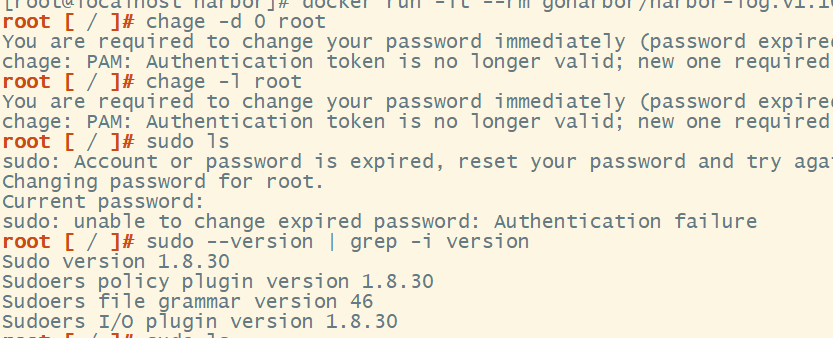
[root@vm ~]# docker run -it --rm goharbor/harbor-log:dev bash
root [ / ]# chage -d 0 root
root [ / ]# chage -l root
You are required to change your password immediately (administrator enforced)
chage: PAM: Authentication token is no longer valid; new one required
root [ / ]# sudo ls
sudo: Account or password is expired, reset your password and try again
Changing password for root.
Current password:

sudo: unable to change expired password: Authentication failure
root [ / ]#
root [ / ]# sudo --version | grep -i version
Sudo version 1.8.30
Sudoers policy plugin version 1.8.30
Sudoers file grammar version 46
Sudoers I/O plugin version 1.8.30
Versions:
Please specify the versions of following systems.
- harbor version: [v1.10.2]
- docker engine version: [y.y.y]
- docker-compose version: [z.z.z]
Note
I just test harbor-log image, this may affect other harbor images as well.
Additional context:
- Harbor config files: You can get them by packaging
harbor.ymland files in the same directory, including subdirectory. - Log files: You can get them by package the
/var/log/harbor/.
 ijumps
All 9 comments
By the way, sudo seems to fix a password expire not work bug, so why harbor set a 90 days password expiration time at first
ijumps
on 15 Apr 2020
Did you change the root password before? Harbor doesn't set a password expiration time, I think it's OS default value
 ninjadq
on 16 Apr 2020
ninjadq
on 16 Apr 2020
Did you change the root password before? Harbor doesn't set a password expiration time, I think it's OS default value
It's os default behave, but harbor choose to use photon as base image.
Note info in reproduce use harbor official image goharbor/harbor-log, nothing changed. If anyone use harbor official image in recently release, there will be a 90 days time bomb, since other harbor component depend on harbor-log, harbor will fail to start after 90 days.
ijumps
on 16 Apr 2020
re-open to make sure the fix is cherry picked to 1.10.x
 reasonerjt
on 21 Apr 2020
reasonerjt
on 21 Apr 2020
password expire not work bug,how to do with???
 andriodjinguang
on 9 Jun 2020
andriodjinguang
on 9 Jun 2020
I have solve it like this:
The error is that 'harbor-log' container stays in restarting mode ...
My solution:
1) Export the harbor-log container:
$ mkdir -p /tmp/harbor-log
$ cd /tmp/harbor-log
$ docker export harbor-log -o harbor-log.tar
2) Extract the .tar y recover the shadow file (/tmp/harbor-log/etc/shadow)
$ tar xvfp harbor-log.tar
3) Substitute 'wrong' values in shadow file:
$ sed -i 's/:90:/:99999:/g' /tmp/harbor-log/etc/shadow
4) Copy this file to a patch that my harbor-log container can use, for example:
$ mkdir -p /opt/harbor-log-etc/
$ cp /tmp/harbor-log/etc/shadow /opt/harbor-log-etc/shadow
5) In the docker-compose.yml in the 'volumes' section of harbor-log include the following lines:
      - type: bind
        source: /opt/harbor-log-etc/shadow
        target: /etc/shadow
6) Perform a:
docker-compose down
and then:
docker-compose up -d
And it will work !!!
 luisgulo
on 9 Jun 2020
luisgulo
on 9 Jun 2020
Issue I described is how to confirm and reproduce it, for anyone who want to know how to fix it, you can try the following options:
First, wait for the official goharbor/harbor-log image update, I think it's in v2.0.0 and will soon in v1.10.3. So you may upgrade your harbor version than.
The fix is very simple, just one line change in dockerfile, So you can build a new image with this fix yourself.
If it's hard for you to build a harbor-log image, you can reset password and fix it in your current harbor-log container, commit it as a new image, save it use it instead. Note that export maybe work but docker export will loss meta-data and build history, so health check in meta-data will loss. But you can try what @luisgulo do in a running container, and use docker commit and docker save to save the fixed image.
Hopes it will help.
ijumps
on 10 Jun 2020
Hi @ijumps, will this issue affect users who are running docker and docker-compose with root user?
We have harbor v1.10.2 running from 7 weeks, will this issue prevent the container from restarting on failure?
Thanks.
 piyush94
on 29 Jun 2020
piyush94
on 29 Jun 2020
will this issue affect users who are running docker and docker-compose with root user
@piyush94 It matters for all users in harbor-log image, not for which user you use to run for docker service. So if you use
goharbor/harbor-log:v1.10.2 image without any patch, when your harbor-log container crash or restart or just exit, it will fail to start.
ijumps
on 30 Jun 2020
Related issues
 272909106
·
4Comments
272909106
·
4Comments
 moooofly
·
3Comments
moooofly
·
3Comments
 andrewtchin
·
3Comments
reasonerjt
·
3Comments
andrewtchin
·
3Comments
reasonerjt
·
3Comments
 problame
·
3Comments
problame
·
3Comments
Most helpful comment
I have solve it like this:
The error is that 'harbor-log' container stays in restarting mode ...
My solution:
1) Export the harbor-log container:
2) Extract the .tar y recover the shadow file (/tmp/harbor-log/etc/shadow)
$ tar xvfp harbor-log.tar3) Substitute 'wrong' values in shadow file:
$ sed -i 's/:90:/:99999:/g' /tmp/harbor-log/etc/shadow4) Copy this file to a patch that my harbor-log container can use, for example:
5) In the docker-compose.yml in the 'volumes' section of harbor-log include the following lines:
6) Perform a:
docker-compose downand then:
docker-compose up -dAnd it will work !!!