Harbor: Impossible to login with default language
Expected behavior and actual behavior:
It's impossible to login when default language is selected (French in my case), but it works when we choose/force a language at the top-right menu.
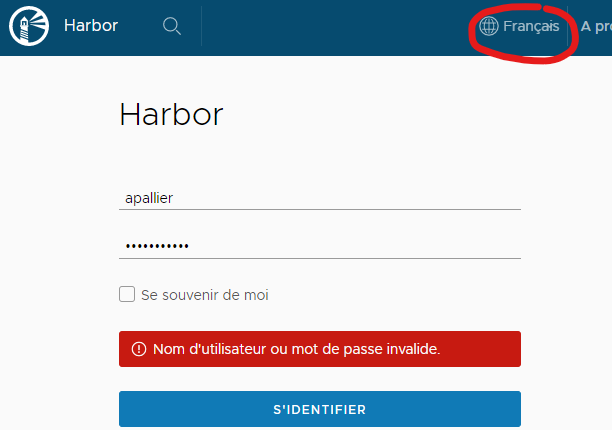
Steps to reproduce the problem:
- Remove all cookies and cache concerning Harbor site from your browser
- Go to the Harbor front page => default language should be automatically detected (from browser info I guess), French in my case.
- Try to login => error (see screenshot above)
It works if at step 2 I force language to English or other, and even if I force to the same language as the default one.
Versions:
- harbor version: 1.9.2 (problem seen juste after upgrade to 1.9.2)
- docker engine version: Docker version 18.03.1-ce, build 9ee9f40
- docker-compose version: docker-compose version 1.21.2, build a133471
- Chrome: 78.0.3904.87
Additional context:
Request when it doesn't work:
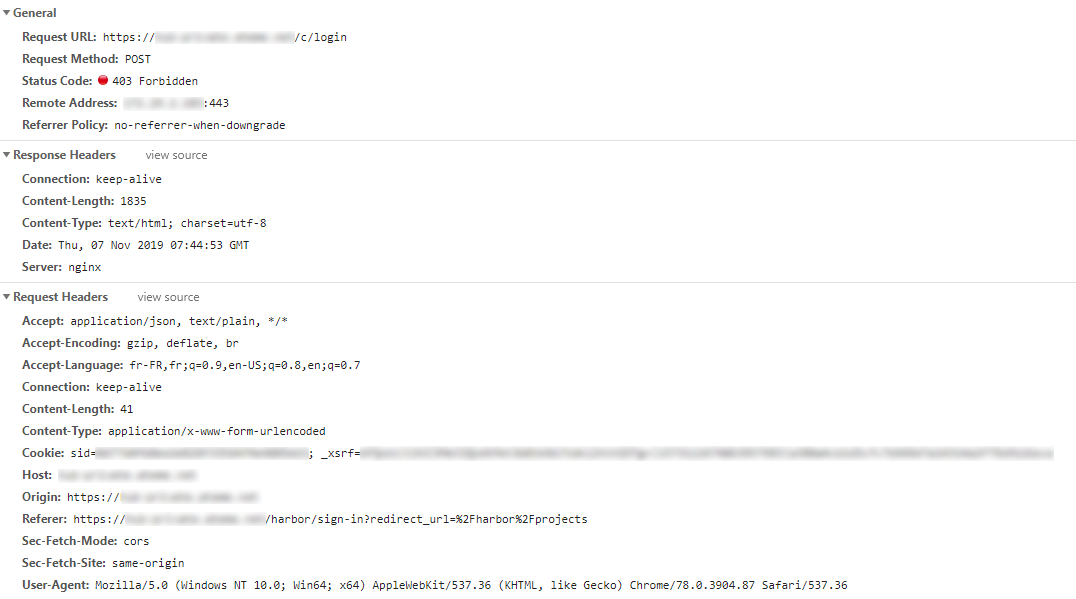
Request when it works:

In /var/log/harbor/core.log when it doesn't work:
Nov  7 08:44:53 172.18.0.1 core[923]: 2019/11/07 07:44:53 #033[1;35m[C] [panic.go:522] the request url is  /c/login#033[0m
Nov  7 08:44:53 172.18.0.1 core[923]: 2019/11/07 07:44:53 #033[1;35m[C] [panic.go:522] Handler crashed with error '_xsrf' argument missing from POST#033[0m
Nov  7 08:44:53 172.18.0.1 core[923]: 2019/11/07 07:44:53 #033[1;35m[C] [panic.go:522] /usr/local/go/src/runtime/panic.go:522#033[0m
Nov  7 08:44:53 172.18.0.1 core[923]: 2019/11/07 07:44:53 #033[1;35m[C] [panic.go:522] /harbor/src/vendor/github.com/astaxie/beego/context/context.go:80#033[0m
Nov  7 08:44:53 172.18.0.1 core[923]: 2019/11/07 07:44:53 #033[1;35m[C] [panic.go:522] /harbor/src/vendor/github.com/astaxie/beego/context/context.go:164#033[0m
Nov  7 08:44:53 172.18.0.1 core[923]: 2019/11/07 07:44:53 #033[1;35m[C] [panic.go:522] /harbor/src/vendor/github.com/astaxie/beego/controller.go:649#033[0m
Nov  7 08:44:53 172.18.0.1 core[923]: 2019/11/07 07:44:53 #033[1;35m[C] [panic.go:522] /harbor/src/vendor/github.com/astaxie/beego/router.go:788#033[0m
Nov  7 08:44:53 172.18.0.1 core[923]: 2019/11/07 07:44:53 #033[1;35m[C] [panic.go:522] /usr/local/go/src/net/http/server.go:2774#033[0m
Nov  7 08:44:53 172.18.0.1 core[923]: 2019/11/07 07:44:53 #033[1;35m[C] [panic.go:522] /usr/local/go/src/net/http/server.go:1878#033[0m
Nov  7 08:44:53 172.18.0.1 core[923]: 2019/11/07 07:44:53 #033[1;35m[C] [panic.go:522] /usr/local/go/src/runtime/asm_amd64.s:1337#033[0m
 apallier
All 11 comments
@jwangyangls
I see the request is caryring xsrf token in the header
could we check why this fails?
Maybe the lang is inconsistent in the cookie? I see it's lang-us?
 reasonerjt
on 8 Nov 2019
reasonerjt
on 8 Nov 2019
I have the same problem, when i try to balance harbor nodes with haproxy.
harbor nodes have common database and redis servers, type of balancing http/tcp - same result, in harbor.yml config defined external_url variable. Docker 19.03.5, harbor 1.9.2, and if i try to login on haproxy i have flapping error - "Handler crashed with error XSRF cookie", but if i login on the harbor node, its authorized me successfully
 lssssssssss
on 16 Nov 2019
lssssssssss
on 16 Nov 2019
This happens to me, too!
I do get [panic.go:522] Handler crashed with error '_xsrf' argument missing from POST all over the place and it only starts working when I have a harbor-lang cookie in place. And I only get this cookie when I change the language
It works with xsrf disabled in configuration.
 KarstenSiemer
on 19 Nov 2019
KarstenSiemer
on 19 Nov 2019
i have exactly the same issue deployed harbor via helm chart.
 MatthiasHertel
on 20 Nov 2019
MatthiasHertel
on 20 Nov 2019
+1
 akathimi
on 23 Nov 2019
akathimi
on 23 Nov 2019
@apallier We had almost the same error appear on a different scenario, we found that xsrf is enabled in on of the core config map(deployed on k8s), setting it to false solved the problem(as a workaround, this should be fixed by the harbor dudes).
the file path is /etc/core/app.conf
EnableXSRF = false
hope this helps
akathimi
on 25 Nov 2019
@reasonerjt now there seems to be a new problem after disabling xsrf:
Harbor:runtime error: invalid memory address or nil pointer dereference
Request Method:     GET
Request URL:    /c/oidc/callback?state=...&session_state=...&code=...
RemoteAddr:     someIpAdress
Stack

/usr/local/go/src/runtime/panic.go:522
/usr/local/go/src/runtime/panic.go:82
/usr/local/go/src/runtime/signal_unix.go:390
/harbor/src/vendor/github.com/astaxie/beego/controller.go:579
/harbor/src/core/api/base.go:180
/harbor/src/core/controllers/oidc.go:151
/usr/local/go/src/reflect/value.go:447
/usr/local/go/src/reflect/value.go:308
/harbor/src/vendor/github.com/astaxie/beego/router.go:815
/usr/local/go/src/net/http/server.go:2774
/usr/local/go/src/net/http/server.go:1878
/usr/local/go/src/runtime/asm_amd64.s:1337

beego 1.9.0 (beego framework)

golang version: go1.12.12
I changed the IP and the URL a bit to make it more readable here.
Anyways this occasionally happens when trying to auth into the ui using oicd
KarstenSiemer
on 28 Nov 2019
does anyone got an idea how to solve the mem nil pointer?
it essentially makes it impossible to login via oidc. But login via admin account still works.
Temporary fix is to delete the core and portal containers. After they come back up healthy and login works for some time
KarstenSiemer
on 2 Dec 2019
Getting the same error within a kind cluster trying to pull an image from harbor. Disabling xsrf solved it as mentioned above. Container image can be pulled. :cat2:
So @reasonerjt this is not only a ui problem.
_note_
latest harbor chart 1.3.0 / 1.10.0
kubernetes 1.16.4 (within kind)
_edit_
also worthy to mention is that harbor runs within the same cluster with a self-signed cert. containerd is configured so it will ignore tls error / check (insecure_skip_verify).
This error did not happen on our production with physical hosts and valid ssl cert.
 fentas
on 18 Feb 2020
fentas
on 18 Feb 2020
This issue has been automatically marked as stale because it has not had recent activity. It will be closed if no further activity occurs. Thank you for your contributions.
![stale[bot] picture](https://avatars3.githubusercontent.com/in/1724?v=4&s=40) stale[bot]
on 19 May 2020
stale[bot]
on 19 May 2020
This issue has been fixed for branches(release-1.9.0, release-1.10.0, release-2.0.0 and master )
 AllForNothing
on 2 Jun 2020
AllForNothing
on 2 Jun 2020
Related issues
 xiaosadexiaohai
·
3Comments
xiaosadexiaohai
·
3Comments
 moooofly
·
3Comments
moooofly
·
3Comments
 andrewtchin
·
3Comments
andrewtchin
·
3Comments
 adomenech73
·
3Comments
adomenech73
·
3Comments
 a-kinder
·
3Comments
a-kinder
·
3Comments
Most helpful comment
@apallier We had almost the same error appear on a different scenario, we found that xsrf is enabled in on of the core config map(deployed on k8s), setting it to false solved the problem(as a workaround, this should be fixed by the harbor dudes).
the file path is /etc/core/app.conf
EnableXSRF = falsehope this helps