Harbor: Replication tasks stuck in "InProgress" status
I have some replication executions that stuck on InProgress mode
I am not able to stop them, getting Internal server error
what can I do more in order to remove the executions or mark them as Finished?
Log for execution: {"code":404,"message":"the log of task 90050 not found"}
 YakirShriker
All 17 comments
What is the version of Harbor that you are using?
 ywk253100
on 3 Jul 2019
ywk253100
on 3 Jul 2019
1.8
YakirShriker
on 3 Jul 2019
Could you provide more information about that? Some screenshots may be helpful. And upload all logs.
ywk253100
on 4 Jul 2019
Hi! thanks for replying.
Example of one execution:
Proxy log
Jul 4 12:28:11 172.18.0.1 proxy[30933]: 192.168.14.196 - "GET /api/replication/executions/90198 HTTP/1.1" 200 191 "https://ctvr-dcr01.
int.liveperson.net/harbor/replications/90198/tasks" "Mozilla/5.0 (Macintosh; Intel Mac OS X 10_14_4) AppleWebKit/537.36 (KHTML, like Ge
cko) Chrome/73.0.3683.75 Safari/537.36" 0.005 0.005 .
Jul 4 12:28:11 172.18.0.1 proxy[30933]: 192.168.14.196 - "GET /api/replication/executions/90198/tasks HTTP/1.1" 200 210 "https://ctvr-dcr01.int.liveperson.net/harbor/replications/90198/tasks" "Mozilla/5.0 (Macintosh; Intel Mac OS X 10_14_4) AppleWebKit/537.36 (KHTML, like Gecko) Chrome/73.0.3683.75 Safari/537.36" 0.004 0.004 .
Core log
Jul 4 12:29:01 172.18.0.1 core[30933]: 2019/07/04 09:29:01 #033[1;44m[D] [server.go:2619] | 192.168.14.196|#033[42m 200 #033[0m| 2.653121ms| match|#033[44m GET #033[0m /api/replication/executions/90198 r:/api/replication/executions/:id([0-9]+)#033[0m
Jul 4 12:29:01 172.18.0.1 core[30933]: 2019/07/04 09:29:01 #033[1;44m[D] [server.go:2619] | 192.168.14.196|#033[42m 200 #033[0m| 3.441975ms| match|#033[44m GET #033[0m /api/replication/executions/90198/tasks r:/api/replication/executions/:id([0-9]+)/tasks#033[0m
Jul 4 12:29:11 172.18.0.1 core[30933]: 2019/07/04 09:29:11 #033[1;44m[D] [server.go:2619] | 192.168.14.196|#033[42m 200 #033[0m| 2.708574ms| match|#033[44m GET #033[0m /api/replication/executions/90198 r:/api/replication/executions/:id([0-9]+)#033[0m
Jul 4 12:29:11 172.18.0.1 core[30933]: 2019/07/04 09:29:11 #033[1;44m[D] [server.go:2619] | 192.168.14.196|#033[42m 200 #033[0m| 2.693955ms| match|#033[44m GET #033[0m /api/replication/executions/90198/tasks r:/api/replication/executions/:id([0-9]+)/tasks#033[0m
Jul 4 12:29:21 172.18.0.1 core[30933]: 2019/07/04 09:29:21 #033[1;44m[D] [server.go:2619] | 192.168.14.196|#033[42m 200 #033[0m| 2.554976ms| match|#033[44m GET #033[0m /api/replication/executions/90198 r:/api/replication/executions/:id([0-9]+)#033[0m
Jul 4 12:29:21 172.18.0.1 core[30933]: 2019/07/04 09:29:21 #033[1;44m[D] [server.go:2619] | 192.168.14.196|#033[42m 200 #033[0m| 3.030617ms| match|#033[44m GET #033[0m /api/replication/executions/90198/tasks r:/api/replication/executions/:id([0-9]+)/tasks#033[0m
Jul 4 12:29:31 172.18.0.1 core[30933]: 2019/07/04 09:29:31 #033[1;44m[D] [server.go:2619] | 192.168.14.196|#033[42m 200 #033[0m| 3.647812ms| match|#033[44m GET #033[0m /api/replication/executions/90198 r:/api/replication/executions/:id([0-9]+)#033[0m
Jul 4 12:29:31 172.18.0.1 core[30933]: 2019/07/04 09:29:31 #033[1;44m[D] [server.go:2619] | 192.168.14.196|#033[42m 200 #033[0m| 4.35759ms| match|#033[44m GET #033[0m /api/replication/executions/90198/tasks r:/api/replication/executions/:id([0-9]+)/tasks#033[0m
Jul 4 12:29:41 172.18.0.1 core[30933]: 2019/07/04 09:29:41 #033[1;44m[D] [server.go:2619] | 192.168.14.196|#033[42m 200 #033[0m| 2.551239ms| match|#033[44m GET #033[0m /api/replication/executions/90198 r:/api/replication/executions/:id([0-9]+)#033[0m
Jul 4 12:29:41 172.18.0.1 core[30933]: 2019/07/04 09:29:41 #033[1;44m[D] [server.go:2619] | 192.168.14.196|#033[42m 200 #033[0m| 2.617723ms| match|#033[44m GET #033[0m /api/replication/executions/90198/tasks r:/api/replication/executions/:id([0-9]+)/tasks#033[0m
Jul 4 12:29:50 172.18.0.1 core[30933]: 2019/07/04 09:29:50 #033[1;44m[D] [server.go:2619] | 192.168.14.196|#033[42m 200 #033[0m| 3.26583ms| match|#033[44m GET #033[0m /api/replication/executions/90198 r:/api/replication/executions/:id([0-9]+)#033[0m
Jul 4 12:29:50 172.18.0.1 core[30933]: 2019/07/04 09:29:50 #033[1;44m[D] [server.go:2619] | 192.168.14.196|#033[42m 200 #033[0m| 5.184166ms| match|#033[44m GET #033[0m /api/replication/executions/90198/tasks r:/api/replication/executions/:id([0-9]+)/tasks#033[0m
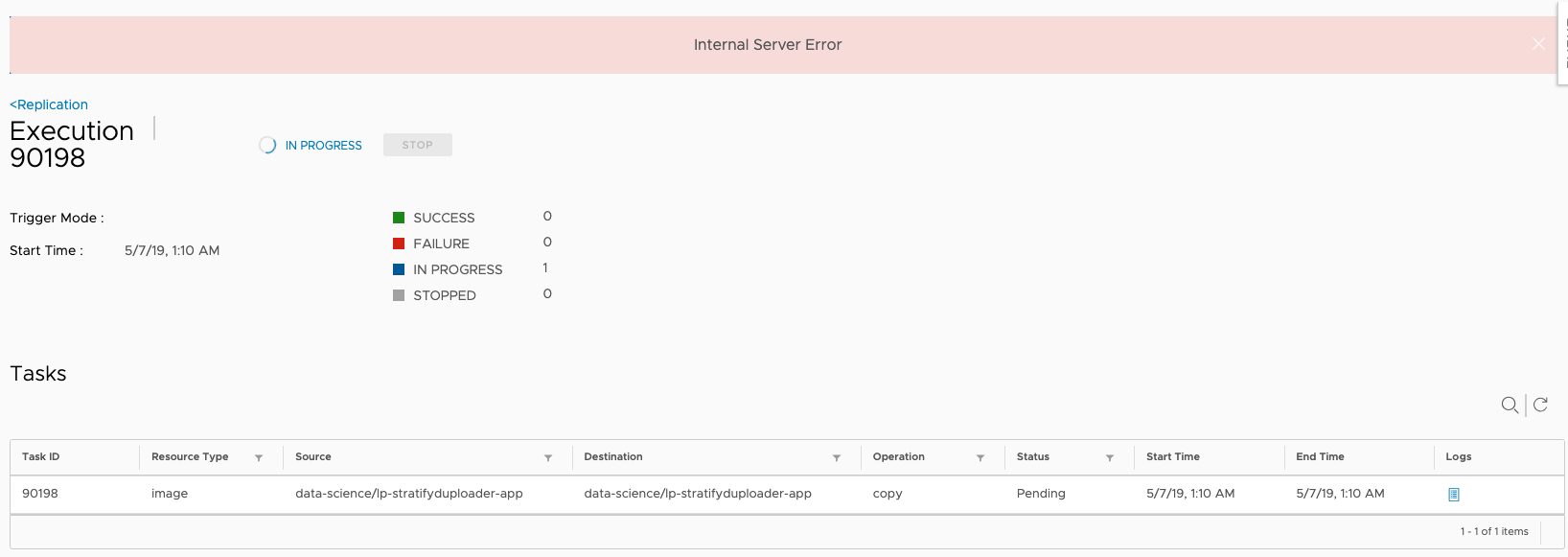
let me know if more logs needed.
YakirShriker
on 4 Jul 2019
Cannot find any error message in the logs you provided. Could you package all logs and upload them?
ywk253100
on 5 Jul 2019
Hi attaching logs
https://drive.google.com/file/d/1dC-TOq58Jvh6rSeJDUqhfx9riJ8nVqlc/view?usp=sharing
YakirShriker
on 8 Jul 2019
The root cause is that the task status hook handler doesn't handle the status update event in sequence. Will do two enhancements in 1.9:
- Handle the event in sequence to avoid the same issue occur again
- For the existing tasks that stuck in
InProgress, enhance thestopfunction to set the correct status for them.
ywk253100
on 7 Aug 2019
Is there anything I can do now to solve the problem at 1.8.0?
YakirShriker
on 7 Aug 2019
You can just login to the database container and update the replication task records to Stopped manually. Some commands you can refer to:
docker exec -it harbor-db bash to log into the database container
psql -U postgres -d registry to connect to the registry database
update replication_task set status='Stopped' where status='InProgress' and execution_id=replace_with_your_id to update the status of stuck tasks, replace the replace_with_your_id with yours.
ywk253100
on 7 Aug 2019
Hi, thank you for your response.
just tried that but I get UPDATE 0 from registry DB
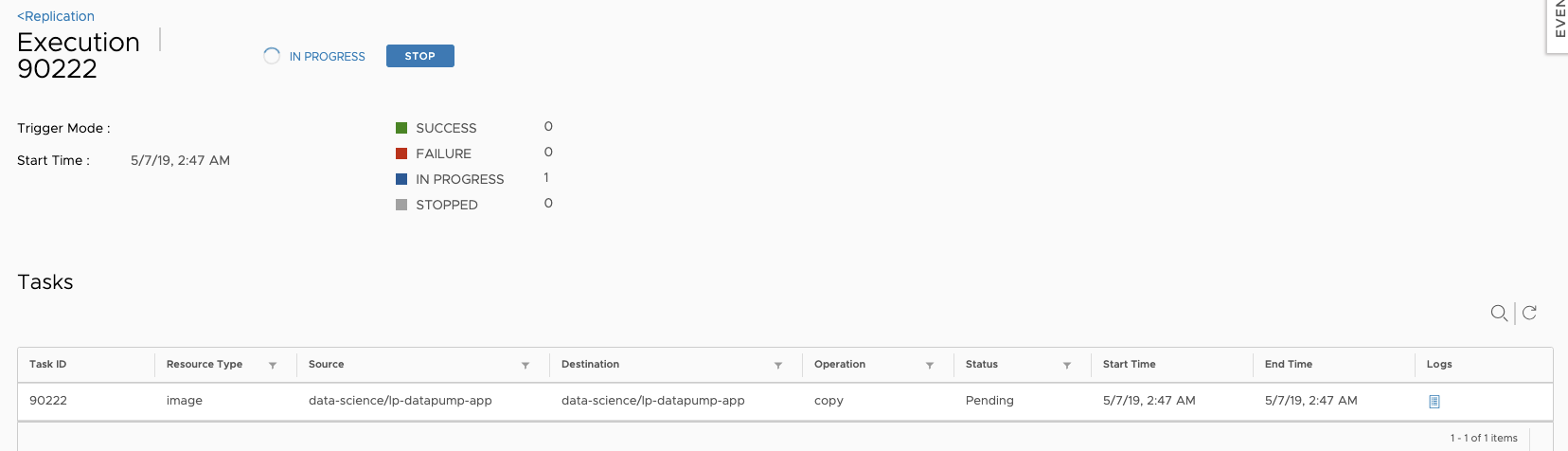
I got this execution stuck on InProgress
Did the command:
registry=# update replication_task set status='Stopped' where status='InProgress' and execution_id='90222';
UPDATE 0
registry=# update replication_task set status='Stopped' where status='InProgress' and execution_id=90222;
UPDATE 0
any ideas?
YakirShriker
on 7 Aug 2019
The issue still exists in 1.8.1, I had to find task numbers "InProgress" from Harbor UI and delete from DB, After this, able to delete replication.
Workaround:
psql -U postgres
c registry
d replication_execution;
select * from replication_execution where id in (1695,1694,1693,1692,1691,1690,1689,1688,1733,1732);
update replication_execution set status = 'Succeed',total = '1', end_time = now() where id in (1695,1694,1693,1692,1691,1690,1689,1688,1733,1732);
After this, you should be able to delete the replication tag from UI.
Hope this helps.
 deshab
on 7 Aug 2019
deshab
on 7 Aug 2019
@YakirShriker Find the task record first by runningselect * from replication_task where execution_id= 90222 and update the status then.
ywk253100
on 8 Aug 2019
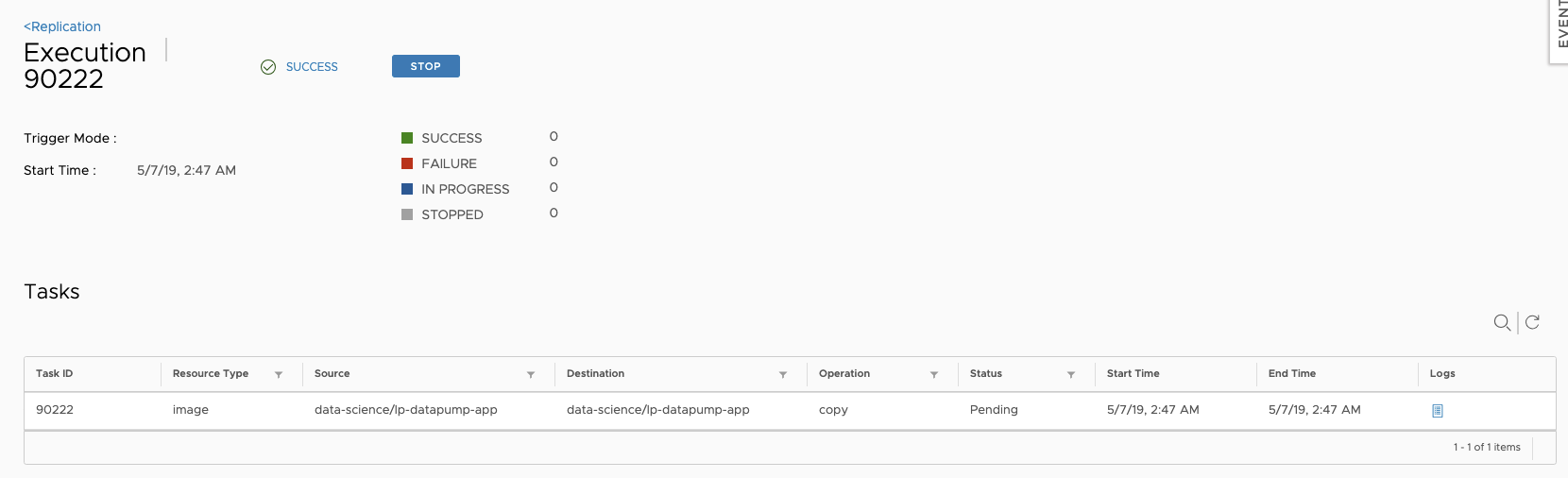
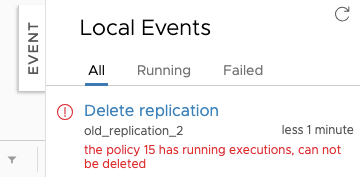
Hi, So I updated the status, but replication still cannot be deleted. There are no executions that InProgress under this replication, but it still giving the same error.
Tried to restart Harbor as well.
YakirShriker
on 8 Aug 2019
registry=# select * from replication_execution where in_progress=1;
id | policy_id | status | status_text | total | failed | succeed | in_progress | stopped | trigger | start_time | end_time
----+-----------+--------+-------------+-------+--------+---------+-------------+---------+---------+------------+----------
(0 rows)
YakirShriker
on 8 Aug 2019
Could you show me all execution and task records in database that related with this replication policy?
ywk253100
on 8 Aug 2019
I used update replication_task set status = 'Succeed', end_time = now() where id in(execution_id) and after it I was able to delete the replication.
Thank you for your help!
YakirShriker
on 8 Aug 2019
Fixed by #8606
ywk253100
on 13 Aug 2019
Related issues
 protochron
·
3Comments
protochron
·
3Comments
 reasonerjt
·
3Comments
reasonerjt
·
3Comments
 andrewtchin
·
3Comments
andrewtchin
·
3Comments
 cten
·
3Comments
cten
·
3Comments
 moooofly
·
3Comments
moooofly
·
3Comments
Most helpful comment
The issue still exists in 1.8.1, I had to find task numbers "InProgress" from Harbor UI and delete from DB, After this, able to delete replication.
Workaround:
psql -U postgres
c registry
d replication_execution;
select * from replication_execution where id in (1695,1694,1693,1692,1691,1690,1689,1688,1733,1732);
update replication_execution set status = 'Succeed',total = '1', end_time = now() where id in (1695,1694,1693,1692,1691,1690,1689,1688,1733,1732);
After this, you should be able to delete the replication tag from UI.
Hope this helps.