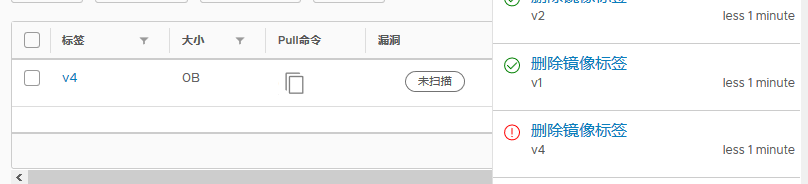
Harbor: Delete tag failed -- size 0 image.
harbor V1.6.0 RC2
reproduce steps:
- push some images into a repo.
- delete batch, and some time there are some tags can't delete, and enter a broken state.
ui.log:
Dec 11 15:48:59 172.18.0.1 ui[3597772]: 2018-12-11T07:48:59Z [ERROR] [repository.go:298]: failed to delete tag v2: 500 {"errors":[{"code":"UNKNOWN","message":"unknown error","detail":{"Path":
"/docker/registry/v2/repositories/testforrsync/test2/_manifests/tags/v1/current/link","DriverName":"filesystem"}}]}
registry.log:
Dec 11 15:48:59 172.18.0.1 registry[3597772]: time="2018-12-11T07:48:59.125019435Z" level=error msg="response completed with error" auth.user.name=harborAdmin err.code=unknown err.message="fi
lesystem: Path not found: /docker/registry/v2/repositories/testforrsync/test2/_manifests/tags/v1/current/link" go.version=go1.7.3 http.request.host="10.182.2.108:25000" http.request.id=51bbb9
d6-22cc-46d5-a204-c76f28955cb8 http.request.method=DELETE http.request.remoteaddr=10.182.2.120 http.request.uri="/v2/testforrsync/test2/manifests/sha256:3e533db287adef4291610c6186c49efcb808e8
eb76f5b8e8873077a769fd09bc" http.request.useragent="Go-http-client/1.1" http.response.contenttype="application/json; charset=utf-8" http.response.duration=7.86665ms http.response.status=500 h
ttp.response.written=188 instance.id=9c456576-0ef7-4676-9710-fa01b8527d3e service=registry vars.name="testforrsync/test2" vars.reference="sha256:3e533db287adef4291610c6186c49efcb808e8eb76f5b8
e8873077a769fd09bc" version=v2.6.2
i don't know why i delete tag 'v2' and registry try to delete the manifest reference from tag 'v1'.
i search issue in docker registry official, and find the issue https://github.com/docker/distribution/issues/1755 .
parhaps they are the same issue. please check.

 mmpei
mmpei
All 29 comments
I've experience same issue since since 1.6.1: some tags has "0B" size and can't be deleted.
Issue persist after upgrade to 1.7.1
 oneumyvakin
on 9 Feb 2019
oneumyvakin
on 9 Feb 2019
I have same issue
harbor version 1.7.1
 a33151
on 20 Feb 2019
a33151
on 20 Feb 2019
I had same issue in harbor version v1.6.0.
Today i update harbor to version 1.7.1,the issue still existed.
 yensure
on 21 Feb 2019
yensure
on 21 Feb 2019
I have same issue here, since Harbor 1.2.0, today I've 1.7.1 installed. In Harbor Web Console an image Tag are reported with 0 bytes of size and its Manifest has no pointing nor data:
[/]# cat /data/registry/docker/registry/v2/repositories/credimei/frontend/_manifests/tags/6b32ea9cfc8b3df0c2962336661077865baa9d8d/index/sha256/e7dd642e969acb450e3f5fe9067d096f0947c5f3084d23c0fea8038087d038f7/link
sha256:e7dd642e969acb450e3f5fe9067d096f0947c5f3084d23c0fea8038087d038f7[/]#
[/]#
[/]# ls /data/registry/docker/registry/v2/blobs/sha256/e7/e7dd*
ls: cannot access /data/registry/docker/registry/v2/blobs/sha256/e7/e7dd*: No such file or directory
[/]#
 gunboe
on 22 Feb 2019
gunboe
on 22 Feb 2019
I believe this could be a bug. This problem is very common when I simultaneously delete multiple Tags through the user interface.
gunboe
on 25 Feb 2019
We also have this issue when deleting multiple tags at once. Same error as reported, 500 and "unknown error".
We are running 1.7.3.
This bug prevent us from running the GC correctly (as tags still appear).
 aleroyer
on 26 Feb 2019
aleroyer
on 26 Feb 2019
I think this might be an issue with Docker Registry and not Harbor.
When trying to delete or get directly a hash (one that appears with 0 bytes in harbor) to the registry, I'm getting a manifest unknown error, see below.
curl -X DELETE -H 'Authorization: Bearer xxx' http://registry:5000/v2/myrepo/myimage/manifests/sha256:03d7371cdfd09a41f04cf4f862e1204a91231f80c1bae785231fafd936491097
{
    "errors": [
        {
            "code": "MANIFEST_UNKNOWN",
            "message": "manifest unknown"
        }
    ]
}
curl -H 'Authorization: Bearer xxx' http://registry:5000/v2/myrepo/myimage/manifests/sha256:03d7371cdfd09a41f04cf4f862e1204a91231f80c1bae785231fafd936491097
{
    "errors": [
        {
            "code": "MANIFEST_UNKNOWN",
            "detail": {
                "Name": "myrepo/myimage",
                "Revision": "sha256:03d7371cdfd09a41f04cf4f862e1204a91231f80c1bae785231fafd936491097"
            },
            "message": "manifest unknown"
        }
    ]
}
I have the path on the filesystem:
/data/docker/registry/v2/repositories/myrepo/myimage/_manifests/revisions/sha256/03d7371cdfd09a41f04cf4f862e1204a91231f80c1bae785231fafd936491097
But it is empty (on others path I have a link file with the hash inside).
For hashes where the link is present, I have the corresponding data in /data/docker/registry/v2/blobs/sha256 but for the one without the link file (so with the error) I can find the corresponding data in blobs directory.
So I guess that the data is partially deleted. There are still some references in the registry somewhere (which leads to something listed on the UI or when asking for tags listing).
aleroyer
on 26 Feb 2019
@aleroyer Before deleting the image did you run GC?
Could this be a dup to https://github.com/goharbor/harbor/issues/5078?
 reasonerjt
on 11 Apr 2019
reasonerjt
on 11 Apr 2019
@reasonerjt Just delete multiple tags on the same repo on the web UI , this issue will occur.
It's very common.
 louyiping
on 27 Apr 2019
louyiping
on 27 Apr 2019
@louyiping
could you double check are these tags having duplicate digest? If they are not could you reproduce if you delete 3 tags, can you push these 3 tags to docker hub so I can reproduce?
reasonerjt
on 29 Apr 2019
@reasonerjt
I hava a try.Firstly I try to delete 3 tags,and then two of them returned failed.Secondly,I try to push these images to harbor,than it was succeed.At the same time , I found these images still presenced in harbor after I have deleted them on the web UI unsuccessfully.In the fact,the result told me "Layer already exists" when I pushed these image to harbor in the seconed step.
yensure
on 29 Apr 2019
@reasonerjt Their digest are different.And if I delete 3 tags, two of them will failed. Below is the error log when I delete 2 tags in the same time. Please check.
May  6 11:28:29 172.18.0.1 registry[1038]: time="2019-05-06T03:28:29.113520475Z" level=error msg="response completed with error" auth.user.name=wenyan err.code=unknown err.message="filesystem: Path not found: /docker/registry/v2/repositories/fool/106074/_manifests/tags/4b7c278-20181026025122-alpha/current/link" go.version=go1.7.3 http.request.host="registry:5000" http.request.id=cb919709-e145-47ea-8052-640b61945f76 http.request.method=DELETE http.request.remoteaddr="172.18.0.8:39501" http.request.uri="/v2/fool/106074/manifests/sha256:4b7355ccefaf918f6fbbda3d872c1eedf135acc3521dc241ce98e4a3cfd4ff65" http.request.useragent=harbor-registry-client http.response.contenttype="application/json; charset=utf-8" http.response.duration=11.125876ms http.response.status=500 http.response.written=207 instance.id=9002e27d-7108-4271-8685-3dc41c14f43e service=registry vars.name="fool/106074" vars.reference="sha256:4b7355ccefaf918f6fbbda3d872c1eedf135acc3521dc241ce98e4a3cfd4ff65" version=v2.6.2
May  6 11:28:29 172.18.0.1 registry[1038]: 172.18.0.8 - - [06/May/2019:03:28:29 +0000] "DELETE /v2/fool/106074/manifests/sha256:4b7355ccefaf918f6fbbda3d872c1eedf135acc3521dc241ce98e4a3cfd4ff65 HTTP/1.1" 500 207 "" "harbor-registry-client"
May  6 11:28:29 172.18.0.1 registry[1038]: time="2019-05-06T03:28:29.11685929Z" level=info msg="response completed" go.version=go1.7.3 http.request.host="registry:5000" http.request.id=8f534a3e-f510-4e85-8830-609acb7004c2 http.request.method=DELETE http.request.remoteaddr="172.18.0.8:39448" http.request.uri="/v2/fool/106074/manifests/sha256:2b6292f3187cd65f387d41724dc63e31a81de50e617fe7a679d3a7d7968bc15b" http.request.useragent=harbor-registry-client http.response.duration=32.382667ms http.response.status=202 http.response.written=0 instance.id=9002e27d-7108-4271-8685-3dc41c14f43e service=registry version=v2.6.2
May  6 11:28:29 172.18.0.1 registry[1038]: 172.18.0.8 - - [06/May/2019:03:28:29 +0000] "DELETE /v2/fool/106074/manifests/sha256:2b6292f3187cd65f387d41724dc63e31a81de50e617fe7a679d3a7d7968bc15b HTTP/1.1" 202 0 "" "harbor-registry-client"
May  6 11:28:29 172.18.0.1 registry[1038]: time="2019-05-06T03:28:29.121096177Z" level=info msg="response completed" go.version=go1.7.3 http.request.host="registry:5000" http.request.id=8f02386c-ea6d-4ab2-b10e-f63924cea8d7 http.request.method=GET http.request.remoteaddr="172.18.0.8:39448" http.request.uri="/v2/fool/106074/tags/list" http.request.useragent=harbor-registry-client http.response.contenttype="application/json; charset=utf-8" http.response.duration=3.76356ms http.response.status=200 http.response.written=1039 instance.id=9002e27d-7108-4271-8685-3dc41c14f43e service=registry version=v2.6.2
louyiping
on 6 May 2019
@reasonerjt Maybe That's because these tags have common layers that will be deleted? For security, I can not push them to docker hub.Sorry.
louyiping
on 6 May 2019
Hi all
current I'm using 1.7.5 now, the same issue
Trying to push the image back then delete it again, nothing changed
Does anyone have any idea to fix this issue?
Thanks a lot
 judexzhu
on 17 May 2019
judexzhu
on 17 May 2019
@judexzhu you should flush registry cache before re-pushing.
this just a workaround.
mmpei
on 18 Jun 2019
root@AWSNX-RC-QA-Dev-harbor-100-104:/var/log/harbor# docker tag busybox awsnx-hub.rongcloud.net/kangyishan-private/fastdfs-proxy:43-20181213181230
root@AWSNX-RC-QA-Dev-harbor-100-104:/var/log/harbor# docker push awsnx-hub.rongcloud.net/kangyishan-private/fastdfs-proxy:43-20181213181230
The push refers to repository [awsnx-hub.rongcloud.net/kangyishan-private/fastdfs-proxy]
0d315111b484: Layer already exists
43-20181213181230: digest: sha256:895ab622e92e18d6b461d671081757af7dbaa3b00e3e28e12505af7817f73649 size: 527
Find an image tag > push > overwrite
Then you can delete it from the UI
 lijinghuatongxue
on 11 Sep 2019
lijinghuatongxue
on 11 Sep 2019
I've had this issue as well. It turned out that once you have obtained the authorization Bearer token, you can do most of the operations without being required to input your username and password again.
For some reason, the DELETE operation on the tag requires the token AND (again) the username and password.
So for all GET operations token suffices, but for ta DELETE (and possibly other DELETEs as well) you also need to re-provide user/pass or get 401 unauthorized.
 RiccardoManfrin
on 24 Oct 2019
RiccardoManfrin
on 24 Oct 2019
This issue has been automatically marked as stale because it has not had recent activity. It will be closed if no further activity occurs. Thank you for your contributions.
![stale[bot] picture](https://avatars3.githubusercontent.com/in/1724?v=4&s=40) stale[bot]
on 22 Jan 2020
stale[bot]
on 22 Jan 2020
i got the same issue is there any resolution in this problem
 prima101112
on 6 Feb 2020
prima101112
on 6 Feb 2020
Push the same tag name to the harbor again, and you can delete it from the ui.
I think, It's a bug.
 hetao29
on 1 Mar 2020
hetao29
on 1 Mar 2020
we occur the same issue on Harbor 1.10 (But in other context ...)
 aminealaouiecherif
on 5 Mar 2020
aminealaouiecherif
on 5 Mar 2020
I'm also getting same error but in my case tag name is also empty so i can't retag it.
{
"digest": "",
"name": "",
"size": 0,
"architecture": "",
"os": "",
"os.version": "",
"docker_version": "",
"author": "",
"created": "0001-01-01T00:00:00Z",
"config": null,
"signature": null,
"labels": []
}
_Error on UI : Bad argument_
Can some help to delete this tag? I'm not sure how this happened.
Harbor : 1.8.6
 arsulesandy
on 7 Apr 2020
arsulesandy
on 7 Apr 2020
These are due to a bug in upstream docker distribution, essentially the blob is not written to the storage but the manifest created successfully and referencing the non-existing blob.
https://github.com/docker/distribution/issues/1755
The workaround:
https://github.com/goharbor/harbor/issues/6515#issuecomment-593051531
With the change in v2.0, I believe this problem will not happen in Harbor even the bug remains in distribution.
I will keep this open to see if anyone hit this in v2.0.0
reasonerjt
on 11 Apr 2020
it look like a docker registry bug。
 timchenxiaoyu
on 6 May 2020
timchenxiaoyu
on 6 May 2020
Push the same tag name to the harbor again, and you can delete it from the ui.
I think, It's a bug.
With my Harbor is v1.10.2, that's workaround is working NO more! At beginning Tags were deleted.
Now I have a few Zeroed images that can not be removed after this "overlap". My Zerroed images have now the same behavior in issue #2663.
gunboe
on 27 May 2020
Push the same tag name to the harbor again, and you can delete it from the ui.
I think, It's a bug.With my Harbor is v1.10.2, that's workaround is working NO more! At beginning Tags were deleted.
Now I have a few Zeroed images that can not be removed after this "overlap". My Zerroed images have now the same behavior in issue #2663.
clean the registry data cached in redis before the steps.
command like,
## login redis and execute
select X (index of the redis db that registry used)
flushdb
Push the same tag name to the harbor again, and you can delete it from the ui.
I think, It's a bug.With my Harbor is v1.10.2, that's workaround is working NO more! At beginning Tags were deleted.
Now I have a few Zeroed images that can not be removed after this "overlap". My Zerroed images have now the same behavior in issue #2663.clean the registry data cached in redis before the steps.
command like,## login redis and execute select X (index of the redis db that registry used) flushdb
After stop Harbor, I've removed all redis: rm /data/redis/* and Started it again but, same Issue. :(
When I push an Image with common layers and same Tag name over the Zeroed image, both images are revomed.
gunboe
on 27 May 2020
Push the same tag name to the harbor again, and you can delete it from the ui.
I think, It's a bug.With my Harbor is v1.10.2, that's workaround is working NO more! At beginning Tags were deleted.
Now I have a few Zeroed images that can not be removed after this "overlap". My Zerroed images have now the same behavior in issue #2663.clean the registry data cached in redis before the steps.
command like,## login redis and execute select X (index of the redis db that registry used) flushdbAfter stop Harbor, I've removed all redis:
rm /data/redis/*and Started it again but, same Issue. :(When I push an Image with common layers and same Tag name over the Zeroed image, both images are revomed.
it is not a bug. Harbor will remove all tags with the same digest in one repo when you try to delete one of these tags. it is related to the design of docker registry. and it has been resolved in Harbor 2.0 by redesign the image tag manage system.
mmpei
on 28 May 2020
this was due to a distribution upstream bug but should not be happening in 2.0 since we use db as single source of truth. Also you can now delete a tag or a set of tags on UI without affecting other tags or the associated digest. Definitely feel free to ask for support on here or open a new ticket if you come across this in v2.0
 xaleeks
on 29 May 2020
xaleeks
on 29 May 2020
Related issues
 ddudzinski
·
32Comments
ddudzinski
·
32Comments
 gischethans
·
26Comments
gischethans
·
26Comments
 kumy
·
22Comments
kumy
·
22Comments
 annProg
·
20Comments
annProg
·
20Comments
 jimangel
·
23Comments
jimangel
·
23Comments
Most helpful comment
Push the same tag name to the harbor again, and you can delete it from the ui.
I think, It's a bug.