Harbor: User access to Harbor controlled by membership in a group in LDAP
I'd like to grant user access to my Harbor instance through membership in a group in LDAP - something similar to "LDAP Group Admin DN" setting, but this would be for the user role only.
Is there a way to set authentication config in Harbor like that? I tried fiddling with LDAP Base DN, LDAP Group Base DN or LDAP filter settings but no cigar :/
It seems that currently all user accounts that are in my LDAP directory are able to login to Harbor once I set up basic LDAP integration.
 jacekd81
All 5 comments
Hi @jacekd81 – are you asking to allow _only_ users in a particular group to log into Harbor? If so this functionality was recently added:
https://github.com/goharbor/harbor/blob/master/docs/manage_role_by_ldap_group.md
Let me know if I misunderstood.
 ghost
on 2 Nov 2018
ghost
on 2 Nov 2018
@clouderati you understood me well, however document you linked describes something else.
The feature described in that document allows to assign roles to Projects using LDAP groups, not the whole Harbor.
jacekd81
on 3 Nov 2018
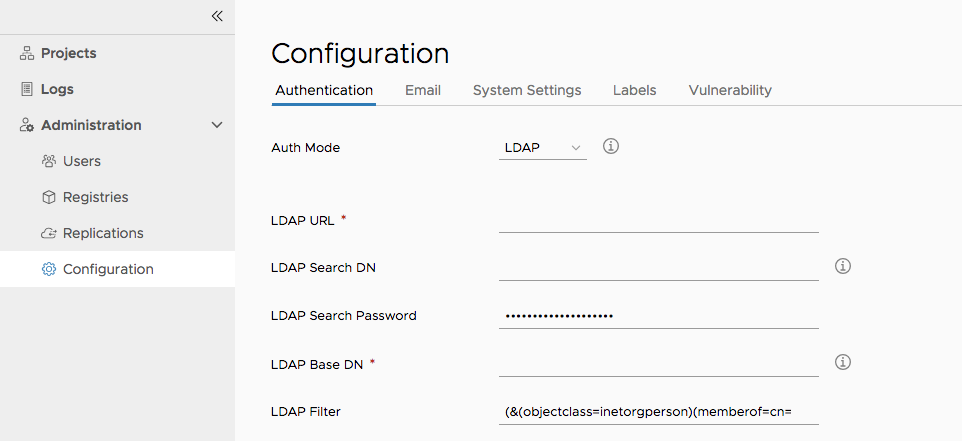
You can setup a LDAP filter to allow some user in specific groups to login
(&(objectclass=inetorgperson)(memberof=cn=harbor_users,ou=groups,dc=example,dc=com))
The cn=harbor_users,ou=groups,dc=example,dc=com is a LDAP group DN
 stonezdj
on 9 Nov 2018
stonezdj
on 9 Nov 2018
stonezdj
on 9 Nov 2018
Thanks a lot for this.
This should work. Too bad LDAP in my company is set up in some strange, that users have no "memberof" properties. Nevertheless I've checked this with AD and it should work.
Thanks again.
jacekd81
on 18 Nov 2018
Related issues
 levchik
·
4Comments
levchik
·
4Comments
 izhichao
·
3Comments
izhichao
·
3Comments
 moooofly
·
3Comments
moooofly
·
3Comments
 cedvan
·
3Comments
cedvan
·
3Comments
 andrewtchin
·
3Comments
andrewtchin
·
3Comments