Harbor: cannot push images due to 500 Internal Server Error
I can docker login, but cannot docker push.
It keeps retrying and turns out to fail.
centos 7
docker 17.12.0-ce
docker-compose 1.18.0
I'm using cephfs to store my registry and it seems involved. I'm very confused with this problem.
Here is the registry log:
Apr 22 21:00:57 172.18.0.1 registry[903]: time="2018-04-22T13:00:57.548629088Z" level=debug msg="filesystem.PutContent(\"/docker/registry/v2/repositories/test/hello-world/_uploads/0c8adeea-ea19-4718-865a-0598ed490937/startedat\")" auth.user.name=admin go.version=go1.7.3 http.request.host=192.168.18.129 http.request.id=693a0db9-e43d-42ea-801b-a00e5816745a http.request.method=POST http.request.remoteaddr=192.168.18.129 http.request.uri="/v2/test/hello-world/blobs/uploads/" http.request.useragent="docker/17.12.0-ce go/go1.9.2 git-commit/c97c6d6 kernel/3.10.0-693.17.1.el7.x86_64 os/linux arch/amd64 UpstreamClient(Docker-Client/17.12.0-ce \(linux\))" instance.id=1baa0e13-8bd3-44fc-85b3-4cbf0929b8b3 service=registry trace.duration=88.357µs trace.file="/go/src/github.com/docker/distribution/registry/storage/driver/base/base.go" trace.func="github.com/docker/distribution/registry/storage/driver/base.(*Base).PutContent" trace.id=0667ee69-8ad5-42f5-859e-8bdb42b077d8 trace.line=95 vars.name="test/hello-world" version=v2.6.2
Apr 22 21:00:57 172.18.0.1 registry[903]: time="2018-04-22T13:00:57.548716468Z" level=error msg="response completed with error" auth.user.name=admin err.code=unknown err.detail="filesystem: mkdir /mnt/mycephfs: permission denied" err.message="unknown error" go.version=go1.7.3 http.request.host=192.168.18.129 http.request.id=693a0db9-e43d-42ea-801b-a00e5816745a http.request.method=POST http.request.remoteaddr=192.168.18.129 http.request.uri="/v2/test/hello-world/blobs/uploads/" http.request.useragent="docker/17.12.0-ce go/go1.9.2 git-commit/c97c6d6 kernel/3.10.0-693.17.1.el7.x86_64 os/linux arch/amd64 UpstreamClient(Docker-Client/17.12.0-ce \(linux\))" http.response.contenttype="application/json; charset=utf-8" http.response.duration=3.695943ms http.response.status=500 http.response.written=153 instance.id=1baa0e13-8bd3-44fc-85b3-4cbf0929b8b3 service=registry vars.name="test/hello-world" version=v2.6.2
Apr 22 21:00:57 172.18.0.1 registry[903]: 172.18.0.5 - - [22/Apr/2018:13:00:57 +0000] "POST /v2/test/hello-world/blobs/uploads/ HTTP/1.1" 500 153 "" "docker/17.12.0-ce go/go1.9.2 git-commit/c97c6d6 kernel/3.10.0-693.17.1.el7.x86_64 os/linux arch/amd64 UpstreamClient(Docker-Client/17.12.0-ce \(linux\))"
Apr 22 21:01:13 172.18.0.1 registry[903]: 127.0.0.1 - - [22/Apr/2018:13:01:13 +0000] "GET / HTTP/1.1" 200 0 "" "curl/7.56.1"
Here is the proxy log:
Apr 22 20:59:26 172.18.0.1 proxy[903]: 192.168.18.1 - "POST /api/projects HTTP/1.1" 201 0 "http://192.168.18.129/harbor/projects" "Mozilla/5.0 (Windows NT 10.0; WOW64) AppleWebKit/537.36 (KHTML, like Gecko) Chrome/66.0.3359.117 Safari/537.36" 0.029 0.029 .
Apr 22 20:59:26 172.18.0.1 proxy[903]: 192.168.18.1 - "GET /api/statistics HTTP/1.1" 200 97 "http://192.168.18.129/harbor/projects" "Mozilla/5.0 (Windows NT 10.0; WOW64) AppleWebKit/537.36 (KHTML, like Gecko) Chrome/66.0.3359.117 Safari/537.36" 0.040 0.040 .
Apr 22 20:59:26 172.18.0.1 proxy[903]: 192.168.18.1 - "GET /api/projects?page=1&page_size=15 HTTP/1.1" 200 240 "http://192.168.18.129/harbor/projects" "Mozilla/5.0 (Windows NT 10.0; WOW64) AppleWebKit/537.36 (KHTML, like Gecko) Chrome/66.0.3359.117 Safari/537.36" 0.068 0.068 .
Apr 22 21:00:27 172.18.0.1 proxy[903]: 192.168.18.129 - "GET /v2/ HTTP/1.1" 401 87 "-" "docker/17.12.0-ce go/go1.9.2 git-commit/c97c6d6 kernel/3.10.0-693.17.1.el7.x86_64 os/linux arch/amd64 UpstreamClient(Docker-Client/17.12.0-ce \x5C(linux\x5C))" 0.018 0.018 .
Apr 22 21:00:27 172.18.0.1 proxy[903]: 192.168.18.129 - "GET /service/token?account=admin&scope=repository%3Atest%2Fhello-world%3Apush%2Cpull&service=harbor-registry HTTP/1.1" 200 965 "-" "docker/17.12.0-ce go/go1.9.2 git-commit/c97c6d6 kernel/3.10.0-693.17.1.el7.x86_64 os/linux arch/amd64 UpstreamClient(Docker-Client/17.12.0-ce \x5C(linux\x5C))" 0.080 0.080 .
Apr 22 21:00:27 172.18.0.1 proxy[903]: 192.168.18.129 - "HEAD /v2/test/hello-world/blobs/sha256:9bb5a5d4561a5511fa7f80718617e67cf2ed2e6cdcd02e31be111a8d0ac4d6b7 HTTP/1.1" 404 0 "-" "docker/17.12.0-ce go/go1.9.2 git-commit/c97c6d6 kernel/3.10.0-693.17.1.el7.x86_64 os/linux arch/amd64 UpstreamClient(Docker-Client/17.12.0-ce \x5C(linux\x5C))" 0.012 0.012 .
If somebody gives some advice, I will be appreciate with that.
Tip: The firewall has been disabled.
 victorvli
All 22 comments
docker log:
Apr 22 21:49:55 node2 dockerd[903]: time="2018-04-22T21:49:55.613649706+08:00" level=info msg="Attempting next endpoint for push after error: Get https://192.168.18.129/v2/: dial tcp 192.168.18.129:443: getsockopt: connection refused"
Apr 22 21:49:55 node2 dockerd[903]: time="2018-04-22T21:49:55.830982501+08:00" level=error msg="Upload failed, retrying: received unexpected HTTP status: 500 Internal Server Error"
victorvli
on 22 Apr 2018
ui log:
Apr 22 22:01:42 172.18.0.1 ui[40789]: 2018-04-22T14:01:42Z [DEBUG] [security.go:286]: user information is nil
Apr 22 22:01:42 172.18.0.1 ui[40789]: 2018-04-22T14:01:42Z [DEBUG] [security.go:300]: using local database project manager
Apr 22 22:01:42 172.18.0.1 ui[40789]: 2018-04-22T14:01:42Z [DEBUG] [security.go:302]: creating local database security context...
Apr 22 22:01:42 172.18.0.1 ui[40789]: 2018-04-22T14:01:42Z [DEBUG] [interceptors.go:120]: in url handler, path: /registryproxy/v2/test/hello-world/blobs/uploads/
Apr 22 22:01:42 172.18.0.1 ui[40789]: 2018/04/22 14:01:42 #033[1;34m[router.go:829][D] | POST | /v2/test/hello-world/blobs/uploads/ | 46.352872ms | match | /registryproxy/* | #033[0m
Apr 22 22:02:02 172.18.0.1 ui[40789]: 2018-04-22T14:02:02Z [DEBUG] [security.go:286]: user information is nil
Apr 22 22:02:02 172.18.0.1 ui[40789]: 2018-04-22T14:02:02Z [DEBUG] [security.go:300]: using local database project manager
Apr 22 22:02:02 172.18.0.1 ui[40789]: 2018-04-22T14:02:02Z [DEBUG] [security.go:302]: creating local database security context...
Apr 22 22:02:02 172.18.0.1 ui[40789]: 2018-04-22T14:02:02Z [DEBUG] [interceptors.go:120]: in url handler, path: /registryproxy/v2/test/hello-world/blobs/uploads/
Apr 22 22:02:02 172.18.0.1 ui[40789]: 2018/04/22 14:02:02 #033[1;34m[router.go:829][D] | POST | /v2/test/hello-world/blobs/uploads/ | 27.384917ms | match | /registryproxy/* | #033[0m
victorvli
on 22 Apr 2018
Seems the root cause was in this line:
Apr 22 21:00:57 172.18.0.1 registry[903]: time="2018-04-22T13:00:57.548716468Z" level=error msg="response completed with error" auth.user.name=admin err.code=unknown err.detail="filesystem: mkdir /mnt/mycephfs: permission denied" err.message="unknown error"
Please check the configuration of your storage.
 reasonerjt
on 23 Apr 2018
reasonerjt
on 23 Apr 2018
yeah, I have noticed that msg.
But the directory "/mnt/mycephfs" already exsists and it mounted ceph filesystem.
And the path of my reigistry is set as "/mnt/mycephfs/harbor/data/registry".
I don't understand why this error happens when pushing images.
victorvli
on 23 Apr 2018
The process of registry is started by non-root user, you have to set the permission to 10000:10000 at the host, so the registry can perform write to that directory.
reasonerjt
on 23 Apr 2018
@JunkaiLee These are two separate issues.
I'm confused if you are using docker-compose the DB is internal.
If you are doing customization like hosting DB in another host, there will be quite a few factors you need to consider, it's out of our support scope.
reasonerjt
on 24 Apr 2018
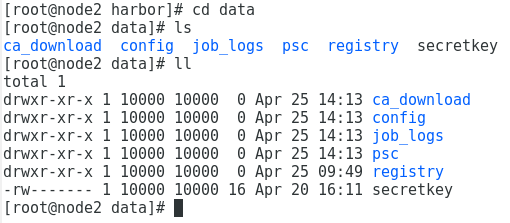
@reasonerjt the directory registry has already been set 10000:10000, but it just cannot push images.
victorvli
on 25 Apr 2018
The condition now is that I can log in, each container of harbor run well but when pushing images it keeps retrying and ends with 500 error.
victorvli
on 25 Apr 2018
@JunkaiLee please provide server side logs, not dockerd, please provide proxy.log and registry.log at around Apr 25 15:53:03
reasonerjt
on 26 Apr 2018
@reasonerjt
Here's the log. Thx.
log.zip
victorvli
on 26 Apr 2018
@JunkaiLee
Checked the log, same root cause:
err.detail="filesystem: mkdir /mnt/mycephfs: permission denied" err.message="unknown error" go.version=go1.7.3 http.request.host=192.168.18.120 http.request.id=6720659f-cd1b-4654-8d8a-f3b11963ea19 http.request.method=POST http.request.remoteaddr=192.168.18.120 http.request.uri="/v2/library/hello-world/blobs/uploads/" http.request.useragent="docker/17.12.0-ce go/go1.9.2 git-commit/c97c6d6 kernel/3.10.0-693.17.1.el7.x86_64 os/linux arch/amd64 UpstreamClient(Docker-Client/17.12.0-ce \(linux\))" http.response.contenttype="application/json; charset=utf-8" http.response.duration=2.444902ms http.response.status=500 http.response.written=153 instance.id=ee8014a2-1a59-404f-91bd-e12e3372fec2 service=registry vars.name="library/hello-world" version=v2.6.2
It's an issue in your env, please check the permission of the directory on your host which you mount into container as /mnt/mycephfs, make sure user 10000:10000 has write permission.
reasonerjt
on 27 Apr 2018
Sorry it doesn't work.
I think it may be some other reason causes the problem.
@reasonerjt
Could mariadb cause this problem?
I'm using 5.5.56-MairaDB and encountered syntax error when executing registry.sql.
I modify several places about TIMESTAMP.
Could it influence registry's pushing image?
The info about pushing image ought to sync with database.
victorvli
on 27 Apr 2018
@JunkaiLee Did you run docker exec into the registry container to check the permission?
I'm almost 100% sure that the permission issue is the reason why it returns 500.
reasonerjt
on 28 Apr 2018
I don't know how to check the permission.
Please let me know how to check it when I get inside the container. Thanks.

@reasonerjt
victorvli
on 1 May 2018
@JunkaiLee
ls -l /mnt/mycephfs
reasonerjt
on 2 May 2018

@reasonerjt
victorvli
on 2 May 2018
sorry it should be ls -l /mnt
And could you show me the config.yml of the registry?
The error says "filesystem: mkdir /mnt/mycephfs: permission denied", I'm curious why registry tries to create directory in /mnt/mycephfs
So the root cause is the permission of the directory /mnt/mycephfs , not /mnt/mycephfs/harbor ...
reasonerjt
on 2 May 2018
@reasonerjt

and the config.yml of registry is:
root [ /etc/registry ]# cat config.yml
version: 0.1
log:
level: debug
fields:
service: registry
storage:
cache:
layerinfo: redis
filesystem:
rootdirectory: /mnt/mycephfs/harbor/data/registry
maintenance:
uploadpurging:
enabled: false
delete:
enabled: true
redis:
addr: 192.168.18.120:6379
db: 0
dialtimeout: 10ms
readtimeout: 10ms
writetimeout: 10ms
pool:
maxidle: 16
maxactive: 64
idletimeout: 300s
http:
addr: :5000
secret: placeholder
debug:
addr: localhost:5001
auth:
token:
issuer: harbor-token-issuer
realm: http://192.168.18.130/service/token
rootcertbundle: /etc/registry/root.crt
service: harbor-registry
notifications:
endpoints:
- name: harbor
disabled: false
url: http://ui:8080/service/notifications
timeout: 3000ms
threshold: 5
backoff: 1s
@JunkaiLee
The permission looks correct, however, I noticed you are running the ls -l commands on the docker host, not in the container.
Could you run docker exec -it .... /bin/bash to get into the container and run ls -l /mnt to see the permission?
Please also check the volume setting in docker-compose.yml of the registry container ( I assume you are using docker-compose to start harbor )
reasonerjt
on 2 May 2018
@reasonerjt

Here's the docker-compose.yml
[root@node3 log]# cat /disk/harbor/ha/docker-compose.yml
version: '2'
services:
log:
image: vmware/harbor-log:v1.4.0
container_name: harbor-log
restart: always
volumes:
- /mnt/mycephfs/harbor/log/:/var/log/docker/:z
- ./common/config/log/:/etc/logrotate.d/:z
ports:
- 127.0.0.1:1514:10514
networks:
- harbor
registry:
image: vmware/registry-photon:v2.6.2-v1.4.0
container_name: registry
restart: always
volumes:
- /mnt/mycephfs/harbor/data/registry:/storage:z
- ./common/config/registry/:/etc/registry/:z
networks:
- harbor
environment:
- GODEBUG=netdns=cgo
command:
["serve", "/etc/registry/config.yml"]
depends_on:
- log
logging:
driver: "syslog"
options:
syslog-address: "tcp://127.0.0.1:1514"
tag: "registry"
adminserver:
image: vmware/harbor-adminserver:v1.4.0
container_name: harbor-adminserver
env_file:
- ./common/config/adminserver/env
restart: always
volumes:
- /mnt/mycephfs/harbor/data/config/:/etc/adminserver/config/:z
- /mnt/mycephfs/harbor/data/secretkey:/etc/adminserver/key:z
- /mnt/mycephfs/harbor/data/:/data/:z
networks:
- harbor
depends_on:
- log
logging:
driver: "syslog"
options:
syslog-address: "tcp://127.0.0.1:1514"
tag: "adminserver"
ui:
image: vmware/harbor-ui:v1.4.0
container_name: harbor-ui
env_file:
- ./common/config/ui/env
restart: always
volumes:
- ./common/config/ui/app.conf:/etc/ui/app.conf:z
- ./common/config/ui/private_key.pem:/etc/ui/private_key.pem:z
- ./common/config/ui/certificates/:/etc/ui/certifates/
- /mnt/mycephfs/harbor/data/secretkey:/etc/ui/key:z
- /mnt/mycephfs/harbor/data/ca_download/:/etc/ui/ca/:z
- /mnt/mycephfs/harbor/data/psc/:/etc/ui/token/:z
networks:
- harbor
depends_on:
- log
- adminserver
- registry
logging:
driver: "syslog"
options:
syslog-address: "tcp://127.0.0.1:1514"
tag: "ui"
jobservice:
image: vmware/harbor-jobservice:v1.4.0
container_name: harbor-jobservice
env_file:
- ./common/config/jobservice/env
restart: always
volumes:
- /mnt/mycephfs/harbor/data/job_logs:/var/log/jobs:z
- ./common/config/jobservice/app.conf:/etc/jobservice/app.conf:z
- /mnt/mycephfs/harbor/data/secretkey:/etc/jobservice/key:z
networks:
- harbor
depends_on:
- ui
- adminserver
logging:
driver: "syslog"
options:
syslog-address: "tcp://127.0.0.1:1514"
tag: "jobservice"
proxy:
image: vmware/nginx-photon:v1.4.0
container_name: nginx
restart: always
volumes:
- ./common/config/nginx:/etc/nginx:z
networks:
- harbor
ports:
- 80:80
- 443:443
- 4443:4443
depends_on:
- registry
- ui
- log
logging:
driver: "syslog"
options:
syslog-address: "tcp://127.0.0.1:1514"
tag: "proxy"
networks:
harbor:
external: false
@JunkaiLee
OK, now it's clear, the config.yml takes effect in the container, so rootdirectory in config.yml should point to the directory inside the container, i.e. /storage not a path on docker host.
reasonerjt
on 2 May 2018
It works. Thanks for all the help and patience.
[root@node3 harbor]# docker login 192.168.18.130 -u admin -p Harbor12345
WARNING! Using --password via the CLI is insecure. Use --password-stdin.
Login Succeeded
[root@node3 harbor]# docker push 192.168.18.130/library/hello-world:latest
The push refers to repository [192.168.18.130/library/hello-world]
2b8cbd0846c5: Pushed
latest: digest: sha256:d5c74e6f8efc7bdf42a5e22bd764400692cf82360d86b8c587a7584b03f51520 size: 524
Related issues
 AlexZeitler
·
30Comments
AlexZeitler
·
30Comments
 mmpei
·
29Comments
mmpei
·
29Comments
 gischethans
·
26Comments
gischethans
·
26Comments
 roldancer
·
30Comments
roldancer
·
30Comments
 ddudzinski
·
32Comments
ddudzinski
·
32Comments
Most helpful comment
It works. Thanks for all the help and patience.