Harbor: Add 'Image ID' column to repository page
It is very conveniently to see which tags alias which images.
Harbor v1.1.1
 xkrt
xkrt
All 6 comments
why are we adding the image id to the repository page? whats the use case for doing that? when there are more than one image in a repo, what does that look like?
@steven-zou @tonycgil @akshayl
 lweitzman
on 8 Jun 2017
lweitzman
on 8 Jun 2017
We use docker tags for versioning our images (we use format yymmdd-
Also, we use special tags prod and stage, which points to (alias) same images with "version tags". Sometimes stage and prod aliases same image, sometimes them alias different images.
I believe this scheme is not rare and quite common.
The problem with Harbor UI, which btw is a great project 👍, that we do not see what versions prod/stage tags alias because we do not see images ids. Compare screenshots of Harbor and output of docker images:
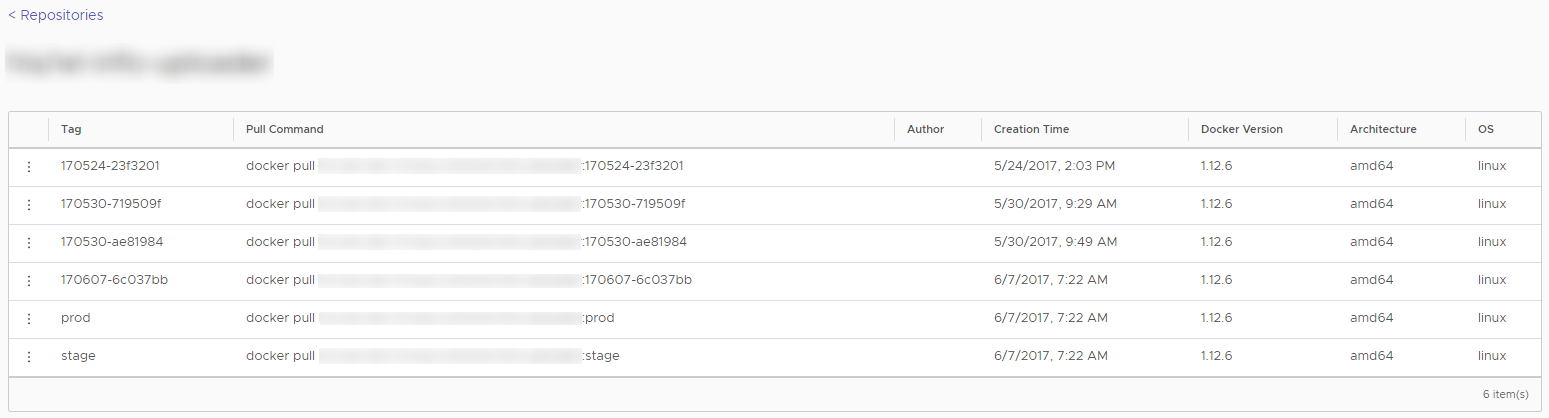

As you can see, if I look at the output of docker images command - I can easily figure out that prod and stage tags both points to image with version tag 170607-6c037bb.
But this impossible to figure out with current Harbor UI.
xkrt
on 9 Jun 2017
@xkrt you're saying that because an image can have multiple tags, which will be displayed on different rows, you can't tell that 2 rows in the datagrid refer to the same image. would a better solution be to group the tags of a given image together in the datagrid? is there any reason to actually copy and use the image ID on the command line? @akshayl @steven-zou @tonycgil thanks.
lweitzman
on 9 Jun 2017
@lweitzman yes, looks like your proposal solves my problem. And I do not see any uses cases of copying image id actually.
Btw maybe you should consider some "columns to show settings" functionality. For example, I do not really need "Architecture" and "OS" columns at all, they just waste of space for me.
xkrt
on 9 Jun 2017
The Image ID is a concept of docker client side. You can use digest instead and you can get it from UI.
 ywk253100
on 27 Feb 2018
ywk253100
on 27 Feb 2018
Hello there, but I can't find where is showed image digest ... I need to check image version stored in our Harbor and the one used to deploy on Kubernetes.
 loganmzz
on 29 Apr 2020
loganmzz
on 29 Apr 2020
Related issues
 xiaosadexiaohai
·
3Comments
xiaosadexiaohai
·
3Comments
 272909106
·
4Comments
272909106
·
4Comments
 abououdine
·
3Comments
abououdine
·
3Comments
 levchik
·
4Comments
levchik
·
4Comments
 steveal
·
3Comments
steveal
·
3Comments