Hangfire next execution in the past
Hello,
for a while we've been using Hangfire with several recurring jobs in a .net core api. Ive configured IIS to make sure it is always running. Ive set the appPool to AlwaysRunning with timeout of 0, and enabled pre-load for the site.


This seemed to work fine at first.
However sometimes the jobs still stop working, when i open the dashboard the next execution date is a time in the past, when i trigger the job again manually it works fine again.
Any idea what i could be doing wrong here?
Regards
Johan
 JBastiaan
All 75 comments
We experienced it after upgrading to v.1.7.4 in a distributed environment, where some servers ran 1.6.24 and a single one ran 1.7.4. Tried to upgrade all to v1.7.4, which caused all of our scheduled jobs to be stuck. Ended up rolling back to v1.6.2x versions and had to update the Hangfire.Hash table and remove all rows that had field = 'V' and value ='2' and everything started working again.
 mikanyg
on 9 Jul 2019
mikanyg
on 9 Jul 2019
I've made some changes for recurring jobs in the latest 1.7.5 release, so may be they solve these issues. If not, please post here log messages as they should contain exceptions to understand what's going wrong.
 odinserj
on 22 Jul 2019
odinserj
on 22 Jul 2019
We had the same issue as @JBastiaan with 1.7.4, after upgrading to 1.7.5 we are seeing all of our recurring jobs in the DISABLED state. When I mouse over it says the following: "Cron expression is invalid or don't have any occurrences over the next 100 years". The Cron expression works fine as far as I can tell. The expression is "20 1 * * *", I checked Cron Tab it says its fine. Below is a screen shot of what I am seeing.

From what I can tell this error message isn't correct and can be misleading.
 twurm
on 3 Aug 2019
twurm
on 3 Aug 2019
I've modified recurring jobs page and scheduler to show actual errors in dashboard when there's a scheduling error. Fix will be available in version 1.7.6 shortly, the build is already queued on AppVeyor CI.
odinserj
on 5 Aug 2019
@odinserj thanks for the quick turn around! I'll pull it down today!
twurm
on 5 Aug 2019
I'm also getting this error. I deleted all recurring jobs, then upgraded to 1.7.6 but after a while they start showing "next execution: xxx hours ago" and they stop firing according to the cron job

 Tieno
on 8 Aug 2019
Tieno
on 8 Aug 2019
@Tieno could you show me the output of the following query (should be run against your Hangfire database)? I need to see whether identifiers of those jobs are sitting in the schedule first.
SELECT TOP (20) *
  FROM [HangFire].[Set]
  WHERE [Key] = N'recurring-jobs'
  ORDER BY [Score]
@odinserj , here's a screenshot: 
Tieno
on 12 Aug 2019
@Tieno, thank you for update. Now I see that the Score value is inconsistent with the NextExecution one, and that's a bug. I've spent almost entire day thinking how can this happen, but failed – everywhere they are updated simultaneously.
Could you also tell me more about your recurring job by running the queries below, and post here your configuration logic related to Hangfire?
SELECT TOP (20) *
  FROM [HangFire].[Set]
  WHERE [Key] = N'recurring-jobs'
  ORDER BY [Score]

SELECT TOP (1000) *
  FROM [HangFire].[Hash]
  WHERE [Key] LIKE N'recurring-job:%'
@odinserj What do you mean by configuration logic?
The recurring jobs are configured in an Owin startup class by calling "RecurringJob.AddOrUpdate"
Below you can find the results of the query
I routinely delete the recurring jobs so they get recreated. At the moment only
ShutDownMonitor and MyCareNetMonitor are showing the problem of "next execution in the past". After a while all recurring jobs have a next execution in the past.
SELECT TOP (1000) *
  FROM [HangFire].[Hash]
  WHERE [Key] LIKE N'recurring-job:%'

Id  Key Field   Value   ExpireAt
253500  recurring-job:RebuildDefragmentedIndexesArchive Queue   defaultsequentialqueue  NULL
253501  recurring-job:RebuildDefragmentedIndexesArchive Cron    10 4 * * *  NULL
253502  recurring-job:RebuildDefragmentedIndexesArchive TimeZoneId  Romance Standard Time   NULL
253503  recurring-job:RebuildDefragmentedIndexesArchive Job {"Type":".Invoicing.Batch.Jobs.Maintenance.RebuildIndexesArchiveWorkerJob, Invoicing.Batch, Version=1.0.0.0, Culture=neutral, PublicKeyToken=null","Method":"Run","ParameterTypes":"[]","Arguments":"[]"}   NULL
253504  recurring-job:RebuildDefragmentedIndexesArchive CreatedAt   2019-08-07T05:32:40.3669804Z    NULL
253505  recurring-job:RebuildDefragmentedIndexesArchive NextExecution   2019-08-16T02:10:00.0000000Z    NULL
253506  recurring-job:RebuildDefragmentedIndexesArchive V   2   NULL
254026  recurring-job:RebuildDefragmentedIndexesArchive LastExecution   2019-08-15T02:10:07.9100911Z    NULL
254027  recurring-job:RebuildDefragmentedIndexesArchive LastJobId   1439604 NULL
254835  recurring-job:MyCareNetMonitor  Queue   default NULL
254836  recurring-job:MyCareNetMonitor  Cron    */15 * * * *    NULL
254837  recurring-job:MyCareNetMonitor  TimeZoneId  Romance Standard Time   NULL
254838  recurring-job:MyCareNetMonitor  Job {"Type":"Invoicing.Batch.Jobs.MyCareNet.MyCareNetQueueDownloadOrSendJobsWorkerJob, Invoicing.Batch, Version=1.0.0.0, Culture=neutral, PublicKeyToken=null","Method":"Run","ParameterTypes":"[\"Invoicing.Common.Orchestration.Messages.MCNKeyHandle, Invoicing.Common, Version=1.0.0.0, Culture=neutral, PublicKeyToken=null\",\"System.Int32, mscorlib, Version=4.0.0.0, Culture=neutral, PublicKeyToken=b77a5c561934e089\"]","Arguments":"[\"{\\\"KeyHandle\\\":\\\"REMOVED\\\",\\\"MinutesLeft\\\":718,\\\"RequestAt\\\":\\\"2019-08-14T08:19:24.5139004+02:00\\\",\\\"user\\\":\\\"591978667963\\\"}\",\"15\"]"}    NULL
254839  recurring-job:MyCareNetMonitor  CreatedAt   2019-08-09T06:26:37.3305973Z    NULL
254840  recurring-job:MyCareNetMonitor  NextExecution   2019-08-14T17:45:00.0000000Z    NULL
254841  recurring-job:MyCareNetMonitor  V   2   NULL
254842  recurring-job:ShutDownMonitor   Queue   default NULL
254843  recurring-job:ShutDownMonitor   Cron    */10 * * * *    NULL
254844  recurring-job:ShutDownMonitor   TimeZoneId  Romance Standard Time   NULL
254845  recurring-job:ShutDownMonitor   Job {"Type":"Invoicing.Batch.Jobs.MyCareNet.ShutDownMyCareNetMonitorWorkerJob, Invoicing.Batch, Version=1.0.0.0, Culture=neutral, PublicKeyToken=null","Method":"Run","ParameterTypes":"[\"System.String, mscorlib, Version=4.0.0.0, Culture=neutral, PublicKeyToken=b77a5c561934e089\",\"System.Int64, mscorlib, Version=4.0.0.0, Culture=neutral, PublicKeyToken=b77a5c561934e089\"]","Arguments":"[\"\\\"20:02:24 PM +02 - 14-08-2019\\\"\",\"637014097445139004\"]"}    NULL
254846  recurring-job:ShutDownMonitor   CreatedAt   2019-08-09T06:26:37.4712312Z    NULL
254847  recurring-job:ShutDownMonitor   NextExecution   2019-08-14T06:40:00.0000000Z    NULL
254848  recurring-job:ShutDownMonitor   V   2   NULL
255258  recurring-job:MyCareNetMonitor  LastExecution   2019-08-14T17:30:04.3771158Z    NULL
255259  recurring-job:MyCareNetMonitor  LastJobId   1439587 NULL
255260  recurring-job:ShutDownMonitor   LastExecution   2019-08-14T06:30:10.5051333Z    NULL
255261  recurring-job:ShutDownMonitor   LastJobId   1438470 NULL
256230  recurring-job:RebuildDefragmentedIndexes    Queue   defaultsequentialqueue  NULL
256231  recurring-job:RebuildDefragmentedIndexes    Cron    0 4 * * *   NULL
256232  recurring-job:RebuildDefragmentedIndexes    TimeZoneId  Romance Standard Time   NULL
256233  recurring-job:RebuildDefragmentedIndexes    Job {"Type":"Invoicing.Batch.Jobs.Maintenance.RebuildIndexesWorkerJob, Invoicing.Batch, Version=1.0.0.0, Culture=neutral, PublicKeyToken=null","Method":"Run","ParameterTypes":"[]","Arguments":"[]"}   NULL
256234  recurring-job:RebuildDefragmentedIndexes    CreatedAt   2019-08-13T16:06:15.0311007Z    NULL
256235  recurring-job:RebuildDefragmentedIndexes    NextExecution   2019-08-16T02:00:00.0000000Z    NULL
256236  recurring-job:RebuildDefragmentedIndexes    V   2   NULL
256237  recurring-job:UpdateFacturenIndexVoorDoorstorting   Queue   defaultsequentialqueue  NULL
256238  recurring-job:UpdateFacturenIndexVoorDoorstorting   Cron    0 4 * * *   NULL
256239  recurring-job:UpdateFacturenIndexVoorDoorstorting   TimeZoneId  Romance Standard Time   NULL
256240  recurring-job:UpdateFacturenIndexVoorDoorstorting   Job {"Type":"Invoicing.Batch.Jobs.Maintenance.UpdateFacturenIndexVoorDoorstortingWorkerJob, Invoicing.Batch, Version=1.0.0.0, Culture=neutral, PublicKeyToken=null","Method":"Run","ParameterTypes":"[]","Arguments":"[]"}  NULL
256241  recurring-job:UpdateFacturenIndexVoorDoorstorting   CreatedAt   2019-08-13T16:06:18.9611080Z    NULL
256242  recurring-job:UpdateFacturenIndexVoorDoorstorting   NextExecution   2019-08-16T02:00:00.0000000Z    NULL
256243  recurring-job:UpdateFacturenIndexVoorDoorstorting   V   2   NULL
256244  recurring-job:Update GefactureerdeZorgdagen dagelijks   Queue   defaultsequentialqueue  NULL
256245  recurring-job:Update GefactureerdeZorgdagen dagelijks   Cron    0 4 * * *   NULL
256246  recurring-job:Update GefactureerdeZorgdagen dagelijks   TimeZoneId  Romance Standard Time   NULL
256247  recurring-job:Update GefactureerdeZorgdagen dagelijks   Job {"Type":"Invoicing.Batch.Jobs.Maintenance.QueueUpdateHistoriekFacturatieTabelWorkerJob, Invoicing.Batch, Version=1.0.0.0, Culture=neutral, PublicKeyToken=null","Method":"Run","ParameterTypes":"[]","Arguments":"[]"}  NULL
256248  recurring-job:Update GefactureerdeZorgdagen dagelijks   CreatedAt   2019-08-13T16:06:21.9157922Z    NULL
256249  recurring-job:Update GefactureerdeZorgdagen dagelijks   NextExecution   2019-08-16T02:00:00.0000000Z    NULL
256250  recurring-job:Update GefactureerdeZorgdagen dagelijks   V   2   NULL
256251  recurring-job:RebuildDefragmentedIndexes    LastExecution   2019-08-15T02:00:00.1752636Z    NULL
256252  recurring-job:RebuildDefragmentedIndexes    LastJobId   1439589 NULL
256253  recurring-job:Update GefactureerdeZorgdagen dagelijks   LastExecution   2019-08-15T02:00:00.1752636Z    NULL
256254  recurring-job:Update GefactureerdeZorgdagen dagelijks   LastJobId   1439590 NULL
256255  recurring-job:UpdateFacturenIndexVoorDoorstorting   LastExecution   2019-08-15T02:00:00.1752636Z    NULL
256256  recurring-job:UpdateFacturenIndexVoorDoorstorting   LastJobId   1439591 NULL


SELECT TOP (20) *
  FROM [HangFire].[Set]
  WHERE [Key] = N'recurring-jobs'
  ORDER BY [Score]


Id  Key Score   Value   ExpireAt
3962913 recurring-jobs  -1  ShutDownMonitor NULL
3962912 recurring-jobs  -1  MyCareNetMonitor    NULL
3996549 recurring-jobs  1565920800  Update GefactureerdeZorgdagen dagelijks NULL
3996548 recurring-jobs  1565920800  UpdateFacturenIndexVoorDoorstorting NULL
3996547 recurring-jobs  1565920800  RebuildDefragmentedIndexes  NULL
3898507 recurring-jobs  1565921400  RebuildDefragmentedIndexesArchive   NULL
@odinserj have you got any ideas where the problem might be? We're still experiencing these issues.
Tieno
on 2 Sep 2019
as a workaround I created a background process in hangfire that manually corrects the recurring jobs with a score of -1
`
  public class RecurringJobFixupBackgroundProcess : IBackgroundProcessAsync,
  IBackgroundProcess
  {
    private readonly string _connectionString;
    private readonly string _schemaName;

    public RecurringJobFixupBackgroundProcess(string connectionString, string schemaName)
    {
        _connectionString = connectionString;
        _schemaName = schemaName;
    }
    public async Task ExecuteAsync(BackgroundProcessContext context)
    {

        using (var conn = new SqlConnection(_connectionString))
        {
            if (conn.State != ConnectionState.Open)
            {
                await conn.OpenAsync(context.StoppingToken);
            }
            using (var cmd = new SqlCommand())
            {
                cmd.Connection = conn;
                cmd.CommandText = $@"update {_schemaName}.[Set]  set Score = 0  WHERE [Key] = N'recurring-jobs' and Score = -1";
                await cmd.ExecuteNonQueryAsync(context.StoppingToken);
            }
        }
        context.Wait(TimeSpan.FromMinutes(10));
    }

    public void Execute(BackgroundProcessContext context)
    {
        ExecuteAsync(context).GetAwaiter().GetResult();
    }
}
`
Tieno
on 5 Sep 2019
would be lovely to have a fix for this.
I have 1.7.6 also and they work couple days and at an unknown moment it stops. The only way for jobs to start working again is to select them from dashboard and run them again which will keep it working for couple more days (if lucky)
 sseyalioglu
on 8 Sep 2019
sseyalioglu
on 8 Sep 2019
To add context, when there is a problem, seeing this in DB
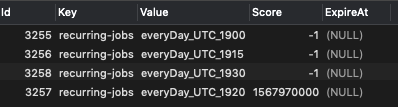
When there is no problem, looks like the following
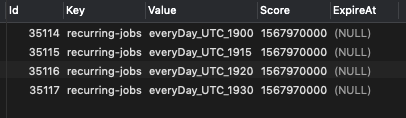
all based on what @odinserj asked earlier
sseyalioglu
on 8 Sep 2019
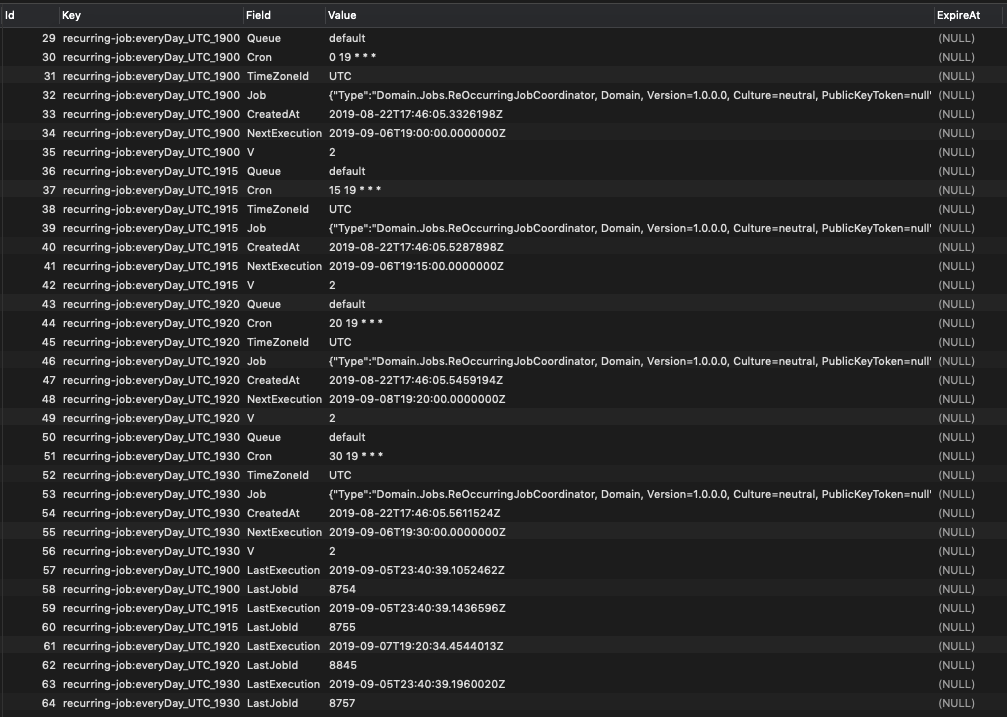
And more requested data from the last query: (problematic one when workaround not applied)
Id Key Field Value ExpireAt
29 recurring-job:everyDay_UTC_1900 Queue default
30 recurring-job:everyDay_UTC_1900 Cron 0 19 * * *
31 recurring-job:everyDay_UTC_1900 TimeZoneId UTC
32 recurring-job:everyDay_UTC_1900 Job {"Type":"Domain.Jobs.ReOccurringJobCoordinator, Domain, Version=1.0.0.0, Culture=neutral, PublicKeyToken=null","Method":"DailyBookingContactComplete","ParameterTypes":"[\"Hangfire.Server.PerformContext, Hangfire.Core, Version=1.7.6.0, Culture=neutral, PublicKeyToken=null\"]","Arguments":"[null]"}
33 recurring-job:everyDay_UTC_1900 CreatedAt 2019-08-22T17:46:05.3326198Z
34 recurring-job:everyDay_UTC_1900 NextExecution 2019-09-06T19:00:00.0000000Z
35 recurring-job:everyDay_UTC_1900 V 2
36 recurring-job:everyDay_UTC_1915 Queue default
37 recurring-job:everyDay_UTC_1915 Cron 15 19 * * *
38 recurring-job:everyDay_UTC_1915 TimeZoneId UTC
39 recurring-job:everyDay_UTC_1915 Job {"Type":"Domain.Jobs.ReOccurringJobCoordinator, Domain, Version=1.0.0.0, Culture=neutral, PublicKeyToken=null","Method":"DailyBuildMonthsInvoices","ParameterTypes":"[\"Hangfire.Server.PerformContext, Hangfire.Core, Version=1.7.6.0, Culture=neutral, PublicKeyToken=null\"]","Arguments":"[null]"}
40 recurring-job:everyDay_UTC_1915 CreatedAt 2019-08-22T17:46:05.5287898Z
41 recurring-job:everyDay_UTC_1915 NextExecution 2019-09-06T19:15:00.0000000Z
42 recurring-job:everyDay_UTC_1915 V 2
43 recurring-job:everyDay_UTC_1920 Queue default
44 recurring-job:everyDay_UTC_1920 Cron 20 19 * * *
45 recurring-job:everyDay_UTC_1920 TimeZoneId UTC
46 recurring-job:everyDay_UTC_1920 Job {"Type":"Domain.Jobs.ReOccurringJobCoordinator, Domain, Version=1.0.0.0, Culture=neutral, PublicKeyToken=null","Method":"DailyAddConversionToInvoices","ParameterTypes":"[\"Hangfire.Server.PerformContext, Hangfire.Core, Version=1.7.6.0, Culture=neutral, PublicKeyToken=null\"]","Arguments":"[null]"}
47 recurring-job:everyDay_UTC_1920 CreatedAt 2019-08-22T17:46:05.5459194Z
48 recurring-job:everyDay_UTC_1920 NextExecution 2019-09-08T19:20:00.0000000Z
49 recurring-job:everyDay_UTC_1920 V 2
50 recurring-job:everyDay_UTC_1930 Queue default
51 recurring-job:everyDay_UTC_1930 Cron 30 19 * * *
52 recurring-job:everyDay_UTC_1930 TimeZoneId UTC
53 recurring-job:everyDay_UTC_1930 Job {"Type":"Domain.Jobs.ReOccurringJobCoordinator, Domain, Version=1.0.0.0, Culture=neutral, PublicKeyToken=null","Method":"DailyPeriodicDeliveryScheduling","ParameterTypes":"[\"Hangfire.Server.PerformContext, Hangfire.Core, Version=1.7.6.0, Culture=neutral, PublicKeyToken=null\"]","Arguments":"[null]"}
54 recurring-job:everyDay_UTC_1930 CreatedAt 2019-08-22T17:46:05.5611524Z
55 recurring-job:everyDay_UTC_1930 NextExecution 2019-09-06T19:30:00.0000000Z
56 recurring-job:everyDay_UTC_1930 V 2
57 recurring-job:everyDay_UTC_1900 LastExecution 2019-09-05T23:40:39.1052462Z
58 recurring-job:everyDay_UTC_1900 LastJobId 8754
59 recurring-job:everyDay_UTC_1915 LastExecution 2019-09-05T23:40:39.1436596Z
60 recurring-job:everyDay_UTC_1915 LastJobId 8755
61 recurring-job:everyDay_UTC_1920 LastExecution 2019-09-07T19:20:34.4544013Z
62 recurring-job:everyDay_UTC_1920 LastJobId 8845
63 recurring-job:everyDay_UTC_1930 LastExecution 2019-09-05T23:40:39.1960020Z
64 recurring-job:everyDay_UTC_1930 LastJobId 8757
sseyalioglu
on 8 Sep 2019
One final comment. I have another one running under version 1.7.4 and works perfectly fine since Aug 15th and the previous versions earlier for months.
sseyalioglu
on 8 Sep 2019
Any progress on this? I am experiencing the same issues as described above.
 kresimirlesic
on 9 Sep 2019
kresimirlesic
on 9 Sep 2019
If it might help anything, I think our jobs started showing next execution at in the past immediately after one of the deployments. It was a regular deployment and the hangfire version was not increased as a part of it.
kresimirlesic
on 9 Sep 2019
@kresimirlesic are your jobs start on fixed times or every X min/hour etc?
Ours is fixed times daily.
sseyalioglu
on 9 Sep 2019
@sseyalioglu my job is configured to run every 5 minutes
kresimirlesic
on 9 Sep 2019
I would like to share one more observation.
The only way to have jobs status corrected is to manually triggering it.
Once I manually trigger it shows that next run would be running properly (at least how you fee it)
However after some time (today's experience), 1 of 4 jobs seems like going to work next day but all other 3 started to be in the past again. (within 2-3 hours as seen below)

This is super annoying, I can't be doing this manually every day and keeping an eye on it.
Please fix.
sseyalioglu
on 10 Sep 2019
@odinserj is there any timeline for this fix? This is occuring for me on multiple projects and it is really annoying. Not to mention that there is a lot of critical stuff in those jobs.
Thanks!
kresimirlesic
on 10 Sep 2019
@odinserj @kresimirlesic @Tieno I have another insight to this.
- We've downgraded to 1.7.4 but this did not change the behavior.
- We have 2 separate applications using 2 different databases where one of them is experiencing the issue
- As a result, I think it is related to something in database possibly. In the configuration for the problematic one we have the following (in startup.cs)
In ConfigureService
services.AddHangfire(cfg => cfg.UseStorage(new MySqlStorage(hangfireConnection,
                                                                        new MySqlStorageOptions
                                                                        {
                                                                            QueuePollInterval          = TimeSpan.FromSeconds(60),
                                                                            PrepareSchemaIfNecessary = false,
                                                                            JobExpirationCheckInterval = TimeSpan.FromMinutes(2)
                                                                        })));
and in Configure() it is initiated in the following way:
app.UseHangfireServer(new BackgroundJobServerOptions {WorkerCount = 2});
                app.UseHangfireDashboard();
In the one that works fine without an issue we have the following in ConfigureService
services.AddHangfire(cfg => cfg.UseStorage(new MySqlStorage(hangfireConnection, new MySqlStorageOptions
                {
                    QueuePollInterval = TimeSpan.FromSeconds(60),
                    PrepareSchemaIfNecessary = true,
                    DashboardJobListLimit = 1000
                })));
sseyalioglu
on 12 Sep 2019
@kresimirlesic what is the underlying data source you are using?
sseyalioglu
on 13 Sep 2019
@kresimirlesic @odinserj I am almost sure that, the issue is somehow related to database itself. Seems like on a clean fresh database, there is no issue.
sseyalioglu
on 16 Sep 2019
@sseyalioglu we are using postgre
kresimirlesic
on 24 Sep 2019
@kresimirlesic @odinserj I tried so much to make it work but does not.
I've made complete new database, didn't work. Changed from hangfire to hangfire.core didn't work. Run it on single server only, didn't work.
Read everything on 1.7 upgrade guide and followed, and it did not work either.
All it comes to is that, when it is time for the job to really work, everything goes upside down.
I am not sure how this still cannot be fixed!
I am downgrading as well to 1.6.27 (I hope this will solve the issue)
Is there any ETA or anything on this issue?
sseyalioglu
on 10 Oct 2019
@sseyalioglu, any chance you are using multiple applications with different code bases that share the same storage? Please tell me the output of these queries again when nothing is working, and I will start looking into this deeply tomorrow.
odinserj
on 10 Oct 2019
@odinserj only a single application and same exact version.
Results from first query:
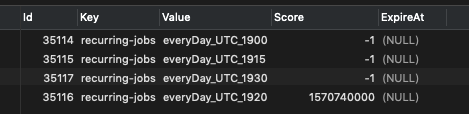
Results from second query:
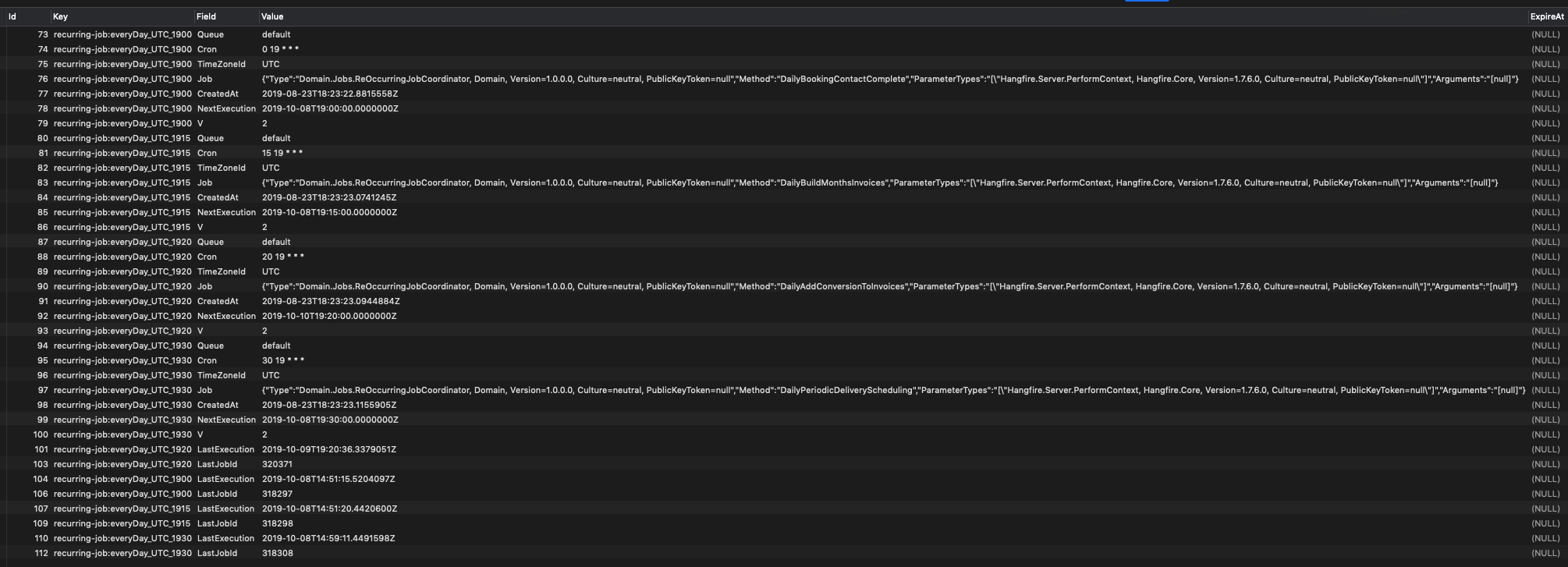
I really would like this problem be solved because everyday I have to manually trigger the jobs myself.
Also using the following strorage package
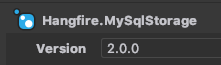
dotnet core 2.2, running on ubuntu 16.04 to provide a bit more context.
sseyalioglu
on 10 Oct 2019
@sseyalioglu, any chance you are using multiple applications with different code bases that share the same storage? Please tell me the output of these queries again when nothing is working, and I will start looking into this deeply tomorrow.
I do this, but I made sure to update all libraries to the same version of hangfire.
Tieno
on 11 Oct 2019
@sseyalioglu, I've found at least one problem with Hangfire.MySqlStorage – the precision of the Set.Score column is not high enough, and the type of that column should be changed to double (currently it's float).
This add delays to scheduled jobs and will cause issues for recurring jobs. Please change the column type (it's better to also submit a PR to the https://github.com/arnoldasgudas/Hangfire.MySqlStorage repository) and let me know about the results.
But lower precision doesn't explain why it's set to -1 in the Set table, and has the correct value in the Hash table.
odinserj
on 11 Oct 2019
@Tieno, @sseyalioglu please use the modified version of the Hangfire.Core.dll assembly to diagnose the issue – https://www.dropbox.com/s/l3yo6zwsvtaa8cq/Hangfire-1.7.6-track-recurring.zip?dl=0. You'll need to configure the logging subsystem first to record logs starting from the warning level.
It will dump recurring job, changed fields and new next execution date when attempting to record the '-1' value to the database. Please post those messages here for further analysis.
odinserj
on 11 Oct 2019
@Tieno same code base and same application (same version) only used here. @odinserj I will make the changes and let you know the results and if all works, will send PR as well.
sseyalioglu
on 11 Oct 2019
@odinserj tomorrow will be two years since I filed Set.Score precision issue there :)
It doesn’t have schema update capability though, so existing databases would still require manual fix.
 pieceofsummer
on 11 Oct 2019
pieceofsummer
on 11 Oct 2019
Great @sseyalioglu, thanks! Debug information will point what's going on, because I was unable to reproduce the issue.
odinserj
on 11 Oct 2019
@pieceofsummer sometimes it takes time to merge PRs ;-(
odinserj
on 11 Oct 2019
Hey @odinserj, did you get a chance to find a fix for postgre as well? The same issue as described above happens on postgre.
kresimirlesic
on 11 Oct 2019
@odinserj from the logs, what kind of log am I looking for?
I see there are few loggers there which are
Hangfire.Processing.BackgroundExecution
Hangfire.Server.ServerHeartbeatProcess
Hangfire.MySql.ExpirationManager
Hangfire.MySql.CountersAggregator
Hangfire.BackgroundJobServer
Hangfire.Server.BackgroundServerProcess
I honestly don't see anything related to recurring jobs. Is there any keyword I can focus on to get data?
I made a search with "recurring" keyword and was able to get the following:
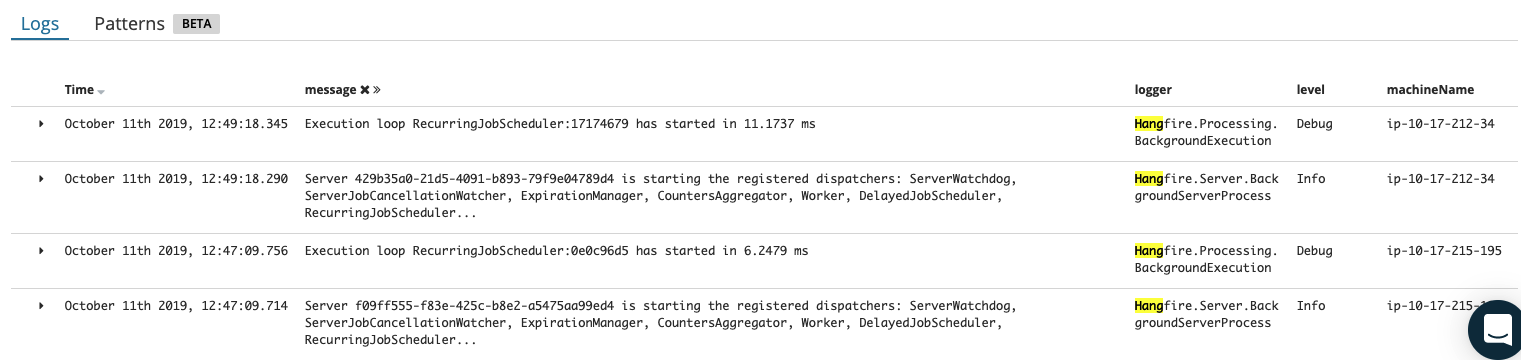
And the following is the current condition:
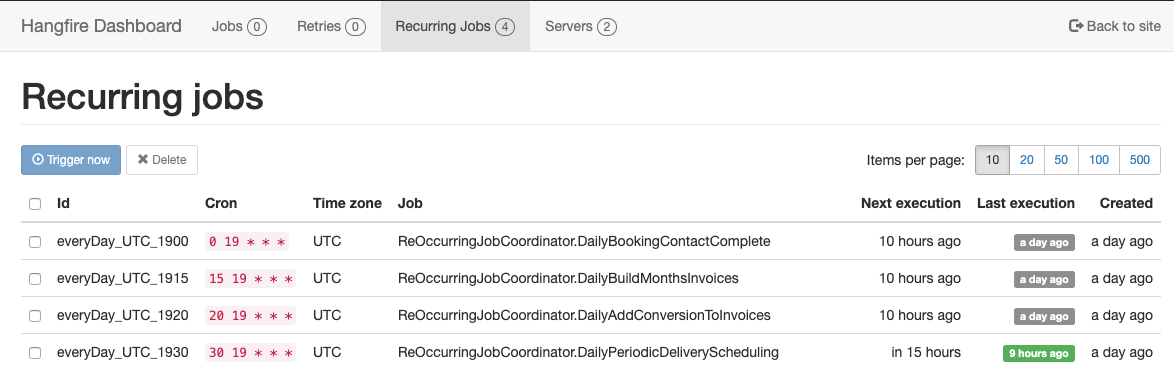
Honestly don't know when we went into "ago" state.
The ones in "ago" state were never executed (or never started) but the one that needs to happen 19:30 is executed normally. And I don't really see any interesting log about it.
Finally log level is set to "warning" however I can only see "Debug" and "Info" logs (mainly debug).
sseyalioglu
on 13 Oct 2019
The following line is added when persisting a recurring job with -1 value in the Score table to catch what original and changed values cause the behavior. So if the problem is caused by the RecurringJobScheduler component and your application does use the Hangfire.Core.dll assembly from that Dropbox link, it should emit a warning message.
logger.Warn($"Recurring job '{recurringJobId}' is being disabled. Job: ({String.Join(";", recurringJob._recurringJob.Select(x => $"{x.Key}:{x.Value}"))}), Changes: ({String.Join(";", changedFields.Select(x => $"{x.Key}:{x.Value}"))}), NextExecution: ({nextExecution})");
However previously update package version was triggering this logging message only from the RecurringJobScheduler class, and the following link will add logging also for the RecurringJobManager class. I was sure that it can't be the source of the problem, because it's too simple, but everything is possible.
Please download the new package and try again, sorry for yet another required step.
https://www.dropbox.com/s/l3yo6zwsvtaa8cq/Hangfire-1.7.6-track-recurring.zip?dl=0
odinserj
on 14 Oct 2019
Ok, I was not able to see any log having "is being disabled". I will download the new one and try again. Will let you know the outcome possibly by tomorrow.
sseyalioglu
on 14 Oct 2019
@odinserj just happened again however I cannot see any log like this, all I see is the following:
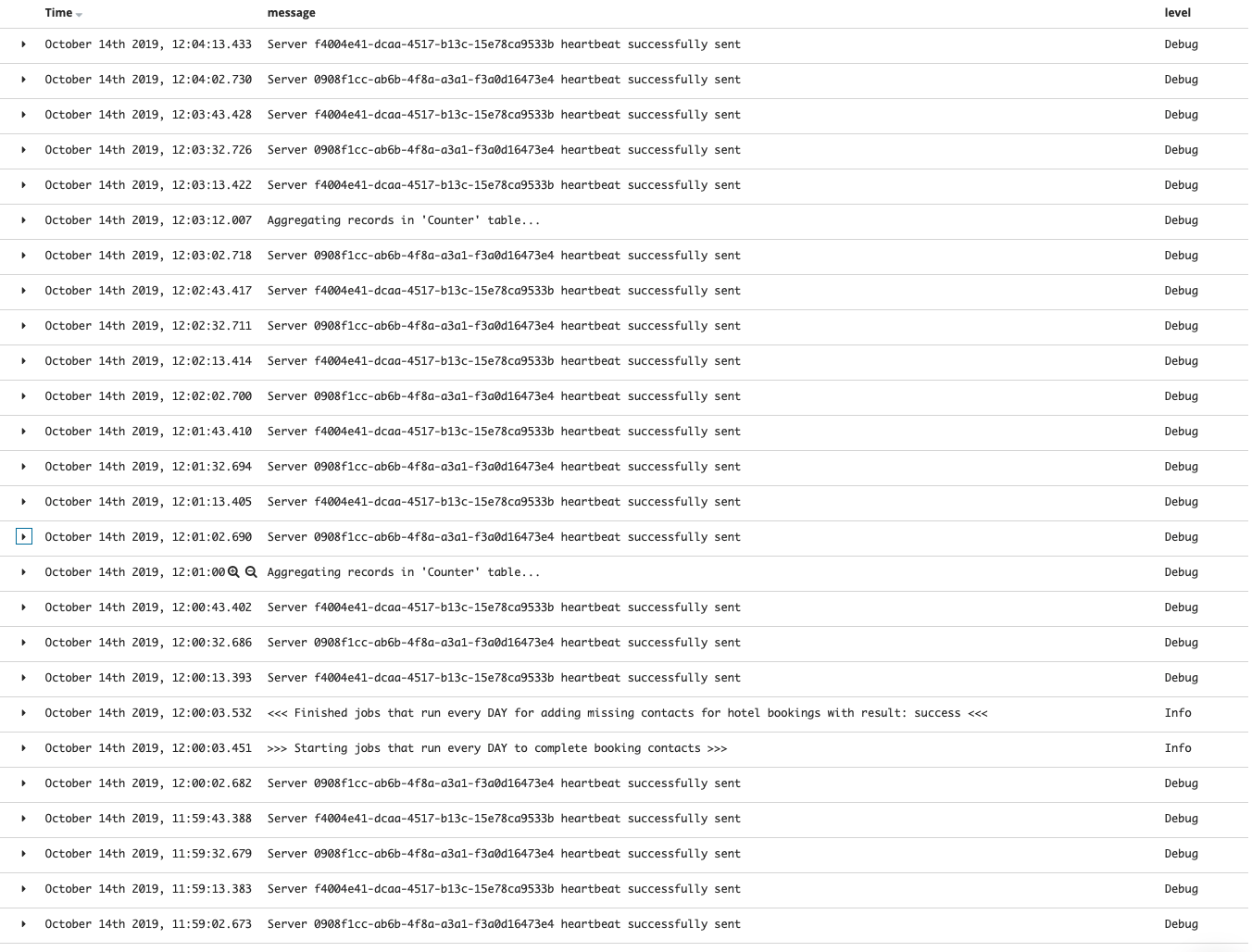
As you can see here, it actually triggered the job once and then it got lost as you can see here:
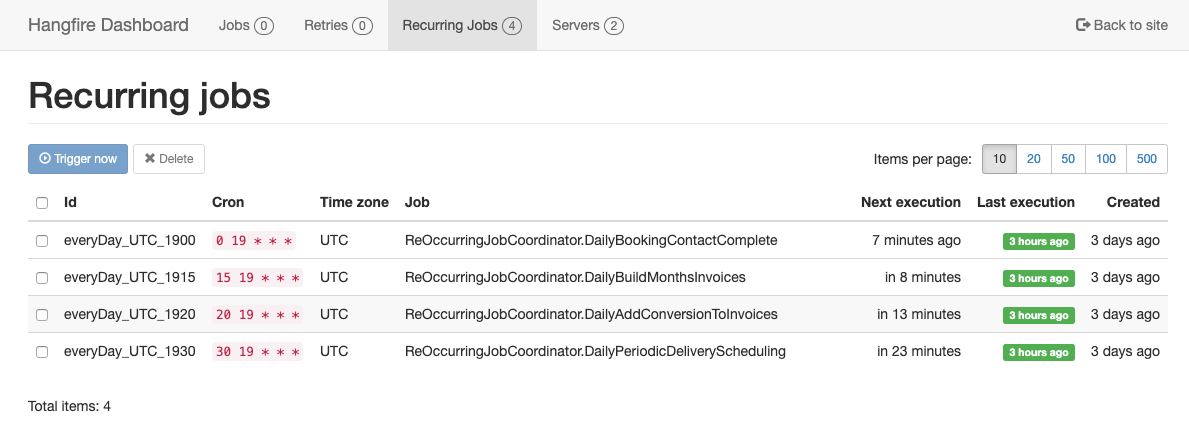
I am suspecting, same will happen to the jobs once their time will hit.
And here is a quick context of how I run those jobs (not sure if it matters)
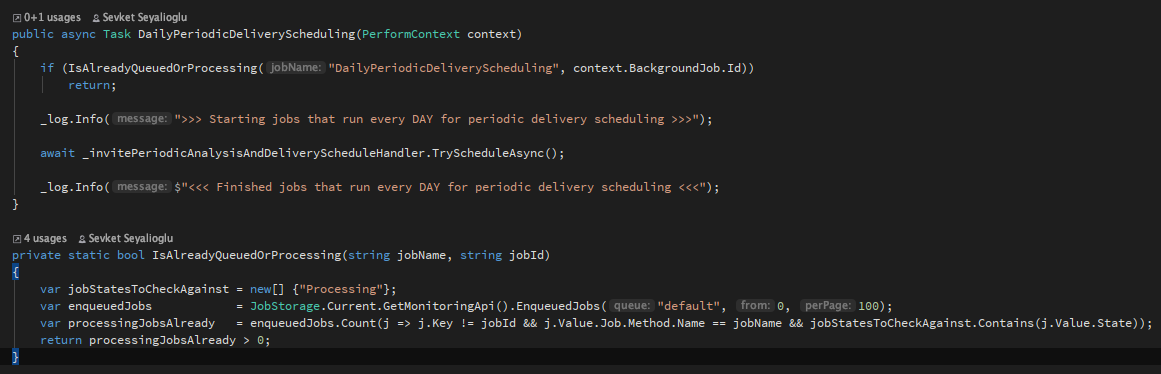
sseyalioglu
on 14 Oct 2019
@odinserj as suspected, just after execution, second job fall into "ago" state again without any log matching. (I have warnings working in the system)
sseyalioglu
on 14 Oct 2019
@odinserj sorry, need to correct something here. This time it seems like it did not happen. If I don't refresh the page, it says "ago" but after refreshing says "in a day" so I will wait and update when it actually happens. Sorry about so many messages here as I got confused. But clearly in the morning, all jobs were in "ago" state.
sseyalioglu
on 14 Oct 2019
No worries, thank you for your assistance on this issue. Data on the page
itself isn’t refreshed automatically, but counters and relative dates do.
But as we’ve seen earlier, -1 value is being stored in your database for an
unknown reason, so will wait for your response!
пн, 14 окт. 2019 г. в 22:25, sseyalioglu notifications@github.com:
@odinserj https://github.com/odinserj sorry, need to correct something
here. This time it seems like it did not happen. If I don't refresh the
page, it says "ago" but after refreshing says "in a day" so I will wait and
update when it actually happens. Sorry about so many messages here as I got
confused. But clearly in the morning, all jobs were in "ago" state.—
You are receiving this because you were mentioned.
Reply to this email directly, view it on GitHub
https://github.com/HangfireIO/Hangfire/issues/1459?email_source=notifications&email_token=AAIHLPT4XUQILVAYXMDOQ63QOTBRJA5CNFSM4H4PTDE2YY3PNVWWK3TUL52HS4DFVREXG43VMVBW63LNMVXHJKTDN5WW2ZLOORPWSZGOEBGE56A#issuecomment-541871864,
or unsubscribe
https://github.com/notifications/unsubscribe-auth/AAIHLPVRW32KMKTBEGQAQE3QOTBRJANCNFSM4H4PTDEQ
.>
Kind regards, Sergey Odinokov,
Founder/developer @ http://hangfire.io
Contacts:
Email: [email protected]
Skype: odinserj
odinserj
on 14 Oct 2019
@sseyalioglu any news, do your logs contain any interesting messages?
odinserj
on 16 Oct 2019
@odinserj funny enough that this didn't happen in the past 2 days (first time ever). Did you change anything else? I will wait a little more and try using the nuget versions once again if it does not occur.
sseyalioglu
on 16 Oct 2019
Very strange, there are some changes between 1.7.6 and the first updated package (but I doubt they can affect recurring jobs), but there are no changes between modified versions except some more logging.
odinserj
on 18 Oct 2019
@odinserj I am not sure, if I say "good" but it happened again. I will dig in the logs now.
sseyalioglu
on 18 Oct 2019
@odinserj unfortunately I was not able to get any logs in that fashion. But for better understanding, I've done some screen recording (with voice), please take a look. https://d.pr/v/XK1Gxv
I will dig a little more to see if I can get anything
sseyalioglu
on 18 Oct 2019
That's great anyway, because at least we can get to know the source of the problem.
odinserj
on 18 Oct 2019
unfortunately, the expected log "is being disabled" or any other warning from hangfire does not appear during the expected timeframe.
sseyalioglu
on 18 Oct 2019
Here are the only things I can see after analyzing deeply. https://d.pr/v/azZkpA
sseyalioglu
on 18 Oct 2019
Thank you for the screen-casts. Wow the problem is completely insane, I see your logs are produced, and even heartbeats are here. Are you sure your production application uses the updated version? Because sometimes during deploys something happens and assembly isn't updated. That's the simplest reason, but I will dig more into this – someone is setting the -1 value. I hope to be able to find this without using WireShark.
odinserj
on 18 Oct 2019
I am running this on my dev env (cannot do it on live). I don't think I can use wireshark, all ubuntu servers with no ui. And I can verify that deployed app is using the updated assembly. (In a few hours, I will log in and check the version of the file from the running version in dev)
sseyalioglu
on 18 Oct 2019
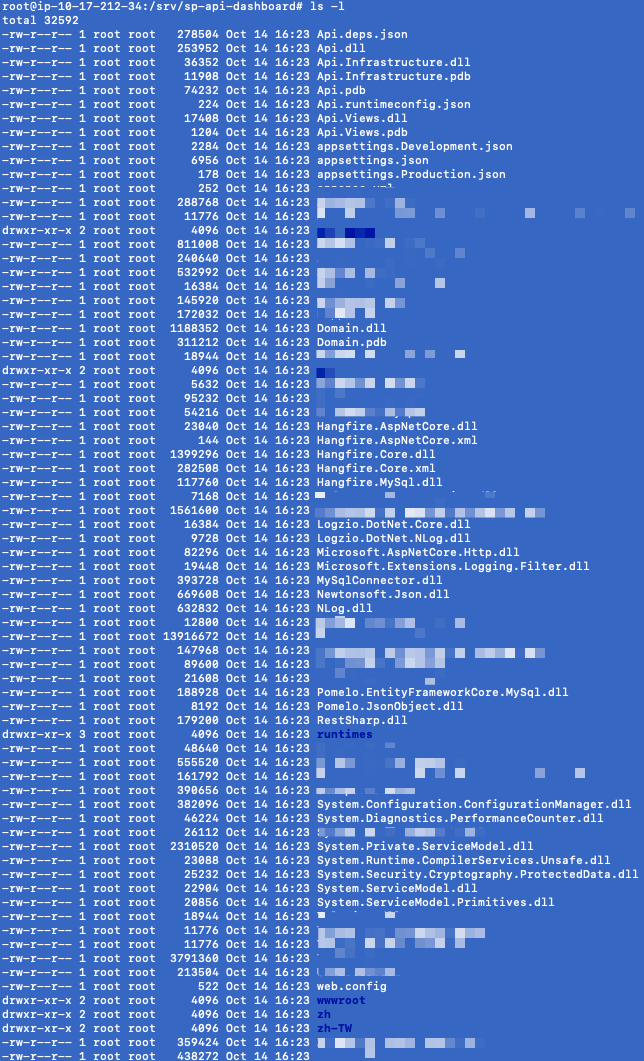
@odinserj it is more difficult than I've imagined in linux. Seems like I don't have file version info just like in windows.However I can clearly confirm that, all files got updated together without exception as seen here:
sseyalioglu
on 18 Oct 2019
@sseyalioglu you can use exiftool Hangfire.Core.dll on Linux to get various metadata, including file and assembly version.
Another crude way is something like strings Hangfire.Core.dll | grep 'Hangfire.Core, Version='
pieceofsummer
on 18 Oct 2019
It is "Hangfire.Core, Version=1.7.6.0, Culture=neutral, PublicKeyToken=null" but I don't think this tells much. I've verified the dropbox file and deployed file are identical using beyond compare binary comparison / CRC comparison etc.
sseyalioglu
on 18 Oct 2019
@sseyalioglu I don't see any other places that can set the score value to -1. I suspect you have another Hangfire Server running on version 1.7.5 or below that can't find a target method (due to its absence or different signature). Nevertheless, I've updated that logging to always (not only when score is -1) emit a trace-level message (not the warning). So if you don't see any message when value is changed to "ago", then it's another server that mess things up.
odinserj
on 23 Oct 2019
Updated logging is available in version 1.7.7.
odinserj
on 23 Oct 2019
@odinserj thanks for the explanations. I will try 1.7.7 obviously.
Just a simple question. Assuming that you are correct about another server with earlier version, wouldn't I see that other server in this list?

How can we see/verify if anything else is causing any trouble? (I know, I don't have any other)
sseyalioglu
on 23 Oct 2019
Yes, it should be in that list. I suspect, but I can be wrong, and the best way to ensure there's no intervention by another server is to update to 1.7.7 and check yet another trace log message "Recurring job 'XXX' is being updated" that must be there in any case, because there are no conditions anymore.
odinserj
on 24 Oct 2019
I will let you know.
sseyalioglu
on 24 Oct 2019
Thank you for your patience @sseyalioglu
odinserj
on 25 Oct 2019
@odinserj i am facing the same issue. My setup is:
2 applications are targetting the same Hangfire tables but they are using different queue. In the 'Recurring jobs' overview some jobs show the text 'Could not load file.....', but when visiting the same page for the other application it shows the method correctly.
In general the jobs are being executed correctly, but sometimes (within a day) the 'next execution' is in the past.
I'am using version 1.7.2. Is there a fix already for this problem?
Thank you
 kklein88
on 11 Nov 2019
kklein88
on 11 Nov 2019
@odinserj i have upgraded to 1.7.7 and also ran the DB scheme script. So i am running Scheme version 7. When checking the hangfire dashboards the recurring-job which is known in one application but not in the other is running perfectly a single time. But then in the 'Next execution' column the text 'ERROR' is shown and the recurring job is never executed again.
kklein88
on 13 Nov 2019
@odinserj the issue still happens to our systems and there is absolutely no related log unfortunately.
sseyalioglu
on 13 Nov 2019
I'm really sorry for the issues, the changes should have been implemented behind a feature toggle with the default behaviour equivalent to the older one. After a short vacation I've realised there's a better and much simpler solution than just disabling recurring jobs when there are troubles.
I've just committed a change to add retry attempts to recurring jobs instead of disabling them. So now even in unsupported scenario of having the same storage for multiple applications, other instances will get a chance to run recurring job to behave the same way as in 1.6.X versions.
I will release the changes in 1.7.8 hopefully next week, but you can update to version 1.7.7-build-03046 from the continuous integration feed – https://ci.appveyor.com/nuget/hangfire.
@sseyalioglu but I'm still not sure whether this will help you, because this change alters the branch where log messages should appear. Do you have trace level enabled for your logs?
odinserj
on 15 Nov 2019
@odinserj Why not support for multiple applications using same storage/ui? It’s clearly something people use in the micro service era. I have done it and mostly it worked with the 1.6.x releases, though retries could end up in wrong applications queue.
If hangfire supported multiple apps it would get even more projects to use it.
mikanyg
on 15 Nov 2019
@odinserj I think I finally found the problem with the actual reason.
After adding an hourly job, and seeing nothing got executed with the problem appearing, I've digged deeper into other logs such as syslogs as well.
What I figured out was, there was a ghost app (very old, and deleted) running against the same database. No files exist, but it was still running in memory.
Here is how it looks in the logs for anyone else having similar issues.

I think that ghost app was acting faster than the regular one and always picking it up and disabling it so we were never able to see any logs generated by the newer version.
I've killed that already and hopefully in 1 hour will know the effect.
sseyalioglu
on 19 Nov 2019
@odinserj I confirm that, my problem is over. It really was this ghost running app. Sorry for all the trouble.
sseyalioglu
on 19 Nov 2019
I had same problem on MSSQL, lots of time deleted tables and started hangfire server but nothing changed. When create a new database problem has solved.
 hisvarlar
on 27 Nov 2019
hisvarlar
on 27 Nov 2019
Version 1.7.8 was released yesterday that uses retries instead of immediately disabling a recurring job if there are any exceptions. So the behavior is almost the same as was in version 1.6.X and it can be used for multiple applications, although I don't recommend doing so until there's a proper handling of such a feature.
@sseyalioglu could you tell me where that ghost application was running and whether it was running in IIS' Application Pool? I wrongly told you it's not possible to have an unlisted server that's still running on version 1.7.0, but that's true only for SQL Server storage, where 'BackgroundServerGoneException' is thrown when server was already removed on a heartbeat. MySQL implementation should also throw this exception, and a PR should be added.
@mikanyg I could add support for multiple applications in one day, but that will break a lot of applications. I was attempted to solve this without introducing breaking changes for several times, but failed. I will perform yet another try in the near future to see whether it's possible in 1.8.0, because it's indeed a really great feature.
Thank you for your assistance on this issue, the result is much better than it was in the original version! I'm closing this issue, please open new ones if you catch a similar problem.
odinserj
on 6 Dec 2019
Version 1.7.8 was released yesterday that uses retries instead of immediately disabling a recurring job if there are any exceptions. So the behavior is almost the same as was in version 1.6.X and it can be used for multiple applications, although I don't recommend doing so until there's a proper handling of such a feature.
@sseyalioglu could you tell me where that ghost application was running and whether it was running in IIS' Application Pool? I wrongly told you it's not possible to have an unlisted server that's still running on version 1.7.0, but that's true only for SQL Server storage, where 'BackgroundServerGoneException' is thrown when server was already removed on a heartbeat. MySQL implementation should also throw this exception, and a PR should be added.
@mikanyg I could add support for multiple applications in one day, but that will break a lot of applications. I was attempted to solve this without introducing breaking changes for several times, but failed. I will perform yet another try in the near future to see whether it's possible in 1.8.0, because it's indeed a really great feature.
Thank you for your assistance on this issue, the result is much better than it was in the original version! I'm closing this issue, please open new ones if you catch a similar problem.
@odinserj in our case, we are running on ubuntu 16.04 over kestrel (core 2.2) with MySQL. Ghost app was on kestrel (its service was disabled, its files were deleted, but service was never stopped and it kept on running for months). Because I've got into db and regenerate the DB from scratch, ghost app (hf v1.6.something was there using the DB connection where DB was not listing anything about it)
I hope this info helps.
sseyalioglu
on 6 Dec 2019
Hi,
I am still facing this issue. Can you please confirm if this is fixed? I have got two recurring jobs and the next execution is coming up with an error for one of the jobs. This is running as an IIS application on windows OS. Can you please help me on this?
Thanks
Karthik
 kartthikn
on 3 Oct 2020
kartthikn
on 3 Oct 2020
@kartthikn Not sure if this is the same root cause as yours, I had this problem when running two job queues on two servers that do not share code. This is not a supported use case by Hangfire. I've developed a workaround though
 GeXiaoguo
on 4 Oct 2020
GeXiaoguo
on 4 Oct 2020
Related issues
 tompazourek
·
3Comments
tompazourek
·
3Comments
 cindro
·
3Comments
cindro
·
3Comments
 shorbachuk
·
4Comments
shorbachuk
·
4Comments
 plmwong
·
3Comments
plmwong
·
3Comments
 vikramjb
·
3Comments
vikramjb
·
3Comments
Most helpful comment
Version 1.7.8 was released yesterday that uses retries instead of immediately disabling a recurring job if there are any exceptions. So the behavior is almost the same as was in version 1.6.X and it can be used for multiple applications, although I don't recommend doing so until there's a proper handling of such a feature.
@sseyalioglu could you tell me where that ghost application was running and whether it was running in IIS' Application Pool? I wrongly told you it's not possible to have an unlisted server that's still running on version 1.7.0, but that's true only for SQL Server storage, where 'BackgroundServerGoneException' is thrown when server was already removed on a heartbeat. MySQL implementation should also throw this exception, and a PR should be added.
@mikanyg I could add support for multiple applications in one day, but that will break a lot of applications. I was attempted to solve this without introducing breaking changes for several times, but failed. I will perform yet another try in the near future to see whether it's possible in 1.8.0, because it's indeed a really great feature.
Thank you for your assistance on this issue, the result is much better than it was in the original version! I'm closing this issue, please open new ones if you catch a similar problem.