Hangfire: Failed Hangfire job returns gibberish when examining its logs
Hi,
I am a paying Hangfire Pro customer and I am really in love with your product, which we are using in our company's SaaS product. Though, lately I have been encountering this rather annoying issue. Sometimes, when a job fails and I go to check its log, it returns a bunch of gibberish rather than the actual logs. Check out the screencast I recorded here: https://drive.google.com/file/d/1NUuNhkEsHRAqnbvHJTG5tqK8dOqmTiZM/view
I have been trying to identify whether there is a pattern in the jobs that I have this problem with but I can't find any. For all I know, this seems to be occurring in a totally random fashion.
I am running on .NET Core 2.1 in Google App Engine with Redis as a backend (specifically, Google Cloud Memorystore).
Is this something you have experienced before? Please let me know if you need any further information from me. I will be happy to provide server logs and/or Redis logs if necessary. Thank you.
 sebastianbk
All 5 comments
Looks like that page was compressed, but there's no corresponding content type header set, and that's your browser wasn't able to understand the response properly. Could you tell us more where do you host the dashboard, its show its configuration logic and list the response header?
 odinserj
on 19 Feb 2019
odinserj
on 19 Feb 2019
Hi @odinserj
Apologies for the slow reply. I have taken a screenshot of both the request and the response from Chrome Dev Tools. See the image below.
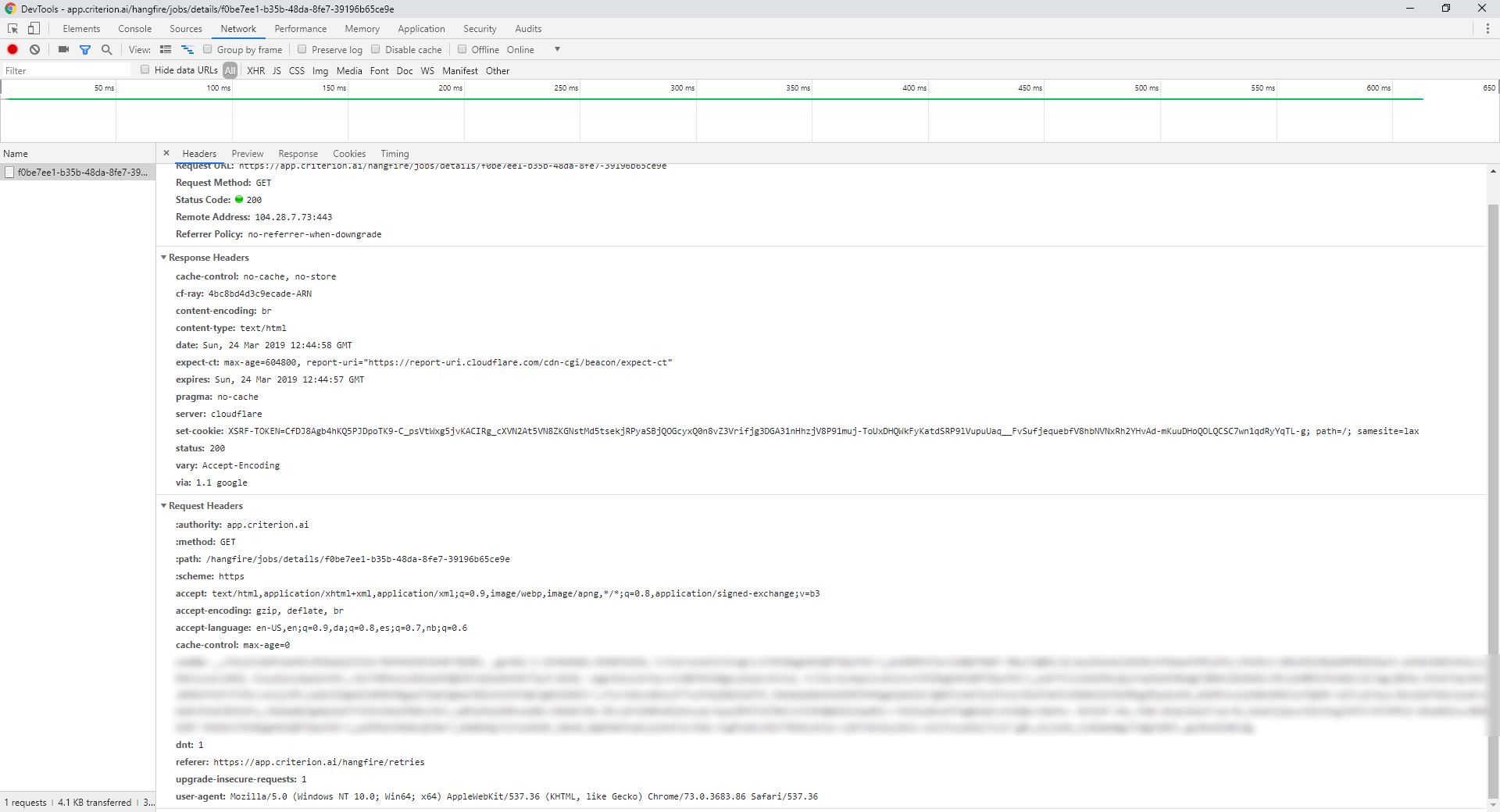
Here is how I register Hangfire in Startup.cs file. In the ConfigureServices method:
services.AddHangfire(config =>
{
config.UseRedisStorage(Configuration[Constants.RedisConfig], new RedisStorageOptions { Prefix = "{hangfire-pro}:" });
config.UseConsole();
});
And in the Configure method:
app.UseHangfireServer();
app.UseHangfireDashboard("/hangfire", new DashboardOptions
{
Authorization = new [] { new HangfireAuthorizationFilter() }
});
Finally, here is my implementation of the IDashboardAuthorizationFilter:
public class HangfireAuthorizationFilter : IDashboardAuthorizationFilter
{
public bool Authorize(DashboardContext context)
{
try
{
var httpContext = context.GetHttpContext();
return httpContext.User.IsInRole(RoleHelper.OwnerRole) || httpContext.User.IsInRole(RoleHelper.SupporterRole);
}
catch
{
return false;
}
}
}
I have these references in my .csproj file:
<PackageReference Include="Hangfire" Version="1.6.22" />
<PackageReference Include="Hangfire.Console" Version="1.4.2" />
<PackageReference Include="Hangfire.Pro" Version="2.1.2" />
<PackageReference Include="Hangfire.Pro.Redis.StrongName" Version="2.4.0" />
Is there something I am doing wrong in the configuration of Hangfire?
sebastianbk
on 24 Mar 2019
I did some further investigation and looked at my use of WebMarkupMin for HTTP compression. I tried removing that library and, after doing so, my problems with Hangfire vanished. So I guess you are right that it did have something to do with compression.
Now, I have deployed my app with WebMarkupMin but I would really like to use it. Is there any way you could make WebMarkupMin compatible with Hangfire?
sebastianbk
on 24 Mar 2019
Looks to me that you can do something like this in your startup-code to add paths which shouldn't be processed by WMM
var htmlMinificationManager = HtmlMinificationManager.Current;
    htmlMinificationManager.ExcludedPages = new List<IUrlMatcher>
    {
        new ExactUrlMatcher("/hangfire"),
                new RegexUrlMatcher(@"^\/hangfire\/.+$"),
    };
 burningice2866
on 24 Mar 2019
burningice2866
on 24 Mar 2019
Hi @burningice2866. That seems like a good solution. Thank you very much. I will close this issue.
sebastianbk
on 26 Mar 2019
Related issues
 dealproc
·
3Comments
dealproc
·
3Comments
 dgaspar
·
4Comments
dgaspar
·
4Comments
 fb5000
·
3Comments
fb5000
·
3Comments
 nsnail
·
3Comments
nsnail
·
3Comments
 jeffsugden
·
4Comments
jeffsugden
·
4Comments
Most helpful comment
Looks to me that you can do something like this in your startup-code to add paths which shouldn't be processed by WMM