Hangfire generates lots of "ObjectDisposedException" exceptions on very simple application
I create very simple application - winforms with NuGet packages Hangfire.Core and Hangfire.SqlServer.
Hangfire initializes with two strings
GlobalConfiguration.Configuration.UseSqlServerStorage(Properties.Settings.Default.ConnectionString);
_server = new BackgroundJobServer();
Jobs are adds with this string
var name = DateTime.Now.Ticks.ToString();
RecurringJob.AddOrUpdate(name, () => Console.WriteLine($"job '{name}'"), Cron.MinuteInterval(1));
Link on the screenshot https://c2n.me/3ZHcBcd
After adding some jobs i see lots of "Exception thrown: 'System.ObjectDisposedException' in System.Transactions.dll" in output window. This problem comes with 1.6.17, 1.6.22, 1.7 versions. Its terrible problem becouse i cant normally work with Output window - i need to analyze information about potentially important exceptions but not about Hangfire transactional games.
 Sellec
All 4 comments
Don't see any of them with the same setup.
'WindowsFormsApp2.exe' (CLR v4.0.30319: WindowsFormsApp2.exe): Loaded 'C:\WINDOWS\Microsoft.Net\assembly\GAC_MSIL\System.Windows.Forms\v4.0_4.0.0.0__b77a5c561934e089\System.Windows.Forms.dll'. Skipped loading symbols. Module is optimized and the debugger option 'Just My Code' is enabled.
'WindowsFormsApp2.exe' (CLR v4.0.30319: WindowsFormsApp2.exe): Loaded 'C:\WINDOWS\Microsoft.Net\assembly\GAC_MSIL\System\v4.0_4.0.0.0__b77a5c561934e089\System.dll'. Skipped loading symbols. Module is optimized and the debugger option 'Just My Code' is enabled.
'WindowsFormsApp2.exe' (CLR v4.0.30319: WindowsFormsApp2.exe): Loaded 'C:\WINDOWS\Microsoft.Net\assembly\GAC_MSIL\System.Drawing\v4.0_4.0.0.0__b03f5f7f11d50a3a\System.Drawing.dll'. Skipped loading symbols. Module is optimized and the debugger option 'Just My Code' is enabled.
'WindowsFormsApp2.exe' (CLR v4.0.30319: WindowsFormsApp2.exe): Loaded 'C:\WINDOWS\Microsoft.Net\assembly\GAC_MSIL\System.Configuration\v4.0_4.0.0.0__b03f5f7f11d50a3a\System.Configuration.dll'. Skipped loading symbols. Module is optimized and the debugger option 'Just My Code' is enabled.
'WindowsFormsApp2.exe' (CLR v4.0.30319: WindowsFormsApp2.exe): Loaded 'C:\WINDOWS\Microsoft.Net\assembly\GAC_MSIL\System.Core\v4.0_4.0.0.0__b77a5c561934e089\System.Core.dll'. Skipped loading symbols. Module is optimized and the debugger option 'Just My Code' is enabled.
'WindowsFormsApp2.exe' (CLR v4.0.30319: WindowsFormsApp2.exe): Loaded 'C:\WINDOWS\Microsoft.Net\assembly\GAC_MSIL\System.Xml\v4.0_4.0.0.0__b77a5c561934e089\System.Xml.dll'. Skipped loading symbols. Module is optimized and the debugger option 'Just My Code' is enabled.
'WindowsFormsApp2.exe' (CLR v4.0.30319: WindowsFormsApp2.exe): Loaded 'C:\WINDOWS\Microsoft.Net\assembly\GAC_MSIL\Accessibility\v4.0_4.0.0.0__b03f5f7f11d50a3a\Accessibility.dll'. Symbols loaded.
'WindowsFormsApp2.exe' (CLR v4.0.30319: WindowsFormsApp2.exe): Loaded 'C:\Users\odinserj\Documents\Visual Studio 2017\Projects\WindowsFormsApp2\WindowsFormsApp2\bin\Debug\Hangfire.Core.dll'. Skipped loading symbols. Module is optimized and the debugger option 'Just My Code' is enabled.
'WindowsFormsApp2.exe' (CLR v4.0.30319: WindowsFormsApp2.exe): Loaded 'C:\Users\odinserj\Documents\Visual Studio 2017\Projects\WindowsFormsApp2\WindowsFormsApp2\bin\Debug\Hangfire.SqlServer.dll'. Skipped loading symbols. Module is optimized and the debugger option 'Just My Code' is enabled.
'WindowsFormsApp2.exe' (CLR v4.0.30319: WindowsFormsApp2.exe): Loaded 'C:\WINDOWS\Microsoft.Net\assembly\GAC_32\System.Transactions\v4.0_4.0.0.0__b77a5c561934e089\System.Transactions.dll'. Skipped loading symbols. Module is optimized and the debugger option 'Just My Code' is enabled.
'WindowsFormsApp2.exe' (CLR v4.0.30319: WindowsFormsApp2.exe): Loaded 'C:\WINDOWS\Microsoft.Net\assembly\GAC_32\System.Data\v4.0_4.0.0.0__b77a5c561934e089\System.Data.dll'. Skipped loading symbols. Module is optimized and the debugger option 'Just My Code' is enabled.
'WindowsFormsApp2.exe' (CLR v4.0.30319: WindowsFormsApp2.exe): Loaded 'C:\WINDOWS\Microsoft.Net\assembly\GAC_32\System.EnterpriseServices\v4.0_4.0.0.0__b03f5f7f11d50a3a\System.EnterpriseServices.dll'. Skipped loading symbols. Module is optimized and the debugger option 'Just My Code' is enabled.
'WindowsFormsApp2.exe' (CLR v4.0.30319: WindowsFormsApp2.exe): Loaded 'C:\WINDOWS\Microsoft.Net\assembly\GAC_32\System.EnterpriseServices\v4.0_4.0.0.0__b03f5f7f11d50a3a\System.EnterpriseServices.Wrapper.dll'. Skipped loading symbols. Module is optimized and the debugger option 'Just My Code' is enabled.
'WindowsFormsApp2.exe' (CLR v4.0.30319: WindowsFormsApp2.exe): Loaded 'C:\WINDOWS\Microsoft.Net\assembly\GAC_MSIL\System.Xml.Linq\v4.0_4.0.0.0__b77a5c561934e089\System.Xml.Linq.dll'. Skipped loading symbols. Module is optimized and the debugger option 'Just My Code' is enabled.
'WindowsFormsApp2.exe' (CLR v4.0.30319: WindowsFormsApp2.exe): Loaded 'C:\Users\odinserj\Documents\Visual Studio 2017\Projects\WindowsFormsApp2\WindowsFormsApp2\bin\Debug\Newtonsoft.Json.dll'. Skipped loading symbols. Module is optimized and the debugger option 'Just My Code' is enabled.
'WindowsFormsApp2.exe' (CLR v4.0.30319: WindowsFormsApp2.exe): Loaded 'C:\WINDOWS\Microsoft.Net\assembly\GAC_MSIL\System.Numerics\v4.0_4.0.0.0__b77a5c561934e089\System.Numerics.dll'. Skipped loading symbols. Module is optimized and the debugger option 'Just My Code' is enabled.
'WindowsFormsApp2.exe' (CLR v4.0.30319: WindowsFormsApp2.exe): Loaded 'C:\WINDOWS\Microsoft.Net\assembly\GAC_MSIL\System.ComponentModel.DataAnnotations\v4.0_4.0.0.0__31bf3856ad364e35\System.ComponentModel.DataAnnotations.dll'. Skipped loading symbols. Module is optimized and the debugger option 'Just My Code' is enabled.
'WindowsFormsApp2.exe' (CLR v4.0.30319: WindowsFormsApp2.exe): Loaded 'C:\WINDOWS\Microsoft.Net\assembly\GAC_MSIL\System.Runtime.Serialization\v4.0_4.0.0.0__b77a5c561934e089\System.Runtime.Serialization.dll'. Skipped loading symbols. Module is optimized and the debugger option 'Just My Code' is enabled.
'WindowsFormsApp2.exe' (CLR v4.0.30319: WindowsFormsApp2.exe): Loaded 'C:\WINDOWS\Microsoft.Net\assembly\GAC_MSIL\System.Runtime.Caching\v4.0_4.0.0.0__b03f5f7f11d50a3a\System.Runtime.Caching.dll'. Skipped loading symbols. Module is optimized and the debugger option 'Just My Code' is enabled.
'WindowsFormsApp2.exe' (CLR v4.0.30319: WindowsFormsApp2.exe): Loaded 'Anonymously Hosted DynamicMethods Assembly'.
job '636861959007760064'
job '636861959009173044'
job '636861959010768621'
job '636861959012524929'
job '636861959013967335'
job '636861959015409169'
job '636861959016761036'
job '636861959018612451'
job '636861959019649357'
job '636861959021407723'
job '636861959022921763'
job '636861959024440784'
job '636861959025880367'
job '636861959027483832'
job '636861959028931224'
job '636861959030690742'
job '636861959031728636'
job '636861959033243532'
job '636861959034683755'
job '636861959036128432'
job '636861959037489021'
job '636861959038923218'
job '636861959040286705'
job '636861959041648836'
job '636861959379803723'
job '636861959381564552'
job '636861959383171133'
job '636861959384768577'
job '636861959386444828'
job '636861959387882004'
job '636861959389324842'
job '636861959390927718'
job '636861959392290821'
job '636861959393808888'
job '636861959395166009'
job '636861959396522466'
job '636861959398203106'
job '636861959399494285'
The thread 0x2080 has exited with code 0 (0x0).
The thread 0x1d50 has exited with code 0 (0x0).
The thread 0x1914 has exited with code 0 (0x0).
The thread 0x1b24 has exited with code 0 (0x0).
The thread 0x760 has exited with code 0 (0x0).
The thread 0x3fdc has exited with code 0 (0x0).
The thread 0x980 has exited with code 0 (0x0).
The thread 0x2294 has exited with code 0 (0x0).
The thread 0x2748 has exited with code 0 (0x0).
The thread 0x3d64 has exited with code 0 (0x0).
The thread 0x3990 has exited with code 0 (0x0).
The thread 0x2f68 has exited with code 0 (0x0).
The thread 0x3dbc has exited with code 0 (0x0).
The thread 0x2458 has exited with code 0 (0x0).
The thread 0x1748 has exited with code 0 (0x0).
The thread 0x1414 has exited with code 0 (0x0).
The thread 0x2cc has exited with code 0 (0x0).
The thread 0xfe8 has exited with code 0 (0x0).
The thread 0x2ba4 has exited with code 0 (0x0).
The thread 0x3c0c has exited with code 0 (0x0).
The thread 0x3368 has exited with code 0 (0x0).
The thread 0x2264 has exited with code 0 (0x0).
The thread 0x34c4 has exited with code 0 (0x0).
The thread 0x2690 has exited with code 0 (0x0).
The thread 0x20d4 has exited with code 0 (0x0).
The thread 0x3f04 has exited with code 0 (0x0).
The thread 0x3564 has exited with code 0 (0x0).
The program '[14716] WindowsFormsApp2.exe' has exited with code 0 (0x0).
i need to analyze information about potentially important exceptions but not about Hangfire transactional games.
👎
 odinserj
on 19 Feb 2019
odinserj
on 19 Feb 2019
Have the same issue:
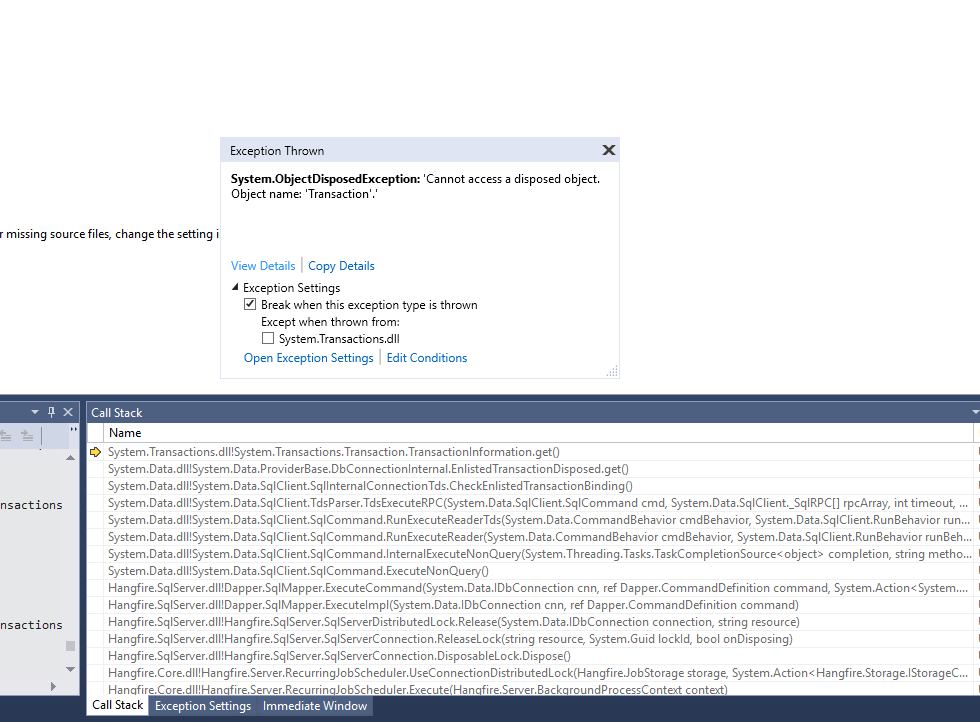
We use .Net Core in Full Framework 4.7.2. And the config:
"Dashboard": {
"AppPath": "/swagger/index.html?url=/swagger/v1/swagger.json",
"StatsPollingInterval": 2000
},
"Server": {
"HeartbeatInterval": "00:00:30",
"Queues": [ "default" ],
"SchedulePollingInterval": "00:00:15",
"ServerCheckInterval": "00:04:00",
"ServerName": null,
"ServerTimeout": "00:04:00",
"ShutdownTimeout": "00:00:15",
"WorkerCount": 20
}
Happens every minute on one machine and only on start on another.
Hope this can help a bit..
 dmitryos
on 21 Feb 2019
dmitryos
on 21 Feb 2019
Don't see any of them with the same setup.
This is the example application - https://c2n.me/3ZXFgmx
Sellec
on 21 Feb 2019
Those exceptions are not generated by Hangfire, neither it can choose not to log them. This is how DbConnectionInternal.EnlistedTransactionDisposed is actually implemented:
c#
protected bool EnlistedTransactionDisposed
{
    get
    {
        try
        {
            Transaction enlistedTransactionOriginal = _enlistedTransactionOriginal;
            if (enlistedTransactionOriginal != null)
            {
                return enlistedTransactionOriginal.TransactionInformation == null;
            }
            return false;
        }
        catch (ObjectDisposedException)
        {
            return true;
        }
    }
}
You probably have "Enable Just My Code" option disabled in Debugger settings, so it would log exceptions from anywhere, not just those coming from your code. Enabling it back would help.
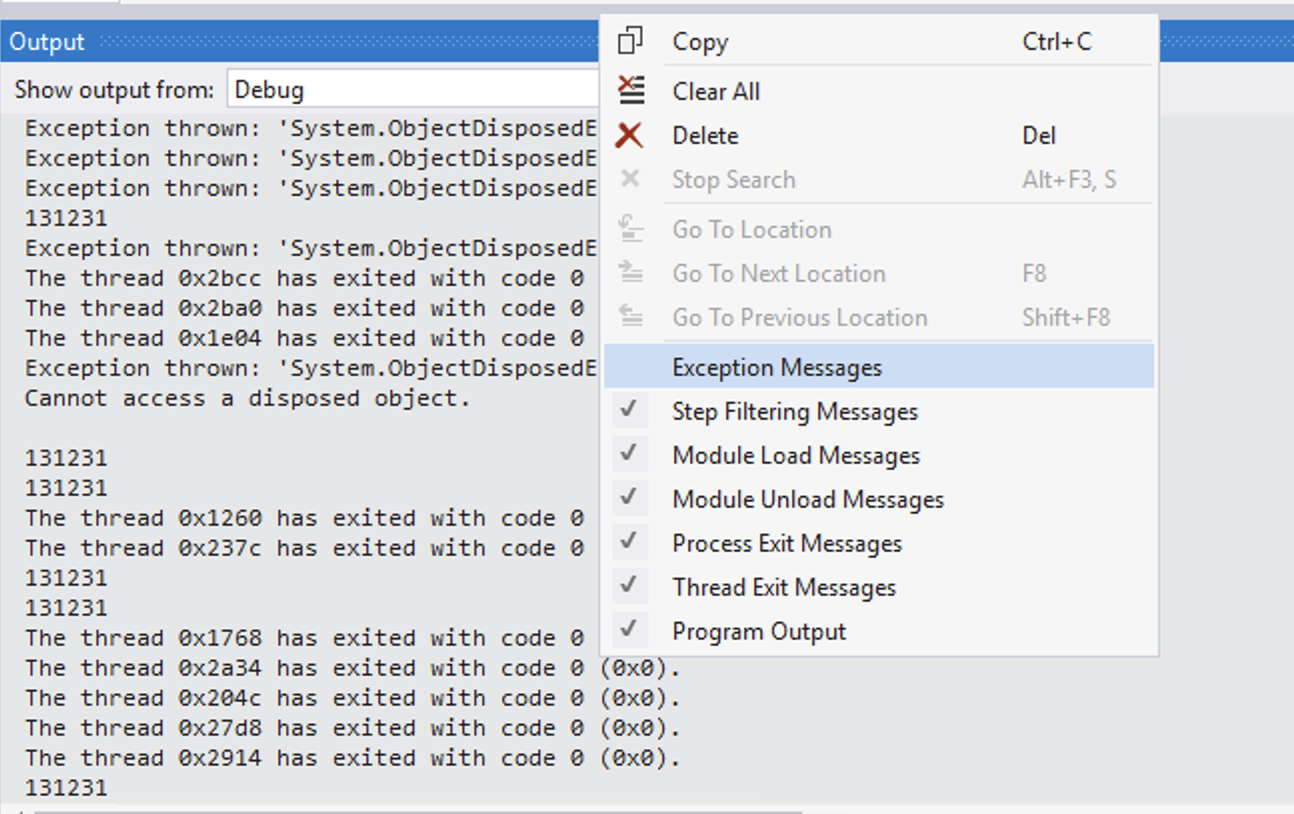
Alternatively, you can exclude any exception messages from the Output window. It's not like they're very helpful anyways.
 pieceofsummer
on 22 Feb 2019
pieceofsummer
on 22 Feb 2019
Related issues
 shorbachuk
·
4Comments
shorbachuk
·
4Comments
 plmwong
·
3Comments
plmwong
·
3Comments
 cbmek
·
3Comments
cbmek
·
3Comments
 dealproc
·
3Comments
dealproc
·
3Comments
 nigel-dewar
·
3Comments
nigel-dewar
·
3Comments
Most helpful comment
Those exceptions are not generated by Hangfire, neither it can choose not to log them. This is how
DbConnectionInternal.EnlistedTransactionDisposedis actually implemented:c# protected bool EnlistedTransactionDisposed { get { try { Transaction enlistedTransactionOriginal = _enlistedTransactionOriginal; if (enlistedTransactionOriginal != null) { return enlistedTransactionOriginal.TransactionInformation == null; } return false; } catch (ObjectDisposedException) { return true; } } }You probably have "Enable Just My Code" option disabled in Debugger settings, so it would log exceptions from anywhere, not just those coming from your code. Enabling it back would help.
Alternatively, you can exclude any exception messages from the Output window. It's not like they're very helpful anyways.
