Hangfire: Exception stack trace for failed tasks
For failed jobs that throw an exception I only get the exception type and message, no stack trace on the dashboard. I'm sure that has not always been the case.
Am I wrong and it's never been there / has changed in recent version, or am I doing something wrong?
The exception stack trace is stored in the database, just not shown
 barclayadam
All 12 comments
Hi @barclayadam, which version are you running in this case? We have several applications using hangfire in different versions, but all of them are showing the stacktrace for us when the jobs fails.
 rsilvanet
on 28 Sep 2018
rsilvanet
on 28 Sep 2018
Hey @rsilvanet we are on version 1.6.20
barclayadam
on 28 Sep 2018
In the database, in the State table, I _do_ see the exception details being recorded but as separate fields:
json
{
  "$type":"System.Collections.Generic.Dictionary`2[[System.String, mscorlib],[System.String, mscorlib]], mscorlib",
  "FailedAt":"2018-09-26T10:41:32.4170444Z",
  "ExceptionType":"System.Exception",
  "ExceptionMessage":"Oops",
  "ExceptionDetails":"System.Exception: Oops\r\n   at async Task ....HandleAsync(... task, BackgroundTaskContext context) in etc."
}
I see Reason being used on the details page at https://github.com/HangfireIO/Hangfire/blob/master/src/Hangfire.Core/Dashboard/Pages/JobDetailsPage.cshtml#L190 but do not see anything else.
From code it seems Reason it set to ex.Message at https://github.com/HangfireIO/Hangfire/blob/0f3d7a3ebf176c8ab90c1315b160d9d85d7cbf59/src/Hangfire.Core/Server/Worker.cs#L263
barclayadam
on 28 Sep 2018
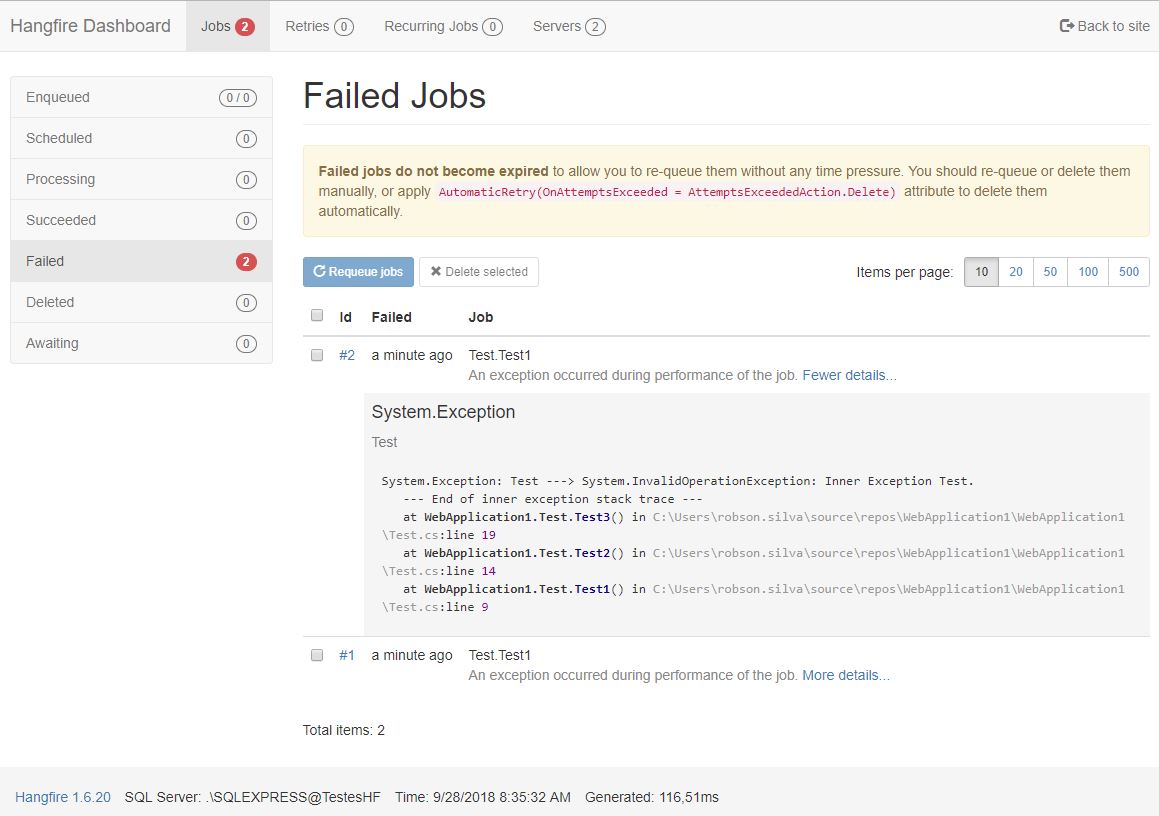
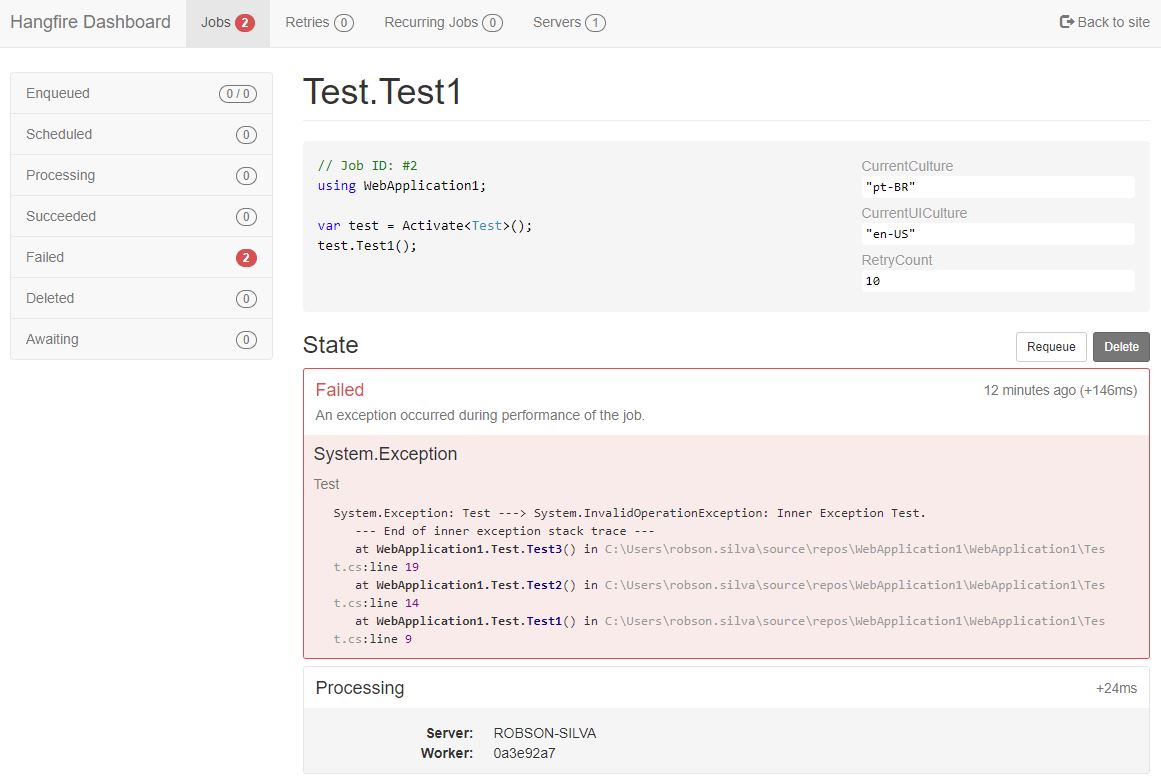
Hi @barclayadam, it's really weird. I've created a new project here in the 1.6.20, and it shows me the stacktrace.
In the failed jobs list:
And in the details of the job as well:
rsilvanet
on 28 Sep 2018
About your comment:
"I see Reason being used on the details page at (..). but do not see anything else."
Right below the line you tagged, there is a call to the method Html.RenderHistory(entry.StateName, entry.Data) and the result is used in the line 202:
The render call ends up here (for failed jobs):
rsilvanet
on 28 Sep 2018
Can you maybe replicate your case in a new project, push to a repository and share the link here?
rsilvanet
on 28 Sep 2018
I have tracked down this issue to our use of https://github.com/benaadams/Ben.Demystifier.
In a logger I was calling exception.Demystify which gave a stack trace that cannot be rendered by that formatter.
As the stack traces are _much_ nicer I'll try and get some time to look at the formatter to see if I can make it work with the simplified stack trace output.
This raises another question, would the use of the Ben.Demystifier package in the dashboard be welcomed as a dependency of Hangfire?
barclayadam
on 28 Sep 2018
As an example the below stack trace is not rendered at all:
System.Exception: Oops
   at async Task TaskHandler.HandleAsync(Task task, BackgroundTaskContext context) in D:/Source/TaskHandler.cs:line 58
   at async Task TaskExecutor.InvokeTaskHandler<TTask>(TTask backgroundTask) in D:/Source/TaskExecutor.cs:line 93
   at async Task TaskExecutor.Execute(BackgroundTask task) in D:/Source/TaskExecutor.cs:line 54
barclayadam
on 28 Sep 2018
@barclayadam take a look at Hangfire.StackTrace package. In most cases, it will give you a pretty stack trace without any changes to Hangfire itself.
Or at least it can give you an idea of how to replace a default stack trace renderer.
 pieceofsummer
on 28 Sep 2018
pieceofsummer
on 28 Sep 2018
@pieceofsummer Nice work on that package, thanks for sharing. Definitely seems like something that should be included by default, or at least mentioned more as it makes the stack _much_ better
barclayadam
on 1 Oct 2018
Since async stack traces in .NET Core 2.1 were greatly improved in readability (so great by default) and since Hangfire.StackTrace is available (by the way, we could add it to the https://www.hangfire.io/extensions.html page), I think we should close the issue – I don't think Hangfire should improve anything here.
 odinserj
on 16 Jan 2019
odinserj
on 16 Jan 2019
I had the exact same problem, also because I was using exception.Demystify() in my logger. (I did not realize that exception.Demystify() was modifying the stack trace of the exception itself, I thought it was returning a copy of the exception but it doesn't.)
@odinserj Would you accept a pull request to handle demystified exceptions?
I have opened HangfireIO/HangfireIO.github.io#53 to include Hangfire.StackTrace in the extensions page.
 0xced
on 15 Mar 2019
0xced
on 15 Mar 2019
Related issues
 dbones
·
3Comments
dbones
·
3Comments
 JvanderStad
·
3Comments
JvanderStad
·
3Comments
 pwueje
·
4Comments
pwueje
·
4Comments
 jeffsugden
·
4Comments
jeffsugden
·
4Comments
 cottsak
·
3Comments
cottsak
·
3Comments
Most helpful comment
@barclayadam take a look at Hangfire.StackTrace package. In most cases, it will give you a pretty stack trace without any changes to Hangfire itself.
Or at least it can give you an idea of how to replace a default stack trace renderer.