I mapped the Hangfire Dashboard to the route /hangfire.
app.UseHangfireDashboard("/hangfire")
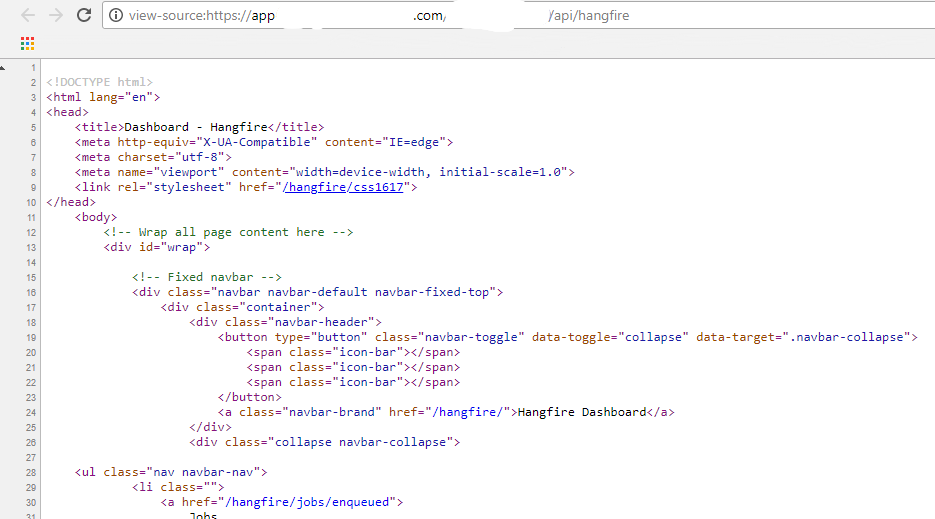
The Dashboard is reachable by the URL https://app-dev.example.com/exampleapp/api/hangfire/ after deployment, but the Dashboard URLs point to https://app-dev.example.com/hangfire/. Because of this, the Dashboard does not work. Is anywhere a possibility to change the BaseUrl of the Dashboard?

 wolfmarco
All 10 comments
Webforms, MVC, Self Hosted? Can you let us see your OWIN Startup class?
 natiki
on 15 Feb 2018
natiki
on 15 Feb 2018
I use MVC inside a ASP.Net core webservice which is hosted in IIS. I use the method extension https://github.com/HangfireIO/Hangfire/blob/master/src/Hangfire.AspNetCore/HangfireApplicationBuilderExtensions.cs#L31 to register the Dashboard.
wolfmarco
on 15 Feb 2018
There you can find an example implementation https://github.com/wolfmarco/AspNetCoreWithHangfireExample/blob/master/src/AspNetCoreWithHangfireExample/Startup.cs
wolfmarco
on 15 Feb 2018
And what happens if you use /exampleapp/api/hangfire/ instead of just hangfire ?
What is your applications relative root path?
 burningice2866
on 16 Feb 2018
burningice2866
on 16 Feb 2018
The app is hosted at
https://app11.example.com/hangfire/
https://app12.example.com/hangfire/
and we call the app with the url (load balancer)
https://loadbalancer.example.com/app1/hangfire/
The dashboard includes e.g. the CSS stylesheet by /hangfire/css1617. But the stylesheet is not available at https://loadbalancer.example.com/hangfire/css161. Instead the stylesheet should be imported by /app1/hangfire/css1617. So we need the possibility to configure the basepath /app1.
wolfmarco
on 16 Feb 2018
Hi,
I have the same issue...
Do you have any solution/workaround ?
thanks
 flomuson
on 12 Jun 2018
flomuson
on 12 Jun 2018
I don't really have a solution. Our workaround is to call the dashboard directly without the load balancer.
wolfmarco
on 13 Jun 2018
@flomuson @wolfmarco must be similar to #1049
 pieceofsummer
on 13 Jun 2018
pieceofsummer
on 13 Jun 2018
The Hangfire Dashboard tries to load the CSS and JS files by https://loadbalancer.example.com/hangfire/css161 instead of https://loadbalancer.example.com/app1/hangfire/css161. The URL https://loadbalancer.example.com/hangfire/ does not exist. I don't understand how a rewrite/redirect should work in this case.
wolfmarco
on 14 Jun 2018
Following workaround works, because our load balancer fills the request header X-Forwarded-Prefix. Instead of this header you can also use a fix value or a setting for different environments.
app.Use((context, next) =>
{
  if (context.Request.Path.StartsWithSegments("/hangfire"))
  {
    context.Request.PathBase = new PathString(context.Request.Headers["X-Forwarded-Prefix"]);
  }
  return next();
});

app.UseHangfireDashboard("/hangfire", new DashboardOptions
{
  Authorization = new[] {new DashboardAuthorizationFilter()},
  AppPath = _appSettings.CurrentValue.WebUiUri
})
.UseHangfireServer(backgroundJobServerOptions);
Related issues
 abdelrady
·
4Comments
abdelrady
·
4Comments
 dealproc
·
3Comments
dealproc
·
3Comments
 shorbachuk
·
4Comments
shorbachuk
·
4Comments
 cbmek
·
3Comments
cbmek
·
3Comments
 odinserj
·
4Comments
odinserj
·
4Comments
Most helpful comment
Following workaround works, because our load balancer fills the request header
X-Forwarded-Prefix. Instead of this header you can also use a fix value or a setting for different environments.