Hangfire: What causes multiple servers under 1 app pool?
I noticed sometimes my production site will have multiple servers at various times. Mostly its one but sometimes two or three. I know its not really a problem but .. is it a misconfiguration on my side or could be a potential problem with something else.. or just normal, unavoidable behaviour as app pools restart?

 ppumkin
All 23 comments
I have the same issue. It keeps growing until we reset iis manually. It happens on different servers, one, two at a time:

 mdymel
on 19 Nov 2015
mdymel
on 19 Nov 2015
Same issue here, but a more extreme example. One instance is started 8 days ago, and one instance 2 days ago. Now we do happen to have a release around those days/time what caused the application pool to recycle. Would it be possible that some code of Hangfire is still lingering in memory and processing some jobs? We actually noticed because we store some information about the job in-memory (progress, mostly) and that progress information was not updated but via our logging we still found out that the job completed.
For clarity, the setup:
- One application pool
- One IIS web site
- Overlapped recycle disabled
- No other HangFire servers other than the one that should be run by the application pool

Update: I dug into the Hangfire tables I found out that some of the jobs even now are still being executed by the rogue Hangfire instance. I suppose one application domain hasn't unloaded when we released an update on the web application 2 days ago.
 Sebazzz
on 1 Jun 2016
Sebazzz
on 1 Jun 2016
Can you make a process dump and post here all the call stacks? You can do this via Task Manager → Details tab → Right-click on a process → Create dump file. This will generate a dump file that you can open with Visual Studio and see call stacks of all the threads. This gives almost immediate answer what is going on in your process.
 odinserj
on 12 Jul 2016
odinserj
on 12 Jul 2016
I have a minidump still, but I wasn't able to load all symbols. For what its worth, the thread dump.
Also a screenshot I took earlier showing the two app domains:

Powershell code:
cd IIS:\AppPools\nl_myapppool\WorkerProcesses
$c = Get-ChildItem
$a = $c.appDomains
$a.Collection
This returns '1' showing that IIS has no knowledge of the second app domain.
Sebazzz
on 19 Jul 2016
@Sebazzz, thanks a lot for the dump, it contains all the needed method names. Examining the contents...
odinserj
on 19 Jul 2016
Whoa, 108 threads! @Sebazzz, would you like to send me the original dmp file via dropbox or something like that? You can send a secret link via email (available in my profile on GitHub). I'll open it using Visual Studio.
odinserj
on 19 Jul 2016
All the Hangfire threads are waiting for a shutdown cancellation token that is canceled during the application shutdown. So looks like something prevents your application from shutting down. Hangfire itself can't do this, because all of its threads are background.
Look at Thread 89 on line 4573, there is a thread that processes an HTTP request to the Telerik's WebResource handler. It is very strange that there is a pending request to an appdomain that should not serve any request anymore. It should either be processed or timed out to allow appdomain to be unloaded.
There is no symbol information in call stack to analyze why the request is blocked, but we can at least investigate why it wasn't timed out, since pending request may prevent appdomain from being unloaded.
The request is stucked in the native MgdReadEntityBody method call. If we go to the above method, ReadEntityCoreSync method, we'll see manipulations with the IsInReadEntitySync property with the following comment:
// Mark a blocking call
// It allows RequestTimeoutManager to eventualy to close the connection and unblock the caller
// and handle request timeout properly (if in cancelable state)
So, the request should be in a _cancelable state_ to allow RequestTimeoutManager to abort the corresponding thread. This may be the reason why it's still pending, so further investigation is required. This may be caused by ASP.NET itself, or Telerik's WebResourceHandler. To learn what's going on, we should start with the BeginCancelablePeriod method call, since it affects the MustTimeout method call logic.
odinserj
on 19 Jul 2016
I think its more of an ASP.NET issue - I have been having these issues
since I reported it... they go away after a while so not really that
bothered by it. They get "cancelled" eventually - They just linger around
for a while. Everything still works as expected so that is the main
concern. This seems to be a very strange side effect.
On Tue, 19 Jul 2016 at 14:08 Sergey Odinokov [email protected]
wrote:
All the Hangfire threads are waiting for a shutdown cancellation token
that is canceled during the application shutdown. So looks like something
prevents your application from shutting down. _Hangfire itself can't do
this_, because all of its threads are background
https://msdn.microsoft.com/en-us/library/system.threading.thread.isbackground(v=vs.110).aspx
.Look at Thread 89 on line 4573, there is a thread that processes an HTTP
request to the Telerik's WebResource handler. It is very strange that there
is a pending request to an appdomain that should not serve any request
anymore. It should either be processed or timed out to allow appdomain to
be unloaded.There is no symbol information in call stack to analyze why the request is
blocked, but we can at least investigate why it wasn't timed out, since
pending request may prevent appdomain from being unloaded.The request is stucked in the native MgdReadEntityBody
http://referencesource.microsoft.com/#System.Web/Hosting/IISUnsafeMethods.cs,bcc8f06f73264af7
method call. If we go to the above method, ReadEntityCoreSync
http://referencesource.microsoft.com/#System.Web/Hosting/IIS7WorkerRequest.cs,bea360c6267495f5
method, we'll see manipulations with the IsInReadEntitySync
http://referencesource.microsoft.com/#System.Web/WorkerRequest.cs,c36adbc49ef81c4a,references
property with the following comment:// Mark a blocking call
// It allows RequestTimeoutManager to eventualy to close the connection
and unblock the caller
// and handle request timeout properly _(if in cancelable state)_So, the request should be in a _cancelable state_ to allow
RequestTimeoutManager to abort the corresponding thread. This may be the
reason why it's still pending, so further investigation is required. This
may be caused by ASP.NET itself, or Telerik's WebResourceHandler. To
learn what's going on, we should start with the BeginCancelablePeriod
http://referencesource.microsoft.com/#System.Web/HttpContext.cs,074771451fffbbbe
method call, since it affects the MustTimeout
http://referencesource.microsoft.com/#System.Web/HttpContext.cs,acfadc2b5b8a1494,references
method call logic.—
You are receiving this because you authored the thread.
Reply to this email directly, view it on GitHub
https://github.com/HangfireIO/Hangfire/issues/457#issuecomment-233626404,
or mute the thread
https://github.com/notifications/unsubscribe-auth/ABMRk2OJmEdNhyiQv-uljQDzKiKbA7zIks5qXMwTgaJpZM4GH5QF
.
ppumkin
on 19 Jul 2016
HTTP request is a subject to the RequestTimeoutManager logic only when all of the following statements are true:
- Execution timeout has a correct positive value (
<httpRuntime executionTimeout="00:01:50"/>) - Debugging mode is set to
false(<compilation debug="false">tag). IHttpAsyncHandlerwasn't used to process the request.
It also looks like that long-running network requests may cause this, because _execution timeout_ refers only to the amount of time the worker process spent processing the request; which is just a subset of time-taken (see this SO answer).
odinserj
on 19 Jul 2016
@odinserj I will send the minidump when I get to work tomorrow.
All the Hangfire threads are waiting for a shutdown cancellation token that is canceled during the application shutdown. So looks like something prevents your application from shutting down. Hangfire itself can't do this, because all of its threads are background.
Yes, I thought so, but background threads don't matter for app domains do they? The app domain was recycled, but the application pool process doesn't necessarily need to be restarted for the new app domain to load.
@ppumkin I can tell you the zombied app domain was running for at least a few days.
Sebazzz
on 19 Jul 2016
@Sebazzz, @ppumkin, @mdymel, how do you start the background processing, using the UseHangfireServer, HangfireBootstrapper (from making app always running) or by creating a custom BackgroundJobServer instance?
odinserj
on 21 Jul 2016
@Sebazzz, in Microsoft.Owin.Host.SystemWeb source code I've found the following comment in the ShutdownDetector class:
// Normally when the AppDomain shuts down IRegisteredObject.Stop gets called, except that
// ASP.NET waits for requests to end before calling IRegisteredObject.Stop.
Unfortunately I can't prove this, because ASP.NET source code on referencesource is not enough, and I can't find when the PipelineRuntime.StopProcessing method is called – it's backed by the IPipelineRuntime COM interface, and looks like it is called from IIS. So, let's trust ASP.NET guys, and keep in mind that IRegisteredObject.Stop method call may be postponed, or not called at all (at least if there are some requests pending), like in your case.
Both UseHangfireServer and HangfireBootstrapper use IRegisteredObject interface to handle appdomain shutdown notifications from ASP.NET. Now we understand, that this is not enough to handle the edge cases. Despite of UseHangfireServer uses more aggressive checks provided by the Microsoft.Owin.Host.SystemWeb, it may not handle appdomain restarts caused by bin directory changes (like during the deployments).
So I'd like to add a new integration for ASP.NET applications that use all of these super-duper aggressive checks. Looks like it will use the reflection, but Katana developers already doing this in the ShutdownDetector class.
P.S. Disable overlapped recycle, works for _application POOL recycles_, but it doesn't work for _application DOMAIN restarts_. Configuration change and deployments do not cause _app pool recycle_, where a new worker is started. They only lead to appdomain restart. So this setting doesn't prevent your application from having two instances running.
P.P.S. Don't know, how exactly the IIS:\AppPools\nl_myapppool\WorkerProcesses resource works, but the RemoveThisAppDomainFromAppManagerTableOnce method is called before calling IRegisteredObject.Stop. If the resource is checking appmanager tables, it may not count running yet app domains.
odinserj
on 21 Jul 2016
@odinserj Using regular UseHangfireServer to setup Hangfire. Thumbs up for the investigation work!
Sebazzz
on 21 Jul 2016
I've just released Hangfire.AspNet 0.1.0 as a proof of concept (already available on NuGet). Together with IRegisteredObject, it uses timer-based checks for HostingEnvironment.ShutdownReason property. The value of this property is set before any calls to IRegisteredObject.Stop and any other blocking methods; and the value isn't reverted once it was set. So it is ideal candidate to check for.
Documentation is still pending, but you can use https://github.com/HangfireIO/Hangfire.Highlighter as an example.
odinserj
on 28 Jul 2016
Following the Highlighter example to the T, deploying to my Azure App Service (S2, 2 Core 3.5 GB), keeps spawning more and servers, eventually bringing the App Service to its knees! Why does it keep spawning more servers?!? Why won't it stick to just 1 server! I've set the worker count to 1 to try to minimize the damage but eventually, it still fails. I have scoured the webs looking for a solution! This has been a very frustrating experience. I am using Hangfire 1.6.14, Hangfire.AspNet 0.2.0, Hangfire.SqlServer 1.6.14, Hangfire.Dashboard.Authorization 2.1.0
 SergeySagan
on 29 Sep 2017
SergeySagan
on 29 Sep 2017
@odinserj
I'm still having a similar problem, even after trying Hangfire.AspNet. Is there a way to overwrite the behavior of the BackgroundProcessingServer class when instantiating BackgroundProcessContext so that it doesn't use a Guid to identify the server? My idea is to have one server per application port.
 samiraguiar
on 19 Oct 2017
samiraguiar
on 19 Oct 2017
We are also experiencing issues with hangfire spawning many server instances, to the point when it brings our application pool to stop running.
Any idea how to fix this? We been running fine for a good year but now recently it started doing this. only thing we have changes is adding queues to the hangfire setup.
 Zapnologica
on 2 Oct 2018
Zapnologica
on 2 Oct 2018
Same issue on .NET Core.
 colotiline
on 4 Apr 2019
colotiline
on 4 Apr 2019
@colotiline How are you hosting .NET Core? In-process, out-of-process IIS? Standalone? It seems very unlikely that this happens on .NET Core if the latter.
Sebazzz
on 4 Apr 2019
@sebazzz
Host:
Debug mode for a web application from VS code on a Windows desktop machine.
Setup:
Standard setup from the documentation in the startup.cs.
Database:
PostgreSQL 10.
Issue:
After restarting the app I’ve got two servers of the hangfire.io.
colotiline
on 5 Apr 2019
That is nowhere the same situation. This bug is about multiple instances after proper recycle of an application pool. This is problematic because the other instance is still active and also handles jobs (albeit with older versions of the assemblies if this happens after an redeploy).
In your case the original instance is not active. It cannot be because the process that hosted it was terminated.
Sidenote: for development purposes its better to include the HangFire.MemoryStorage package, especially in a multi-developer scenario when sharing the same database. If you would otherwise fire a job it might run at some other developer machine and you'Il have a hard time debugging.
Sebazzz
on 8 Apr 2019
If it helps anyone, we had this issue in Azure, and we figured out that there is a hangfire server per deployment slot, which makes logical sense. So stopping the extra deployment slots in the azure portal will stop the "extra" servers. I hope that helps!
 DaleCam
on 29 Apr 2019
DaleCam
on 29 Apr 2019
You are right @DaleCam but, what if I want all that slots and still don't want multiple hangfire server instances?
For that, you can add a different config file(or JSON config for .Net core) for each and every slot. after that you can validate if your environment is production or not and create a hangfire server instance like below.it will not create new instance until meet your condition and you can smoothly experience single instance of hangfire server.
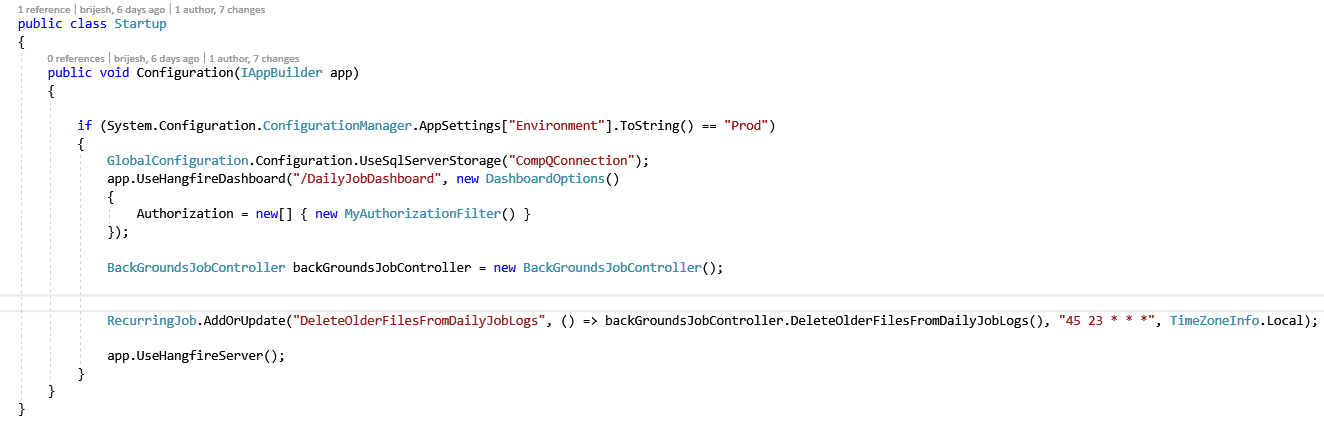
also HangFire.MemoryStorage package suggestion from @Sebazzz work for local debugging.
 naza-b
on 2 Mar 2021
naza-b
on 2 Mar 2021
Related issues
odinserj
·
4Comments
 dealproc
·
3Comments
dealproc
·
3Comments
 dbones
·
3Comments
dbones
·
3Comments
 nigel-dewar
·
3Comments
nigel-dewar
·
3Comments
 dgaspar
·
4Comments
dgaspar
·
4Comments
Most helpful comment
@odinserj Using regular
UseHangfireServerto setup Hangfire. Thumbs up for the investigation work!