Handson-ml: Chapter 2, Prepare the data for Machine Learning algorithms
Hi!
I really love your book. Really. Especially when it comes to explaining algorithms inner behaviours and usage.
But unfortunately it is really hard to guess for me and follow what is really the correct preprocessing data flow I should use. Considering corrections maybe you could - at least here in the notebook - clear things up a bit.
I really lost the narration in Chapter 2, Prepare the data for Machine Learning algorithms. The peak is probably reached when you paste the code from scikit-learn PR. The PR is now merged, but as a person who is developing scikit skills it is really hard for me to guess where to look for it in scikit. Let's say that pasting CategoricalEncoder class code in my projects is not the most elegant solution :)
So once again. Love whole book. Hate this part when it comes to data preprocessing. You got me lost and I have to go to other courses for this one. And I do not want to because I love the book so much. So please could you fix somehow this subchapter flow to show how it should be done without pasting any code from scikit source? World will be much better place because of that :)
 msznajder
All 10 comments
Hi @msznajder ,
Thanks for your kind words, I really appreciate it. I'm glad you find the book useful.
Yes, preprocessing is not the most fun part of Machine Learning, it's true! In short, a categorical feature such as ocean_proximity cannot be fed directly to most learning algorithms, because they expect numbers. One solution is just to list all the possible values (<1H OCEAN, INLAND, NEAR OCEAN, NEAR BAY, ISLAND) and pass the index of each value in this list to the learning algorithm. For example, if an instance has ocean_proximity equal to <1H OCEAN, then send 0. If it is equal to INLAND then send 1. If it is NEAR OCEAN then send 2. Etc. This does not work well because the learning algorithm will have the impression that <1H OCEAN (i.e., 0) is closer (i.e., more similar) to INLAND (i.e., 1) than to NEAR OCEAN (i.e., 2), which seems wrong. A common solution is to create a "dummy" feature for each possible value. In other words, create a <1H OCEAN feature which is equal to 1 when ocean_proximity is equal to <1H OCEAN, or 0 otherwise. And do the same for INLAND, NEAR OCEAN and so on. Then you can drop the ocean_proximity feature itself. So for example, instead of sending the ocean_proximity feature equal to NEAR OCEAN to the learning algorithm (which generally wouldn't know what to do with it), you would send a vector (called a one-hot vector) equal to [0, 0, 1, 0, 0]. Similarly, instead of sending INLAND, you would send [0, 1, 0, 0, 0].
This is called one-hot encoding. As you can see there are two steps: first, convert the string value to an index, then convert this index to a one-hot vector.
Encoding categorical features using Scikit-Learn was not trivial when I wrote the book, because there was no class for that, so I used the LabelEncoder class instead, which was not really meant for that purpose (it's meant to do one-hot encoding for labels, not features). My code eventually stopped working after Scikit-Learn was updated to 0.17, and they wrote that they would have a class for that purpose eventually: the CategoricalEncoder class. It is actually available in Scikit-Learn 0.20, and it does exactly what we want! :) So one option is to simply update Scikit-Learn to 0.20 (currently the dev version) and use this class directly instead of copy/pasting the code.
If you don't want to update to 0.20, then frankly I think including that class in your code base is the simplest and best solution: it's a well isolated class, so you could put it in a categorical_encoder.py file, and simply write from categorical_encoder import CategoricalEncoder in your code. The day you update to Scikit-Learn 0.20, you can just remove the categorical_encoder.py file and change your imports to from sklearn.preprocessing import CategoricalEncoder. If you do any differently, you are going to have trouble when you update to 0.20.
I hope this helps,
Aurélien
 ageron
on 14 Jan 2018
ageron
on 14 Jan 2018
Hi @ageron
First I would like to thank you very much for the book, too. It is written in an interesting way, it keeps me hungry for more when I read it. And thank you so much for regurarly updating the jupyter notebooks and keeping in touch with your readers!
I think what maybe is confusing about chapter two is that it shows _different ways_ to tackle the listed problems. While this is valuable to know, it makes it a bit harder as soon as we try to use the code on our own. Take exercise 1) of that chapter for example:
Try a Support Vector Machine regressor (sklearn.svm.SVR), with various hyperparameters ...
To solve that, I have to find a good spot inside the jupyter notebook to insert that code. When I then run through all the cells inside the notebook, it can be confusing to see what the necessary steps are to get a result and what are just _different ways_ of doing something (and therefore at that moment just nice to know).
I decided to to use an IDE (like Spyder (which comes with Anaconda) or PyCharm) to get an overview / a "better feeling" for the code. After splitting the notebook for chapter two into different files, it became more clear what the workflow is.
Here are the split files: chapterTwo_split.zip
A brief description of the content:
dataanalysis.py    (fetching and analyzing the data)

datapreparation.py (transformation steps, model selection,
                    hyperparameter tuning, plus the Extra Material)

mlbook             (a python package containing the implementations
                    of the functions and classes)
I commented out as much code as possible inside datapreparation.py and grouped some statements so it became clear what the needed steps are. (Disclaimer: I think the splitting of the code could be done better than I did here)
So, I highly appreciate that you show us all the different ways, and I would keep it that way. But maybe it makes sense to also provide that code in a way so it can be used later for other projects?
 hohlb
on 23 Jan 2018
hohlb
on 23 Jan 2018
That's very valuable feedback, thanks @hohlb, I'll look into your code.
ageron
on 24 Jan 2018
Hi Aurélien
First of all, very happy to tell you that this is one of the best books I have came across in recent times on ML. Already hooked up with it. Thanks for writing this.
I have a related query on above issue. I have just updated Scikit Learn to Scikit-Learn 0.20 as mentioned above and will run all the codes written so far for Chapter 2. Apart from CategoricalEncoder, do you foresee any change I need to do in the codes already written which are available in the book with this update of Scikit-Learn?
One more query on following Custom Transformers -
_from sklearn.base import BaseEstimator, TransformerMixin
rooms_ix, bedrooms_ix, population_ix, household_ix = 3, 4, 5, 6_
What does _ix represent? It looks like any column name with rooms, bedrooms, population and households in Housing Data will be picked up while performing this transformation.
Also, I am new to Python and can already see that an advanced knowledge of NumPy and Pandas are required for reading this book (same you mentioned at the start of the book). Could you please let me know any recommended courses or books or websites to master NumPy and Pandas?
Thanks and Regards
Abhik
 abhikjha
on 29 Jan 2018
abhikjha
on 29 Jan 2018
Hi @abhikjha ,
Thanks for your kind words. :)
I don't see any significant change other than the CategoricalEncoder when migrating to 0.20 (at least regarding the code examples in the book). Oh, and you will get warnings in some predictors (e.g., SGDRegressor if you don't specify either tol or max_iter). But that's about it.
The _ix suffix means "index". It's the index of each column in the provided DataFrame. I wish I could provide column names instead, but unfortunately when you give a Pandas DataFrame to a Scikit-Learn transformer, it outputs a NumPy array, so the column names and index are lost. That's why I need to resort to using column indices instead. You may prefer to use sklearn-pandas instead: it allows you to easily preprocess a DataFrame by providing a list of transformers for each column.
I wrote a few tutorials that I recommend you go through: check out the "Scientific Python tutorials" section here: http://nbviewer.jupyter.org/github/ageron/handson-ml/blob/master/index.ipynb
Hope this helps,
Aurélien
ageron
on 29 Jan 2018
Hi Aurélien
Thank you for such prompt response and sending me the link. This looks really useful. I will go through this asap. Also, thank you for explaining _ix suffix. It makes sense now to me.
Apparently, I cannot download Scikit-Learn - 0.20. Below is the screenshot -
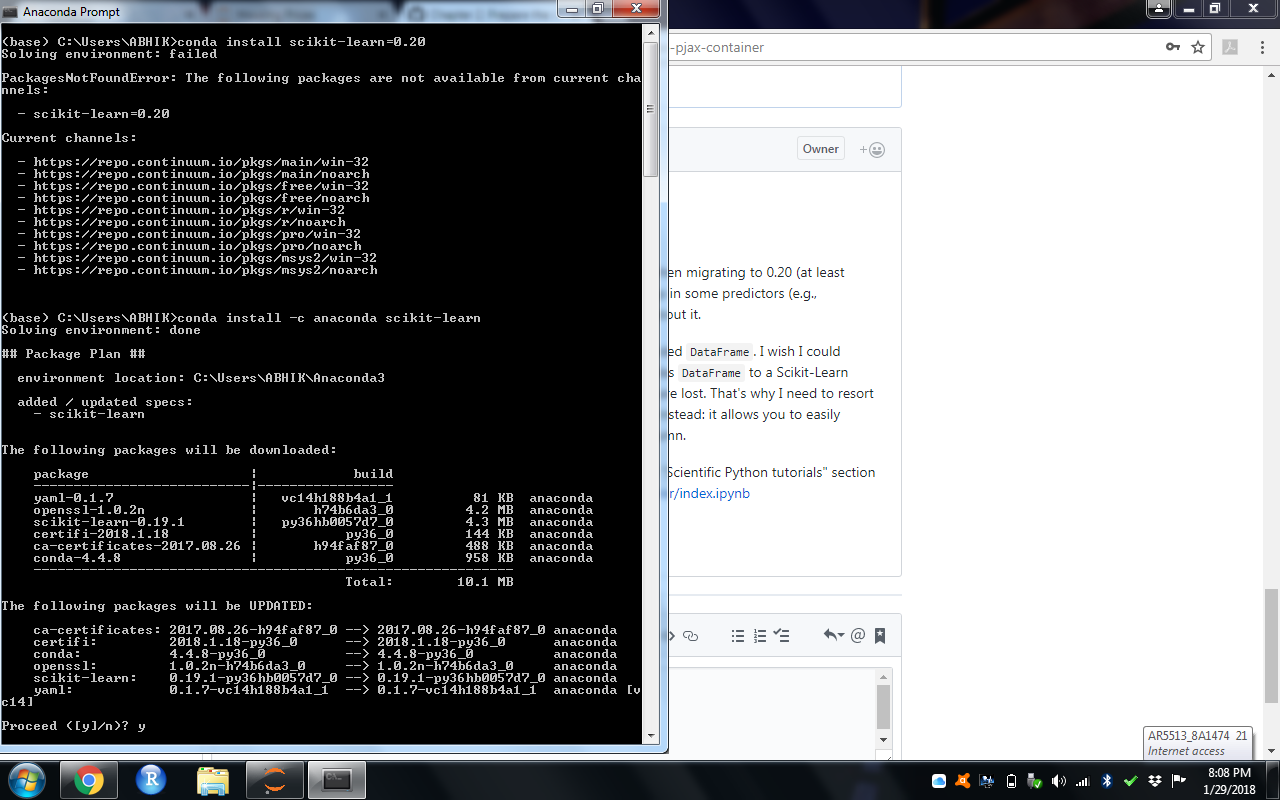
It looks like the most recent version I can update is Scikit-Learn - 0.19.1. So, at this moment, will use your code for CategoricalEncoder.
Thanks and Regards
Abhik
abhikjha
on 29 Jan 2018
Version 0.19.1 IS the latest version of scikit learn.
 drorata
on 29 Jan 2018
drorata
on 29 Jan 2018
Hi @drorata ,
Yes, version 0.20 is currently the "dev" version, as I mentioned above. The current stable release is 0.19.1. I recommend using the CategoricalEncoder class I copied from dev for now, until version 0.20 is officially released.
Hope this helps,
Aurélien
ageron
on 6 Feb 2018
Thanks both of you! for the time being, I have just copied the code for CategoricalEncoder.
abhikjha
on 7 Feb 2018
The Scikit-Learn team decided to upgrade the OneHotEncoder class rather than creating a new CategoricalEncoder class. I updated the notebook for chapter 2 to use the OneHotEncoder class. I also updated it to use the new ColumnTransformer class which will also be introduced with Scikit-Learn 0.20. It simplifies having different preprocess steps for different columns (instead of using a FeatureUnion and having a column selector transformer).
ageron
on 2 Aug 2018
Related issues
 nitml
·
3Comments
nitml
·
3Comments
 kenorb
·
3Comments
kenorb
·
3Comments
 qinhanmin2014
·
5Comments
qinhanmin2014
·
5Comments
 akjain90
·
4Comments
akjain90
·
4Comments
 tetsuyasu
·
3Comments
tetsuyasu
·
3Comments
Most helpful comment
Hi @msznajder ,
Thanks for your kind words, I really appreciate it. I'm glad you find the book useful.
Yes, preprocessing is not the most fun part of Machine Learning, it's true! In short, a categorical feature such as
ocean_proximitycannot be fed directly to most learning algorithms, because they expect numbers. One solution is just to list all the possible values (<1H OCEAN,INLAND,NEAR OCEAN,NEAR BAY,ISLAND) and pass the index of each value in this list to the learning algorithm. For example, if an instance hasocean_proximityequal to<1H OCEAN, then send 0. If it is equal toINLANDthen send 1. If it isNEAR OCEANthen send 2. Etc. This does not work well because the learning algorithm will have the impression that<1H OCEAN(i.e., 0) is closer (i.e., more similar) toINLAND(i.e., 1) than toNEAR OCEAN(i.e., 2), which seems wrong. A common solution is to create a "dummy" feature for each possible value. In other words, create a<1H OCEANfeature which is equal to 1 whenocean_proximityis equal to<1H OCEAN, or 0 otherwise. And do the same forINLAND,NEAR OCEANand so on. Then you can drop theocean_proximityfeature itself. So for example, instead of sending theocean_proximityfeature equal toNEAR OCEANto the learning algorithm (which generally wouldn't know what to do with it), you would send a vector (called a one-hot vector) equal to[0, 0, 1, 0, 0]. Similarly, instead of sendingINLAND, you would send[0, 1, 0, 0, 0].This is called one-hot encoding. As you can see there are two steps: first, convert the string value to an index, then convert this index to a one-hot vector.
Encoding categorical features using Scikit-Learn was not trivial when I wrote the book, because there was no class for that, so I used the
LabelEncoderclass instead, which was not really meant for that purpose (it's meant to do one-hot encoding for labels, not features). My code eventually stopped working after Scikit-Learn was updated to 0.17, and they wrote that they would have a class for that purpose eventually: theCategoricalEncoderclass. It is actually available in Scikit-Learn 0.20, and it does exactly what we want! :) So one option is to simply update Scikit-Learn to 0.20 (currently the dev version) and use this class directly instead of copy/pasting the code.If you don't want to update to 0.20, then frankly I think including that class in your code base is the simplest and best solution: it's a well isolated class, so you could put it in a
categorical_encoder.pyfile, and simply writefrom categorical_encoder import CategoricalEncoderin your code. The day you update to Scikit-Learn 0.20, you can just remove thecategorical_encoder.pyfile and change your imports tofrom sklearn.preprocessing import CategoricalEncoder. If you do any differently, you are going to have trouble when you update to 0.20.I hope this helps,
Aurélien