Handbrake: Missing Export/Import Queue options in Queue window
Please describe the problem or feature request in detail:
Export/Import Queue function is missing in Queue windows.
What are the steps to reproduce this problem:
Open Queue window and pull down Options menu.
What version of HandBrake you are running:
Nightly 20170909150001-f626271-master (2017091001) 64 bit
What operating system and version and you running (e.g. OSX 10.11, Windows 7, Ubuntu 14):
Windows 10 64 bit
Here is some screenshots of current nightly and that of with the menu, 20160115214425-e3d65a6-master (2016011601).
It used to be like this.

Queues are saved in *.hbq file and the queue file can be imported after exiting HB.

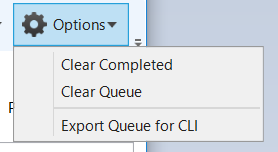
Now it only has Export function for CLI. There is no way to export from GUI and import to GUI.
My workaround is to stop encoding while there are still ongoing queues anyway, and to exit to restart. This is possible because somehow HB seems to remember the last unfinished queues and restore them on the next run. However, I am anxious about it, wondering if HB does not remember anything. The old-style Export/Import function is missed.
I also found this forum thread, dating back to March 2016. But I remember the menu was still available in 2017.
 taxen
taxen
All 26 comments
Check ec1ae47d59d52315d7279bafcb883d69803ee96e [WinGui: Remove the legacy XML based queue import/export funcitonality]
 secondfry
on 12 Sep 2017
secondfry
on 12 Sep 2017
Yup, this functionality was removed. The formats changed greatly and since so few people actually used it, it hasn't yet made sense to restore it.
HandBrake saves the queue every time there is a change on it, so if the app crashes, or you close/restart it, it offers to recover the last saved queue.
I'll mark it as an enhancement but there is chance this won't be coming back.
 sr55
on 12 Sep 2017
sr55
on 12 Sep 2017
OK, that will do it then. Please close this issue. Thank you!
taxen
on 13 Sep 2017
Oh unfortunate. I have a script I run a half dozen times a year that makes queues for Handbrake to rip. I've dropped back to 0.10.5 until I re-write my script to just use Handbrake CLI instead of making queues, I suppose.
 kdorff
on 18 Jul 2018
kdorff
on 18 Jul 2018
Really disappointed this functionality was dropped; I export/import with the GUI a ton. I also have several hundred HBQ files that I've kept as backup in case I need to re-encode something previously completed. Without majorly overhauling my process, sounds like I'm indefinitely stuck on the 1.0.7 release.
(Note, I'm not worried about the format...I can script a translator from XML to JSON and rip through all my saved HBQ's...but it'd be really nice to keep the import functionality in the GUI)
 xenokira
on 4 Aug 2018
xenokira
on 4 Aug 2018
Update: Re-opening. Been seeing enough demand to revisit this.
The XML format won't be returned as the GUI is moving away from using XML.
Current thinking is to import the CLI JSON Format. (What the UI currently exports) Currently this only models an encode job, not a UI task (which has additional settings related to GUI behaviours) so it's going to require some thought and coordination between the cross-platform UI's. In other words, it'll be a while.
That said, for folks using this, I do want to hear why? If the issue is deficiencies in the UI, then I'd rather invest my time there.
sr55
on 4 Aug 2018
I do want to hear why?
By "why" if you mean why I want to request this feature back, then my answer is this:
Suppose there are more than a couple of queues in the Queue window and encode function is running.
Then, while running, I sometimes want to stop right after the running queue is done, not continuing the second queue. Ex. I want to update DLL often.
If this feature is back on, I can save the rest of the queues into some format (I really do not care about file format. Whatever can be reloaded is just fine.), and then clear those queues and let the program running while it is encoding the first queue. Apparently, Handbrake will stop right after the first queue is done, because there is no other queue to run.
Right now, what I do without this feature is.... watch out when the second queue starts after the first one, and close the program. Like you explained, the rest of the queues are saved automatically and will be recovered whenever I launch Handbrake next time. But, by this method I need to be alert as to when the first queue is done. And that is rather inconvenient.
taxen
on 20 Aug 2018
+1 Need to be able to import exported queue either in XML or JSON formats. For legacy support, it would be great to be able to import XML based queues too but XML is nto too important for me.
 timematcher
on 25 Aug 2018
timematcher
on 25 Aug 2018
Since you ask why:
I personally would love a queue-to-CLI export. Right now, I have a perfectly normal 4 core desktop. In the closet I have a 48 core, 64GB monster that lacks even a basic video interface. HandbrakeCLI runs just fine on it, but I have to type up each run or modify a previous run in a text editor. Being able to setup a big runset using the GUI on my desktop, export the queue as a list of CLI commands, find-replace some path variables, and submit it to the big machine would be very nice.
Right now, the "export queue for cli" creates a .json file that does not seem to be usable in the method I just described.
 UrQuan3
on 31 Aug 2018
UrQuan3
on 31 Aug 2018
Lately I've been using handbrake to batch transcode videos from AVC to HEVC. The new GUI summary tab preview allows me to quickly differentiate between greyscale and color videos thus I prefer it to the CLI. I will queue up many days worth of transcode time at a sitting and use the export and import queue feature to save my queue when I need to reboot the machine for software installations and updates. Additionally, although I've been lucky thus far, in the event of a power outage in excess of my UPS reserve time the exported queue can be imported rather than having to be re-created. Please count me among the users who would like the import/export queue feature re-instated.
 gyrocoptic
on 21 Sep 2018
gyrocoptic
on 21 Sep 2018
You don't need to export/import to "save the queue". If you close the app, or it crashes and you re-open it, you are prompted if you want to reload the previous queue or not.
It has automatic queue backup and recovery on every change made.
sr55
on 21 Sep 2018
I know there is auto recovery system as a safeguard. Still, I want to have export function back on. There is slight possibility to mistakenly hit cancel button when the recovery dialog pops up, and all queue data will be gone for good. Or the recovery data stay intact in somewhere even if wrongly ignored?
taxen
on 21 Sep 2018
Not loading will clear it.
Could always backup
C:\Users\%localappdata%\AppData\Roaming\HandBrake folder first
Could even be done automatically with a batch script to copy the queue file sideways before loading the exe
Not ideal but there is probably better UX around the prompt question to take care of that scenario
sr55
on 21 Sep 2018
Just wondering, is it really hard to bring export feature back? Maybe that the reulctancy? So many people have asked for it and more so many keep using the old version just to keep using the export/import feature.
timematcher
on 21 Sep 2018
it's less trivial than it used to be, since the design goals have expanded with what we want to do with it. It's not what I would call hard.
It's a mixture of lack of time, and demand / personal interest for other features being higher.
I've been slowly working on it in the background but it's a little ways off yet,
sr55
on 21 Sep 2018
@taxen -> I've made some UI improvements to better cover the use case you specify. Import/Export is a bit tedious for that specific use-case.
ebc64438a1c1621f9aef1d38f166419ed5b6e92c
- Queue files will now be archived for up to 7 days.
- Pressing "No" at startup will add .archive to the filename.
- Additional Button added to the Source Selection window that makes it obvious there is a queue archive available.
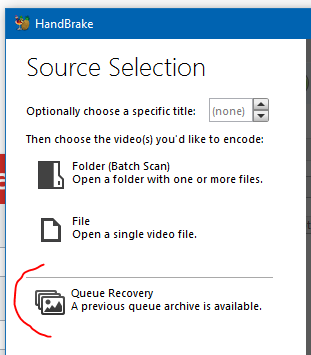
sr55
on 22 Sep 2018
Following up with my own input on 'why' (sorry, didn't see this until now). For me, I have all my disc-based movies and TV shows encoded for use with media software in my home. Having encoded a few thousand files with Handbrake, there have been more than a few instances where I needed to go back and reprocess something--say I mixed up subtitle tracks, or grabbed the wrong video track, audio track, etc. Being able to import a previous queue is really handy as a starting point and can definitely save some time when revisiting old projects.
xenokira
on 22 Sep 2018
@sr55
I have tested the new 'Queue Recovery' function to the end which I pushed Cancel more than once for traditional queue recovery warning on the initial startup. The result is quite satisfactory for queue recovery purpose. However, I hope the storage time would be much longer than 7 days, ideally without limitation, because I might not use HB within 7 days period. One thing I noticed is... there is no '.archive' file anywhere. I did find 'hb_queue_recovery8756.xml' in \AppData\Roaming\HandBrake\Nightly\ though. But I also found a similar file 'hb_queue_recovery15148.xml' in \AppData\Roaming\HandBrake\ and this file was created even before the implementation of this new backup function. So I am not sure where and how the new recovery queue data is stored as you explain.
For backup and recovery purpose with careless cancellation, the implementation should work fine for me, except the 7 days period.
For more convenient way of exporting/importing queue purpose, I still would like to have just good old day's importing queue function. In my case, the important thing is to be able to import any queue(s) even after the queue(s) is removed in the job list, as long as I successfully saved the queue(s) before removing. Current solution does not guarantee these manually removed queue(s) to be back on once they are removed. The recovery function deals with the last updated job list, which sometimes I do not intend to recover.
taxen
on 26 Sep 2018
An archive file will be created when prompted to recover a queue and you press no.
A new queue file is created for each instance of HandBrake (the number in the xml file is the process id)
I may make the days configurable. Didn't really want to but see it could be an issue. What's a typical length of time for you to not use HandBrake?
Queue Import/Export is back on my todo list, it's just a bit more involved so I figured I'd improve this particular use case in the mean time.
sr55
on 26 Sep 2018
@sr55 > What's a typical length of time for you to not use HandBrake?
Usually on and off of a few days period. Longest off period could be a month or two.
I tested the new queue page layout committed by c2eb804 and I see what you updated.
It was not what I imagined, but I now see there is no need to place a slidebar between the two panes.
Progressbar on left pane is now fit into the place, and all the other info (source and destination) are also displayed on the right pane at a glance.
Thank you.
taxen
on 28 Sep 2018
I'm going with a more responsive approach so you can do things like:
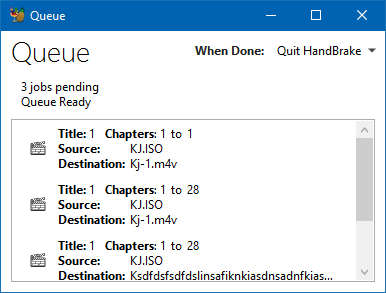
After about 650 pixels, it expands back tot he full window. (That might change as I don't think 650 is the sweet point.
Adding a drag point adds some odd behaviours in that isn't all that nice.
Still playing with the design so we'll see where it ends up.
sr55
on 28 Sep 2018
@sr55 Is this issue still relevant with the new queue?
 bradleysepos
on 5 Apr 2019
bradleysepos
on 5 Apr 2019
i'm kind of looking for the import queue capability too. i created a script about a year or two ago that i use for batch converting tons of video that we document here in my office to free up space. manually doing the queue with same parameters over and over again is a bit less convenient than just importing a pre-generated queue
 SkyEngine-OSP
on 11 Apr 2019
SkyEngine-OSP
on 11 Apr 2019
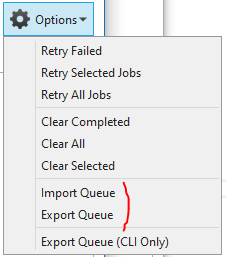
This feature has now been re-implemented.
Take note of the two export options.
- Import/Export queue are for the Windows UI only and are not compatible with the CLI export option.
- The Export Queue (CLI Only) output cannot be re-imported. Limitations of the CLI make it impractical to fully / correctly support all the options. Don't really see this as being an issue.
Should be available in a nightly in the next few days.
sr55
on 7 Jun 2019
Any chance it being added for macOS?
 retorquere
on 24 May 2020
retorquere
on 24 May 2020
Also looking for this added back to macOS.
TV series have several titles (15-20 including bonus material) that I need to manually map to filenames. If I could start with File > Add Titles to Queue, then export the queue, I could do this mapping in a single text file vs. more error-prone GUI steps.
As it stands, I need to create my own title-to-name mapping file then run handbrake-cli in a bash loop.
 austind
on 6 Aug 2020
austind
on 6 Aug 2020
Related issues
 d4rkne55
·
5Comments
d4rkne55
·
5Comments
 NiklasBr
·
3Comments
NiklasBr
·
3Comments
 bohning
·
4Comments
bohning
·
4Comments
 rajibkhan
·
5Comments
rajibkhan
·
5Comments
 alanorth
·
6Comments
alanorth
·
6Comments
Most helpful comment
This feature has now been re-implemented.
Take note of the two export options.
Should be available in a nightly in the next few days.