Hammerspoon: Unable to bind to certain function keys
I'm running into a strange issue where some hotkeys are not being registered when bound to certain function keys - specifically just F10 and F11. Here's an example:
# doesn't work
hs.hotkey.bind({}, "f10", function() hs.alert("pressed f10") end)
hs.hotkey.bind({}, "f11", function() hs.alert("pressed f11") end)

# works
hs.hotkey.bind({}, "f12", function() hs.alert("pressed f12") end)
The above config seems valid and the Hammerspoon console shows them being parsed at least:
hotkey: Enabled hotkey F10
hotkey: Enabled hotkey F11
But the keys are never actually captured. They just act like normal function keys.
As far as I can tell these keys are not bound to anything in the OS and they don't appear to be special as other apps (e.g. Quicksilver, Alfred) can use them without issue.
Any idea what I'm doing wrong?
 djl
djl
All 17 comments
Your example code works for me. Does it output anything when listening to all keyDown events?
tap = hs.eventtap.new({hs.eventtap.event.types.keyDown}, function(event)
print(hs.inspect(event:getRawEventData()))
end)
tap:start()
 heptal
on 22 May 2016
heptal
on 22 May 2016
Yep. Looks like the keys are being picked up:
{
CGEventData = {
flags = 8388864,
keycode = 109,
type = 10
},
NSEventData = {
characters = "",
charactersIgnoringModifiers = "",
keyCode = 109,
modifierFlags = 8388864,
type = 10,
windowNumber = 0
}
}
{
CGEventData = {
flags = 8388864,
keycode = 103,
type = 10
},
NSEventData = {
characters = "",
charactersIgnoringModifiers = "",
keyCode = 103,
modifierFlags = 8388864,
type = 10,
windowNumber = 0
}
}
The keyCodes match up with the output of Key Codes so I think they're correct.
It also happens regardless of the selected keyboard layout or physical keyboard (I'm not sure if that makes any difference).
djl
on 22 May 2016
And can you confirm the hotkey appears in hs.hotkey.getHotkeys()?
heptal
on 22 May 2016
Both hotkeys are there:
{ {
_hk = <userdata 1> -- hs.hotkey: keycode: 109, mods: 0x0000 (0x7fa4701ec9c8),
delete = <function 1>,
disable = <function 2>,
enable = <function 3>,
enabled = true,
idx = "F10",
msg = "F10"
}, {
_hk = <userdata 2> -- hs.hotkey: keycode: 103, mods: 0x0000 (0x7fa46c709388),
delete = <function 1>,
disable = <function 2>,
enable = <function 3>,
enabled = true,
idx = "F11",
msg = "F11"
} }
This seems silly, but have you tried restarting?
heptal
on 22 May 2016
If you're willing to debug in Xcode, put a breakpoint here and see if the event is getting received and that the callback is invoked.
heptal
on 22 May 2016
Ah, interesting. When running Hammerspoon from Xcode I get this in my Console.app:
2016-05-22 20:50:47.952 Hammerspoon[4575:37394] (missing delegate):log level 6: hs.hotkey:enable() RegisterEventHotKey failed: -9878
hotkey: Enabled hotkey F10
2016-05-22 20:50:47.952 Hammerspoon[4575:37394] (missing delegate):log level 6: hs.hotkey:enable() RegisterEventHotKey failed: -9878
hotkey: Enabled hotkey F11
And now I get this even when running the release build. Not sure why I wasn't getting that before...
djl
on 22 May 2016
That error code corresponds to eventHotKeyExistsErr. Are you binding it elsewhere in your config with a callback that doesn't do much?
heptal
on 22 May 2016
The hotkeys are only bound once. To be sure, I stripped out everything apart from the two problematic lines:
hs.hotkey.bind({}, "f10", function() hs.alert("pressed f10") end)
hs.hotkey.bind({}, "f11", function() hs.alert("pressed f11") end)
Same issue unfortunately.
djl
on 22 May 2016
tl;dr version: I suspect you have F10 and F11 bound to something in the OS X Keyboard shortcuts... check System Preferences -> Keyboard -> Shortcuts
More detail:
Checking into this, I found that I could use F10, but not F11, unless I included a modifier of some sort (command key, option, etc.)... digging a little deeper, I found that I do indeed have F11 bound in my system shortcuts to Show Desktop, but F10 isn't bound to anything.
Checking the Console application while trying the two problematic lines when they are in my init.lua file, I get the following:
5/23/16 12:23:02.613 PM Hammerspoon[442]: (missing delegate):log level 6: hs.hotkey:enable() RegisterEventHotKey failed: -9878
Doing it from the Hammerspoon console, I get:
5/23/16 12:24:53.535 PM Hammerspoon[442]: hs.hotkey:enable() RegisterEventHotKey failed: -9878
However, the LuaSkin log captured by Hammerspoon which can be displayed with hs.logger.printHistory() shows:
12:24:53 hotkey: Created hotkey for F10
12:24:53 hotkey: Enabled hotkey F10
12:24:53 hotkey: Created hotkey for F11
12:24:53 hotkey: Enabled hotkey F11
What bugs me most about this is that the "delegate missing" portion of the first log message indicates that one of the [LuaSkin log...] methods is being used to log the error, but doing the exact same thing from the console (after the LuaSkin log delegate is assigned) _doesn't log a LuaSkin error_ in the printable history.
So, your specific problem will probably be fixed by checking the Keyboard shortcuts in System Preferences, but I need to look closer at the source code and figure out why the error message isn't propagating to at least the Hammerspoon logger instance, and more usefully to the console itself when assignment fails for a reason external to Hammerspoon... I'll add it to the list!
 asmagill
on 23 May 2016
asmagill
on 23 May 2016
I definitely don't have anything bound to either key in System Preferences -> Keyboard -> Shortcuts. When I first ran into this issue a few months ago the first thing I tried was disabling all the default shortcuts. Obviously it didn't help :(
Also, if these keys were already bound to something in the OS, wouldn't that mean they _wouldn't_ act like regular function keys? In my case they do.
In Emacs, for example, if I check the keys with C-h k <key>, it says they're function keys:
<f10> runs the command menu-bar-open...
<f11> runs the command toggle-frame-fullscreen
Hmm... well, something seems to be binding them if you're getting the same error number I did in the Console application or XCode logs... I do plan to make the handling of internal errors like this pass through to the Lua portion of Hammerspoon so it's more obvious when it occurs, but I don't think we can tell _what_ has already bound to it. Other than the system keyboard shortcuts, I can't think of any obvious candidates or places to check... Do you have any other add-ons or startup applications that might bind to the function keys? It's time consuming, but you might try disabling them and then trying each one an restarting Hammerspoon until you find the culprit.
asmagill
on 24 May 2016
One issue is that hs.hotkey is keeping track of keys/logging 'Enabled hotkey...' in its own Lua tables without checking the actual result on the C side. It should probably query the handlers array on the C side when listing them.
Also, other applications binding hotkeys theoretically shouldn't prevent the same combination being bound in Hammerspoon. Overriding cmd+c works fine, for example.
RegisterEventHotKey doc
This function registers a global hot key based on the virtual key code and modifiers you pass in. When the user enters the hot-key combination, a kEventHotKeyPressed event is sent to the target you specified. Only one such combination can exist for the current application (that is, multiple entities in the same application cannot register for the same hot key combination). The same hot key can, however, be registered by multiple applications. This means that multiple applications can potentially be notified when a particular hot key is requested.
heptal
on 24 May 2016
After installing the 10.11.5 update suddenly everything is working again.
Maybe it was the update that fixed the issue or maybe it was just a coincidence. Either way it's working now but if it happens again I'll try to debug more thoroughly.
djl
on 25 May 2016
FWIW, in case this issue comes up again, I found that if a key is automatically assigned via the OS X Keyboard shortcuts, it may not be sufficient to just uncheck the keyboard shortcut... I couldn't assign F11 by itself until I actually changed the "Show Desktop" shortcut to something else -- simply unchecking it was not enough (though I didn't try a reboot after unchecking it). I'd love to know a way to simply set it to "none" in the keyboard shortcuts panel, but that's a quest for another day...
asmagill
on 29 May 2016
I just ran into the same problem trying to set F11 as a shortcut. @asmagill's solution of reassigning the 'Show Desktop' shortcut solved it for me. (It was the same situation for me: although the 'Show Desktop' shortcut wasn't enabled, simply having it set caused Hammerspoon not to be able to register the shortcut.)
 pyrmont
on 9 Oct 2016
pyrmont
on 9 Oct 2016
@asmagill @pyrmont and those coming here from your favorite search engine: the same issue of being unable to use an assigned and disabled keyboard shortcut (in particular F11, and possibly other Mission Control shortcuts?) in Hammerspoon still exists on macOS Catalina (10.15.7).
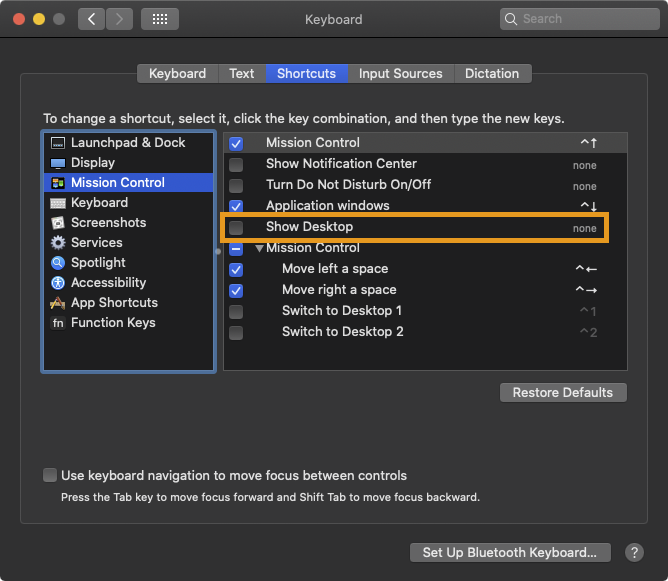
While a workaround is to set the shortcut to a set of key combinations that you hopefully won't need, there is a way to set "Show Desktop" (and probably many other shortcuts) to "none" by writing to com.apple.symbolichotkeys.
To set the keyboard shortcut for "Show Desktop" to "none", run the following in a terminal and then reboot:
defaults write com.apple.symbolichotkeys.plist AppleSymbolicHotKeys -dict-add 36 "
  <dict>
    <key>enabled</key><false/>
    <key>value</key><dict>
      <key>type</key><string>standard</string>
      <key>parameters</key>
      <array>
        <integer>65535</integer>
        <integer>65535</integer>
        <integer>0</integer>
      </array>
    </dict>
  </dict>
"

defaults write com.apple.symbolichotkeys.plist AppleSymbolicHotKeys -dict-add 37 "
  <dict>
    <key>enabled</key><false/>
    <key>value</key><dict>
      <key>type</key><string>standard</string>
      <key>parameters</key>
      <array>
        <integer>65535</integer>
        <integer>65535</integer>
        <integer>0</integer>
      </array>
    </dict>
  </dict>
"
After rebooting, System Preferences → Keyboard → Shortcuts → Mission Control:
background
Reading com.apple.symbolichotkeys via defaults read com.apple.symbolichotkeys is a bit of a pain, and I haven't discovered the complete mapping of shortcuts to their respective keys: disabling (or enabling) "Show Desktop" and reading the defaults shows the corresponding keys of 36 and 37.
The parameters to pass are (65535, 65535, 0), with the latter two indicating a keyboard shortcut of "none".
A lot of information was helpful from the following:
- StackOverflow answer to "How do I change Mission Control shortcuts from the command line?"
- Defaults & symbolichotkeys in Mac OS X
- StackOverflow answer to "How to disable default Mission Control shortcuts in terminal?"
other relevant issues
 cardi
on 30 Sep 2020
cardi
on 30 Sep 2020
Related issues
 latenitefilms
·
3Comments
latenitefilms
·
3Comments
 luckman212
·
4Comments
luckman212
·
4Comments
 specter78
·
3Comments
asmagill
·
4Comments
specter78
·
3Comments
asmagill
·
4Comments
 agzam
·
3Comments
agzam
·
3Comments
Most helpful comment
@asmagill @pyrmont and those coming here from your favorite search engine: the same issue of being unable to use an assigned and disabled keyboard shortcut (in particular
F11, and possibly other Mission Control shortcuts?) in Hammerspoon still exists on macOS Catalina (10.15.7).While a workaround is to set the shortcut to a set of key combinations that you hopefully won't need, there is a way to set "Show Desktop" (and probably many other shortcuts) to "none" by writing to
com.apple.symbolichotkeys.To set the keyboard shortcut for "Show Desktop" to "none", run the following in a terminal and then reboot:
After rebooting, System Preferences → Keyboard → Shortcuts → Mission Control:

background
Reading
com.apple.symbolichotkeysviadefaults read com.apple.symbolichotkeysis a bit of a pain, and I haven't discovered the complete mapping of shortcuts to their respective keys: disabling (or enabling) "Show Desktop" and reading the defaults shows the corresponding keys of36and37.The parameters to pass are
(65535, 65535, 0), with the latter two indicating a keyboard shortcut of "none".A lot of information was helpful from the following:
other relevant issues