Hack: [Windows] font height inconsistency with Hack 3.001 release
Hello,
First off, I love the font. However, after updating my Windows machine to v3.001, the font rendering is somewhat strange for Italics and Bold... Any ideas on how to fix this? I reboot, and nothing has changed...
Thanks,

 jlanzarotta
All 79 comments
Can you confirm that you installed this with the WIndows installer that includes the new v3.001 release files?
https://github.com/source-foundry/Hack-windows-installer/releases/tag/v1.5.1
 chrissimpkins
on 23 Jan 2018
chrissimpkins
on 23 Jan 2018
Please try the installer if you haven't so far. If you did, please post the fileC:\Program Files\Hack Windows Installer\Log-FontData.txt. That's a basic log we are generating where we maybe are able to find out what's wrong.
 texhex
on 23 Jan 2018
texhex
on 23 Jan 2018
For what it's worth, I saw a similar problem using my custom build of the font (make ttf) on my work machine (Windows 10).
 jdw1996
on 24 Jan 2018
jdw1996
on 24 Jan 2018
We've had a number of issues related to font caching with residual previous builds that lead to rendering errors on Windows. Try the Windows installer linked above and let us know if that fixes the problem for you. We have yet to develop something simple for developers who need to install new builds, test, re-install new builds on the Windows platform.
chrissimpkins
on 24 Jan 2018
Yeap, used the latest installer. Here is the file you requested... Hope it helps...
jlanzarotta
on 24 Jan 2018
Thanks @jlanzarotta. Let's see whether @texhex thinks that there is an install issue here. If not I will have a look at the tables to confirm that we didn't modify something unintentionally.
@texhex can you confirm that you are seeing this problem on your Win install?
chrissimpkins
on 24 Jan 2018
@jlanzarotta From my point of view, the installation is looking normally, there is nothing that is unexpected.
Idea I have to find out what is going on on your machine:
- Is the program you are using Java based? Could you maybe try to replicate the problem with Notepad++ and does it show the same errors?
Could you please open a command prompt and enter the command "dir c:\windows\fonts\Hack.". The listing should only list four files (Hack-Bold.ttf - Hack-BoldItalic.ttf - Hack-Italic.ttf - Hack-Regular.ttf)
Would it be possible that you run the installer a second time and post the Log-FontData.txt after that? It should show that all files were already in place and no installation is required.
texhex
on 25 Jan 2018
- I am using Vim and IntelliJ.
- Yes, there are only the four fonts you listed in "c:\windows\fonts\hack.".
- I tried your suggestion and tried to replicate the problem in Notepad++. Notepad++ rendered everything just fine.
Then I noticed why Notepad++ rendered correctly. In Notepad++, the text was not italics, just plain. So I set Vim and IntelliJ to not use bold or italics, they they work fine now also. Could it an issue with just bold and italics?
Here is the fine you asked for...
Log-FontData.txt
jlanzarotta
on 25 Jan 2018
We've had long standing problems with the JetBrains editors on Win. They all use a Java font renderer that is very finicky with our fonts on the Win platform for some reason. Thanks for testing in another editor and for helping to troubleshoot here. I will take a look at our OT tables and confirm that there were no unexpected changes in this release. Would be helpful to me if you could confirm that reinstallation of the last version (3.000) with the Win installer fixes the problem.
Let's see what Michael has to say about the new install logs.
chrissimpkins
on 25 Jan 2018
Can you also let us know what Win version you are using?
chrissimpkins
on 25 Jan 2018
The 3.000 version works beautifully. All applications render correctly.
I am using Windows 7.
jlanzarotta
on 25 Jan 2018
and current releases of IntelliJ / vim?
chrissimpkins
on 25 Jan 2018
@jdw1996 Joseph, can you let us know what editor you are seeing these problems in and confirm that the issue is that there are different vertical heights of glyphs when rendered in bold/italics, but not in regular only?
chrissimpkins
on 25 Jan 2018
@jorgheymans Jorg, do you happen to have any free time to help us test this in the Java renderer project that you developed assuming that I can find something to modify in the build artifacts?
chrissimpkins
on 25 Jan 2018
I've seen the problem in Firefox (i.e. on webpages using my default monospace font), Vim, and Word, which makes me think it's not strictly a Java problem. I'm not having any issue using regular, but certain glyphs do appear taller than others in bold, italic, and bold italic.
jdw1996
on 25 Jan 2018
Strange. OK, thanks for that feedback. Can I ask you to verify that the same glyphs appear "too short" or "too tall" relative to others c/w the image in the OP? I will need a handful of glyphs to explore and will begin there.
chrissimpkins
on 25 Jan 2018
It seems that they are the same. Specifically, I have tall: abcdeosv. Capital letters all appear the same height as each other.
jdw1996
on 25 Jan 2018
Beginning to sound like a hinting issue. We bumped a couple of ttfautohint build dependencies. That may have done it. More info when I have it.
chrissimpkins
on 25 Jan 2018
@jlanzarotta: Thanks for efforts! I checked both installation logs and they look the same, so my guess is that, after 3.001 didn't worked, you went and installed 3.0 again. The hash values of the fonts found on your machine match exactly the 3.0 release.
If this is true, I do not find any indicator that this error is caused by an installation error, I'm sorry.
@chrissimpkins: I set my Notepad++ to Hack 10pt and Bold+Italic. Here's how it looks (using the best RFC ever as example). If I'm not mistaking, this is indeed a "real" font bug:

texhex
on 25 Jan 2018
this is indeed a "real" font bug
Thanks @texhex. On it!
chrissimpkins
on 25 Jan 2018
@texhex do we have a decent set of docs to use FSCW for testing installs of new font changes as I produce them?
chrissimpkins
on 25 Jan 2018
We could use the Test-Windows-Installer for that. What would be your preferred way?
Pushing the test fonts to the /Hack repo, then pushing a trigger file to the Test-Windows-Installer repo which would in turn start AppVeyor which would build and upload the new setup.exe?
Or would you like to push the new build directly to the Test-Windows-Installer repo?
texhex
on 25 Jan 2018
Whatever is easiest for all involved. If I can push somewhere and testers can pull auto builds of a win installer that would probably be best (if I understood you correctly). short of that an approach to help them clear cache for manual installs is OK by me too. Will version according to git commit sha1 and can rename if would like to do side by side comps
chrissimpkins
on 25 Jan 2018
Ok, then pushing to the Test-Windows-Installer repo it is then. Preparing repo.
texhex
on 25 Jan 2018
@chrissimpkins Repository done. Put the new TTF builds in \testfonts inside the Test-Windows-Installer repo and a Setup EXE will be build and added to Releases with the comment you used for your commit.
texhex
on 25 Jan 2018
Fantastic! Testers here can download that from the releases and it will behave as the Win installer does?
chrissimpkins
on 25 Jan 2018
Yes, it will only use a new folder for the Logs etc. (C:\Program Files\Hack Test Win Installer). The font installation is 100% the same as with the current Hack Windows Installer.
texhex
on 25 Jan 2018
@chrissimpkins I will be offline in about 30 minutes for today, so if you could give it a quick test, that would be great.
texhex
on 25 Jan 2018
Not in a spot where I can build fonts atm. Will do a bit of diagnostic work tonight and will probably try to push a set with reverted ttfautohint dependencies. The OT table diff is likely going to be extensive. Will know more this evening. And to confirm because I am compulsive. This installer is something you have tested and should not damage systems (_edit_) alter their system in a way that differs from our official installer tool? We are using exact same install implementation as in the official installer tool?
chrissimpkins
on 25 Jan 2018
Will post more info here tonight.
chrissimpkins
on 25 Jan 2018
The installer is exactly the same we use for normal Hack-Windows-Installer, no difference there. Once used, the computer will have one more entry in the Add/Remove programs applet and a new folder in C:\Program Files. The Test Installer can also be uninstalled and this will remove these two elements.
I was thinking about adding some Cryptocoin mining code and a command to blow up the machine if the user had any other mono-spaced font installed beside Hack, but decided to not do that 😀
texhex
on 25 Jan 2018
I was thinking about adding some Cryptocoin mining code and a command to blow up the machine if the user had any other mono-spaced font installed beside Hack, but decided to not do that 😀
Ha! 😄
Just making sure that testers are aware if any new logging etc added for testing purposes and that they can safely use it without causing other problems (e.g., deletion of other fonts). Damage was probably not the proper word there.
chrissimpkins
on 25 Jan 2018
@lemzwerg
Werner, we have a bizarre issue here that seems to have taken place between our v3.000 release and v3.001 release. It was noted on Windows machines. There is no rendering behavior change between versions in the regular sets; however, the lowercase italics have a strange variable height appearance (see image in OP). We've ruled out installation / caching issues that have caused us problems in the past on Windows. My suspicion is that this is a hinting issue. There were no design changes to the problematic glyphs between these releases.
We built v3.000 with the following ttfautohint and build dependency settings:
including the following patches that addressed macOS build issues at that time:
As of v3.001 we used newer versions of Harfbuzz and FreeType dependencies and eliminated the patches because Cosimo told me that they were no longer necessary here https://github.com/source-foundry/ttfautohint-build/commit/fecf34fda2b6c8d40c03174aad711c319cb07a39:
The only change that was made to the ttfautohint settings was elimination of the metadata write to name record ID = 5. The remainder is exactly the same between builds:
  <TTFA>
    <source>

ttfautohint version = 1.7

adjust-subglyphs = 0
default-script = latn
dw-cleartype-strong-stem-width = 0
fallback-scaling = 0
fallback-script = latn
fallback-stem-width = 145
gdi-cleartype-strong-stem-width = 1
gray-strong-stem-width = 0
hinting-limit = 200
hinting-range-max = 50
hinting-range-min = 6
hint-composites = 0
ignore-restrictions = 0
increase-x-height = 10
reference = master_ttf/Hack-Regular.ttf
reference-index = 0
symbol = 0
TTFA-info = 1
windows-compatibility = 1
x-height-snapping-exceptions =
control-instructions = \
   0 uni0025 touch -1, 21-23, 39 xshift 0 yshift 0.5 @ 10; \
   0 uni0025 touch 40 xshift 0 yshift 0.75 @ 10; \
   0 uni0025 touch 41-43 xshift 0 yshift 0.5 @ 10; \
   0 uni0025 touch 51-53, 72-74 xshift 0 yshift 0.5 @ 10; \
   0 uni0025 touch 40, 43 xshift 0 yshift -0.75 @ 11; \
   0 uni0025 touch 41-42 xshift 0 yshift 0.75 @ 11; \
   0 uni0025 touch -1, 21-23, 39 xshift 0 yshift -0.25 @ 14; \
   0 uni0025 touch 8-10, 30-32 xshift 0 yshift 0.25 @ 14; \
   0 uni0025 touch 51-53, 72-74 xshift 0 yshift -0.5 @ 14; \
   0 uni0025 touch 40-43 xshift 0 yshift -0.25 @ 14


    </source>
  </TTFA>
I reviewed the OT dump from v3.000 and v3.001 files across regular and italic builds and found the following:
- no change in the instructions between Regular set v3.000 and v3.001 across the following glyphs
n,c,r,e,m,o. These were selected because they seemed to demonstrate differences in height when viewed in the italic set in the OP image but do not demonstrate this when viewed in the regular set (no image, this is per user report) - there were changes in the instruction sets between Italic set v3.000 and v3.001 for all of the above glyphs
Here is an example of the changes that were present for n (U+006E) vs. o (U+006F) which demonstrate an undesirable difference in height in the OP image. v3.000 is on the left and v3.001 is on the right:
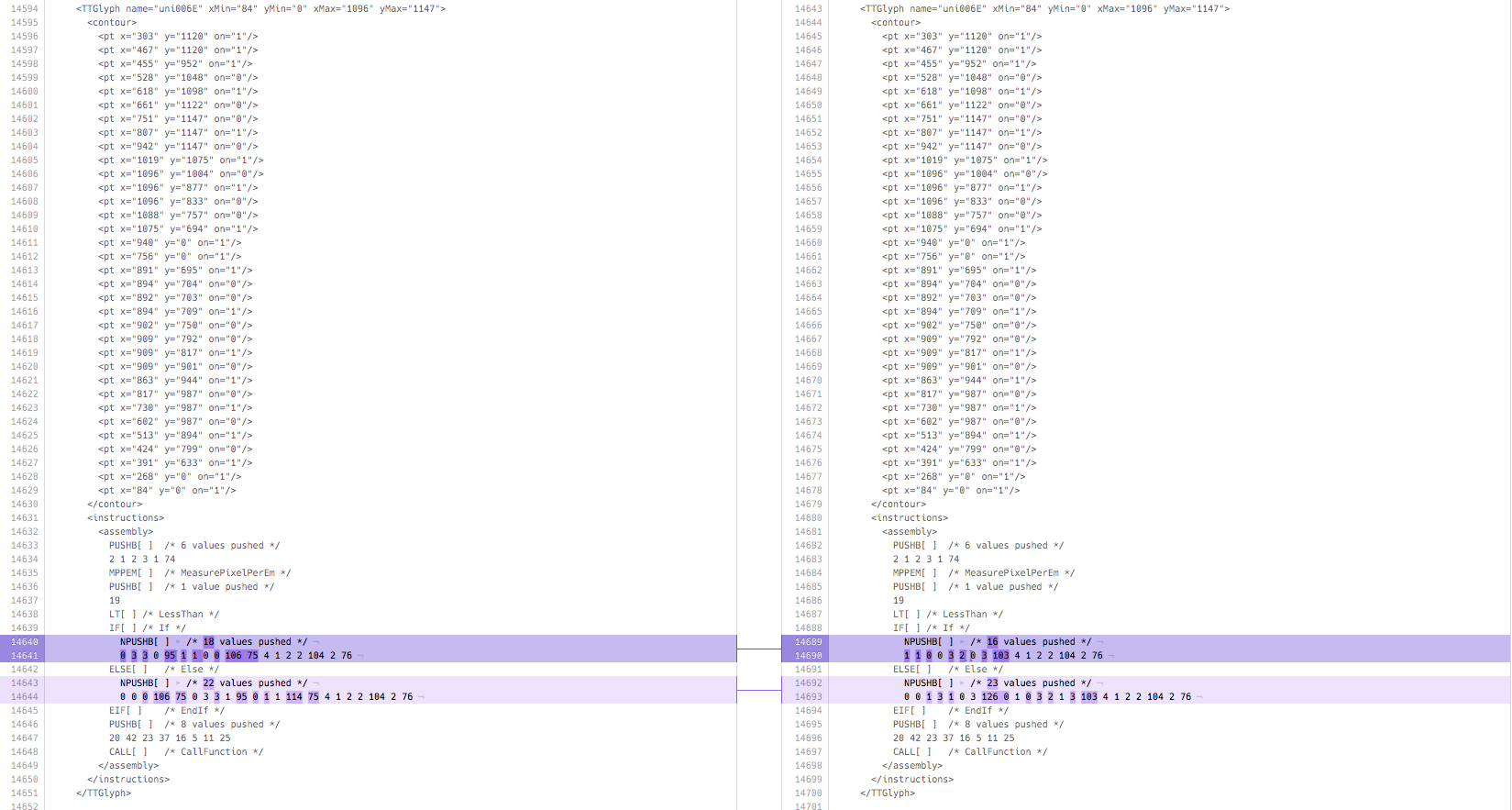
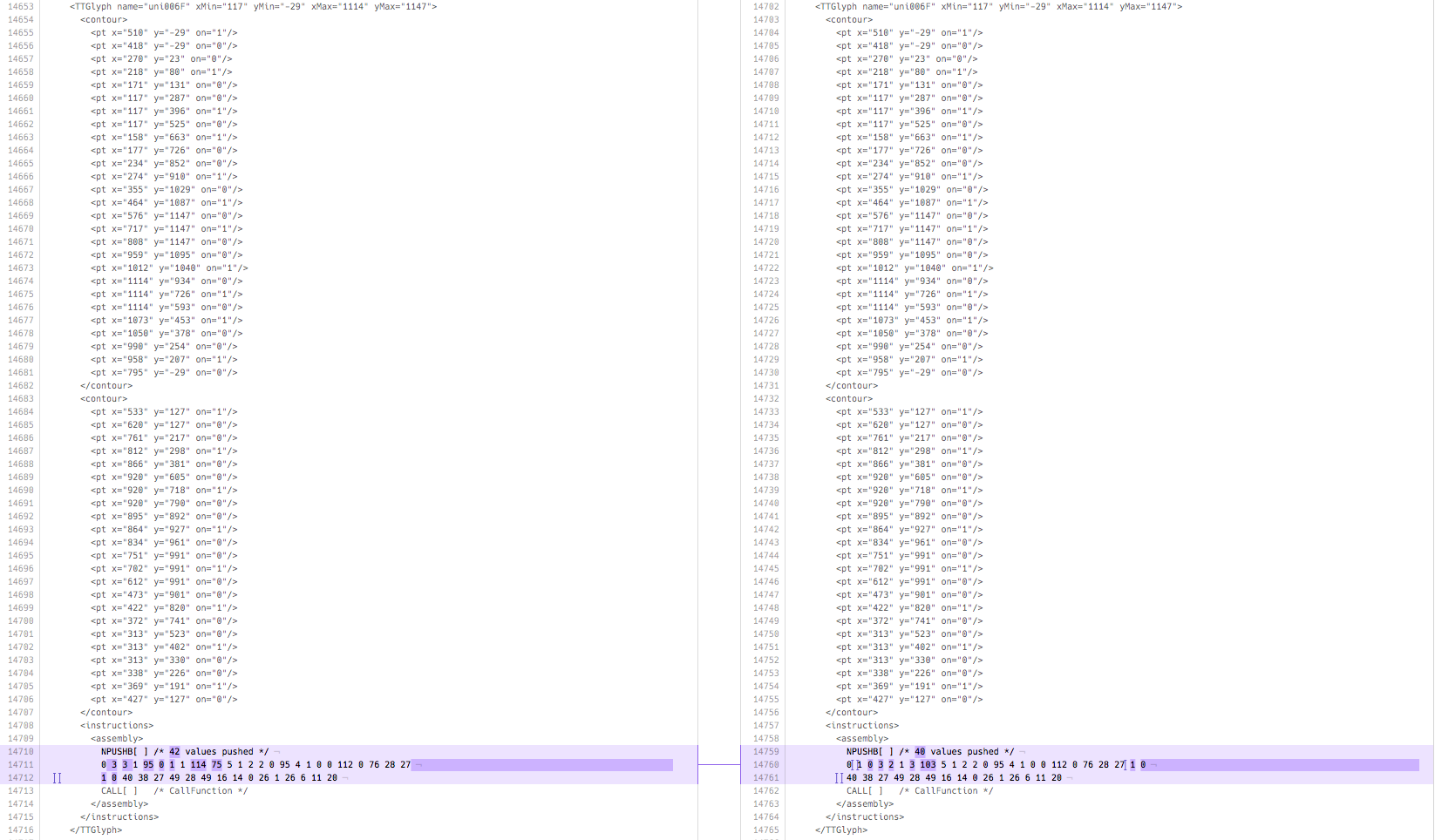
Thoughts?
chrissimpkins
on 26 Jan 2018
@jlanzarotta @jdw1996
The obvious first step is to revert the ttfautohint build dependency changes back to those that we used in the v3.000 release and see if it addresses the problem. The build script was changed in https://github.com/source-foundry/Hack/commit/76cfd90c57411b22a2bba7007b770bf12041ebb0 and the fonts are available in Michael's Windows installer at this installer release https://github.com/source-foundry/Hack-Test-Win-Installer/releases/tag/v1.2.44.
The fonts will show as Version 3.002;[76cfd90c5]-dev
Mind giving this a go and let us know what you see when you load regular and italic (and bold/bolditalic if problem exists there) in the same editors that you used when you reported this issue?
If this works I will push a new release as v3.002 with this fix tomorrow because this is likely affecting all Windows users out there.
chrissimpkins
on 26 Jan 2018
This is indeed strange. I'll investigate (unfortunately, this will take some time).
 lemzwerg
on 26 Jan 2018
lemzwerg
on 26 Jan 2018
Thanks @lemzwerg. Another possibility that struck me is that I may have used a Homebrew installed macOS version of 1.7 for our v3.0 build and did not do so in v3.001. Can you verify what versions of Harfbuzz and FreeType you used to compile the Homebrew version of ttfautohint v1.7?
chrissimpkins
on 26 Jan 2018
The compile script allows for system installed ttfautohint to take precedence over the one built into the ttfautohint-build directory.
chrissimpkins
on 26 Jan 2018
You have to look up the homebrew git repository for the respective formulae. Note that homebrew already contains ttfautohint version 1.8.1.
lemzwerg
on 26 Jan 2018
Will do. Yes, I removed Homebrew ttfautohint from my system for this build because I wasn't ready to review hints for new version of ttfautohint. I went through hinting manually for entire basic Latin set with 1.7 for v3.0 release. Thanks Werner.
chrissimpkins
on 26 Jan 2018
@lemzwerg So, here is the commit where you changed the Homebrew build from 1.7 to 1.8.1.
https://github.com/Homebrew/homebrew-core/commit/6f0e115f9832f5e06e9ce614ab6fd26ee06a2315#diff-46aea55e64ff46faf413af34d41ca299
I can't gather from that update how Homebrew handles dependencies because the build dependencies are not pinned to a specific version in the script. Only other thing that I came across is that they are building from a mirror of the git repo, not from the gnu.org repository. There are SHA256 hashes for each macOS release so they must compile ttfautohint at each Homebrew release update with the current dependency versions at the time and push those out as stable builds thereafter? Based upon how ttfautohint uses these Harfbuzz and FreeType libraries, should this build process be this fragile and version dependent within major versions of Harfbuzz / FreeType? We have people building off of ttfautohint-build and this will be an important issue for anyone who tries to replicate our build process here.
chrissimpkins
on 26 Jan 2018
@chrissimpkins I tried installing the files from this link: https://github.com/source-foundry/Hack-Test-Win-Installer/releases/tag/v1.2.44
The result was different, but still not quite right:
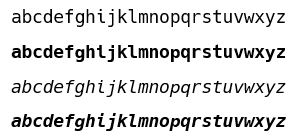
All of the characters with ascenders became shorter when bolded, and the p, g, and y became shorter as well. Ditto the bold italics. The p and q are both shorter than normal in the italics.
jdw1996
on 26 Jan 2018
@jdw1996 excellent that is helpful! thank you very much for testing this build. I can verify that I am still seeing changes in the instruction sets in the binaries generated with that build process. I will reinstall the Homebrew version of ttfautohint 1.7 later today and push a new test Win installer for you to try. I think that I have identified how ttfautohint differs between these releases, but it remains to be determined why this is happening and how to address it in the build scripting available in the repository. Will push a fix for Win users as soon as we land on a set of binaries that render correctly and can continue to troubleshoot the root cause over time. Will need feedback from Werner re: the latter.
chrissimpkins
on 26 Jan 2018
I've also added a very obvious message on the current release of the production Windows installer that guides users back to the installer with the previous v3.000 release of Hack. Will push a new production Win installer release as soon as we land on a set of fonts that render appropriately in Win.
chrissimpkins
on 26 Jan 2018
Can you also confirm @jdw1996 that when you revert back to the v3.000 release through the Win installer, this issue is no longer present? And I believe that you are on Win 10? @jlanzarotta is on Win 7 and seeing this issue. Corrected with reinstall of v3.000 with the previous Win installer.
chrissimpkins
on 26 Jan 2018
Chris, I'm not a homebrew (or Mac) user at all. I'm just updating the formula as a courtesy to users. How homebrew handles dependencies is beyond my knowledge.
I'm actually surprised that either a newer FreeType or harfbuzz version should cause the problems – I rather believe it's an issue with ttfautohint itself, and maybe newer versions of the other libraries expose a bug.
lemzwerg
on 26 Jan 2018
@chrissimpkins I just tried it and the problem does not appear using v3.000 with the Windows installer. There also wasn't a problem when I was using my custom build of v3.000.
I don't know if I mentioned it, but I am indeed on Windows 10.
jdw1996
on 26 Jan 2018
@lemzwerg No worries, I understand Werner. I really appreciate your help with the troubleshooting here. I don't understand the source in ttfautohint (or have enough language background) well enough to even begin to approach this issue.
@jdw1996 excellent, thank you!
There also wasn't a problem when I was using my custom build of v3.000.
This is an interesting comment. Did you build with our build scripts when you prepared the custom build and if so, how were you building ttfautohint (and on what platform)?
chrissimpkins
on 26 Jan 2018
I did use the instructions in the README, specifically the Makefile with make ttf.
I'm going to be away from the computer I built it on for the weekend, so I can't tell you what version of ttfautohint I have installed. The OS is Xubuntu 17.10, though.
I'm also not sure if my ttfautohint was updated or not between building v3.000 and v3.001. If the issue is still unresolved at the beginning of next week, I can try building from the v3.000 source and perhaps isolate the problem to either the source or the version of ttfautohint.
jdw1996
on 26 Jan 2018
@jdw1996 thanks. This may be a macOS specific issue for ttfautohint compiles then. It would be helpful to know if you are using an apt packaged version of ttfautohint or if you built fonts with the ttfautohint compilation process here. The scripting here does not install ttfautohint on PATH so you will know by which ttfautohint output. No rush. Let us know when you have a chance.
chrissimpkins
on 26 Jan 2018
The same problem is occurring on the Linux platform https://github.com/source-foundry/Hack/issues/379
chrissimpkins
on 26 Jan 2018
It is not straightforward to revert a Homebrew install of ttfautohint to a previous release directly with the homebrew tool. For anyone following along or who might need to do this in the future, the compiled Homebrew release binaries X macOS releases are available under the Files tab here:
chrissimpkins
on 26 Jan 2018
I have a few more sets of test fonts that you can try:
- converted to Linux compilation and hinting with ttfautohint + all dependency builds from scratch at versions ttfautohint v1.7, Harfbuzz v1.5, FreeType v2.8 --> https://github.com/source-foundry/Hack-Test-Win-Installer/releases/tag/v1.2.45
- Linux compilation with same approach as above, converted ttfautohint flag
-nback to-Ias we used in v3.000. This leads to write of ttfautohint metdata to the font version string which should not influence hinting, but let's check this if number 1 does not work --> https://github.com/source-foundry/Hack-Test-Win-Installer/releases/tag/v1.2.46 - Linux compilation with same approach as in number 1, but eliminated font-v write of metadata to the version string to confirm that we are not damaging the font binaries in some fashion with these modifications. Again, this should not be the issue but I am running out of ideas if number 1 does not fix the problem. --> https://github.com/source-foundry/Hack-Test-Win-Installer/releases/tag/v1.2.47
Let me know how if any of these fix the issue. Thanks for all of your help with testing here.
chrissimpkins
on 27 Jan 2018
@chrissimpkins I tried 1.2.45, but unfortunately I do not see any difference:
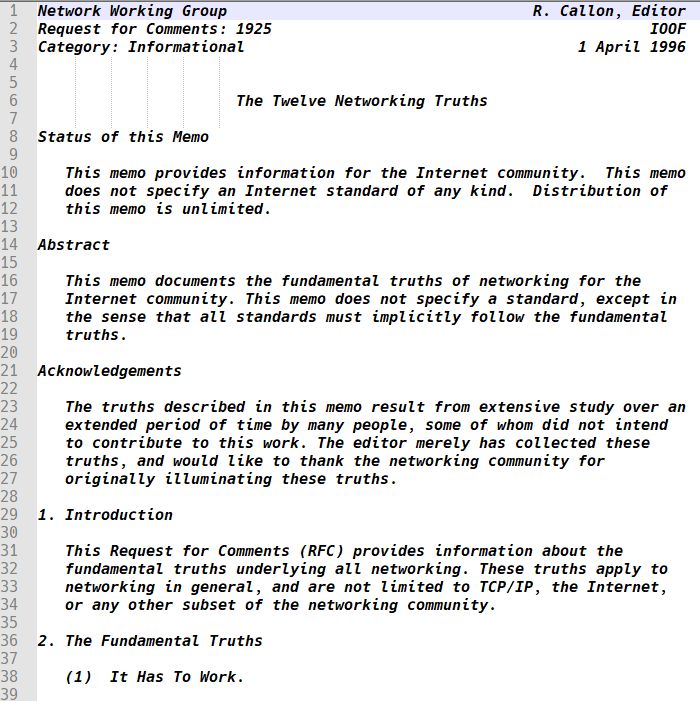
texhex
on 27 Jan 2018
Thanks @texhex. Any luck with the two other builds?
chrissimpkins
on 27 Jan 2018
Sorry, but I'm too stupid for Linux and too poor for a Mac ; ).
texhex
on 27 Jan 2018
Sorry not following. I am wondering if 1.2.46 or 1.2.47 happened to fix the issue? If not I will try to switch the font compiler and see if there is a problem there.
chrissimpkins
on 27 Jan 2018
I reviewed the contours for these glyphs in the OpenType tables and there are no changes there. This would not be expected because we didn't touch the source for any of these glyphs in this release. I reviewed the outlines in the binaries with a font editor and the design maintains the proper height relationship between these lower case glyphs. This is an issue somewhere in the compile through hinting portion of the chain. Work continues to try to sort this out...
chrissimpkins
on 27 Jan 2018
@chrissimpkins: Sorry, my fault. I thought the "Linux compilation" means I should install on Linux. Didn't read the section entirely, you are linking to Windows installer every time. Will do a test shortly.
texhex
on 27 Jan 2018
Tried 1.2.46, no gain:
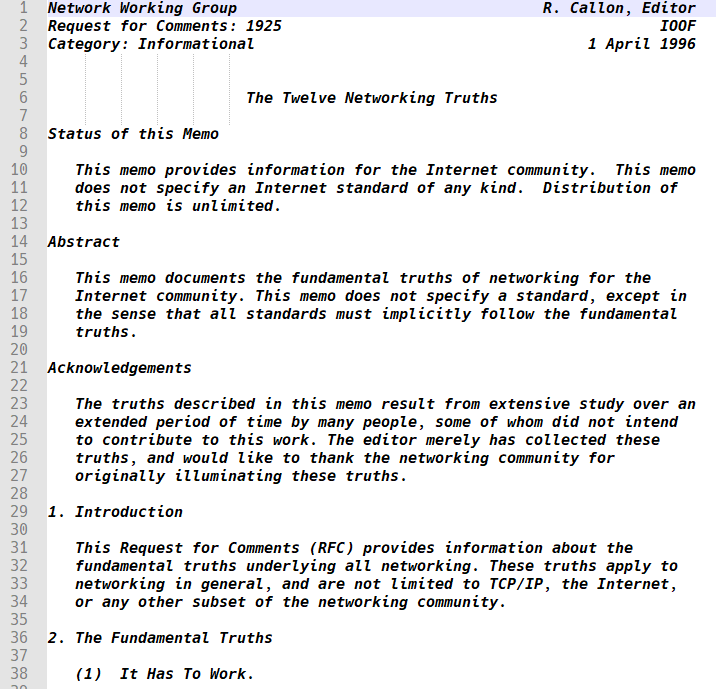
texhex
on 27 Jan 2018
And also 1.2.47 doesn't seem to improve this:
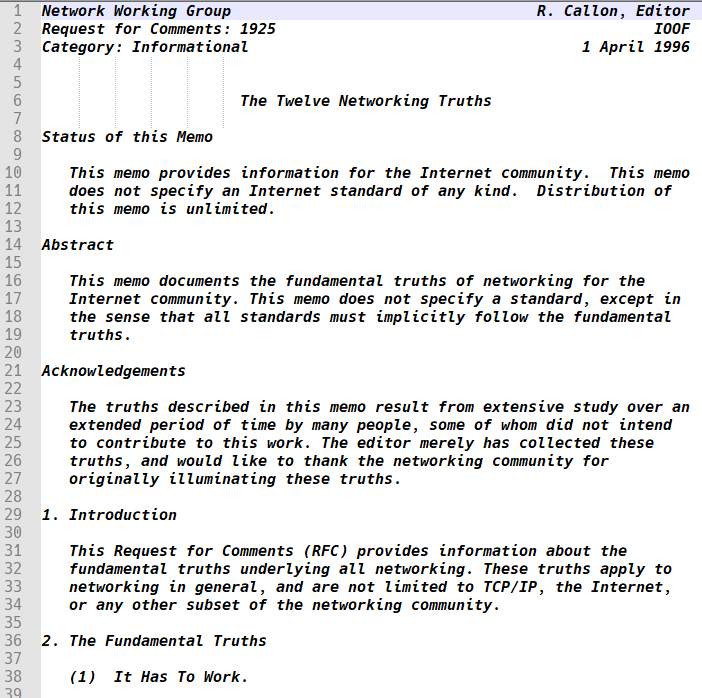
texhex
on 27 Jan 2018
Well, we know more about what it is not... :)
Thanks for doing all of this testing @texhex. It looks like this is not macOS specific. There is something going on across compile approaches. I have a few other ideas. Will push some new testing files over the weekend.
chrissimpkins
on 27 Jan 2018
I was able to get a Windows box to look into this issue. Looking at this at the sizes 8, 9, 10, 11, 12, 14 in Notepad, it appears that the only affected sizes are 8, 10, and 14. The others all appear to render appropriately. Can you confirm this on your systems?
chrissimpkins
on 27 Jan 2018
Checking with Notepad++, I can confirm this. 8, 10 and 14 are affected. It happens again on 16 and 18 were it seems the "e" and "o" "shrink" too much (I believe, I'm not a designer).
texhex
on 27 Jan 2018
Thanks @texhex. I went through bold and bold italic and they seem to be affected across a more broad range of these sizes.
This is definitely a hinting issue. For some reason we seem to have lost much of the auto in the ttfautohint :)
Let me do some testing today and will let you know if I figure this out. Remains unclear why this changed between v3.000 and v3.000 but we can safely say now that this is (1) result of instruction set differences; (2) size dependent; (3) does not affect regular set; (4) does affect bold, italic, and bold italic sets.
This points me in a direction. I have another idea. More to come...
chrissimpkins
on 27 Jan 2018
I think that my hunch was correct.
This appears to fix the issue across italic, bold, and bold italic sets:
Win: https://github.com/source-foundry/Hack-Test-Win-Installer/releases/tag/v1.2.48
Linux: https://github.com/source-foundry/Hack/tree/bugfix-windows-revert-ttfadep/build/ttf
This will install test builds Version 3.002;[f1c8c7abc]-dev.
We were linking vertical metrics in the bold, italic, and bold italic sets to the regular set with the ttfautohint -R flag to maintain consistency of glyph height when you switch between regular and any of these other sets. This seems to now result in incorrect renders of the non-regular sets for those whose platform pays attention to the instruction sets built into the fonts (including Windows, Linux - does not include macOS which is why I don't see it on my development machine). I will have to go back through the commit history. My recollection is that this is a setting that was present at the time of the v3.000 builds. If that is the case, then something has changed with ttfautohint behavior. The removal of this setting may mean that we need to go back through the ASCII set and determine whether any manual hinting adjustments are necessary in the bold, italic, and bold italic sets. cc @lemzwerg - this appears to be the problem here...
Please install the above build files through the Win installer on Windows. Linux users should install the builds available here https://github.com/source-foundry/Hack/tree/bugfix-windows-revert-ttfadep/build/ttf with your distro specific direct installation mechanism and a cache clear - see README).
Please confirm that the variable height issue in the lower case glyphs is eliminated at all sizes between 8 - 14. If you don't mind, can I ask you to use the following text specimen to examine these changes in all four variant sets:
ABCDEFGHIJKLMNOPQRSTUVWXYZ
abcdefghijklmnopqrstuvwxyz
0123456789
~!@#$%^&*()-_=+[{]}\|/?.,<>
Based upon the appearance of all of these glyphs across that size range, we will make a decision about whether we should push a fix release as is or if we will need to manually modify the instruction sets for any of the glyphs at any of the sizes in the 8 - 14 range to make this production ready. I will review this on my end as well so that I can see what you are seeing.
Thanks all for your help here. I apologize for this issue and still don't have a good explanation for it, but we appear to have identified the root and a fix. I always perform QA testing on the OT tables before releases with a combination of tools, visually inspect all ASCII glyphs when hinting settings are modified, and obviously visually inspect all design changes (including the hinted renders) for all glyphs that change during the work for a release. This fell outside of the range of expected/possible changes and I suppose that the only way to prevent it in the future is to establish visual testing of the fonts on Win/Linux/macOS going forward. If anyone out there is willing to assist with this, we leave our release PR's open for weeks prior to merging to master. It would be extremely helpful to have a group of individuals who are willing to install these "release candidates" at that time and give these anticipated release builds a spin in text before the merge occurs so that we can try to address these issues in advance of a release. We'll come up with an approach. Feel free to let me know if there is a better way to communicate about upcoming release ready builds if you are interested in helping with this testing.
chrissimpkins
on 27 Jan 2018
Summary for @lemzwerg :
- not macOS specific, occurred with our Linux compile testing too
- occurred with our Python compile chain across Python 2 & 3 installs of the tooling
- unclear whether it is related to Harfbuzz/FreeType libraries
- is related to use of
-Rwith link to regular set from italic, bold, bold italic
Original summary of the issue: https://github.com/source-foundry/Hack/issues/377#issuecomment-360677156
Unclear whether this represents a ttfautohint bug. I can verify that we did build the v3.000 release with the same -R setting as we used in v3.001 and the glyphs did not render as shown in the image in the OP:
Is it possible that blue zones are being defined differently due to a compiler update? fontmake and many of its dependencies changed between these releases. I can verify that we did not change anything in the source files before they hit the compiler that would have modified blue zone settings in any of the sets.
Looping in @anthrotype to see if he has any feedback about the above paragraph. I don't know the answer or where to begin to explore this issue. Happy to file an issue report anywhere it is felt to be necessary if this does appear to be a new issue introduced during the compilation / hinting process somewhere.
chrissimpkins
on 27 Jan 2018
@chrissimpkins 1.2.48 looks good for 10pt:

texhex
on 28 Jan 2018
I reviewed across all four variants x sizes 8 - 14 x specimen linked above. We appear to be in good shape with this build.
Displayed at size 10:

chrissimpkins
on 28 Jan 2018
Are we ready to release a fixed version or do you want to wait?
I'm asking because @jlanzarotta has most likely already muted this discussion here :-), given how many comments this issue already has. So I think only a new "normal" Hack-Win-Installer would be noticed.
texhex
on 28 Jan 2018
I will merge this over to dev and build / version tag a new release set that contains these changes tonight. Should be able to merge these and push a new release on this repo later this evening. We've diverted desktop users away from these files but web font users who are using the URL that automatically version bumps through jsDelivr/npm are actively affected by this issue which is why I have been working to get this fixed asap.
If I only need to push the release fonts to the Hack-Win-Installer repo, I am happy to take care of the installer release. If there is other work to do to prepare the installer that differs from how the test installer worked, I will let you know when these files are ready. Let me know how you would like to approach it.
chrissimpkins
on 28 Jan 2018
This will go out as a v3.002 bugfix release and we will push all planned v3.002 work to v3.003. I will update the milestone tagged issue reports.
chrissimpkins
on 28 Jan 2018
As a side note, I now have two new Linux and one new Win 10 VM set up with an approach to visually proof the fonts before releases. PIA, but hopefully this won't happen again™ :)
chrissimpkins
on 28 Jan 2018
This fix was released as v3.002. Will close this thread when the Windows installer is available for these builds.
chrissimpkins
on 29 Jan 2018
Hack Windows Installer 1.5.2 with Hack v3.002 is live.
@jlanzarotta: Please give 1.5.2 a try, this will fix this issue for good.
@chrissimpkins: Ready to close this issue when you are.
texhex
on 29 Jan 2018
@texhex thanks for all of your help with testing this over the weekend Michael. I really appreciate all of your help to get this fix out.
Thanks for the report @jlanzarotta Much appreciated!
chrissimpkins
on 29 Jan 2018
@lemzwerg Werner, if there is anything that I can do to help investigate this issue further please let me know. We are closing this issue report as we have released a fix for it.
chrissimpkins
on 29 Jan 2018
Well, I just need some time to look into it :-/
lemzwerg
on 29 Jan 2018
@lemzwerg No worries! Not intended to rush you. Just wanted you to be aware that I am happy to help. I just don't know how to dig into the issue further to do so. I am happy to post a ticket on ttfautohint repo if you would like so that this information is preserved somewhere.
chrissimpkins
on 29 Jan 2018
@lemzwerg additional information on the hinting settings for the user on Linux who reported the same issue in case this is helpful:
https://github.com/source-foundry/Hack/issues/379#issuecomment-362673465
chrissimpkins
on 2 Feb 2018
Related issues
 mozartilize
·
7Comments
mozartilize
·
7Comments
 Rowno
·
16Comments
Rowno
·
16Comments
 jpotier
·
13Comments
jdw1996
·
14Comments
jpotier
·
13Comments
jdw1996
·
14Comments
 jeremyswann
·
6Comments
jeremyswann
·
6Comments