Habitica: "Hide Locked Backgrounds" is misaligned to the left instead of in the centre
At User Icon > Backgrounds, the "Hide Locked Backgrounds" switch is on the left of the modal. It should be in the centre:
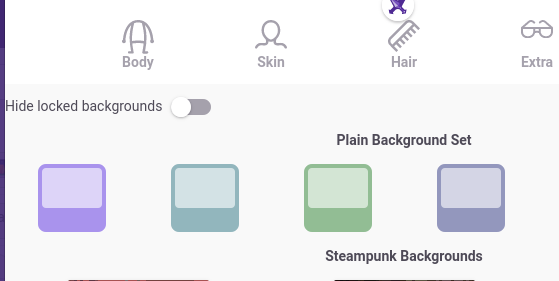
 Alys
Alys
All 16 comments
Hi
I would like to work on this issue .Please allow me.
 himanshus852
on 25 Oct 2020
himanshus852
on 25 Oct 2020
@himanshus852 Thank you! Please go ahead! Post here if you have questions or run into trouble.
The person who originally reported this, @Zarathustrik, has posted to the Report a Bug guild again with some extra details that they've just noticed:
_"there is some problem with this bug in " Hide locked backgrounds". I reloaded my page it appers again, I reloaded again it disappears, then I reloaded again and it appears again. There is something starnge with this floatint bug, Thank you"_
From my testing just now, it seems to depend on which page you were looking at before going to the backgrounds. Here's one way to reproduce the bug:
- Go to the Tasks page.
- Reload it with your browser's refresh / reload button.
- Click on User Icon > Backgrounds.
- Observe that "Hide locked backgrounds" is misaligned.
- Go to the Tavern page.
- Reload it with your browser's refresh / reload button.
- Click on User Icon > Backgrounds again.
- Observe that "Hide locked backgrounds" is correctly aligned.
There may well be other ways to reproduce it.
Alys
on 26 Oct 2020
@Alys labels ;)
I was about to ask for this one and saw that someone had claimed it but it was still marked Help Wanted
 thewilloftheshadow
on 27 Oct 2020
thewilloftheshadow
on 27 Oct 2020
Can I work on this issue?
 anshuman9999
on 18 Nov 2020
anshuman9999
on 18 Nov 2020
Hi, I saw this issue open and decided to give it a go, and I think I have it fixed.
I can proceed to pull request if it's okay.
 ivan-suarez
on 19 Nov 2020
ivan-suarez
on 19 Nov 2020
@anshuman9999 @ivan-suarez This issue is labelled as "in progress", not "help wanted", so it's not currently available to be worked on. See "Ways to Help" in Guidance for Blacksmiths for more details about selecting issues and the label system. :)
@himanshus852 How are you going with this? Do you still want to work on it?
Alys
on 19 Nov 2020
@himanshus852 Since you haven't replied, we'll make this issue available for others to work on again.
@thewilloftheshadow Since you were the first other person to inquire, are you interested in taking this up?
 shanaqui
on 10 Dec 2020
shanaqui
on 10 Dec 2020
Hey @shanaqui! I've actually promised myself I wouldn't work on anymore frontend jobs right now because they always frustrate me and mess up my day. Sorry about that!
thewilloftheshadow
on 13 Dec 2020
Hi! Can I take this one?
 yiqcheng98
on 13 Dec 2020
yiqcheng98
on 13 Dec 2020
I dont mind acting as a backup if this ticket frees up after @yiqcheng98
 SachJay
on 18 Dec 2020
SachJay
on 18 Dec 2020
Hey, can I work on this issue?
 tirlochanarora16
on 23 Dec 2020
tirlochanarora16
on 23 Dec 2020
Sorry for the delay everyone, I'm assigning this issue to @yiqcheng98 if you still want it!
 paglias
on 23 Dec 2020
paglias
on 23 Dec 2020
If he doesn't accept can I take it then?
tirlochanarora16
on 23 Dec 2020
If @yiqcheng98 isn't interested I'll go in order of who posted before but since @SachJay already has an assigned issue that would be you :)
paglias
on 23 Dec 2020
Okay
tirlochanarora16
on 24 Dec 2020
I've been playing around with when this bug occurs based on @Alys's comment above, and I think I've figured out exactly how to reproduce it. Maybe this will be helpful to whoever works on it.
I went to every subsection of the Habitica website (Tasks, Items, Equipment, Market, Quests, Party, etc.) all the way across the bar, except for the Help tab, because those subsections lead to different websites (except Report a Bug and Habitica Help).
There are some sections that always misalign the toggle, whether you refresh the browser or not. These are Tasks, Items, Equipment, Stable, and Market.
All other sections (Quests, Seasonal Shop, Time Travelers, Party, Tavern Chat, My Guilds, Discover Guilds, Group, My Challenges, and Discover Challenges) will correctly center-align the toggle if you refresh the browser.
However, moving from any page that center-aligns the toggle to any page that left-aligns it will always "reset" the alignment back to left-aligned. For example:
- Go to Shops > Quests
- Refresh the browser
- Alignment is center-aligned
- Go to Inventory > Items
- Alignment is left-aligned (no refresh needed for this to occur)
- Go to Shops > Quest (or any section that center-aligns)
- Alignment is still left-aligned
- Refresh the browser
- Alignment is center-aligned
So basically, whenever you visit a page that left-aligns the toggle, all pages thereafter will also left-align it until you refresh. Once you refresh, all pages that center-align the toggle will center-align it until you visit one of the pages that left-aligns it.
Hopefully this makes sense and is somewhat useful! Good luck!
 JohnJSal
on 31 Dec 2020
JohnJSal
on 31 Dec 2020
Related issues
 aksteele
·
3Comments
Alys
·
3Comments
Alys
·
4Comments
Alys
·
3Comments
Alys
·
4Comments
aksteele
·
3Comments
Alys
·
3Comments
Alys
·
4Comments
Alys
·
3Comments
Alys
·
4Comments