Habitica: Static overview page layout is completely broken
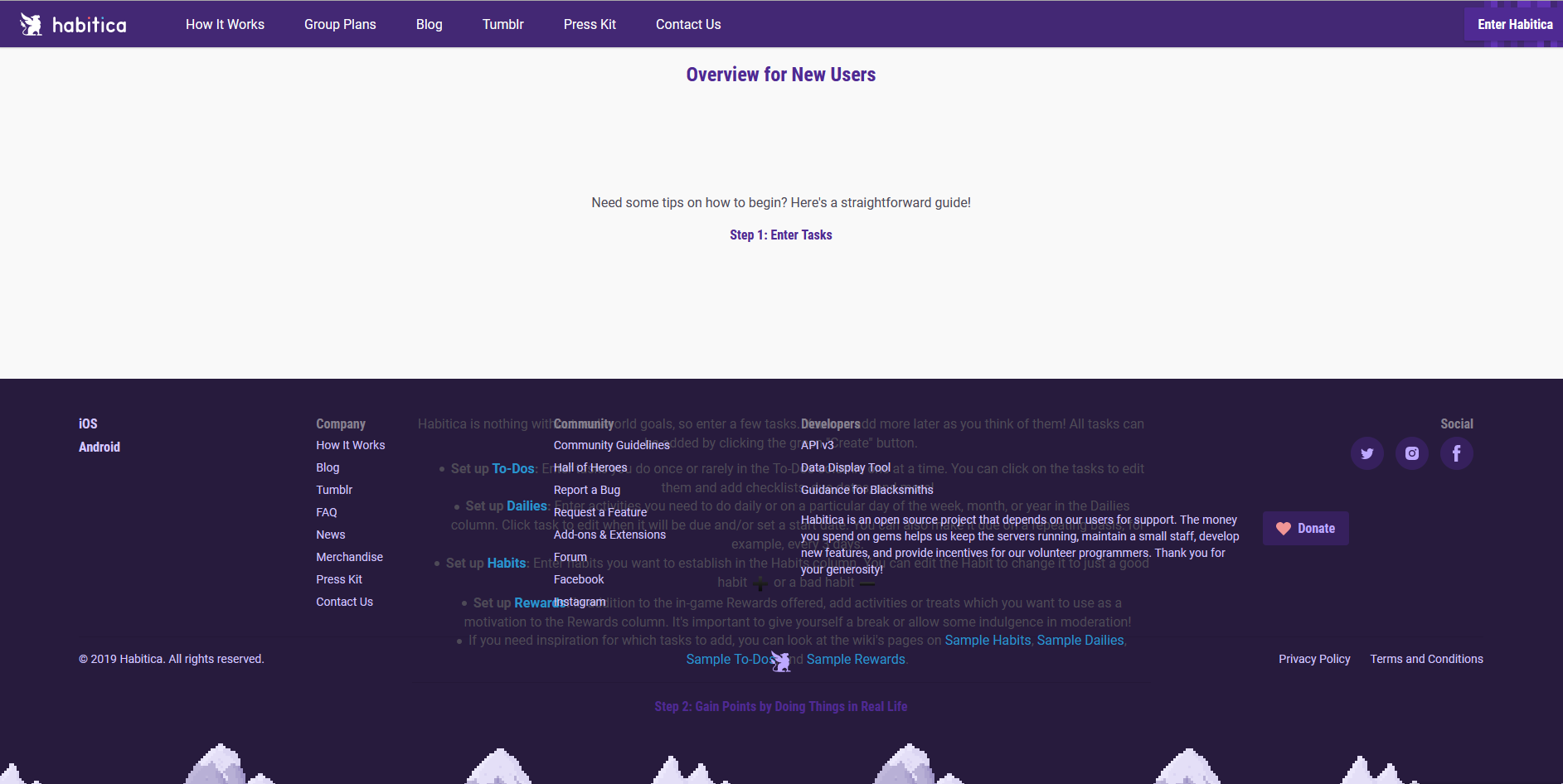
The footer is appearing in front of the intended text, which also appears to be displaced downwards.
 shanaqui
All 6 comments
@shanaqui where is a link to that page? can't find it anywhere
 paglias
on 10 Apr 2020
paglias
on 10 Apr 2020
The direct link is this: https://habitica.com/static/overview
I don't know where the user found it.
shanaqui
on 10 Apr 2020
It's at Help > "Overview for New Users"
 Alys
on 11 Apr 2020
Alys
on 11 Apr 2020
This problem is still happening in production but not on my local install (and a contributor in Aspiring Blacksmiths has also noticed it's not happening on their local install). My install's two most recent commits are these:
commit 15c09691aff8e3a472bbcfafc0d9314b4a547746 (HEAD -> develop, upstream/develop)
Merge: 8ca5ee99b0 27263e9b2f
Author: Matteo Pagliazzi <[email protected]>
Date:   Sat Apr 18 17:42:47 2020 +0200

    Merge branch 'release' into develop

commit 27263e9b2f83c569421d0fb7fa6e98b7b940953b (tag: v4.140.8, upstream/release)
Author: Matteo Pagliazzi <[email protected]>
Date:   Sat Apr 18 17:41:40 2020 +0200

    4.140.8
And those should be what's on production now (see the releases page), so this bug might be related to a config difference between local installs and production??
Alys
on 19 Apr 2020
It appears on a local install the elements are formatted with inline CSS, but on the production page its being sourced from https://habitica.com/static/css/static.692e5880.css.
'container-fluid static-view' appears to be the culprit editing this inline so it isn't used fixes this issue in prod.
 CraigInches
on 19 Apr 2020
CraigInches
on 19 Apr 2020
Looks like some css from a different page was leaking into the overview one (thanks @CraigInches !) It's been fixed in https://github.com/HabitRPG/habitica/commit/d4b867acc3f6f356f5cca0d6db0d70d8bf71783d
paglias
on 19 Apr 2020
Related issues
Alys
·
4Comments
 omtigger
·
3Comments
Alys
·
4Comments
omtigger
·
3Comments
Alys
·
4Comments
 evanostroski
·
4Comments
Alys
·
3Comments
evanostroski
·
4Comments
Alys
·
3Comments