Habitica: Profiles are not displaying avatars or health/mana/experience bars
Profiles are not showing avatars or health/mana/experience bars. Example from a person who reported:
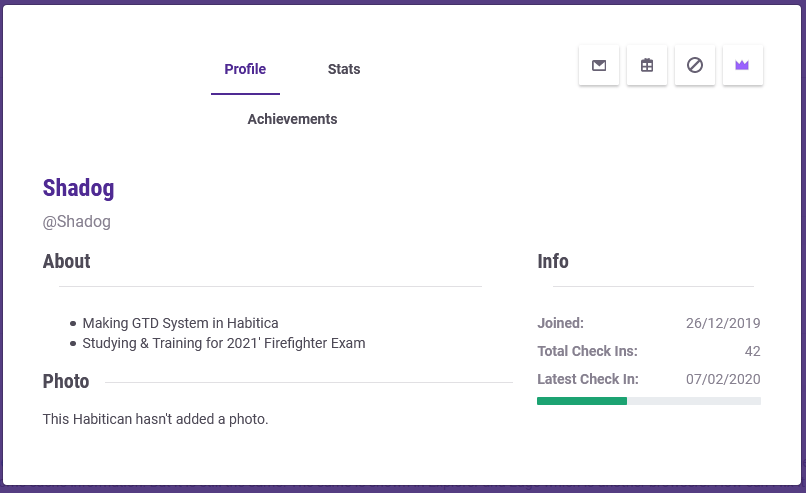
This appears to be only affecting users without tiers, but not all users without tiers, according to the reports.
Reported on Firefox, Chrome, Explorer and Edge.
EDIT: See this comment for the fix: https://github.com/HabitRPG/habitica/issues/11830#issuecomment-583717977
We need a quick fix for this so if a contributor would like to take it on, that's great, but please be willing to submit a pull request in a day or less. We'd still like you to test the fix on your own local install though to ensure that there's no other inadvertent bugs. :)
 shanaqui
All 7 comments
Might be relevant errors? Happens when I click on a profile with the issue but not otherwise. (I've pared most of these (other than the TypeError and the failed log) down to their "not expanded" versions because it was really long and I didn't want to spit too much information here if it wasn't absolutely relevant (but I get the feeling I might have cut info off of "component" where it occurred, though what I paste looks different than what I copied...). Let me know if it'd be better to post the full log.
logging.js:30 Unhandled error in Vue.js code.

logging.js:31 Error: TypeError: Cannot read property 'level' of undefined
    at a.r (memberDetails.vue?6321:1)
    at a.t._render (vue.runtime.esm.js:3548)
    at a.r (vue.runtime.esm.js:4066)
    at nr.get (vue.runtime.esm.js:4479)
    at new nr (vue.runtime.esm.js:4468)
    at Bn (vue.runtime.esm.js:4073)
    at a.kr.$mount (vue.runtime.esm.js:8415)
    at init (vue.runtime.esm.js:3118)
    at p (vue.runtime.esm.js:5978)
    at h (vue.runtime.esm.js:5925)

logging.js:32 Component where it occurred: a {_uid: 3970, _isVue: true, $options: {…}, _renderProxy: a, _self: a, …}

logging.js:33 Info: render

loggly.tracker.js:176 Failed to log to loggly because of this exception:
TypeError: Converting circular structure to JSON
    --> starting at object with constructor 'kr'
    |     property '$options' -> object with constructor 'Object'
    |     property 'router' -> object with constructor 'de'
    --- property 'app' closes the circle

loggly.tracker.js:177 Failed log data: {err: TypeError: Cannot read property 'level' of undefined
    at a.r (https://habitica.com/static/js/app…, vm: a, info: "render", sessionId: "e598d36d-b993-47ed-a281-352f6b79954f"}
 citrusella
on 8 Feb 2020
citrusella
on 8 Feb 2020
@citrusella Useful!! Thank you!
It might be from this:
logging.js:31 Error: TypeError: Cannot read property 'level' of undefined
    at a.r (memberDetails.vue?6321:1)
From this code:
https://github.com/HabitRPG/habitica/blob/71cc313c9a2231b35885bdfb30b185a72098e670/website/client/src/components/memberDetails.vue#L27
which should probably have a check for whether member.contributor is defined before it tries to read the level.
That tallies with "This appears to be only affecting users without tiers" although this part would then be odd: "but not all users without tiers, according to the reports."
I'm just about to get into RaB now so I'll look at the new reports of this to see if that throws more light onto it.
 Alys
on 8 Feb 2020
Alys
on 8 Feb 2020
...Huh, I was looking at the stuff that had recently gone into the website and the change that included that file particularly intrigued me but I didn't want to say anything without seeing if I could quickly play around with changing it back (because I'm not learned enough yet to know how to actually fix it) just to see if the change had caused anything...
"Quickly" turned into "oh wait my months-behind local install doesn't have the same code in that file so now I have to update it"... but it is what it is. XD
Glad to see I was potentially sniffing up the right tree? o.o (I couldn't make heads or tails of the actual errors I posted enough to really use them so I was mostly looking stabbing around in the dark at anything that just looked related to that part of the page.)
EDIT: So... reverting this precisely to what's on the left technically fixes it but introduces an entirely different issue (users with tiers have their display names duplicated, users without them have their display name missing entirely).
And reverting line 35 there (I was just playing around at this point) fixes it for an affected user viewing their own profile but not for another user viewing them and removes the name of people with tiers from the header.
I gotta stop playing around with this. XD This whole extra edit is just a big TL;DR of "citrusella starts playing with things just to see what breaks when she does". ._.
citrusella
on 8 Feb 2020
I've done some testing and I'm sure it's breaking for people who don't have any information in their ccontributor object. Fixing it should be a simple matter of something vaguely like:
v-if="member.contributor && member.contributor.level && member.contributor.level > 0 && ...
The reason that the bug doesn't occur for some players who have no contributor tiers is that they have a contributor object like this:
    "contributor": {
        "admin": false
    },
I.e., the contributor object is not empty. That stops the bug. I've confirmed that by viewing the profile of a user with an empty contributor object (the bug occurs), then adding admin:false to it, then viewing again (the bug doesn't occur). I'd guess it's because member.contributor is only populated if contributor isn't empty. (The contributor.admin field is usually missing for non-admins but can be set to false for reasons that aren't relevant to the bug.)
Alys
on 8 Feb 2020
One final point just for those who are curious:
A player with a completely empty contributor object will still be able to view their own profile with no bug in it. That's because the user's own data loaded into the browser does contain at least an empty contributor object.
It's only when the player's data has NO contributor object (not even an empty one) that you see this bug, and that only happens when you've viewing someone else's profile (if they don't have contributor.admin set).
Alys
on 8 Feb 2020
When the fix for this goes live, staff or moderators should modify the Report a Bug guild's description to remove the info about the bug and add N/A in the "CURRENT KNOWN HIGH-IMPACT BUGS" section. I'm labelling this as "notify helpers" to remind me.
Alys
on 9 Feb 2020
I've made the change to the Report a Bug guild description!
 SabreCat
on 11 Feb 2020
SabreCat
on 11 Feb 2020
Related issues
 omtigger
·
3Comments
omtigger
·
3Comments
 mikean92
·
3Comments
mikean92
·
3Comments
 kantamablade
·
4Comments
Alys
·
4Comments
Alys
·
4Comments
kantamablade
·
4Comments
Alys
·
4Comments
Alys
·
4Comments