Habitica: Experience gained from Enchanted Armoire should appear in header stats immediately
When you gain experience from the Enchanted Armoire, your experience bar in the header does not change immediately. You have to click the sync button to make the new experience appear.
The desired behaviour is that as soon as you gain experience from the Armoire, your exerperience bar should increase and thee number to the right of it should change. Clicking the sync button should not be necessary.
 Alys
Alys
All 18 comments
By the way, when you get enough Experience from the Armoire to level-up, the level-up doesn't happen until you complete a task (https://github.com/HabitRPG/habitica/issues/2433). That's not directly related to this issue (this issue is much newer!), but if the contributor who works on this issue happens to see a way of fixing the level-up problem at the same time, you'd be welcome to do that. Don't feel that you have to though. :) It's more important to get the stats bar updating itself when you get the Experience.
After this issue is resolved, if the level-up problem still happens, I'll create a new issue to get it fixed, as I mentioned at https://github.com/HabitRPG/habitica/issues/2433#issuecomment-582637603 . I'm labelling this issue as "notify helpers" as a reminder to me (I review that label periodically).
Alys
on 5 Feb 2020
@Alys I'd like to tackle this, but for my own developer happiness, I need to know a few things:
- Is there a way to pre-populate the database and log into a generated account? I'm more of a Ruby on Rails guy and Rails does this by running a script that populates the database in a
seeds.rbfile - Is there a developer console where I can execute commands to test functions without having to use the interface? Again, I'm a Node/Vue newbie and am not familiar with the related developer tools.
 ianrandmckenzie
on 14 Feb 2020
ianrandmckenzie
on 14 Feb 2020
_edit by Alys 2020-02-15: This comment is not specific to this issue but is a useful local install troubleshooting tip. If your install is running correctly, you can ignore this comment. See also the "Review the Server Output" section of Setting up Habitica Locally on Linux where this tip has been copied._
I ran into an issue loading the website on localhost where I got this error:
Proxy error: Could not proxy request /api/v4/tasks/user from localhost:8080 to http://localhost:3000.
See https://nodejs.org/api/errors.html#errors_common_system_errors for more information (ECONNREFUSED).
There was 2 possible problems. First, mongodb had stopped running. On MacOS I ran brew services start [email protected] to fix this issue.
The next possible problem is that I use nvm (node version manager) and for some reason it reverted back to my system's node 10. I switched to Node 12, and that solved my problem. I am adding this comment so that people Googling a similar problem will see this.
ianrandmckenzie
on 14 Feb 2020
Okay, I think I'm at wits end for this. I worked on this for 4 hours, but my lack of experience with Node/Vue is really showing in this attempt. The best I could come up with is to add:
website/client/src/store/actions/shops.js:79:
if (isExperience) store.state.user.data.stats.exp += item.value;
This updated the experience bar, but it duplicated the Experience received notification. It shows this message:
"You wrestle with the Armoire and gain Experience. Take that!"
But it also shows the default experience gained message. Another problem with this solution is that if you are, for example, at 390/400 experience for your level, and get 16 XP from the Enchanted Armoire, your xp bar goes to 406/400 and the "leveling up" chain of commands don't trigger. I tried looking for them, but by the time I got to that point my brain was pretty mushy.
Other things I tried unsuccessfully was adding:
website/client/src/store/actions/shops.js:11:
import * as Analytics from '@/libs/analytics';
website/client/src/store/actions/shops.js:99:
Analytics.updateUser();
It didn't work, I probably don't properly understand what Analytics.updateUser(); does.
I also tried:
website/common/script/ops/buy/buyArmoire.js:13:
import updateStats from '../../fns/updateStats';
website/common/script/ops/buy/buyArmoire.js:161:
updateStats(user, user.stats, this.req);
That didn't work, either. Again, I assume I dont properly understand the updateStats() function. I also tried both solutions above in combination with each other to no effect.
I might try this again later, but if someone wants to take over, I've at least given you a list of things not to do, as well as something that kinda works.
ianrandmckenzie
on 15 Feb 2020
@ianrandmckenzie Thanks very much for trying and adding your notes here! I'll leave this marked as help wanted.
Thanks for the troubleshooting tips too! I've added them to the "Review the Server Output" section of Setting up Habitica Locally on Linux.
There are no scripts for pre-populating the database with an automaticcally generated account. We've had some in the past but they become outdated when Habitica's code changed. You'll find database commands for adding some of the more complex data in the Using Your Local Install to Modify Habitica's Website and API page.
Is there a developer console where I can execute commands to test functions without having to use the interface? Again, I'm a Node/Vue newbie and am not familiar with the related developer tools.
The answer is probably no but I'm not sure which kind of commands your asking about or which interface you want to avoid using. If you're asking about database commands, you can use the MongoDB interface (see that previous link).
(BTW, I've removed your zapier calendar link comment since your username is mentioned in this one now.)
Alys
on 15 Feb 2020
Hi! I read all the notes @ianrandmckenzie made, and was fiddling around with this a little earlier. I noticed that instead of directly updating the experience value, in shops.js you can instead add
await store.dispatch('user:fetch', { forceLoad: true });
which appears to sync the user (disclaimer: I have no idea if this is the intended fix). Then if you call updateStats within buyArmoire.js exactly as was described, you will correctly get the level-up if your experience goes over.
However, this runs into the exact same problem of the experience notification firing twice, once with the special Armoire message and once with the generic message. I have no idea how to prevent that from happening. :/ Even currently on the site, when you have to click the sync button for experience to update, the generic experience notification still shows up afterwards.
 agentx999
on 17 Feb 2020
agentx999
on 17 Feb 2020
Nice going, @agentx999. I wonder if the Armoire-specific error message needs to be changed so that instead of popping up by itself, it changes the default experience message. This might have to be a minor architectural decision that needs to be made. @Alys what do you think? Maybe @agentx999 should just delete the Enchanted Armoire experience-related message and instead alter the default experience message that pops up upon armoire purchase that rewards xp?
ianrandmckenzie
on 17 Feb 2020
Altering the default Experience message to make it show the Enchanted Armoire message is a nice idea from that point of view, but unfortunately the default notifications aren't really designed for that to be possible (or at least not at all easy).
Here's how the default Experience notifications work (the same applies to the default gold and mana notifications):
When Habitica's website notices that your Experience has changed since the last time a sync happened, it shows you the default Experience notification to tell you about the change in your Experience, regardless of why your XP changed. Here's four examples illustrating different ways of getting XP and how the default notifications show it:
You complete a task on the website which adds 2 XP to your account in the database. An automatic sync happens immediately so the website sees that your XP has changed and it shows you a notification for 2 XP.
You use the Armoire on the website and are given 22 XP. A sync does not happen immediately but the XP is added to your account in Habitica's database. You then click the sync button so the website sees that your XP has changed and it shows you a notification for 22 XP. At this point, the website doens't know that this XP came from the Armoire, it just knows that your XP increased by 22.
You open the website, then leave it open and go to the mobile app where you complete several tasks, which together add a total of 10 XP to your account. You then come back to the website and click its sync button. The website sees that you now have 10 XP more than before, so it shows you 10 XP in a single default XP notification (it's telling you about the total change, not individual changes from each task).
You open the website, then go to the mobile app to complete tasks, which add 10 XP. You then come back to the website, and you don't sync immediately. You use the Armoire and you get 22 XP from it. You then sync. The website realises that you now have 32 XP more than before so it shows you 32 XP in a single default XP notification.
Hopefully that's illustrated the default notifications well enough to show that it's not simple at all to change the default notification to display the Armoire messsage. In some cases (like the second example) that would be appropriate if it could be done, but in other cases (like the fourth one) it wouldn't be appropriate.
If any of that isn't clear or you have questions, please post here!
Alys
on 17 Feb 2020
That clears a lot of things up - thank you so much!
I am now a little confused as to what the fix for this particular issue should look like, though. I was trying to force the Armoire to sync immediately, which was why I was running into the double XP notifications. But it sounds like in the fourth case, those double notifications would actually be different (the Armoire one would show 22 XP and the default one would show 32 XP). Which seems confusing from the user end of things. So maybe syncing isn't a good idea.
I was also trying out @ianrandmckenzie's idea of directly updating the Experience bar - you can get it to do the level-up if you call updateStats in both shops.js and buyArmoire.js. Which feels a little weird, but might be the better way to go? Then there's still the double notification problem. If we can't modify the default notification, is there a way to somehow prevent it from displaying at all?
@ianrandmckenzie you were working on this issue at first. Would you like to take it over? I was looking into all this just because I was curious - I have no intention of taking it from you if you want to work on it!
agentx999
on 17 Feb 2020
It is a bit of a tricky situation. My personal feeling at the moment is that it probably doesn't really matter if there's a double XP notification at the same time (one from the Armoire and one default XP notification). I _think_ that's likely to be clearer than the current situation.
You're right that for the fourth example case, the notifications would show different amounts, but technically that's the correct behaviour, and anyone who commonly switches between app and website like that is probably used to seeing the default notifications that summarise the changes that happen on the app.
Note though that this is just my personal opinion and if the staff post to say otherwise, listen to them not me. :) There might be better ways of handling this.
Sorry, the medium level coding label might have been misleading. The code itself wouldn't be too hard but the decision for how to fix this best is clearly harder than I was considering when I logged the issue, due to the notifications.
I'm changing this from help wanted to suggestion discussion but this is still definitely something we want fixed and you're all welcome to keep discussing the code here! If there's been no complaints in a week or no better ideas, I'll change it back to help wanted with a note that it doesn't matter if there's both an Armoire XP notification and a default XP notification.
Alys
on 17 Feb 2020
Alternatively, it's not too difficult to change the style of the Armoire notification so that they look different.
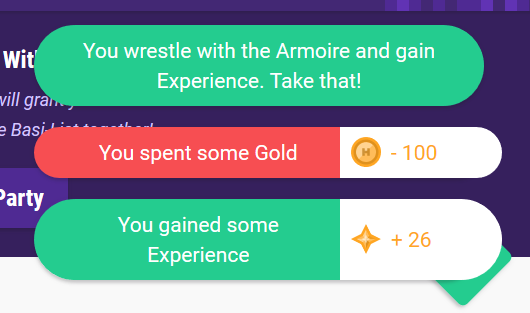
That way it's not as obvious that the XP notification gets duplicated? Just a possible idea I'm throwing out there, not sure if it's any better since it doesn't fix the actual problem.
(I'm starting to empathize with residents of Habitica who wrestle with the Armoire. I'm gaining so much coding experience from wrestling with these notifications... :P)
agentx999
on 18 Feb 2020
@agentx999 (LOL for your last point.)
Speaking for myself alone (this is not approval to proceed), I really like that idea! Removing the XP amount from the Armoire's "gain Experience" notification and showing the default XP notification at the same time seems to me to be the best solution so far. For easy comparison for anyone reading this, here's the current Armoire Experience notification:
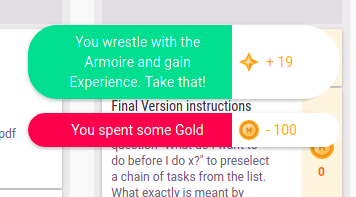
@Tressley what do you think? The issue is that:
- Currently when someone gets XP from the Armoire they see the Armoire's XP notification but their XP stat in the header doesn't update automatically. They have to click the sync button to see their header XP stat change, and when the sync happens they see the default XP notification, which makes it look like they've received the same amount of XP a second time.
- It is not possible to prevent the default XP notification from appearing (at least not without a lot of work).
- A proposed fix is to force a sync at the same time that you get the XP from the Armoire, which would make your XP in the header update immediately, however that would cause you to see both the Armorie's XP notification and the default XP notification at the same time, again making it look like you'd gained the XP twice.
- @agentx999 's idea is to do that proposed fix and also to change the Armoire's XP notification so that it no longer states how much XP you got. You would still see how much XP you got in the default XP notification - see @agentx999's screenshot of the suggested fix in the previous comment.
Alys
on 18 Feb 2020
@agentx999 feel free to finish it off. I already have a PR in Habitica's pipeline, and it sounds like at this point that you've put in just as much work as I have. My day job has taken over my vacation, so I can't contribute as much to open source as I had planned. I am also 5 years into my coding career, so it's not like I have anything to prove. I just wanted to help out with a game I love.
I really like your modification to the Armoire XP message. I think that's a great workaround fix alternative to making fundamental changes to the notifications.
ianrandmckenzie
on 19 Feb 2020
@Alys / @agentx999 -- I think that sounds like a reasonable solution! Just to confirm I'm on the right page, the user would see:
- A notification for how much Gold they spent.
- A notification that says, "You wrestle with the Armoire and gain experience. Take that!"
- A single notification that states how much experience you earned.
 Tressley
on 19 Feb 2020
Tressley
on 19 Feb 2020
@Tressley Yes, that's correct.
@agentx999 Would you like me to mark this as in progress for you to implement your suggestion?
If you'd prefer not, that's fine, and I'll mark it as help wanted for someone else to implement your suggestion.
Alys
on 20 Feb 2020
@Alys Sure, I can implement it myself - I pretty much have it on my local install already. Thanks!
agentx999
on 20 Feb 2020
@agentx999 Great, thanks! I've marked it as in progress for you.
Alys
on 20 Feb 2020
@agentx999 if you get stuck on making your changes compatible with the test suite, let me know and I can take over if you're not much of a tests guy.
ianrandmckenzie
on 20 Feb 2020
Related issues
Alys
·
3Comments
 omtigger
·
3Comments
omtigger
·
3Comments
 Frownigami1
·
4Comments
Frownigami1
·
4Comments
 mikean92
·
3Comments
Alys
·
3Comments
mikean92
·
3Comments
Alys
·
3Comments