Habitica: pinned items sometimes can't be moved (item path not valid) - `pinnedItemsOrder` errors
RobotKing (7966165f-4b5c-4ad3-b761-e99f3b729400) reports:
"When I try to change the order of pinned rewards around, I get an error message _[the error that uses the wrongItemPath string]_. The item that was moved around was the locked quest scroll for Terror of the Taskwoods Part 2. This error only happens on this quest scroll - I've unpinned and repinned the reward, but the issue continues. ... I was getting 502 errors occasionally on the right hand side"
"it seems to only happen intermittently - I just tried it then and there was no error, even through the error was present 5 minutes ago when I tested it for the issue. It also only seems to happen with locked quest scrolls too, weirdly enough."
Here's an example of the error from Loggly:
{"method":"POST","originalUrl":"/api/v3/user/move-pinned-item/quests.taskwoodsTerror2/move/to/3",
"headers":{"connection":"Keep-Alive","accept":"application/json, text/plain, */*","accept-encoding":"gzip, deflate, br","accept-language":"en-US,en;q=0.9","host":"habitica.com","max-forwards":"10","referer":"https://habitica.com/" ...  },
"body":{},
"httpCode":400,"isHandledError":true,"timestamp":"2018-05-27T08:59:13.465Z","level":"warn",
"message":"BadRequest: Error processing the string \"wrongItemPath\". Please see Help > Report a Bug.\n
at handler (/usr/src/habitrpg/website/transpiled-babel/controllers/api-v3/user.js:1882:13)\n at args (/usr/src/habitrpg/website/transpiled-babel/libs/routes.js:17:39)\n at Layer.handle [as handle_request] (/usr/src/habitrpg/node_modules/express/lib/router/layer.js:95:5)\n at next (/usr/src/habitrpg/node_modules/express/lib/router/route.js:137:13)\n at _user.model.findOne.lean.exec.then.user (/usr/src/habitrpg/website/transpiled-babel/middlewares/language.js:100:14)\n at <anonymous>"}
NB: The "Error processing the string" bug has been reported at https://github.com/HabitRPG/habitica/issues/10403.
This issue is for us to work out what is causing the wrongItemPath message to be thrown.
EDIT 2020-12-26:
This appears to be due to a pinned item being added to the user's pinnedItems array but not to the pinnedItemsOrder array. I believe an item needs to be in both for sorting to work.
Anyone affected by this can unpin the item and repin it. I believe that should fix the problem for them.
 Alys
Alys
All 12 comments
If they got 502 errors before it's likely the website was out of sync
 paglias
on 28 May 2018
paglias
on 28 May 2018
As mentioned in https://github.com/HabitRPG/habitica/issues/10850 this bug was reported by @Ieahleen (c073342f-4a65-4a13-9ffd-9e7fa5410d6b).
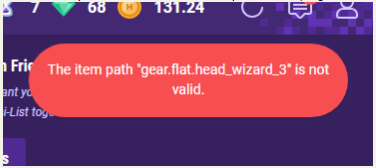
I found a few examples of errors like the one below in Loggly:
{"method":"POST",
"originalUrl":"/api/v4/user/move-pinned-item/gear.flat.head_wizard_3/move/to/2",
"headers":{"connection":"Keep-Alive","accept":"application/json, text/plain, */*","accept-encoding":"gzip, deflate, br","accept-language":"it-IT,it;q=0.9,en-US;q=0.8,en;q=0.7","host":"habitica.com","max-forwards":"10","referer":"https://habitica.com/","user-agent":"...","origin":"https://habitica.com","x-user-timezoneoffset":"-60",
"x-api-user":"c073342f-4a65-4a13-9ffd-9e7fa5410d6b",
"x-client":"habitica-web",
"dnt":"1","x-forwarded-proto":"https","x-forwarded-port":"443","x-original-host":"habitica.com",
"x-original-url":"/api/v4/user/move-pinned-item/gear.flat.head_wizard_3/move/to/2",
"x-forwarded-for":"...","x-arr-ssl":"...","x-arr-log-id":"7aa01789-44aa-4df4-a3d0-1f5a546262cc","content-length":"0"},
"body":{},
"httpCode":400,
"isHandledError":true,
"timestamp":"2018-11-17T08:41:04.528Z",
"level":"warn",
"message":"BadRequest: The item path \"gear.flat.head_wizard_3\" is not valid.\n at handler (/usr/src/habitrpg/website/transpiled-babel/controllers/api-v3/user.js:1687:13)\n at args (/usr/src/habitrpg/website/transpiled-babel/libs/routes.js:17:39)\n at Layer.handle [as handle_request] (/usr/src/habitrpg/node_modules/express/lib/router/layer.js:95:5)\n at next (/usr/src/habitrpg/node_modules/express/lib/router/route.js:137:13)\n at _user.model.findOne.lean.exec.then.user (/usr/src/habitrpg/website/transpiled-babel/middlewares/language.js:100:14)\n at <anonymous>"}
Another instance of this has been reported by Nakonana (33bb14bd-814d-40cb-98a4-7b76a752761c):
"Minor bug: when I try to change position of the june background which I pinned to my rewards section it says "The item path 'backgrounds.backgrounds062019.underwater_vents' is not valid". The background then just appears in its previous position."
Alys
on 17 Jun 2019
@johnjsal (624e48a3-cbea-4bbe-ae44-ca9183f49626) reported this bug, with the posts below.
"I just pinned a Background to my Rewards column, and every time I try to move it, I get [the item path not valid error message shown below], although it does move. However, when the page reloads, it's back in the first position again, so it won't remain where I put it. I haven't seen this happen with any other Backgrounds yet."
I checked his pinned items and that background was in there, with the correct data. When I used the same array in my account on Firefox, that background appeared at the bottom of my pinned items, and I could move it up and down without error.
After I checked that (so when I know that it was in the array), JohnJSal said:
"My process was to refresh the browser window (F5), drag the Background lower in the Rewards column (which then gives the error message), then refresh again. After the second refresh, the Background is in the first position again. This doesn't seem to happen with the other pinned Backgrounds. I use Chrome 87.0.4280.88 (64 bit), if that matters.
I also tried the above steps with Firefox and it does the same thing, with the same error message. Firefox is 84.0 (64 bit).
Edit: I unpinned the Background and re-pinned it, and now it does not give me that error, and it stays where I put it! Not sure what went wrong, but it seems to have been maybe a one-off thing that just happened and then....didn't happen? :smile:"
And also :
Everything I did was on the website. I never used the app at any point during the problem.
When I re-pinned it, it appeared in the very first spot (upper left corner of the Rewards column) because I remember then dragging it toward the bottom, and that time it stayed there.
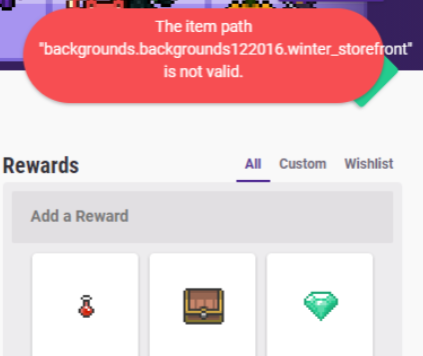
Alys
on 21 Dec 2020
cc'ing @negue
paglias
on 21 Dec 2020
I can't reproduce it, not on habitica.com itself nor locally.
At first I thought the item didn't exist, but then it wouldn't be visible at all.
Could the server be pushed / restarted at them time? @paglias
Otherwise I don't know what happened or why.
 negue
on 21 Dec 2020
negue
on 21 Dec 2020
Yeah if it's not reproducible it's likely an issue with a concurrent server deployment
paglias
on 23 Dec 2020
It keeps happening, it usually happens with items pinned automatically. It didn't happen with the gala gear tho.
Example, I'll make the thing happen during writing this message:
- I'm a rogue, I have the Nunchaku available to buy in my rewards,
- now I buy it and the Ninja-to appear,
- now if I try to move the Ninja-to (because I like to have them in order by price):
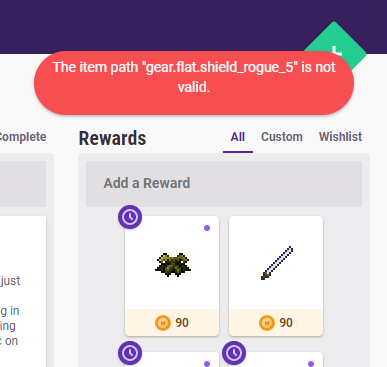
I've tried syncing and reloading the page, the error keeps apeparing every time I move irt.
Now I also think I have a sorting issue in my rewards, items are moving randomly when moving them (I am not moving anymore the Ninja-to, I don't know if it's connected or coincidental). If you want to check my UUID is: c073342f-4a65-4a13-9ffd-9e7fa5410d6b
 ieahleen
on 24 Dec 2020
ieahleen
on 24 Dec 2020
I haven't had time to do the testing I planned for this yet, but I have started to suspect it's a similar bug to the tasksOrder sorting bug with the problem lying in the pinnedItemsOrder array. E.g., if a pinned item is added to pinnedItems but not to pinnedItemsOrder, then perhaps the pinned item sorting bug occurs.
EDIT:
This was the post from from @johnjsal that made me start thinking it was like the tasksOrder sorting bug:
_"One final thing I just thought of after reading your last comment is that while I was having the problem with the error message, I also noticed that none of my pinned backgrounds were staying where I was putting them. After dragging one (even the other ones that didn't give the error message when moved) to a new location, it would sometimes stay but just as often be shuffled around with the rest of them after a refresh."_
_"Not sure if that's relevant, but perhaps it's related to the "bad data" you referred to. When the problem stopped happening, I don't recall seeing the backgrounds become disordered anymore."_
Alys
on 26 Dec 2020
In fact, I can see that in @ieahleen 's data now - thank you for posting here @ieahleen !
    "pinnedItems": [
        {
            "type": "armoire",
            "path": "armoire"
        },
        {
            "type": "potion",
            "path": "potion"
        },
        {
            "path": "quests.lostMasterclasser2",
            "type": "quests"
        },
        {
            "path": "quests.lostMasterclasser3",
            "type": "quests"
        },
        {
            "path": "quests.lostMasterclasser4",
            "type": "quests"
        },
        {
            "type": "marketGear",
            "path": "gear.flat.weapon_armoire_rancherLasso"
        },
        {
            "type": "marketGear",
            "path": "gear.flat.armor_armoire_gownOfHearts"
        },
        {
            "type": "marketGear",
            "path": "gear.flat.shield_special_summer2020Rogue"
        },
        {
            "type": "marketGear",
            "path": "gear.flat.shield_armoire_redRose"
        },
        {
            "type": "marketGear",
            "path": "gear.flat.weapon_rogue_4"
        },
        {
            "type": "marketGear",
            "path": "gear.flat.armor_rogue_3"
        },
        {
            "type": "marketGear",
            "path": "gear.flat.head_rogue_5"
        },
        {
            "type": "marketGear",
            "path": "gear.flat.shield_rogue_5" // XXX not in `pinnedItemsOrder`
        }
    ],
    "pinnedItemsOrder": [
        "gear.flat.armor_special_winter2021Rogue",
        "gear.flat.shield_armoire_redRose",
        "gear.flat.head_rogue_5",
        "gear.flat.shield_special_winter2021Rogue",
        "gear.flat.weapon_special_winter2021Rogue",
        "gear.flat.head_special_winter2021Rogue",
        "gear.flat.armor_rogue_3",
        "gear.flat.weapon_rogue_4",
        "gear.flat.shield_rogue_4",
        "gear.flat.shield_special_summer2020Rogue",
        "gear.flat.weapon_armoire_rancherLasso",
        "gear.flat.armor_armoire_gownOfHearts",
        "potion",
        "armoire",
        "quests.lostMasterclasser2",
        "quests.lostMasterclasser3",
        "quests.lostMasterclasser4"
    ]
Sorry, I should have included this above:
@ieahleen if you unpin the item giving the trouble and repin it, the problem should be fixed (unless you're unlucky enough to have the same issue happen a second time, in which case try yet again). Tell us if unpinning and re-pinning TWICE doesn't fix it!
I'm about to edit this issue's title to add "pinnedItemsOrder error" to it, and add a brief summary to the top post.
Alys
on 26 Dec 2020
With that information I can try to reproduce or rather improve the sorting
negue
on 26 Dec 2020
Related issues
 aksteele
·
3Comments
aksteele
·
3Comments
 khipkin
·
3Comments
Alys
·
3Comments
khipkin
·
3Comments
Alys
·
3Comments
 Frownigami1
·
4Comments
Frownigami1
·
4Comments
 audiolion
·
4Comments
audiolion
·
4Comments
Most helpful comment
In fact, I can see that in @ieahleen 's data now - thank you for posting here @ieahleen !