Habitica: Text overflowing of social buttons for long titles on login page
General Info
- UUID: 2d57fd14-0fd1-4bf5-abe9-d65bb42fbc6f
- Browser: Google Chrome 63.0.3239.132 / Safari 11.0
- OS: Ubuntu 17.04 / macOS High Sierra 10.13
Description
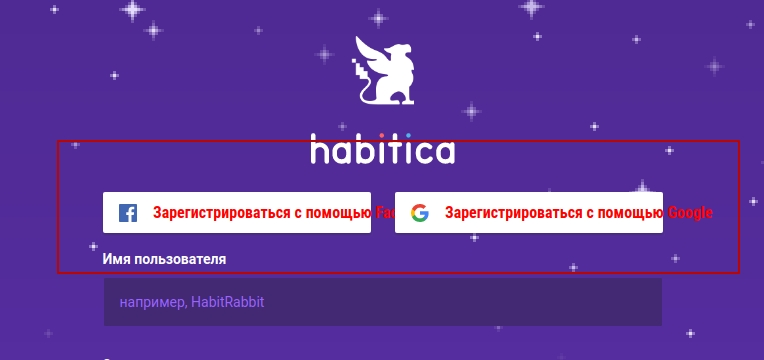
For example, in Russian, the titles go beyond the buttons (marked in red for clarity). What are the options for correction?
Console Errors
 lex111
All 26 comments
Hi @lex111, I could take a look at this!
 rkojima
on 31 Jan 2018
rkojima
on 31 Jan 2018
@rkojima Thank you!
@Tressley What's the desired method to fix this that rkojima should implement? For example, should the buttons expand horzontally to be as wide as needed to fit the text? Or should the text wrap and the buttons expand downwards? Or something else?
 Alys
on 3 Feb 2018
Alys
on 3 Feb 2018
@Alys -- The buttons should expand to accommodate the length of the text.
 Tressley
on 5 Feb 2018
Tressley
on 5 Feb 2018
@Tressley should the width or the height expand though. Looks like the width would throw of the alignment.
 TheHollidayInn
on 5 Feb 2018
TheHollidayInn
on 5 Feb 2018
The width. The buttons should remain centered, but they may be wider than the inputs. That's fine.
Tressley
on 5 Feb 2018
@rkojima feel free to stay on this any time now, thanks!
Alys
on 6 Feb 2018
Hi @Tressley and @Alys,
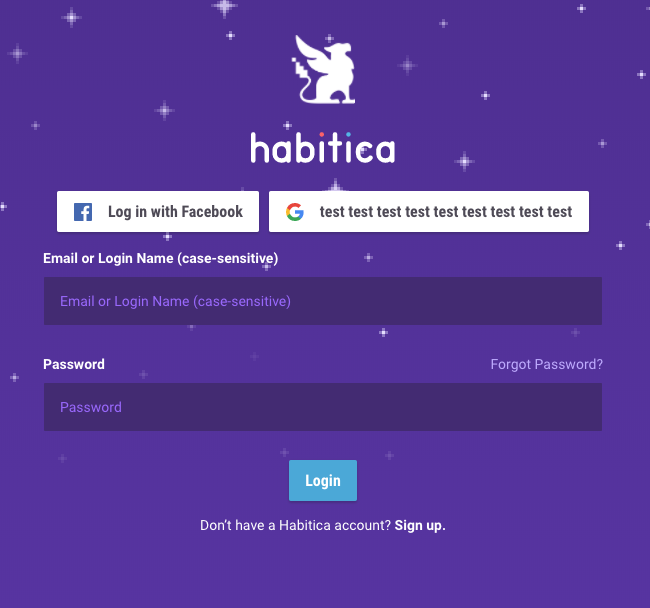
Here's what I currently have. The buttons will now contain all of the text. However, as you can see in the screenshot, if one button has more text than the other, the space between the two buttons will not be aligned in the center. The buttons together are in the center. What do you think?
rkojima
on 14 Feb 2018
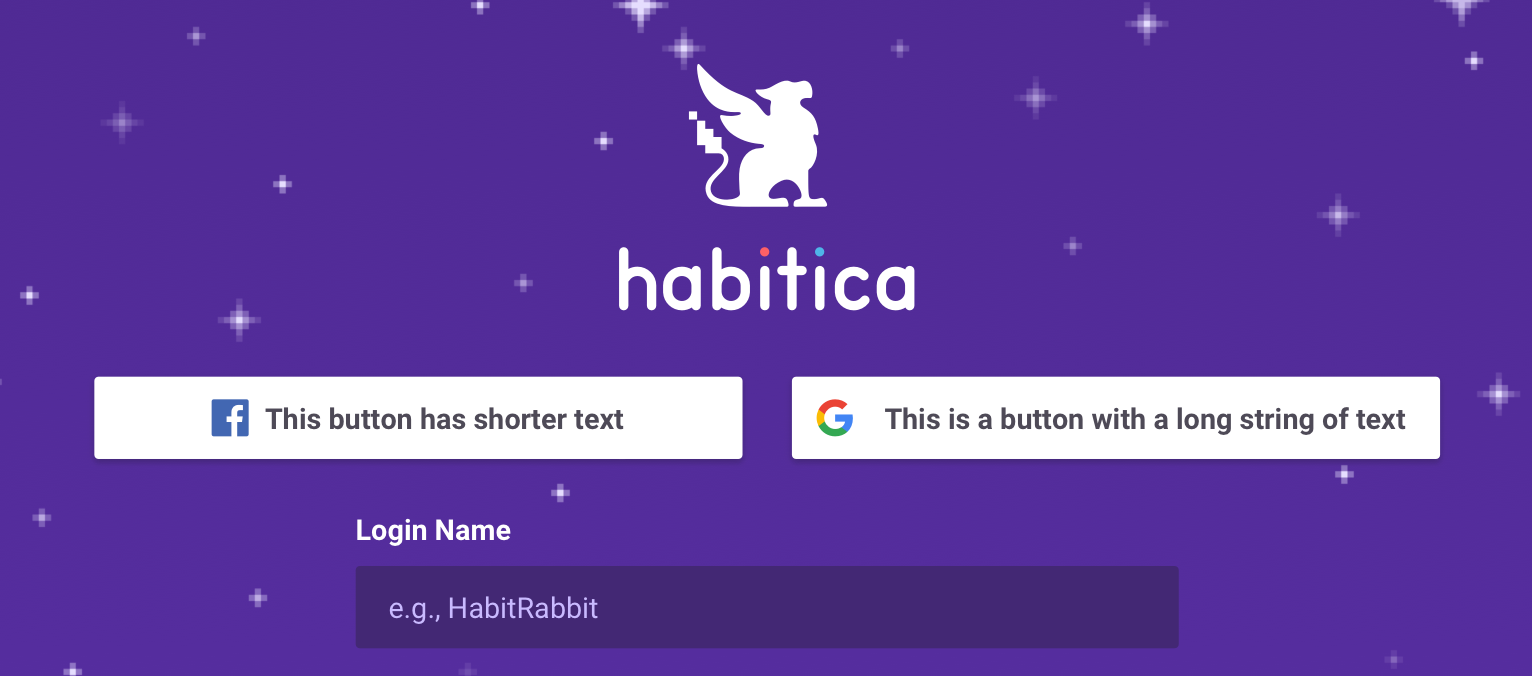
@rkojima -- Thanks for your work on this! To answer, both buttons should have the same width with the content centered in them. That button group is then centered to the form field.
Here's a quick mock-up:
Tressley
on 15 Feb 2018
@Alys @Tressley,
I wanted to add some JS logic so that the size of the buttons change the longer the text inside the button is. Where would I add that? Would it be sensible to add this code in the vue file that I'm currently working in, or should I create a new js file just for this function?
rkojima
on 21 Feb 2018
The vue file is probably the best place since this function will be used
only there (at least for now). Thank you!
Alys
on 22 Feb 2018
If I want to write tests for this, the folder I would go to is habitica -> test -> client -> unit -> specs -> components -> ??? Or if I need to create a new folder for it, what should I name it?
rkojima
on 23 Feb 2018
habitica -> test -> client -> unit -> specs
is okay. the specific folder wil depende on where your functionality is added in website/client, if in a component then specs/components will work
 paglias
on 24 Feb 2018
paglias
on 24 Feb 2018
So after fetching and rebasing to the latest develop branch, I'm running into problems with the node module node-rdkafka. I have this error that's on this page:
https://github.com/Blizzard/node-rdkafka/issues/178
And the solution says that I need to set and link some flags for openssl. Can someone tell me how I do this?
rkojima
on 2 Mar 2018
Can you try to delete your node modules and reinstall? On which os are you?
paglias
on 5 Mar 2018
Hi @paglias, I deleted my node modules folder and did "npm install" but am still having the same issue. I have macOS.
rkojima
on 6 Mar 2018
Have you tried installing openssl and set the flags mentioned here https://github.com/Blizzard/node-rdkafka/issues/178#issuecomment-304827021 before running npm install? You should be able to past them into the terminal before using npm install
paglias
on 6 Mar 2018
@paglias I tried deleting, then pasting the two lines of code before doing npm install, and I'm not getting anything. When I reinstalled openssl, I got this:
This formula is keg-only, which means it was not symlinked into /usr/local,
because Apple has deprecated use of OpenSSL in favor of its own TLS and crypto libraries.

If you need to have this software first in your PATH run:
  echo 'export PATH="/usr/local/opt/openssl/bin:$PATH"' >> ~/.zshrc

For compilers to find this software you may need to set:
    LDFLAGS:  -L/usr/local/opt/openssl/lib
    CPPFLAGS: -I/usr/local/opt/openssl/include
So like you said, I need to use the flags mentioned in https://github.com/Blizzard/node-rdkafka/issues/178#issuecomment-304827021, but I tried pasting them and it didn't work.
I think having macOS High Sierra is giving me problems.
rkojima
on 7 Mar 2018
@paglias I got help from a friend and got it to work! Here's what I did.
In my terminal, I typed source ~/.bash_profile
In there, I typed in export CPPFLAGS=-I/usr/local/opt/openssl/include and
export LDFLAGS=-L/usr/local/opt/openssl/lib. I saved it, then did npm install for good measure.
I think knowing where to put these flags was the hardest part about this; that took forever.
rkojima
on 7 Mar 2018
great! thanks for posting a solution!
paglias
on 7 Mar 2018
@rkojima Is this issue still in progress? Please let us know. Thank you!
 beffymaroo
on 17 Apr 2018
beffymaroo
on 17 Apr 2018
Oh I think I have a PR for it: https://github.com/HabitRPG/habitica/pull/10042
But I don't think I could work on it now; all it needs is some tests
rkojima
on 19 Apr 2018
@rkojima Thanks so much for the update! I'll mark the PR as ready for testing.
beffymaroo
on 10 May 2018
^ anyone potentially considering: check out linked PR above.
beffymaroo
on 16 Jun 2018
@beffymaroo Is this still an issue? I popped in the Russian text from the language file and it looks like it fits just fine.

 forresthatfield
on 22 Aug 2018
forresthatfield
on 22 Aug 2018
@BlkStormy Thanks for the screenshot! Comparing that to the one at the top of the page, it looks like the Russian translation has been changed, possibly to use words that are less appropriate but that fit in the boxes. :( Can you make the text longer by typing in random letters and see if it stretches outside the boxes? If so, we'd still want a fix. You could also try the German translation - they tend to be long too. Basically though, those buttons should expand neatly to contain any length of text since we can't easily predict all the translated versions that will be used (the same should apply to any other HTML elements on the site although any other problems like this are out of scope for this issue).
Alys
on 22 Aug 2018
@Alys Got it - I'll add a pull request for this now.
forresthatfield
on 24 Aug 2018
Related issues
 mikean92
·
3Comments
Alys
·
3Comments
Alys
·
4Comments
Alys
·
4Comments
Alys
·
3Comments
mikean92
·
3Comments
Alys
·
3Comments
Alys
·
4Comments
Alys
·
4Comments
Alys
·
3Comments