Habitica: No sort party members in Header feature
Currently, we are missing the following options to sort party mates in the header: background, Habitica date joined, last time user logged in, and sort by level. There should also be options that allow you to choose between sorting by ascending and descending for each sort type. For this ticket, we'll definitely need to see screenshots to make sure that everything is presented correctly.
 lemoness
All 27 comments
can i try this?
I've been meaning to work on a Vuejs project.
 kartikadur
on 27 Oct 2017
kartikadur
on 27 Oct 2017
@kartikadur Sure! Thank you! Comment here if you have questions or run into trouble.
 Alys
on 27 Oct 2017
Alys
on 27 Oct 2017
@Alys I think I have everything mostly figured out, just need a few clarifications.
- What data point does
backgroundrefer to in the user profile data? - Should the list (mentioned above) be the new sort list or should it be added to the existing sort list?
- Am I allowed to do the i18n stuff? If yes, which files am I allowed to modify?
- Is there a prescribed unit test structure for a given code file?
- Is there a prescribed design spec for making changes to UI?
kartikadur
on 30 Oct 2017
@kartikadur
preferences.backgroundin the user's data. All avatars that use the same background should be grouped together. I believe that's the only requirement for this sort order. There's no need to try to put the avatars in order of the name of the background, or its release date, or anything like that.- The list from this issue should be added to the existing sort list (good question; thank you).
- Edit only the files in
website/common/locales/en/not in the other locales directories. See the README in that directory for details. (However if you'd like to help with translations for a language you are fluent in, you'd be welcome to! Guidance for Linguists)
Is there a prescribed unit test structure for a given code file?
Is there a prescribed design spec for making changes to UI?
I'm not aware of documentation about that but other admins might post here about it.
Alys
on 31 Oct 2017
@Alys thanks for the update
kartikadur
on 2 Nov 2017
Since this ticket requires preapproval, I wanted to confirm a few things before I make any design / code choices. Listed below are the sort options, to the best of my understanding.
sortBy option | sortBy order | flavour text (website/common/locales/en) |
---------- | ---------- | ---------- |
background | n/a | background |
class | n/a | class |
date joined | ascending | earliest date joined |
| | descending | latest date joined |
last login | ascending | earliest login |
| | descending | latest login |
level | ascending | lowest level |
| | descending | highest level |
name | ascending | name (a - z) |
| | descending | name (z - a) |
tier | ascending | lowest tier |
| | descending | highest tier |
- Does the flavour text mesh within the larger context of the website's tone? I've tried to keep the text length small but let me know if there are better options.
Another option I am considering for the flavour text is using svg assets similar to
 and
and  to indicate ascending and descending, to save space.
A single dropdown for sorting is usually preferable, but 7+ (12 in this case) choices might prove a little unweildy.
Another option is to divide it into 2 dropdowns with 6 (first col) and 2 (second col) choices, but that has its own issues with screen real estate.
- I am looking for alternatives, but let me know if there are other options being considered for the sort UI?
- Let me know if there are any other suggestions
Thanks
kartikadur
on 2 Nov 2017
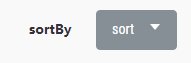
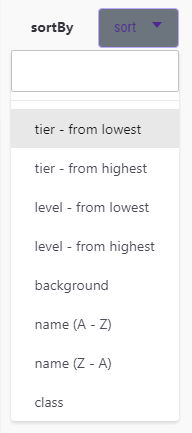
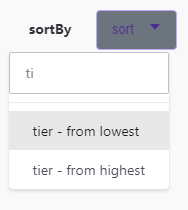
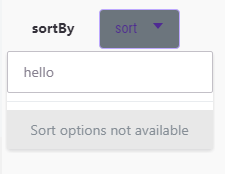
sort options dropdown
closed | open - all options | open - filtered options | open - no options |
----- | ----- | ----- | ----- |
 |
|  |
|  |
| 
Quick jsFiddle mock up -- I'm using a free/ anonymous account so it might be deleted in the near future.
edit: added some error handling.
Incase the mock up gets deleted
I've included a quick mockup of the sort options dropdown. It doesn't have all the sort options and css rules, but is provided for showcase purposes.
- Since there are so many sort options, I have included a text input within the dropdown to filter options.
- Sort options that have ascending and descending options will return sorted or reverse sorted arrays.
- The flavour text (tier - from lowest, tier - from highest, etc.) is a placeholder, that can be changed for better suggestions.
- When user searches for sort option that does not exist, error message /
sort option not availableis displayed. - Beyond this the current code base will remain largely the same.
kartikadur
on 6 Nov 2017
Thanks for all this work! I'm tagging @Tressley on this so that he can give you some feedback on the implementations of the designs.
lemoness
on 6 Nov 2017
No problem. This is an interesting interaction design issue.
kartikadur
on 8 Nov 2017
Hey @kartikadur -- Great work so far! A couple of points of feedback:
- There are a lot of options, but I don't think we need to get that granular for this type of control. The user search provides a lot of value and I think the options you've suggested in your JSFiddle are inline with the more common usecases. I think the list I'd go with is: [Class, Date Joined, Level (Descending), Name (Ascending, A-Z), Tier (Descending)]
- No need for the search input in the menu. While I do agree it's more options than normal, there aren't enough to warrant a search.
- Capitalize the first letter of each option.
cc: @lemoness
 Tressley
on 8 Nov 2017
Tressley
on 8 Nov 2017
@Tressley, thanks for the update.
Does sorting 'class', a categorical parameter, provide any benefits? I would assume a filter would be more suited for it. (ditto with background if it is still being considered).
For 'Date Joined' should I use ascending, descending, or both ?
kartikadur
on 8 Nov 2017
@kartikadur - Class can be sorted alphabetically (Healer, Mage, Rogue, Warrior), but yes, you're correct in stating a filter would be more appropriate. Date Joined should be both! Sorry for the confusion.
Tressley
on 8 Nov 2017
@kartikadur Please also include Last login in both directions since it's one of the most useful sort orders.
I'd like to see Background kept too since it's often the most attractive option unless @Tressley has a specific objection to it. It could be sorted by background key (no need to sort by name). I'd suggest allowing sorting in both directions to give the user the most flexibility in choosing an attractive arrangement for the header. In the past we've had people share themed screenshots of their headers with all visible party members using the same background and I'd like to keep allowing that use case.
Alys
on 9 Nov 2017
@Tressley should I be add filter options in that case or just stick to sort options? Thanks for the clarification.
@Alys Thanks for the update, I'll keep 'Last Login' (asc, desc) as it does seem to have a valid use case, though I am a little shakey on 'Background'
If I may use an example: user wants to take a background themed screenshot. Suppose the user wants a background that appears in position 3 in an alphabetically (or otherwise) sorted order. With sorting they have to coordinate with the entire group to ensure that background options 1 and 2 are not selected by any one. If anyone in the party has not logged in, is unwilling to change their background, or cannot be reached then it poses a problem. With filtering it is a single interaction within habitica. (I can think of a similar use case for Class as well). Of course I will defer to @Alys, @Tressley, and @lemoness's final decision.
Let me know if I can finalize the list as stated below.
- 7 options - [Date Joined(asc, desc), Last Login(asc, desc), Level(desc), Name(a-z), Tier(desc)]
- +2 sort options - [Class, Background] sorted alphabetically by name.
kartikadur
on 9 Nov 2017
@kartikadur That background example is just one of the use cases. A more relevant one that I should have remembered earlier is that some of the backgrounds tile - they've been specifically designed by the artists to be used by two or more players at once with the sort option set to background to take advantage of the tiling. You can see them on the wiki at Backgrounds > Tiling Backgrounds. I'm not sure filtering would be a good alternative - it's only a temporary state isn't it, not a permanent state in the header all the time?
Alys
on 9 Nov 2017
@Alys thanks for letting me know.
In that case, I'll start working on the list below.
- Class (sorted alphabetically by name of class)
- Background (sorted alphabetically by name of background)
- Date Joined (asc, desc)
- Last Login (asc, desc)
- Level (desc)
- Name (a-z)
- Tier (desc)
kartikadur
on 9 Nov 2017
@kartikadur -- Let's stick with Sort options for now. I'll need some time to address filters in the design. In the mean time, I think the list you've provided looks good to start working with. @Alys -- Does this hit everything for you?
Tressley
on 10 Nov 2017
@kartikadur @Tressley Yes, thanks, that list is good! I'd be happy for the work to start based on it.
I have a slight preference for allowing sorting in both directions for all options to maximise flexibility, but I understand you probably want to keep the list short so it's not worth considering that unless there's other requests for it in future.
Alys
on 11 Nov 2017
I can start based on the current inputs. Let me know if there are suggestions for the flavour text.
kartikadur
on 11 Nov 2017
I'm reopening this because while it's fixed nicely in the "View Party" modal by kartikadur's PR, a different change is needed for allowing sorting for the header.
Alys
on 15 Feb 2018
@Alys could you give me an update on what is needed? I figure I can work on it since I made the earlier changes.
kartikadur
on 15 Feb 2018
Ah, sorry, I should have changed the labels on this to indicate it's waiting for a design decision! @kartikadur you'd be most welcome to take this on once a decision has been reached, if you're still interested then! One of us will post here when that happens.
@Tressley
Alys
on 16 Feb 2018
No worries.
kartikadur
on 16 Feb 2018
@Alys Any progress on the design decision? Is there anything anyone can do to help move that along? I really miss seeing my header sorted by most recent login (so I can tell who's active, and see people's outfits as they change — somehow the default sort order shows all the people in my party who haven't checked in in months) so I'd be motivated to help get this to the point that @kartikadur could resume work if there was anything that someone else could do.
 brightbold
on 17 Apr 2018
brightbold
on 17 Apr 2018
There's been no progress so far.
@Tressley What if we did something simple for now and then it could be revisited later if needed? For example, in the party members list, just under the Sort drop-down, there could be a button labelled "Apply this sort to header". When you click it, your most recent sort selection is saved to your party.order setting so it would then be permanently applied to the header (it would not be permanently applied to the members list - that would keep working the way it does now).
Alys
on 18 Apr 2018
There is a design out for this now, and I've been assigned to work on implementing it. I'll link a PR here once I have something together!
 SabreCat
on 19 Apr 2018
SabreCat
on 19 Apr 2018
Commenting the Zeplin art board here for quick reference: https://zpl.io/VkYM1Lb
Tressley
on 20 Apr 2018
Related issues
 thebadwolfgirl
·
4Comments
thebadwolfgirl
·
4Comments
 keccy
·
4Comments
keccy
·
4Comments
 khipkin
·
3Comments
Alys
·
3Comments
khipkin
·
3Comments
Alys
·
3Comments
 mikean92
·
3Comments
mikean92
·
3Comments