Habitica: Cannot use JAWS or other screen-readers with many pages
Trello commenter "@Bookrage" mentioned some accessibility issues for the blind and I asked for some more information. He sent me a more complete writeup of what working.
I use JAWS (Jaws Accessibility With Speech.” One of the two big screenreader programs for Windows and I use Internet Explorer 11 as my browser. (Jaws works okay with Firefox but it actually handles Habitica better with IE oddly enough and is terrible with Chrome.)
In regards to habits, there are a number of problems. First, the buttons involved are just interpereted as checkboxes and when I click on them (with keyboard commands or using an aspect of Jaws called the Jaws Cursor where you control the mouse with the keyboard, it simply check and unchecks the + and – buttons and clicking them again just unchecks them, doing nothing. Also, it is impossible to tell one checkbox from the other so if it did do something, a player using Jaws could easily select weak outcomes rather than strong ones and hurt themselves when they in fact deserve to be rewarded. There is no real reference point since the up and down arrows move people around a site based on the site itself. If I knew which box Jaws came to first, it wouldn’t be a problem.
Also, most buttons on pages are not labeled. These buttons will make Jaws say things like “unlabeled 4 button) or unlabled 1 button. Also, as things stand it doesn’t usually read item icons. The only way I can equip things is remembering exactly what order I got stuff in since all of them just say “unlabeled 1 button) when you have the Jaws cursor focused on them. This is also true for everything in every shop and every pet in both eggs, pets, and mounts. I have to get a sighted person to help me right now.
I can tell you now in regards to the rewards section of the tasks page, the way you purchase something with Jaws is have your cursor sitting on the cost of said item and pressing enter, though I haven’t found a reliable way to look at stats of things before I buy them.
 serverless-mom
All 17 comments
All but one of the concerns mentioned here should be resolved by PR's that are currently open (I still haven't figured out how to add labels to the shop in the tasks view, but soon!)
serverless-mom
on 31 Dec 2015
Could you lable pets and mounds? Those are labled in the iOS app so the developer could provide you with the lables.
 bdorer
on 3 Dec 2016
bdorer
on 3 Dec 2016
We're reopening this issue now that we're done with an overhaul of the website. Feedback about which areas of the site are and are not accessible via screenreader would be very helpful!
 lemoness
on 16 Oct 2017
lemoness
on 16 Oct 2017
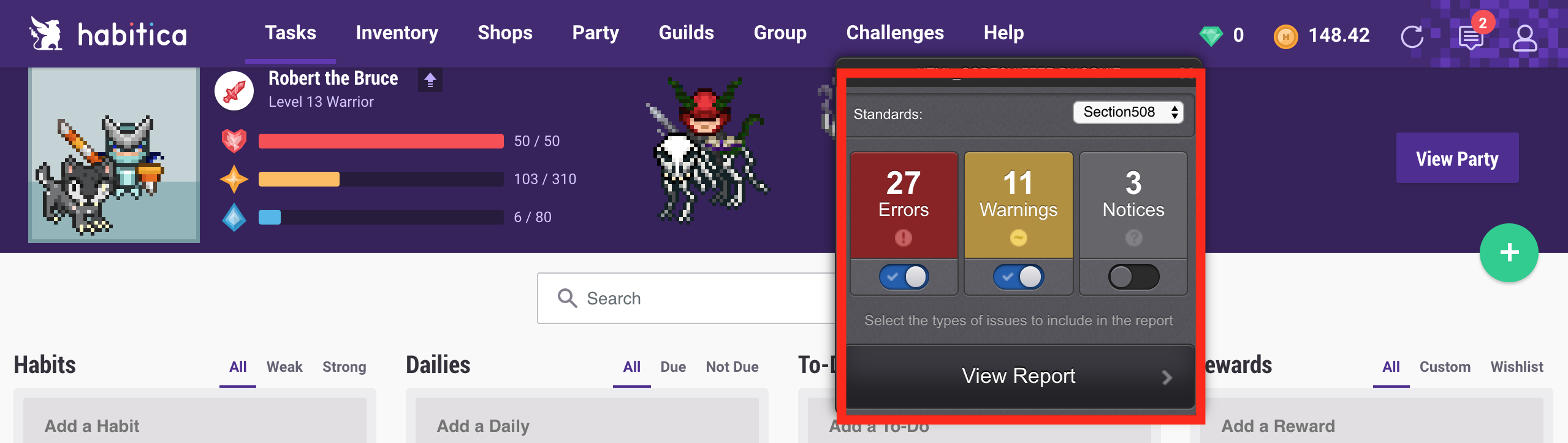
@lemoness I was actually just taking a look at the new website's accessibility. I ran a report on the task page and under 508 standards (the least strict of the government accessibility standards) there are about 27 errors and 11 warnings- at least on my task page. There are currently 1003 errors under the strictest standard, but not even government agencies are complying with that standard yet!
The good news is there are a lot of pretty easy fixes that will make a _huge_ difference for visually impaired users. Things like adding alt attributes to img tags, nesting h tags in a logical order, etc.
I would be happy to make a list of all of the errors and detail how they can be fixed so they can be turned into issues. Let me know what you guys think!
 mattWillis
on 28 Oct 2017
mattWillis
on 28 Oct 2017
@mattWillis A list like that would be INCREDIBLY helpful, thank you! Feel free to post them in here, and then I'll split them into separate tickets as needed :)
lemoness
on 28 Oct 2017
Habitica Accessibility Fixes
TODO
- [ ] Links should include href.
- [ ] Links should include some type of text content.
- [ ] Images must include an alt attribute.
- [ ] Headings should be nested logically not used for styling.
Links
Problem
Error 1194.22 (l): Anchor element found with no link content and no name and/or ID attribute.
Warning 1194.22 (l): Anchor element found with link content, but no href, ID, or name attribute has been supplied.
Description
In modern javascript/single page applications it is common for the front end to handle navigation through internal routes and triggered by event listeners. It is now common to find anchor tags without hrefs <a class="nav-link">My Link</a> or to use an icon without text <a class="nav-link"><svg class="nav-icon"></svg></a>.
The problem with these patterns is that in order for anchor tags to be useful for users who utilize screen readers, they must include a valid href, name, or id and text content. This way when a user focuses on a link the screen reader will read the content and inform the user where they are navigating to.
Solutions
All anchor tags should include href.
:warning: Hashtags (#) are an acceptable placeholder for hrefs only if the anchor includes some sort of text content.
All anchor tags should include some type of text content.
- If an anchor doesn't contain text content (i.e. just an icon), it should include a title attribute - which will also inform sighted users as well - and a screen reader accessible description.
- Fortunately Bootstrap has a css utility class titled
.sr-onlythat can be utilized for the text content. Example:
<a href="#" class="item-with-icon" title="Refreshes content on the page.">
 <span class="sr-only">Refreshes content on the page.</span>
 <svg aria-hidden="true" class="svg-icon">...</svg>
</a>
Images
Problem
Error 1194.22 (a): Img element missing an alt attribute. Use the alt attribute to specify a short text alternative.
Description
Visually impaired users cannot see images on the page, so the alt attribute is read by screen readers in place of images.
It is also good practice to include alt text to images for the following reasons:
- It is displayed in place of the image in browsers if the image file is not loaded.
- It is a requirement of HTML standard.
- Can improve SEO because search engines will read it.
Solution
All img tags must include an alt attribute.
When determining appropriate alternative text for images, context is everything. The first step when determining appropriate alternative text for an image is to decide if the image presents content and if the image has a function.
An alt tag maybe left empty (alt="") only when:
- The image is purely for decoration.
- The content that the image conveys is presented within text in the surrounding context.
Headings
Problem
Error 1194.22 (d): The heading structure is not logically nested...
Description
:warning: h tags should not be used to achieve visual results only. Assistive technologies and other browsers rely upon the literal markup of the page to determine structure. It will confuse screen readers if, for example an h4 is followed directly after an h1.
Solution
Headings should be nested logically not used for styling.
Example:
Current Nesting Structured
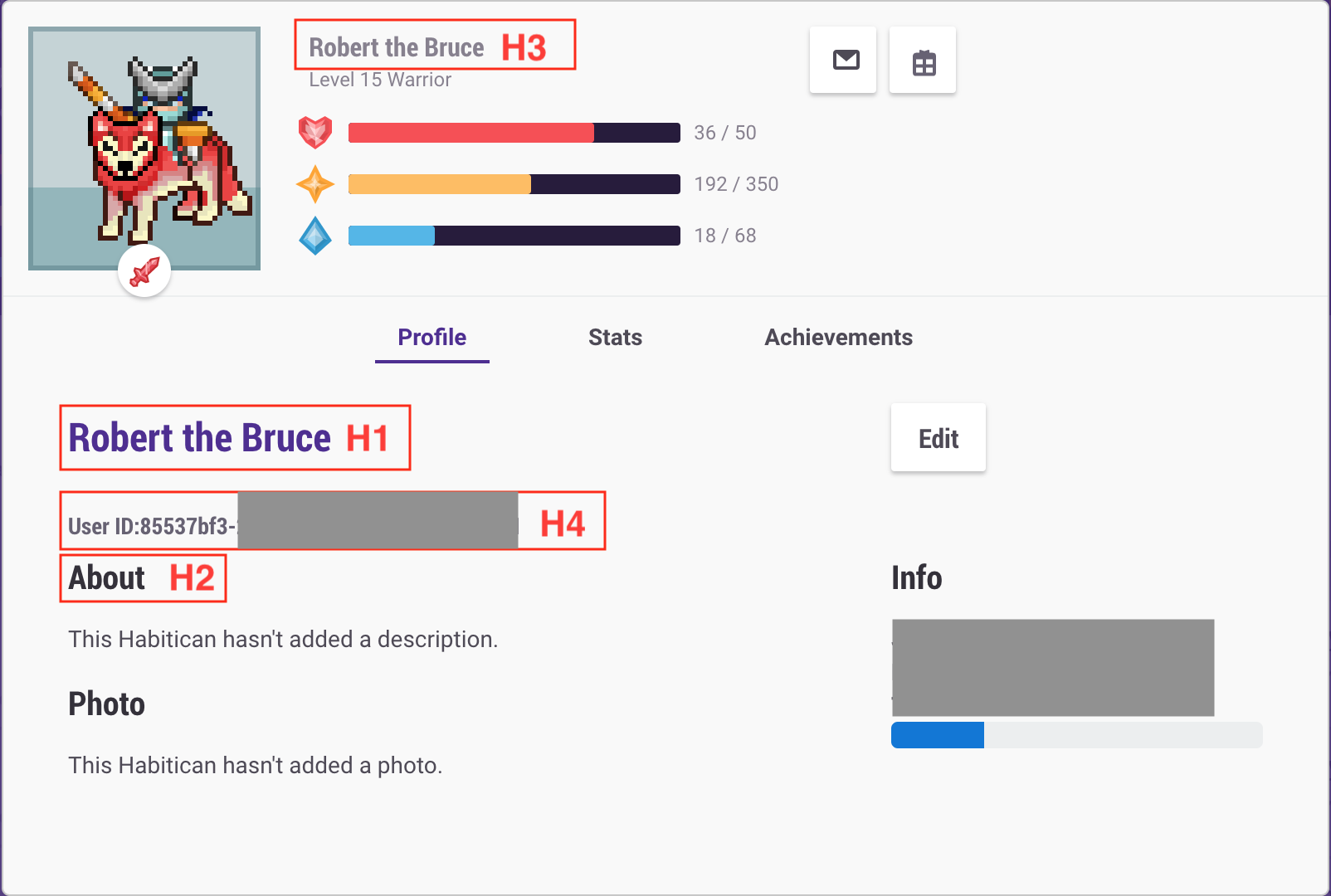
Desired Nesting Structure

mattWillis
on 31 Oct 2017
@lemoness These types of errors constitute around 95% of the accessibility issues on the site. I would be happy to help in implementing fixes. I have never used Vue.js. But I have used Backbone, Ember, and Angular and I am very familiar with Bootstrap.
I also have this comment saved as a markdown file. I can also update with great references and tools to assist in accessibility testing.
mattWillis
on 31 Oct 2017
@mattWillis Thank you so much for this -- it's incredibly helpful. Please feel free to dive in and ask questions if you have them! We'll do our best to assist.
lemoness
on 2 Nov 2017
@lemoness Awesome! I started diving in and feel confident that I will be able to make the necessary changes. Is the develop branch the correct place to make these changes, or should I create a new branch?
mattWillis
on 5 Nov 2017
@mattWillis I recommend creating a new branch in your local install, using
any name you like, basing it on the develop branch. When you do the pull
request, it will be against the develop branch.
Thank you! I really like the assessment you've done and I'm glad you're
helping us with this.
 Alys
on 6 Nov 2017
Alys
on 6 Nov 2017
@mattWillis Hi there! Hope that you're doing well. We're just checking in -- how are these fixes going?
lemoness
on 20 Feb 2018
As reported in #5853 it's also impossible to score dailies with Windows' speech recognition software
 paglias
on 15 May 2018
paglias
on 15 May 2018
Is this related to #9796?
 Joseph67843
on 16 May 2018
Joseph67843
on 16 May 2018
@Joseph67843 yeah they're related but I'd keep them separately as #9796 can be fixed more easily than this one
paglias
on 17 May 2018
Removing help wanted for a focused overhaul on accessibility.
 veeeeeee
on 8 Jan 2019
veeeeeee
on 8 Jan 2019
We're now reevaluating our approach to accessibility so that we can roll out improvements incrementally.
veeeeeee
on 3 Apr 2020
This was posted in the Report a Bug guild by @ViolaJim (16b83d01-b5f4-4fa7-b22f-6e2658e9398a):
_"I'm having some accessibility problems with Habitica. I use the IOS screen reader Voiceover and I can't access things like the user menu. I select it and just get the gem store or private messages popover."_
If you'd like more details, should we discuss it here or by email or anywhere else?
Alys
on 19 Sep 2020
Related issues
Alys
·
4Comments
 omtigger
·
3Comments
omtigger
·
3Comments
 evanostroski
·
4Comments
evanostroski
·
4Comments
 kantamablade
·
4Comments
kantamablade
·
4Comments
 thebadwolfgirl
·
4Comments
thebadwolfgirl
·
4Comments