Ha-bridge: Alexa device discovery now broke
Hi,
I have been using v5.3.1RC1 for a while, everything has worked well and the 'new device overwrites old device' bug has been fixed.
Sadly, and strangely, all my Alexa devices will no longer discover new bridge devices. After much diagnosing I have determined it to be a compatibility issue, possibly caused by an Amazon device update?
Testing:
Any v5.x.x version of the bridge does not allow for discovery. The logs show search and response between Alexa device and bridge but nothing is ever found on the Alexa device.
For reference I'm using ha-bridge on Windows 10.
Thanks
 smartypantsuk
All 143 comments
I think the issue resides with Amazon pushing some sort of update.
 luciano968
on 2 Nov 2020
luciano968
on 2 Nov 2020
I think the issue resides with Amazon pushing some sort of update.
Yeah. I don't mind re-creating my devices in v4.x.x but when I use v4 I get the bug whereby I can't add new devices as it overides the older devices
smartypantsuk
on 2 Nov 2020
I just tried using 4.5.6 and devices were still not discovered.
 Juppers
on 2 Nov 2020
Juppers
on 2 Nov 2020
I have same problem with a completely new installation 5.3.0 and 5.3.1rc1 - never used HA-Bridge before. I thought it may be an echo problem so reset it to factory defaults before testing but devices that are correctly defined in HA-Bridge are not discovered by Alexa app.
UPnP trace shows comms between Echo and HA-Bridge and sending templates 1, 2 and 3 but Alexa App just reports No Devices found.
The guys in Misterhouse have the same problem and suspect a change at Amazon and spoke of something to do with long responses and gzip (beyond my comprehension)
 ggodart
on 2 Nov 2020
ggodart
on 2 Nov 2020
I just tried using 4.5.6 and devices were still not discovered.
V4.x.x always worked well for me. Just had too many other bugs. Maybe it's some other issue for you. Firewall? Different subnet, port?
smartypantsuk
on 2 Nov 2020
Echo and HA-Bridge connected to same router/subnet, and I can see udp traffic between them so unlikely to be firewall.
ggodart
on 2 Nov 2020
I have same problem with a completely new installation 5.3.0 and 5.3.1rc1 - never used HA-Bridge before. I thought it may be an echo problem so reset it to factory defaults before testing but devices that are correctly defined in HA-Bridge are not discovered by Alexa app.
UPnP trace shows comms between Echo and HA-Bridge and sending templates 1, 2 and 3 but Alexa App just reports No Devices found.
The guys in Misterhouse have the same problem and suspect a change at Amazon and spoke of something to do with long responses and gzip (beyond my comprehension)
Did they find a fix, is there a link? There is an option to increase a timeout but perhaps not the correct thing. We could try increasing the timeout to 2000 or 3000
smartypantsuk
on 2 Nov 2020
No sign of a fix yet sadly
ggodart
on 2 Nov 2020
No sign of a fix yet sadly
Still, v4 works for me. How odd
smartypantsuk
on 2 Nov 2020
Hello
For me, no device can be added/updated since one week. I changed nothing between the time it was working and the time it started not working. Probably an Alexa update. Called them, but they even don'y understand my questions.
Here is what I tried, but nothing worked :
- Delelet all Alexa devices and make a new search. But Alexa re-decovered the same as before - even if deleted, renamed, even after I put HA-Bridge down, Crazy !
- Changed devices numbering in HA-Bridge with different sequences (10x, 40x, 60x etc...)
- Reset all my Alexa equipments (2xEcho, 1 spot, 1 Dot). After this and also after I also removed all rooms in Alexa, nothing was dicovered the HA-Bridge is up or down.
- Changed the HA-Bridge version. restored a previous version from an image (it is a Synology virtual machine), changed version (which was 5.2.1) to 5.3.1RC1.
- Deleted everything from HA-Bridge and recreated some test equipments.
- Tried several config options in HA-Brige.
Nothing of all that worked. Alexa is totally ignorig my HA-Bridge devices.
Any thought ?
Thanks
 phyllox
on 3 Nov 2020
phyllox
on 3 Nov 2020
I also tried HA-Bridge 4.5.6 with a clean install, created a device but still discovery didn't work. Tried with 2 versions of echo dot and a full sized echo.
I'm pretty sure Amazon has changed the interface/protocol and nixed all third party Hue emulations.
ggodart
on 3 Nov 2020
Also seeing the same issue (adding new devices) with 5.3.1RC1
Foolishly deleted all my HA-Bridge devices from amazon smart home devices, thinking they'd all return. But nothing detected.
Tried re-installing Gen2 Dot, Gen 3 Dot and Show 8 then re-discovering. No luck.
Then I saw this post regarding V4.x.x, so installed V4.5.6 deleted all in ha-bridge/data directory, added a few dimmable lights but was still unable to add new devices. That was last night. Just for the hell of it ran another discover earlier today, and 3 lights are detected and controllable okay, and one was detected but duplicated. I think one of the duplicates might have been working but I managed to delete the wrong duplicate! Doh! Tried to add the deleted duplicate to no avail.
I then restored V5.3.1RC1 using the /data db and config files as created by 4.5.6, and my 3 working lights are controllable by Alexa. I then tried adding my previously duplicated light, (still with V5.3.1RC1) but it is still not discovered. Currently sticking with my 3 working lights until Amazon resolves this issue whenever that happens to be.
So I can confirm for the sake of smartypantsuk sanity that V4.5.6 sort of worked for me but only after leaving things for about 12 hours before performing a re-discovery. (Some sort of caching thing at the Amazon Alexa device back-end?)
 roadsnail
on 3 Nov 2020
roadsnail
on 3 Nov 2020
Also seeing the same issue (adding new devices) with 5.3.1RC1
Foolishly deleted all my HA-Bridge devices from amazon smart home devices, thinking they'd all return. But nothing detected.
Tried re-installing Gen2 Dot, Gen 3 Dot and Show 8 then re-discovering. No luck.
Then I saw this post regarding V4.x.x, so installed V4.5.6 deleted all in ha-bridge/data directory, added a few dimmable lights but was still unable to add new devices. That was last night. Just for the hell of it ran another discover earlier today, and 3 lights are detected and controllable okay, and one was detected but duplicated. I think one of the duplicates might have been working but I managed to delete the wrong duplicate! Doh! Tried to add the deleted duplicate to no avail.
I then restored V5.3.1RC1 using the /data db and config files as created by 4.5.6, and my 3 working lights are controllable by Alexa. I then tried adding my previously duplicated light, (still with V5.3.1RC1) but it is still not discovered. Currently sticking with my 3 working lights until Amazon resolves this issue whenever that happens to be.
So I can confirm for the sake of smartypantsuk sanity that V4.5.6 sort of worked for me but only after leaving things for about 12 hours before performing a re-discovery. (Some sort of caching thing at the Amazon Alexa device back-end?)
The funny thing was i tried v5.3.1.RC1 again last night and it found 2 new devices. Then it wouldn't find anything else after that.
However, you could be right about the caching issue because one of the devices that it found did not exist in the HA-bridge database. It was a test device that I created but then deleted probably a few hours previous. So where did this ghost device come from if not some cache.
smartypantsuk
on 3 Nov 2020
@smartypantsuk - Re. caching... With regard to my duplicate light I mentioned above, I'm guessing one of them was discovered earlier (under 4.5.6) the other (which did not work from Alexa voice or the Alexa Android App) must be lurking in the cloud somewhere. I definitely reset all of my devices, which presumably clears any on-device stuff? Who knows?
It's interesting that Alexa discover via 5.3.1RC1 managed to pick up any devices. I have had zero success.
roadsnail
on 3 Nov 2020
The guys over at Misterhouse think Amazon have changed the protocol to not use gzip in the header requests during discovery. They are going to do some more testing. It seems devices already discovered may continue to work, but once deleted you can only discover them again if they are in a cache somewhere. I think this is going to need someone from HA-Bridge to snoop the network with a real Hue device to see what should be going on and then patch HA-Bridge accordingly, I don't see Amazon helping here unless they cannot discover real Hue devices themselves now.
ggodart
on 3 Nov 2020
Seems very odd. I have some hue stuff here and a signed sniffer but I've decommissioned everything at present. Really like the hue lights but not zigbee in general. It's a shame they didn't go zwave with the hue system.
I digress. Is ha-bridge even developed anymore?
smartypantsuk
on 3 Nov 2020
most recent release was 26 Mar
ggodart
on 3 Nov 2020
@bwssytems Is this still developed?
smartypantsuk
on 3 Nov 2020
I have the same problem with 5.3.0 - Added a new device yesterday and when it wasn't discovered I foolishly removed all devices in the hope that would clear the problem. Alas it only made it worse, now Alexa refuses to find any of my devices that are defined in HA-Bridge.
After several discoveries, similar to someone else who commented, one of my devices re-appeared but nothing in it's definition is in anyway unique . Here's hoping for a solution.
 Perforex
on 3 Nov 2020
Perforex
on 3 Nov 2020
Okay I've edited the title to better reflect the problem. After further testing it appears that No versions are working with respect to discovery.
I tried tonight again with v4 and v5 I now have no devices in Alexa actually responding and discovery doesn't work at all.
smartypantsuk
on 4 Nov 2020
I can confirm that issue.
I build my own Hue-Emulator for an Arduino/ESP-8266 and the Problem is the same. Alexa stoppt discovering the Bridge / the lights...
Alexa still find it by UDP/SSDP and calls all URLs correctly but dont show Up the lights...
I tried all i know but nothing worked ...
I can only guess, maybe Amazon wants to force us to write an Alexa Skill for that?
Some official answers from Amazon would be nice... :D
 jens7841
on 4 Nov 2020
jens7841
on 4 Nov 2020
I have never had discovery issues very long time user of HA-Bridge, even swapped out routers a year ago without issue (Verizon to Asus). I tried adding a new test device and my echos are able to discover the device. (Gen 1 Echo, multiple Gen 1 & 2 Dots, Gen 1 & 10.1" Premium Show, Gen 1 Spot)
However the alexa smart home page is surely going through changes, the page will change for me to one I've never seen before following these steps (but not every time):
- bottom of the page click discovery
- when discovery is complete refresh the page (F5 or click refresh on the browser)
- the URL glitches and changes to #cards without content, just a "More" button
- click Smart Home from the navigation, this displays the following all on one page: my Device Groups, my enabled Smart Home skills, a single box describing how many discovered smart devices I have currently (count is way off, says 196 I have 115) and includes a link to discovery, a box with a list of my devices, a box with a list of my scenes, then at the bottom a red link to delete all devices and groups.
Anyone else seeing this combined page?
 audiofreak9
on 4 Nov 2020
audiofreak9
on 4 Nov 2020
I have never had discovery issues very long time user of HA-Bridge, even swapped out routers a year ago without issue (Verizon to Asus). I tried adding a new test device and my echos are able to discover the device. (Gen 1 Echo, multiple Gen 1 & 2 Dots, Gen 1 & 10.1" Premium Show, Gen 1 Spot)
However the alexa smart home page is surely going through changes, the page will change for me to one I've never seen before following these steps (but not every time):
- bottom of the page click discovery
- when discovery is complete refresh the page (F5 or click refresh on the browser)
- the URL glitches and changes to #cards without content, just a "More" button
- click Smart Home from the navigation, this displays the following all on one page: my Device Groups, my enabled Smart Home skills, a single box describing how many discovered smart devices I have currently (count is way off, says 196 I have 115) and includes a link to discovery, a box with a list of my devices, a box with a list of my scenes, then at the bottom a red link to delete all devices and groups.
Anyone else seeing this combined page?
Can you confirm the bridge version you are using and try creating a new test device to see if that discovers as of now?
smartypantsuk
on 4 Nov 2020
On an associated note, these changes by Amazon may be related to a development brief I read a few months back. Specifically, that coming soon would be the ability to use some smart home skills offline! In other words, some skills for controlling your smart home will not require to be online. This would be useful and may allow a custom skill to work similar to ha-bridge.
But maybe not. Time will tell.
smartypantsuk
on 4 Nov 2020
After deleting devices from here https://www.amazon.in/hz/mycd/myx#/home/alexaPrivacy/deviceHistory, I was able to discover devices but with delays, patience needed, as highlighted somewhere in the thread it takes some time to clear cached devices, to be on safe side I did a 20 sec reboot for the Echo Plus.
 amyth1884
on 4 Nov 2020
amyth1884
on 4 Nov 2020
Hello
Glad for people who can make it working. For me, whatever I try, still the same, no discovery after a lot of tries.
Have to say that I have also a real Hue bridge, and that devices (mainly bulbs) on this Hue bridge are working as before. But devices on Ha-Bridge (power switchs, power plugs...) are not discovered. Real Hue bridge is on canal 20. Could this canal setting be a problem for HA bridge where I did not find a way to configure it ? I have several Zigbee gateways using a different canal (Hue, Xiaomi,, plus 2x Zigbee dongles).
Also not clear for me if we are just discussing here between HA-Bridhe users, or if somebody in charge of HA-Bridge software is there - if the softwre is still maintained !?
Can the people that have it working say ig they just have HA-Bridge or also a Hue bridge, and maybe send a screenshot of the HA-bridge config ?
Thanks
phyllox
on 4 Nov 2020
Ok, so I added a new device in my habridge to day (5.3.0) and I stumbled on the fact it is not added (discovered) by alexa. "old/existing" devices do work but no new discovered. And then I stumbled on this topic... But I am not seeing a solution yet, correct?
 sanderlv
on 4 Nov 2020
sanderlv
on 4 Nov 2020
Correct, I've emailed [email protected] and [email protected] and got no reply.
Its safe to say that there is no solution to this yet.
ggodart
on 4 Nov 2020
So this means this ENTIRE project is not functional anymore!? That would be the worst news before christmas after covid :-).
@bwssytems can you please advise?
sanderlv
on 4 Nov 2020
Ok, an important update. I also have the emulated hue component in home assistant installed. I can add a device there and it is discovered!
sanderlv
on 4 Nov 2020
I don't have hassio, I have manually installed home assistant, could you
please share the steps to emulate hue bridge in manually installed home
assistant
On Wed 4 Nov, 2020, 9:19 PM sanderlv, notifications@github.com wrote:
Ok, an important update. I also have the emulated hue component in home
assistant installed. I can add a device there and it is discovered!—
You are receiving this because you commented.
Reply to this email directly, view it on GitHub
https://github.com/bwssytems/ha-bridge/issues/1243#issuecomment-721811651,
or unsubscribe
https://github.com/notifications/unsubscribe-auth/AJJZ6I6XXWANXRMSF6M4WTLSOFZW7ANCNFSM4THLD75Q
.
amyth1884
on 4 Nov 2020
No sure what you are asking from me...
but some info:
https://www.home-assistant.io/integrations/emulated_hue/
Use like below. Because if you use the standard way everything is exposed by default. Took me a lot of time to find out on to how selectively present several devices:
disclaimer: this is the first and last post about this since this is the github for habridge. Please request information about home assistant on their forum.
host_ip: <ipofhass>
listen_port: 80
expose_by_default: false
exposed_domains:
 - light
 - media_player
 - scene
 - lock
 - switch
entities:
  light.name1:
    name: "lamp one"
    hidden: false
  media_player.radio:
    name: "Tuner"
    hidden: false
Same issue here with 5.3.0 and 5.3.1RC1 :( (last week it worked perfectly)
 marcopollacci
on 4 Nov 2020
marcopollacci
on 4 Nov 2020
So this means this ENTIRE project is not functional anymore!? That would be the worst news before christmas after covid :-).
@bwssytems can you please advise?
Worst news before covid. We'll have to give the developer some $$ donations
smartypantsuk
on 4 Nov 2020
No sign of a fix yet sadly
Unfortunately not.
 badgerstate
on 4 Nov 2020
badgerstate
on 4 Nov 2020
So this means this ENTIRE project is not functional anymore!? That would be the worst news before christmas after covid :-).
@bwssytems can you please advise?
I wonder if he is still supporting the project.
badgerstate
on 4 Nov 2020
I am very interested in the Home-assistant solution. I will check it out.
But i also dont think that can be resolved from our side. I think Amazon has broken the discovery without an Alexa Skill at all...
I mean Alex finds the emulated bridges but, for whatever reason, dont Show it up...
UDP discovery is working and HUE-API calls from Alexa are also working correctly as before...
I checked HTTP and UDP calls and answers from Alexa and HA Bridge vs an original HUE bridge. I cant find any problems here.
I think we can only try to get an answer from Amazon about this...
jens7841
on 4 Nov 2020
I am very interested in the Home-assistant solution. I will check it out.
But i also dont think that can be resolved from our side. I think Amazon has broken the discovery without an Alexa Skill at all...
I mean Alex finds the emulated bridges but, for whatever reason, dont Show it up...
UDP discovery is working and HUE-API calls from Alexa are also working correctly as before...
I checked HTTP and UDP calls and answers from Alexa and HA Bridge vs an original HUE bridge. I cant find any problems here.
I think we can only try to get an answer from Amazon about this...
I really hope not ;(
marcopollacci
on 4 Nov 2020
Can you confirm the bridge version you are using and try creating a new test device to see if that discovers as of now?
I am using 5.3.1 RC1
I have a few versions, so I played around and can discover devices without issue: 5.3.0 and a few others.
audiofreak9
on 5 Nov 2020
Have to say that I have also a real Hue bridge, and that devices (mainly bulbs) on this Hue bridge are working as before.
It has been reported that HA-Bridge discovery fails with a real Hue Bridge online. Have you tried discovery with the real Hue off?
audiofreak9
on 5 Nov 2020
Brad is still supporting the software, remember however it is as a hobby, not a paid type of thing. You will see rounds of replies when he finds the time, which in my opinion is very frequent for freeware. I've been around since the start, please be patient, things will get worked out.
Personally I believe it’s an Amazon thing. I’ll try to post my config which has existed since nearly day one.
Questions:
Who does and doesn't have their device numbers 'locked'? Meaning you've clicked on the numbers from the list and they appear in BOLD. I always lock my device numbers, even the test devices while I’ve tried to replicate the issue.
Do you have a user set in security settings?
Have you tried clearing all the auto insert users from the Bridge Devices - Manage Links button?
What is entered in the settings for your UPNP IP Address field? Mine is the IP of my RPi.
What is your Emulated Hue Hub Version set to? Mine is 1939070020 try that, it tells devices what Hue Hub software the bridge is emulating.
What is your UPNP Send Delay setting? Mine is 650.
audiofreak9
on 5 Nov 2020
Can you confirm the bridge version you are using and try creating a new test device to see if that discovers as of now?
I am using 5.3.1 RC1
I have a few versions, so I played around and can discover devices without issue: 5.3.0 and a
Have to say that I have also a real Hue bridge, and that devices (mainly bulbs) on this Hue bridge are working as before.
It has been reported that HA-Bridge discovery fails with a real Hue Bridge online. Have you tried discovery with the real Hue off?
I havn't a physical hue hub, or at least one that is in service.
smartypantsuk
on 5 Nov 2020
Brad is still supporting the software, remember however it is as a hobby, not a paid type of thing. You will see rounds of replies when he finds the time, which in my opinion is very frequent for freeware. I've been around since the start, please be patient, things will get worked out.
Personally I believe it’s an Amazon thing. I’ll try to post my config which has existed since nearly day one.
Questions:
- Who does and doesn't have their device numbers 'locked'? Meaning you've clicked on the numbers from the list and they appear in BOLD. I always lock my device numbers, even the test devices while I’ve tried to replicate the issue.
- Do you have a user set in security settings?
- Have you tried clearing all the auto insert users from the Bridge Devices - Manage Links button?
- What is entered in the settings for your UPNP IP Address field? Mine is the IP of my RPi.
- What is your Emulated Hue Hub Version set to? Mine is 1939070020 try that, it tells devices what Hue Hub software the bridge is emulating.
- What is your UPNP Send Delay setting? Mine is 650.
I haven't numbers locked, I didn't know you could lock them.
I have a user set up in security settings.
I've cleared the auto insert users multiple times.
UPNP IP address is the same as the server ha-brisge resides on. I have 'use UPNP address only' checked but have also tried without as that was a bug at some point stopping discovery working.
Emulated hue hub version is default which is all 99999999999. Can't remember how many 9.
650 send delay but have also played with this a lot. Tried 100, 200, 300, 750, 1000 and 1500.
I think this is nothing more than an Amazon update which has broken ha-bridge and the reason some people don't have to issue is that their Amazon devices havn't updated yet, for some reason. We should probably compare Alexa software versions, if that info is available through the app. I'll have a look
smartypantsuk
on 5 Nov 2020
Clearly software versions will vary depending on the Alexa device and generation but let's try comparing software versions because I'm sure guys with working devices may have non-updated devices. Click on the device in the Alexa app then look under the about section for software version. Specify in your post the software version, device type and whether or not ha-bridge is working for you.
Here's mine, ha-bridge not working neither for discovery or control.
Echo Dot - Gen 3 (3 devices)
4262172036
Echo - Gen 2 (1 Device)
658656720
smartypantsuk
on 5 Nov 2020
Personally I believe it’s an Amazon thing. I’ll try to post my config which has existed since nearly day one.
Me too since day 1 the same (~2-3 years)
Questions:* Who does and doesn't have their device numbers 'locked'? Meaning you've clicked on the numbers from the list and they appear in BOLD. I always lock my device numbers, even the test devices while I’ve tried to replicate the issue.I did not know this was possible up until 2 weeks ago when I had "the same sort of troubles. Since then I locked all (expect the newly tried to add one.
* Do you have a user set in security settings?Not sure what you are asking here... I do no know know of anoption to add users in habridge.
* Have you tried clearing all the auto insert users from the Bridge Devices - Manage Links button?Not now cause that gave me a headache 2 weeks ago. But Have don it before.
* What is entered in the settings for your UPNP IP Address field? Mine is the IP of my RPi.Outside IP address of server running habridge (as described in the document. In my case it's a VM running from the begin (the same VM).
* What is your Emulated Hue Hub Version set to? Mine is 1939070020 try that, it tells devices what Hue Hub software the bridge is emulating.From the begin: 9999999999
* What is your UPNP Send Delay setting? Mine is 650.For me also 650, from the begin.
sanderlv
on 5 Nov 2020
Clearly software versions will vary depending on the Alexa device and generation but let's try comparing software versions because I'm sure guys with working devices may have non-updated devices. Click on the device in the Alexa app then look under the about section for software version. Specify in your post the software version, device type and whether or not ha-bridge is working for you.
Here's mine, ha-bridge not working neither for discovery or control.
Echo Dot - Gen 3 (4 devices)
4262172036
sanderlv
on 5 Nov 2020
Echo Dot - Gen 3 (4 devices)
4262172036
Same here
marcopollacci
on 5 Nov 2020
Can you confirm the bridge version you are using and try creating a new test device to see if that discovers as of now?
I am using 5.3.1 RC1
I have a few versions, so I played around and can discover devices without issue: 5.3.0 and a few others.
Can you get us your device type and software version for your Alexa devices as above? You're the only one with it working on the post.
Cheers
smartypantsuk
on 5 Nov 2020
What would happen if I change the 9999999999 to another number. Will alexa "loose" all? At this point I am not willing to change anything...
sanderlv
on 5 Nov 2020
What would happen if I change the 9999999999 to another number. Will alexa "loose" all? At this point I am not willing to change anything...
nothing changed to me...
yesterday i did this, and tried to discover again...nothing :(
marcopollacci
on 5 Nov 2020
What would happen if I change the 9999999999 to another number. Will alexa "loose" all? At this point I am not willing to change anything...
From the main page:
Emulate Hue Hub Version
This setting is used to set the version that the ha-bridge will return in the hub version field. The default is 9999999999 which should work to be higher than the versions that are being used.
smartypantsuk
on 5 Nov 2020
I'm a fresh user of HA-Bridge, my echos are;
Dot Gen 3 sw version 4262172036
Dot Gen 2 sw version 658656720
Echo Gen 2 sw version 658656720
I have only one device defined and this turns on and off OK from the HA-Bridge web page.
It hasn't worked for me under any of the scenarios below;
- HA-Bridge 5.3.0, 5.3.1RC1 or 4.5.6
- I've tried the echos individually to check if its version dependant
- I've edited device.db to change its ID from 100 to 1 and back again
- Wed server IP address is set to the address of the machine running HABridge, this is on the same network as the devices, the echos and the alexa app (No VPN).
- I've enabled Trace UPNP Calls and can see these coming in on the console and can see HA-Bridge responding with templates 1,2 and 3.
Not sure if this helps, but the guys at Misterhouse made some changes and now their devices are discovered OK, these included sending the responses as a long format (not GZIPPED), A quick look at their trace file shows they are using the following for each device;
"11":{"state":{"on":true,"bri":254,"alert": "select","mode": "homeautomation","reachable": true},"swupdate": {"state": "readytoinstall","lastinstall": null},"type": "Dimmable light","name": "Gym lamp","modelid": "LWB014","manufacturername": "Philips","productname": "Hue white lamp","capabilities": {"certified": true,"control": {"mindimlevel": 5000,"maxlumen": 840},"streaming": {"renderer": false,"proxy": false}},"config": {"archetype": "classicbulb","function": "functional","direction": "omnidirectional"},"uniqueid": "00:17:88:01:04:00:3d:96-0b","swversion": "1.23.0_r20156","swconfigid": "321D79EA","productid": "Philips-LWB014-1-A19DLv4"}
ggodart
on 5 Nov 2020
It has been reported that HA-Bridge discovery fails with a real Hue Bridge online. Have you tried discovery with the real Hue off?
Tried to disconnect the true Hue Bridge, but same problem, nothing is discovered.
Anyway, till a few days from now, it was always working fine every time, even with the true Hue Bridge connected..
So the problem is not there, but it was clear in regards of other users comments.
phyllox
on 5 Nov 2020
I never had a real hue
sanderlv
on 5 Nov 2020
I'll post my Echo types and software versions when I get time today.
audiofreak9
on 5 Nov 2020
My Alexa devices :
- Echo Plus (2nd gen) : 4262172036
- Echo (2nd gen) : 658656720
- Echo Dot (2nd gen) : 4262172036
- Echo Spot : 658657020
According to Amz Web page, these are the last versions. As all of them have been reset, they were no doubt
phyllox
on 5 Nov 2020
My Echos (9 total), but some same type and Gens are not on same versions. Interested to compare with non working setup versions.
- Echo (1st Gen) 658655620
- Show (1st Gen) 658657020
- Show (10.1”) 658657020
- Spot (1st Gen) 658657020
- Dot (1st Gen) 658656720
- Dot (1st Gen) 655711520
- Dot (2nd Gen) 658656720
- Dot (2nd Gen) 658655620
- Dot (2nd Gen) 658655620
audiofreak9
on 5 Nov 2020
I'm curious that none of my Echo Dot Gen 1s and 2s are not on Ver. 4262172036...like others above. Maybe why discovery still works for me.
audiofreak9
on 5 Nov 2020
Nothing is discovered for me:
ha-bridge version 5.3.0
Dot (2nd Gen) 658656720
Dot (2nd Gen) 658656720
Echo (2nd Gen) 658656720
Show (1st Gen) 4262173572
Interestingly, none of the echo devices are discovered either. Previously all of my devices were discovered such that I could include them in groups. Now all that is discovered are the commercial sockets and my Hive heating.
Perforex
on 5 Nov 2020
I'm curious that none of my Echo Dot Gen 1s and 2s are not on Ver. 4262172036...like others above. Maybe why discovery still works for me.
And also that you have one Echo dot gen 1 on an older software version and two Echo dot gen 2 on older versions. It seems these devices maybe why you can still discover. It would be interesting to see if if turning off off those older software are devices stopped you being able to discover.
With that said it sounds as though misterhouse has a solution and clearly this is is Amazon's update that broke ha-bridge . I think at this point it's clear that if you have an Alexa device with an older firmware then Discovery will still work for you at the moment.
It may be that if the bridge is updated to work with Amazon's new processes then it may stop older software devices working
smartypantsuk
on 5 Nov 2020
Tried to disconnect the true Hue Bridge, but same problem, nothing is discovered.
Anyway, till a few days from now, it was always working fine every time, even with the true Hue Bridge connected..
So the problem is not there, but it was clear in regards of other users comments.
@phyllox
wait...so you paired your bulbs to a real Hue Bridge, started your Echo Plus device detection and no devices were found? Is that what you're saying?
I've just started logging the communication with Wireshark, but that seems to be ok...the Echo Plus starts a SSDP discovery and afterwards is getting the description.xml of the ha-bridge. After that it retrieves an api key and queries all the lights. In the end every single light is queried. But my Alexa App says no devices were found...
But when you say even the original hue is not working anymore the Alexa Echo itself must be the problem...
edit:
I can confirm my Echo Plus (2nd Gen) is at 4262172036
 sub0ne
on 5 Nov 2020
sub0ne
on 5 Nov 2020
@sub0ne
No, no. Sorry, maybe it was not clear or complete. English is not my language...
Real Hue bridge is still working, I have my bulds in it and if I remove one, it is discovered normally by Alexa.
No problem to have real Hue bridge devices in Alexa, even without the Hue skill.
I just tried to disconnect the real Hue bridge to see if could be the problem making that the HA Bridge devices were not discovered, - as suggested by @audiofreak9.
phyllox
on 5 Nov 2020
It seems as though the issue is constant with everyone. Templates 1 , 2 & 3 are sent successfully but no response from Alexa afterwards. We'll need developer to step in.
smartypantsuk
on 5 Nov 2020
It seems as though the issue is constant with everyone. Templates 1 , 2 & 3 are sent successfully but no response from Alexa afterwards. We'll need developer to step in.
I currently have the source code compiled and up and running, but still have to nail down the problem. I can not agree with fact that there is no response from Alexa after sending the SSDP templates...in my case during discovery Alexa even is querying my lights. But still says there are no new devices. I can see POST for API key and GET etc. from Alexa
sub0ne
on 5 Nov 2020
It seems as though the issue is constant with everyone. Templates 1 , 2 & 3 are sent successfully but no response from Alexa afterwards. We'll need developer to step in.
I currently have the source code compiled and up and running, but still have to nail down the problem. I can not agree with fact that there is no response from Alexa after sending the SSDP templates...in my case during discovery Alexa even is querying my lights. But still says there are no new devices. I can see POST for API key and GET etc. from Alexa
Sorry I didn't mean there is no response after templates are sent, I'm seeing the same issues as you.
smartypantsuk
on 5 Nov 2020
I've tried to debug a little (i'm not an expert of java neither of iot).
i saw in trace debug this:
Nov  5 21:27:33 raspberrypi java[11363]: 2020-11-05 21:27:33,164 [qtp31551531-25] DEBUG com.bwssystems.HABridge.upnp.UpnpSettingsResource - request of description.xml from: 192.168.2.3:80 filled in with address: 192.168.2.36:80
Nov  5 21:27:33 raspberrypi java[11363]: 2020-11-05 21:27:33,195 [qtp31551531-25] DEBUG com.bwssystems.HABridge.hue.HueMulator - hue api user create requested: {"devicetype": "Echo"} from address: 192.168.2.3
Nov  5 21:27:33 raspberrypi java[11363]: 2020-11-05 21:27:33,196 [qtp31551531-25] DEBUG com.bwssystems.HABridge.hue.HueMulator - user add toContinue was false, returning not authorized
Anyone know what is meaning this? (192.168.2.3:80 is the address of my alexa echo and 192.168.2.36:80 is the address of my habridge)
marcopollacci
on 5 Nov 2020
I've tried to debug a little (i'm not an expert of java neither of iot).
i saw in trace debug this:Nov 5 21:27:33 raspberrypi java[11363]: 2020-11-05 21:27:33,164 [qtp31551531-25] DEBUG com.bwssystems.HABridge.upnp.UpnpSettingsResource - request of description.xml from: 192.168.2.3:80 filled in with address: 192.168.2.36:80 Nov 5 21:27:33 raspberrypi java[11363]: 2020-11-05 21:27:33,195 [qtp31551531-25] DEBUG com.bwssystems.HABridge.hue.HueMulator - hue api user create requested: {"devicetype": "Echo"} from address: 192.168.2.3 Nov 5 21:27:33 raspberrypi java[11363]: 2020-11-05 21:27:33,196 [qtp31551531-25] DEBUG com.bwssystems.HABridge.hue.HueMulator - user add toContinue was false, returning not authorizedAnyone know what is meaning this? (192.168.2.3:80 is the address of my alexa echo and 192.168.2.36:80 is the address of my habridge)
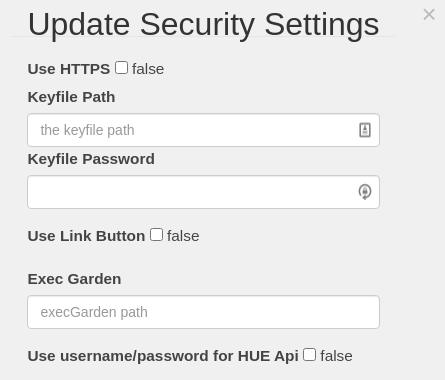
Did you press the link button
smartypantsuk
on 5 Nov 2020
I've tried to debug a little (i'm not an expert of java neither of iot).
i saw in trace debug this:Nov 5 21:27:33 raspberrypi java[11363]: 2020-11-05 21:27:33,164 [qtp31551531-25] DEBUG com.bwssystems.HABridge.upnp.UpnpSettingsResource - request of description.xml from: 192.168.2.3:80 filled in with address: 192.168.2.36:80 Nov 5 21:27:33 raspberrypi java[11363]: 2020-11-05 21:27:33,195 [qtp31551531-25] DEBUG com.bwssystems.HABridge.hue.HueMulator - hue api user create requested: {"devicetype": "Echo"} from address: 192.168.2.3 Nov 5 21:27:33 raspberrypi java[11363]: 2020-11-05 21:27:33,196 [qtp31551531-25] DEBUG com.bwssystems.HABridge.hue.HueMulator - user add toContinue was false, returning not authorizedAnyone know what is meaning this? (192.168.2.3:80 is the address of my alexa echo and 192.168.2.36:80 is the address of my habridge)
Did you press the link button
I haven't option enable..
marcopollacci
on 5 Nov 2020
I've tried to debug a little (i'm not an expert of java neither of iot).
i saw in trace debug this:Nov 5 21:27:33 raspberrypi java[11363]: 2020-11-05 21:27:33,164 [qtp31551531-25] DEBUG com.bwssystems.HABridge.upnp.UpnpSettingsResource - request of description.xml from: 192.168.2.3:80 filled in with address: 192.168.2.36:80 Nov 5 21:27:33 raspberrypi java[11363]: 2020-11-05 21:27:33,195 [qtp31551531-25] DEBUG com.bwssystems.HABridge.hue.HueMulator - hue api user create requested: {"devicetype": "Echo"} from address: 192.168.2.3 Nov 5 21:27:33 raspberrypi java[11363]: 2020-11-05 21:27:33,196 [qtp31551531-25] DEBUG com.bwssystems.HABridge.hue.HueMulator - user add toContinue was false, returning not authorizedAnyone know what is meaning this? (192.168.2.3:80 is the address of my alexa echo and 192.168.2.36:80 is the address of my habridge)
Did you press the link button
I haven't option enable..
Try enabling link button to true.
Then save settings.
Then when you do a search for devices you need to click the link button to authorise Alexa to ha-bridge
smartypantsuk
on 5 Nov 2020
Ok i made some research and i made discover again...
i found one of the mayor problem is uniqueID.
Open device.db and change one of your unique id (one of the idem that alexa DO NOT discover) with
"uniqueid": "00:11:22:33:44:55:66:77-88",
and i can use it again :)
i used this json for example https://github.com/tim-hellhake/hue-bridge-emulator/blob/master/src/hue-color-lamp.json
marcopollacci
on 6 Nov 2020
What I can say until now is, that it is definitly a problem of ha-bridge...I've spend the whole evening tracing a real hue and trying to replicate what it does with node js ^^ the result is a slim hue bridge written with nodejs.
It doesn't seem to be the uniqueid alone, because what I used as device response had a lot more properties than the ha-bridge response.
Another conclusion is, that after some time the Echo Plus is not able to detect a deleted device again. After changing the uniqueid it will be found again...so there must be some kind of cache.
sub0ne
on 6 Nov 2020
Sorry,
i replayed too early :) !
Yeah, need some change at the code of HaBridge i changed src/main/java/com/bwssystems/HABridge/api/hue/DeviceResponse.java with parameter in json i linked before (at line 120)
            response.setType("Extended color light");
            response.setModelid("LCT015");
            response.setSwversion("1.46.13_r26312");
            response.setSwconfigid("52E3234B");
            response.setProductid("Philips-LCT015-1-A19ECLv5");
            response.setProductName("Hue color lamp");
but, if i don't change unique ID i can't discover anyway.
for the new device, i think we need to edit /src/main/java/com/bwssystems/HABridge/dao/DeviceRepository.java
let me know if you can try this edit, maybe tomorrow i will fork the project and update this changes, so if someone wants to test, they can do it
marcopollacci
on 6 Nov 2020
I have been dealing with the same issue since a week or so....out of nothing, new devices wouldn't be discovered anymore.
Trying 5.3.1-RC1, 4.5.6, 5.3.0 again, nothing worked. In another thread someone suggested to delete the cache from here _https://www.amazon.com/hz/mycd/myx#/home/alexaPrivacy/home_, which I did.
I still ended up with only these kind of logs after a discovery:
11-06-2020 02:40:25.702 | INFO | Traceupnp: send upnp discovery template 1 with response address: 192.168.1.12:80 to address: /192.168.1.53:50000 | com.bwssystems.HABridge.upnp.UpnpListener
-- | -- | -- | --
11-06-2020 02:40:28.204 | INFO | Traceupnp: send upnp discovery template 2 with response address: 192.168.1.12:80 to address: /192.168.1.53:50000 | com.bwssystems.HABridge.upnp.UpnpListener
11-06-2020 02:40:30.707 | INFO | Traceupnp: send upnp discovery template 3 with response address: 192.168.1.12:80 to address: /192.168.1.53:50000 | com.bwssystems.HABridge.upnp.UpnpListener
11-06-2020 02:40:30.708 | INFO | Traceupnp: SSDP M-SEARCH packet from 192.168.1.53:50000 | com.bwssystems.HABridge.upnp.UpnpListener
192.168.1.53 is an Echo, 192.168.1.12 is where habridge is running...I ONLY saw responses from this Echo Dot. About 5min later I rebooted this Echo and 2 others (out of 7 Echo Dots (all of them are Gen 2)) and ran a discovery again and suddenly saw lines like this in the logs:
11-06-2020 02:43:38.441 | INFO | Traceupnp: send upnp discovery template 3 with response address: 192.168.1.12:80 to address: /192.168.1.51:50000 | com.bwssystems.HABridge.upnp.UpnpListener
-- | -- | -- | --
11-06-2020 02:43:38.443 | INFO | Traceupnp: SSDP M-SEARCH packet from 192.168.1.51:50000 | com.bwssystems.HABridge.upnp.UpnpListener
11-06-2020 02:43:38.871 | INFO | Traceupnp: request of description.xml from: 192.168.1.51:80 filled in with address: 192.168.1.12:80 | com.bwssystems.HABridge.upnp.UpnpSettingsResource
11-06-2020 02:43:40.945 | INFO | Traceupnp: send upnp discovery template 1 with response address: 192.168.1.12:80 to address: /192.168.1.51:50000 | com.bwssystems.HABridge.upnp.UpnpListener
11-06-2020 02:43:43.050 | INFO | Traceupnp: hue api user create requested: {"devicetype": "Echo"} from address: 192.168.1.51 | com.bwssystems.HABridge.hue.HueMulator
11-06-2020 02:43:43.094 | INFO | Traceupnp: hue api user create requested for device type: Echo#192.168.1.51 and username: f109cb0fb13546ed8321d022c227ba8c | com.bwssystems.HABridge.hue.HueMulator
11-06-2020 02:43:43.240 | INFO | Traceupnp: hue lights list requested by user: f109cb0fb13546ed8321d022c227ba8c from address: 192.168.1.51 | com.bwssystems.HABridge.hue.HueMulator
11-06-2020 02:43:43.393 | INFO | Traceupnp: hue api user create requested: {"devicetype": "Echo"} from address: 192.168.1.51 | com.bwssystems.HABridge.hue.HueMulator
11-06-2020 02:43:43.395 | INFO | Traceupnp: hue api user create requested for device type: Echo#192.168.1.51 and username: f109cb0fb13546ed8321d022c227ba8c | com.bwssystems.HABridge.hue.HueMulator
11-06-2020 02:43:43.426 | INFO | Traceupnp: hue lights list requested by user: f109cb0fb13546ed8321d022c227ba8c from address: 192.168.1.51 | com.bwssystems.HABridge.hue.HueMulator
11-06-2020 02:43:43.448 | INFO | Traceupnp: send upnp discovery template 2 with response address: 192.168.1.12:80 to address: /192.168.1.51:50000 | com.bwssystems.HABridge.upnp.UpnpListener
11-06-2020 02:43:45.950 | INFO | Traceupnp: send upnp discovery template 3 with response address: 192.168.1.12:80 to address: /192.168.1.51:50000 | com.bwssystems.HABridge.upnp.UpnpListener
So basically what I did to a few moments ago to get discovery going again was:
1) Restart habridge (5.3.0)
2) Set the "UPNP Send Delay" to 2500
3) Cleared my data from here: https://www.amazon.com/hz/mycd/myx#/home/alexaPrivacy/home
4) Waiting ~5-10min.
5) Rebooted some of my Echo devices (at least one Echo which IP was listed in the habridge logs showing the "send upnp discovery template" lines)
6) Ran a discovery again and noticed the "hue api user create" lines suddenly showing and my remaining 4 devices where finally discovered!
I've deleted a device from habridge, added a new one, ran discovery again (a few times)...and nothing!
But when I repeated the procedure above, the new device got discovered!
Just before posting this I tested some more and I would also recommend to change the ID range, if you're using the 100 range, create new devices in the 300 range for example (or renumber everything to the 300 range if you deleted your devices and nothing is discovered)...after doing this last thing, another new device was discovered without doing the 6 steps above again.
Cheers.
 marcnl
on 6 Nov 2020
marcnl
on 6 Nov 2020
This has to be an Amazon update that is the problem. It's cool that some of you are finding work arounds, but ha-bridge was working fine for us all then all of a sudden it has just stopped. Ha-bridge doesn't receive automatic updates but alexa does. So ha-bridge definitely needs code adjustment and by the sounds of it misterhouse above may have the answer. What we need is someone to modify the code, compile It, test it then send us it to try. If it works the changes can be commited to the project.
smartypantsuk
on 6 Nov 2020
Ok i made some research and i made discover again...
i found one of the mayor problem is uniqueID.
Open device.db and change one of your unique id (one of the idem that alexa DO NOT discover) with"uniqueid": "00:11:22:33:44:55:66:77-88",and i can use it again :)
i used this json for example https://github.com/tim-hellhake/hue-bridge-emulator/blob/master/src/hue-color-lamp.json
But i tried creating a new database with new devices. That's after leaving it 24 hours or more. I've also deleted all my old devices from aws still nothing works
smartypantsuk
on 6 Nov 2020
- Set the "UPNP Send delay to 2500
I think 1500 is the maximum support by the bridge. According to the main page.
smartypantsuk
on 6 Nov 2020
Ok i made some research and i made discover again...
i found one of the mayor problem is uniqueID.
Open device.db and change one of your unique id (one of the idem that alexa DO NOT discover) with"uniqueid": "00:11:22:33:44:55:66:77-88",and i can use it again :)
i used this json for example https://github.com/tim-hellhake/hue-bridge-emulator/blob/master/src/hue-color-lamp.jsonBut i tried creating a new database with new devices. That's after leaving it 24 hours or more. I've also deleted all my old devices from aws still nothing works
me too, but you set your new device with id like mine? 'cause habridge use another id, shorter than this :(
marcopollacci
on 6 Nov 2020
This has to be an Amazon update that is the problem. It's cool that some of you are finding work arounds, but ha-bridge was working fine for us all then all of a sudden it has just stopped. Ha-bridge doesn't receive automatic updates but alexa does. So ha-bridge definitely needs code adjustment and by the sounds of it misterhouse above may have the answer. What we need is someone to modify the code, compile It, test it then send us it to try. If it works the changes can be commited to the project.
here you can see what i did https://github.com/marcopollacci/ha-bridge/commit/c840f2bc4d04a3c12bfa34416f4ff637ac242002, and then edited one of my device that previously not discovered with uniqueid i wrote before
marcopollacci
on 6 Nov 2020
@marcopollacci
it's not only the uniqueid as I wrote above. I implemented a small hue bridge emulator responding with the device response as ha-bridge does and the device is not discovered. When I take a device reponse equal to the one smartypantsuk posted, it will find the id.
What I can do for you guys is forking the project and fix the stuff, as soon as we can figure out what exactly the problem is.
sub0ne
on 6 Nov 2020
@sub0ne (or anyone who want to try)
plese, try to compile code of my forked project and let me know if working (i used 5.3.x branch).
Actually if i add new device and try to discover i see the new device like some days ago, but i have only Echo 3rd generation :\
marcopollacci
on 6 Nov 2020
Ohh nice one @marcopollacci 👍
The trick with the unique id and the other changes worked for me as well.
But i have not cleared a cache or something. I only changed the code like you.
The interesting thing is, that now all of my Test-Lights are found at the discovery process. Even those that no longer exists :D
Very strange thing at all xD...
I'll try a little now. If i can find something out i wrote here again.
Thanks!
jens7841
on 6 Nov 2020
@sub0ne (or anyone who want to try)
plese, try to compile code of my forked project
dev_branch_5.3.x?
sub0ne
on 6 Nov 2020
@sub0ne (or anyone who want to try)
plese, try to compile code of my forked projectdev_branch_5.3.x?
yes, this one https://github.com/marcopollacci/ha-bridge/tree/dev_branch_5.3.x :)
marcopollacci
on 6 Nov 2020
WRT questions around uniqueid. It's interesting that @mol7os raised some points on uniqueid and Alexa discovery here...
https://github.com/bwssytems/ha-bridge/issues/513
roadsnail
on 6 Nov 2020
UPDATE: After more testing, I am still using bwssystems V5.3.1RC1 HA-Bridge s/w here. I have three Echo devices, two dots (V2/V3) and an echo show.
I am pretty sure I am seeing caching issues as mentioned above, and my guess is that a local device fails to discover a HA device resident in its cache.
So when adding a new HA device I tried switching my V3 dot and echo off, and leave them powered off. I then power cycled the dot V1 (clearing any local volatile cache?), then I did a discover devices using the Amazon smart home device Web page. Following this procedure, I was able to discover a device I had tried to discover (but failed) previously but I ended up with three versions of the same device. I worked out which one works and deleted the other two.
Next, I created a new HA device and this was also discovered but only after a power cycle of my V2 dot.
I then switched on the other two Echo devices, and they are all able to voice activate my HA devices.
Anyhow, I have all of my devices back again and will leave well alone for now.
Further Update: Couldn't leave alone, and hit issues again, so having looked at marcopollaci's changes, decided to clone his fork, compile it and test... see results below
roadsnail
on 6 Nov 2020
@marcopollacci i testet your branch. So far it worked.
I think i also figured out the main problem about this:
The uniqueid must have the part "AA:" (hex) 6 times. This is (or should be in the real hue-world :D ) the MAC-Address from the light. Then followed by two additional "AA:" (hex) parts. This is the "unique endpoint id" as described in the HUE-Api Docu. And at the end there is those "-XX" (X=Number) part. In HA-Bridge this is the group number.
HA-Bridge has only 6 times this AA (hex) part followed by this "-XX" part. So the "unique endpoint id" is missing.
With the last Echo/Alexa update some validation of this uniqueid must have been implemented. This brokes all lights with this 6 part uniqueid.
@marcopollacci i think for this fix we only need the change at the unique id. The other changes at "DeviceResponse" (ModelId/ProcuktId/...) are only "optical" improvements (if you know what i mean :D - Cant think of a better word right now xD) - But they don't bother here either...
But what we are doing with all the already saved devices in the "device.db". Will they still work if they have already been discoverd?
Or must we maybe implement some mechanism that users can generate a new unique id for those "old" ones and re-discover the lamps? (or maybe at least some warning in the UI)
jens7841
on 6 Nov 2020
@marcopollacci i testet your branch. So far it worked.
I think i also figured out the main problem about this:
The uniqueid must have the part "AA:" (hex) 6 times. This is (or should be in the real hue-world :D ) the MAC-Address from the light. Then followed by two additional "AA:" (hex) parts. This is the "unique endpoint id" as described in the HUE-Api Docu. And at the end there is those "-XX" (X=Number) part. In HA-Bridge this is the group number.HA-Bridge has only 6 times this AA (hex) part followed by this "-XX" part. So the "unique endpoint id" is missing.
With the last Echo/Alexa update some validation of this uniqueid must have been implemented. This brokes all lights with this 6 part uniqueid.
@marcopollacci i think for this fix we only need the change at the unique id. The other changes at "DeviceResponse" (ModelId/ProcuktId/...) are only "optical" improvements (if you know what i mean :D - Cant think of a better word right now xD) - But they don't bother here either...
yes, I also thought it was just a unique id problem, but while I was, I thought about updating the rest of the parameter as well (in the json from which I took inspiration there were different)
But what we are doing with all the already saved devices in the "device.db". Will they still work if they have already been discoverd?
Or must we maybe implement some mechanism that users can generate a new unique id for those "old" ones and re-discover the lamps? (or maybe at least some warning in the UI)
in my tests, I had deleted one of my old device and the only way to be able to add it again was to manually edit the device.db and insert a new uniqueID (with new "format"),
I don't know if changing all the old uniqueIDs then we find ourselves with double devices
marcopollacci
on 6 Nov 2020
@marcopollacci. I have also done some initial tests on your branch of ha-bridge and it appears to be working well, even with my old device.db created by the bwssystems version.
So to be clear, I pulled your branch, compiled it on my RPi and copied resulting .jar to my working directory. Restarted the HA-Bridge service so that your new branch is using my existing device.db and habridge.config.
Previously added and working devices continue to operate from Alexa App and Voice without any changes. I can add new devices from my domoticz set up and they are discovered and work without issues.
I haven't tried removing devices set up under the previous HA-Bridge s/w and re-adding them to see if I end up with duplicates, but I don't really need to as they work anyway.
I will now add more devices and continue testing. Nice work. Thanks!
roadsnail
on 6 Nov 2020
@roadsnail i was in the same situation as you with the only difference that I had removed my device from the alexa web page, but as I said before, after changing the uniqueID in device.db all right.
Also, today, I added a new bulb and everything worked fine.
The only thing which remains to be checked (if it has not already been done) is with alexa different echo dot 3 still works or not :)
marcopollacci
on 6 Nov 2020
@marcopollacci , voice commands work fine on my Dot v2 and v3, also my Echo Show 8.
I haven't tried voice discovery on any of my devices yet. I have so far used discover on Amazon's smart home/devices page
roadsnail
on 6 Nov 2020
@roadsnail oh! This is a good news :+1:
marcopollacci
on 6 Nov 2020
I removed all devices via the amazon web interface.
Modified the device.db unique id's.
Ran discovery via android alexa app and it discovered all devices.
Out of interest, rightly or wrongly this is what I did with the unique ID's in the device.db.
Original Unique ID: 00:17:88:5E:D3:6E-00
Change to: 00:17:88:5E:D3:6E
Basically just removing the -00 from the end of each ID.
Commands are working fine on Dot v3 and Echo v2.
smartypantsuk
on 6 Nov 2020
Work now for me after 2 days Wait... nothing change.
 GevaudanBeast
on 6 Nov 2020
GevaudanBeast
on 6 Nov 2020
It seems that thanks to @marcopollacci and maybe some other ones - thanks to you all - it is now working for some of you.
Unfortunately, I am not a technician, and Linux remains for me a great mystery, so I have no idea about what I have to do for it can work for me too.
I understand that the unique Id must be changed in some way, but it is not clear for me which way. Do I have to edit it, but what finally must it look like ? Do I have to change it for each device ? Must the Id be edited in the same way, and how are the Id and the unique Id linked together ?
Also I understand that @marcopollacci makes change to the source code somewhere to have automatic discoveryy as before, but I have no idea what I have to take to have it and what I have to do to compile this.
Sorry, really I know nothing to Linux. Thanks in advance for your help
phyllox
on 7 Nov 2020
For me it works with "ha-bridge-5.3.1RC1.jar" too. Stopping the service and editing the File "data/device.db". After changing the "Unique Id" (for example) from "00:17:88:5E:D3:69-00" to this "00:17:88:5E:D3:69" and running the Service, Alexa will find the device after searching. It works with Alexa and Philips Hue App.
 andoha80
on 7 Nov 2020
andoha80
on 7 Nov 2020
Ok, so this became a long thread. I assume a lot of people are or are going to face this issue. lot's of them not knowing yet due to the fact they did not add any devices recently.
My question: What will be the "final" and "formal" solution? will @bwssytems release a new version with a fix?
Like @phyllox I am also not a linux technician and I would really like to have a "simple" to achieve a solution. Or at least like : do this, do that":-).
Thank you all for diving in to this issue. And I really hope I am also soon able to add devices again and discover them.
Thanks!
sanderlv
on 7 Nov 2020
For those of you running ha-bridge under ubuntu or debian (might work for other dists) this is what I did ymmv:
Note - This needs to be done in your /data directory:
# systemctl stop ha-bridge.service
# cp device.db device.copy
# sed -i 's/-[0-9][0-9]"/"/g' device.db
# systemctl start ha-bridge.service
I then ran a discover and all my devices were found. Thank you to the people who discovered the fix.
Perforex
on 7 Nov 2020
I agree this sounds a bit out of my league. Unfortunately I have not seen bwssystems around, even to simply say that he is aware of the problem.
Ok, so this became a long thread. I assume a lot of people are or are going to face this issue. lot's of them not knowing yet due to the fact they did not add any devices recently.
My question: What will be the "final" and "formal" solution? will @bwssytems release a new version with a fix?
Like @phyllox I am also not a linux technician and I would really like to have a "simple" to achieve a solution. Or at least like : do this, do that":-).Thank you all for diving in to this issue. And I really hope I am also soon able to add devices again and discover them.
Thanks!
badgerstate
on 7 Nov 2020
Have added a compiled 'patch' jar file here https://github.com/roadsnail/ha-bridge-5.3.1rc1-patch if this helps anyone or others wish to test without downloading and compiling source (always to be recommended).
This is the code my RPi is running compiled from @marcopollacci fork of @bwssytems HA-Bridge.
Note, all credit goes to @bwssytems and original developers and @marcopollacci for a quick patch
EDIT: Direct download link -> https://github.com/roadsnail/ha-bridge-5.3.1rc1-patch/raw/main/ha-bridge-5.3.1rc1-patch.jar
roadsnail
on 7 Nov 2020
For those of you running ha-bridge under ubuntu or debian (might work for other dists) this is what I did ymmv:
Note - This needs to be done in your /data directory:
# systemctl stop ha-bridge.service
# cp device.db device.copy
# sed -i 's/-[0-9][0-9]"/"/g' device.db
# systemctl start ha-bridge.serviceI then ran a discover and all my devices were found. Thank you to the people who discovered the fix.
I take it that is somehow modifying possibly stripping the unique id somehow?
smartypantsuk
on 7 Nov 2020
Have added a compiled 'patch' jar file here https://github.com/roadsnail/ha-bridge-5.3.1rc1-patch if this helps anyone or others wish to test without downloading and compiling source (always to be recommended).
This is the code my RPi is running compiled from @marcopollacci fork of @bwssytems HA-Bridge.
Note, all credit goes to @bwssytems and original developers and @marcopollacci for a quick patch
As that is just I .jar file i assume it will work fine on windows too?
smartypantsuk
on 7 Nov 2020
For those of you running ha-bridge under ubuntu or debian (might work for other dists) this is what I did ymmv:
Note - This needs to be done in your /data directory:
# systemctl stop ha-bridge.service
# cp device.db device.copy
# sed -i 's/-[0-9][0-9]"/"/g' device.db
# systemctl start ha-bridge.service
I then ran a discover and all my devices were found. Thank you to the people who discovered the fix.I take it that is somehow modifying possibly stripping the unique id somehow?
Yes exactly. It runs through the file replacing the pattern: "-" followed by any digits "00 - 99" followed by a single quote mark with just a quote mark hence changing all occurrence of , for example, 00:17:88:5E:D3:6E-00 to 00:17:88:5E:D3:6E
To explain the commands I issued:
- stop the ha-bridge
- make a copy of the device.db file
- modify the file removing all the "-00" or "-01" etc
- restart the ha-bridge
Perforex
on 7 Nov 2020
Thanks for the Solution with removing the last numbers on the uniqe id.
Worked fine, now are all devices recoverd in Alexa.
 Zwurg
on 7 Nov 2020
Zwurg
on 7 Nov 2020
For those of you running ha-bridge under ubuntu or debian (might work for other dists) this is what I did ymmv:
Note - This needs to be done in your /data directory:
# systemctl stop ha-bridge.service
# cp device.db device.copy
# sed -i 's/-[0-9][0-9]"/"/g' device.db
# systemctl start ha-bridge.service
I then ran a discover and all my devices were found. Thank you to the people who discovered the fix.I take it that is somehow modifying possibly stripping the unique id somehow?
Yes exactly. It runs through the file replacing the pattern: "-" followed by any digits "00 - 99" followed by a single quote mark with just a quote mark hence changing all occurrence of , for example, 00:17:88:5E:D3:6E-00 to 00:17:88:5E:D3:6E
To explain the commands I issued:
- stop the ha-bridge
- make a copy of the device.db file
- modify the file removing all the "-00" or "-01" etc
- restart the ha-bridge
so the problem was only on the uniqueID. Even simpler than I thought: D!
In any case, updating the rest of the code a bit can help it generate valid uniqueIDs for new devices, right? (I'm not very expert on how uniqueID work)
marcopollacci
on 7 Nov 2020
It's odd how misterhouse seem to think it's an issue with the gzip headers
smartypantsuk
on 8 Nov 2020
@roadsnail So if I use your compilled jar patch, I can have it working not only for existing devices that I could also change using the comamnds listed by @Perforex, but also future ones, avoiding to run the commands each time I want to add a device ?
I am not sure of what has been changed in the code.
Anyway thanks to all of you that found the solution(s).
phyllox
on 8 Nov 2020
For those of you running ha-bridge under ubuntu or debian (might work for other dists) this is what I did ymmv:
Note - This needs to be done in your /data directory:
# systemctl stop ha-bridge.service
# cp device.db device.copy
# sed -i 's/-[0-9][0-9]"/"/g' device.db
# systemctl start ha-bridge.serviceI then ran a discover and all my devices were found. Thank you to the people who discovered the fix.
This worked! Awesome!
sanderlv
on 8 Nov 2020
@phyllox . Hi. I haven't renamed any of my device uniqueid's in my device.db file using @phyllox's method, so I do not know what the result of modifying them - then using the patched jar file compiled from @marcopollacci modifications would be.
As I mentioned above, I have used the .jar compiled from @marcopollacci changes on my existing device.db and my old devices work, plus I was able to add new devices. So no manual editing of device.db
I suggest that if you want to give @marcopollacci patches a shot, then you:
Stop your ha-bridge service (see @Perforex post above for starting/stopping services)
Back up your complete ha-bridge directory. (This will allow you to restore your current .jar and data directory should anything go wrong).
Copy the patched jar file into your ha-bridge directory (you will need to rename it to be the same name as your old jar file).
Restart the ha-bridge service, then test.
I am hoping that @bwssytems will be able to review/merge changes made by @marcopollacci into the repository. Else the project may fragment!
Good luck with your changes/tests!
roadsnail
on 8 Nov 2020
@phyllox . Hi. I haven't renamed any of my device uniqueid's in my device.db file using @phyllox's method, so I do not know what the result of modifying them - then using the patched jar file compiled from @marcopollacci modifications would be.
As I mentioned above, I have used the .jar compiled from @marcopollacci changes on my existing device.db and my old devices work, plus I was able to add new devices. So no manual editing of device.db
I suggest that if you want to give @marcopollacci patches a shot, then you:
- Stop your ha-bridge service (see @Perforex post above for starting/stopping services)
- Back up your complete ha-bridge directory. (This will allow you to restore your current .jar and data directory should anything go wrong).
- Copy the patched jar file into your ha-bridge directory (you will need to rename it to be the same name as your old jar file).
- Restart the ha-bridge service, then test.
I am hoping that @bwssytems will be able to review/merge changes made by @marcopollacci into the repository. Else the project may fragment!
Good luck with your changes/tests!
Your patch works for me, thanks. I removed and re-added a device which generated the extended id (00:11:22:33... E9-03) and the device was found without the need to alter my device.db, perfect.
I noted yesterday that using my method of changing the device.db file a device was incorrectly named when I tried to add it to an Alexa group, I assume because my editing had inadvertently duplicated an id but I didn't really investigate the problem. I think the better alternative in the long run is to use this patch. My method will generate a quick fix but isn't fool proof.
Perforex
on 8 Nov 2020
I am hoping that @bwssytems will be able to review/merge changes made by @marcopollacci into the repository. Else the project may fragment!
I just opened a pull request. Let's see if it will be approved or if other changes will be made :).
Anyway, i'm glad that everything is back to working for many of us!
marcopollacci
on 8 Nov 2020
@roadsnail
Have added a compiled 'patch' jar file here https://github.com/roadsnail/ha-bridge-5.3.1rc1-patch if this helps anyone or others wish to test without downloading and compiling source (always to be recommended).
This is the code my RPi is running compiled from @marcopollacci fork of @bwssytems HA-Bridge.
Sorry, I just try to get the jar file you compiled with a wget, but it says file not found :
https://github.com/roadsnail/ha-bridge-5.3.1rc1-patch/ha-bridge-5.3.1rc1-patch.jar
If I click the jar file link with a browser, nothing inside the link.
Has the file been removed ? Where can I find it.
Thanks
phyllox
on 9 Nov 2020
@roadsnail
Have added a compiled 'patch' jar file here https://github.com/roadsnail/ha-bridge-5.3.1rc1-patch if this helps anyone or others wish to test without downloading and compiling source (always to be recommended).
This is the code my RPi is running compiled from @marcopollacci fork of @bwssytems HA-Bridge.
Sorry, I just try to get the jar file you compiled with a wget, but it says file not found :
https://github.com/roadsnail/ha-bridge-5.3.1rc1-patch/ha-bridge-5.3.1rc1-patch.jarIf I click the jar file link with a browser, nothing inside the link.
Has the file been removed ? Where can I find it?
https://github.com/roadsnail/ha-bridge-5.3.1rc1-patch/raw/main/ha-bridge-5.3.1rc1-patch.jar
smartypantsuk
on 9 Nov 2020
removing the "-00" suffix imho doesn't seem to be the correct solution...
According to the Hue Delevoper documentation lights have a uniqueid in the form AA:BB:CC:DD:EE:FF:00:11-XX
https://developers.meethue.com/develop/hue-api/lights-api/
https://developers.meethue.com/develop/hue-api/supported-devices/
sub0ne
on 9 Nov 2020
removing the "-00" suffix imho doesn't seem to be the correct solution...
According to the Hue Delevoper documentation lights have a uniqueid in the form AA:BB:CC:DD:EE:FF:00:11-XX
https://developers.meethue.com/develop/hue-api/lights-api/
https://developers.meethue.com/develop/hue-api/supported-devices/
@marcopollacci solution uses the developer documentation format you mention. In my experience, the 'old' bwssystems uniqueid format (for example "uniqueid":"00:17:88:5E:D3:02-02") still works for devices discovered before Amazon made changes recently.
I changed my .jar file to be Marco's patched version to allow me to add new devices. An example uniqueid for a device added with the patched jar file looks like this ,"uniqueid":"00:11:22:33:44:55:66:73-00" for device 115 (decimal) in my db
My device.db file now contains both formats and is currently working for my 3 Alexa devices.
roadsnail
on 9 Nov 2020
I have just downloaded the jar from @roadsnail and added a new device - keeping my old device.db untouched. And I can confirm that discovering newly created devices works again, now.
Thank you all for the fix!
 cipher2k
on 9 Nov 2020
cipher2k
on 9 Nov 2020
@roadsnail
Thanks for the link, I do not understand why I did not get the right one.
For me it works too.
Anyway for any reason, some equiments were not discovered the 1st time. I deleted them, then re-created them, and they were discovered. So it works, for the time being.
Hope we could get the "official" solution and the explanation about the Hue unique id. I looked in the Hue apps, but the unique ID is not available,. I know there is a mean using the API interface, but I do not know how to do.
Thanks again to all contributors for the solution
phyllox
on 9 Nov 2020
removing the "-00" suffix imho doesn't seem to be the correct solution...
According to the Hue Delevoper documentation lights have a uniqueid in the form AA:BB:CC:DD:EE:FF:00:11-XX
https://developers.meethue.com/develop/hue-api/lights-api/
https://developers.meethue.com/develop/hue-api/supported-devices/
I agree with you I don't think it is the correct solution according to the documentation you've shared but it does work. I am guessing but I think possibly Amazon have changed something which means the documented uniqueid format is no longer recognised for new devices. If I'm right I expect it will break again when they fix it.
But for now both the format without the "-00" and the format with @marcopollacci has used in his fix seem to work.
Perforex
on 9 Nov 2020
I have updated the Release candidate to have the changes described above
https://github.com/bwssytems/ha-bridge/releases/download/v5.3.1RC2/ha-bridge-5.3.1RC2.jar
 bwssytems
on 9 Nov 2020
bwssytems
on 9 Nov 2020
When will this be "released" and what are the update procedures?
sanderlv
on 9 Nov 2020
When will this be "released" and what are the update procedures?
It's already released. Simple download the .jar file and replace with your current version.
smartypantsuk
on 9 Nov 2020
"Replace"? Do I need to rename it then or reinstall? What does replace mean?
sanderlv
on 9 Nov 2020
Please advise! I have added another device and it is again not discovering... How do I "update"/"replace" the installation with
https://github.com/bwssytems/ha-bridge/releases/download/v5.3.1RC2/ha-bridge-5.3.1RC2.jar
??
sanderlv
on 10 Nov 2020
Please advise! I have added another device and it is again not discovering... How do I "update"/"replace" the installation with
https://github.com/bwssytems/ha-bridge/releases/download/v5.3.1RC2/ha-bridge-5.3.1RC2.jar
??
If you followed the installation instructions at https://github.com/bwssytems/ha-bridge#manual-installation-of-ha-bridge-and-setup-of-systemd-service then you will need to go to the directory where you installed the existing .jar file (ha-bridge in the example - located in your home directory). So cd ~/ha-bridge
There you should find your existing (non-working) .jar file. The example shows ha-bridge-5.3.0.jar
- Rename that file.
mv ha-bridge-5.3.0.jar ha-bridge-5.3.0.jar.sav - Fetch the latest version
wget https://github.com/bwssytems/ha-bridge/releases/download/v5.3.1RC2/ha-bridge-5.3.1RC2.jar - Rename the latest version to be the same name as your previous file.
In this examplemv ha-bridge-5.3.1RC2.jar ha-bridge-5.3.0.jar - Restart your ha-bridge service
sudo systemctl restart ha-bridge.service
If you installed the ha-bridge jar file somewhere else, then navigate to that location and follow steps 1 - 4
If your existing .jar file has a different name (eg ha-bridge-4.5.6.jar) then follow the above steps replacing ha-bridge-5.3.0 with whatever your existing jar file is named
roadsnail
on 10 Nov 2020
Hi
I have this exact issue... Alexa fails to discover anything after years of working. I'm on ha-bridge v5.3.0. (well, I was...)
Any idea on how to install this ha-bridge-5.3.1RC2.jar file onto a QNAP NAS container installation correctly?
I loaded it a while ago from "docker pull linuxserver/habridge".
Unfortunately it doesn't look like the installed container on the QNAP uses any solid directory to work from.
Searching for *.jar in the container directory I find multiple (x7) ha-bridge.jar (with no version numbers) files in multiple directories. The folders are all like.... lib/docker/overlay2/e76197f26df32e974693e63c3c59cc899d64afff2f7630e01bc89dfac1dd4df9/diff/app"
I have replace them all with the new file.
In ABOUT (on the UI) the version does read correctly as v5.3.1RC2 and I can see the "uniqueid":"00:11:22:33:44:55:66:68-00" has been populated on a new device I have added but Alexa still wont discover..... sad times...
 Matttribal
on 12 Nov 2020
Matttribal
on 12 Nov 2020
Just for the record how to update the jar file has been in the Wiki for some time here. However this relates to non-Docker installs.
audiofreak9
on 12 Nov 2020
Yeah replacing the jar file is a lot easier on non-docker systems.
Since my last post 10 min ago. Alexa now works on the few test devices I added!!! No idea why a discovery 10min later worked!
I haven't tested it all fully yet but fingers crossed its looking good!
Matttribal
on 12 Nov 2020
Might be the echo clearing cached discovery.
audiofreak9
on 12 Nov 2020
`
- Rename that file.
mv ha-bridge-5.3.0.jar ha-bridge-5.3.0.jar.sav- Fetch the latest version
wget https://github.com/bwssytems/ha-bridge/releases/download/v5.3.1RC2/ha-bridge-5.3.1RC2.jar- Rename the latest version to be the same name as your previous file.
In this examplemv ha-bridge-5.3.1RC2.jar ha-bridge-5.3.0.jar- Restart your ha-bridge service
sudo systemctl restart ha-bridge.serviceIf you installed the ha-bridge jar file somewhere else, then navigate to that location and follow steps 1 - 4
If your existing .jar file has a different name (eg ha-bridge-4.5.6.jar) then follow the above steps replacing ha-bridge-5.3.0 with whatever your existing jar file is named'
Hi, I have replaced my HA bridge version to V5.3.1RC2 according to the steps. However, my Echo Show still unable to detect the Fibaro device in HA bridge. Below is the log when I'm trying to discover from alexa account. Any idea how to troubleshoot and solve this?
'
Nov 13 06:21:49 raspberrypi java[1173]: 2020-11-13 06:21:49,123 [main] INFO com.bwssystems.HABridge.upnp.UpnpListener - Traceupnp: sendUpnpNotify notifyTemplate1
Nov 13 06:21:49 raspberrypi java[1173]: 2020-11-13 06:21:49,782 [main] INFO com.bwssystems.HABridge.upnp.UpnpListener - Traceupnp: sendUpnpNotify notifyTemplate2
Nov 13 06:21:50 raspberrypi java[1173]: 2020-11-13 06:21:50,441 [main] INFO com.bwssystems.HABridge.upnp.UpnpListener - Traceupnp: sendUpnpNotify notifyTemplate3
Nov 13 06:22:17 raspberrypi java[1173]: 2020-11-13 06:22:17,636 [main] INFO com.bwssystems.HABridge.upnp.UpnpListener - Traceupnp: sendUpnpNotify notifyTemplate1
Nov 13 06:22:18 raspberrypi java[1173]: 2020-11-13 06:22:18,298 [main] INFO com.bwssystems.HABridge.upnp.UpnpListener - Traceupnp: sendUpnpNotify notifyTemplate2
Nov 13 06:22:18 raspberrypi java[1173]: 2020-11-13 06:22:18,966 [main] INFO com.bwssystems.HABridge.upnp.UpnpListener - Traceupnp: sendUpnpNotify notifyTemplate3
 UnitedGeek
on 13 Nov 2020
UnitedGeek
on 13 Nov 2020
`
- Rename that file.
mv ha-bridge-5.3.0.jar ha-bridge-5.3.0.jar.sav- Fetch the latest version
wget https://github.com/bwssytems/ha-bridge/releases/download/v5.3.1RC2/ha-bridge-5.3.1RC2.jar- Rename the latest version to be the same name as your previous file.
In this examplemv ha-bridge-5.3.1RC2.jar ha-bridge-5.3.0.jar- Restart your ha-bridge service
sudo systemctl restart ha-bridge.serviceIf you installed the ha-bridge jar file somewhere else, then navigate to that location and follow steps 1 - 4
If your existing .jar file has a different name (eg ha-bridge-4.5.6.jar) then follow the above steps replacing ha-bridge-5.3.0 with whatever your existing jar file is named'Hi, I have replaced my HA bridge version to V5.3.1RC2 according to the steps. However, my Echo Show still unable to detect the Fibaro device in HA bridge. Below is the log when I'm trying to discover from alexa account. Any idea how to troubleshoot and solve this?
'
Nov 13 06:21:49 raspberrypi java[1173]: 2020-11-13 06:21:49,123 [main] INFO com.bwssystems.HABridge.upnp.UpnpListener - Traceupnp: sendUpnpNotify notifyTemplate1
Nov 13 06:21:49 raspberrypi java[1173]: 2020-11-13 06:21:49,782 [main] INFO com.bwssystems.HABridge.upnp.UpnpListener - Traceupnp: sendUpnpNotify notifyTemplate2
Nov 13 06:21:50 raspberrypi java[1173]: 2020-11-13 06:21:50,441 [main] INFO com.bwssystems.HABridge.upnp.UpnpListener - Traceupnp: sendUpnpNotify notifyTemplate3
Nov 13 06:22:17 raspberrypi java[1173]: 2020-11-13 06:22:17,636 [main] INFO com.bwssystems.HABridge.upnp.UpnpListener - Traceupnp: sendUpnpNotify notifyTemplate1
Nov 13 06:22:18 raspberrypi java[1173]: 2020-11-13 06:22:18,298 [main] INFO com.bwssystems.HABridge.upnp.UpnpListener - Traceupnp: sendUpnpNotify notifyTemplate2
Nov 13 06:22:18 raspberrypi java[1173]: 2020-11-13 06:22:18,966 [main] INFO com.bwssystems.HABridge.upnp.UpnpListener - Traceupnp: sendUpnpNotify notifyTemplate3
Did you remove the previously created device? Because the problem is on the uiqueID. So even changing version, you still have to remove the old device and recreate it, or go to devices.db and change the uniqueID there
marcopollacci
on 13 Nov 2020
@marcopollacci Deleted the devices and redo the bridge. It works. Thank you very much sir. Deeply appreciate all the advice and the contributor of this solution.
UnitedGeek
on 13 Nov 2020
I didn't want to recreate all the devices so I edited the devices.db
You have to change and prolong the uniqueid of every device (replace all helps..).
The new uniqueid had to be longer than my old ones. This is an example of a device which gets recognized again:
00:11:22:33:44:55:66:64-64
If the last to digits are not the same than the two digits before (64 to 64 in this case) the device will not be recognized. There were some devices where the last digits were just 00 like 00:11:22:33:44:55:66:64-00 -> this will not work. It has to be 00:11:22:33:44:55:66:64-64.
 derd3000
on 14 Nov 2020
derd3000
on 14 Nov 2020
Thanks to everyone involved in this fix. Spent an age chasing multicast traffic across my network. Found this thread, updated in about 45 seconds and all sorted.
PHEW
C
 CatmanV2
on 24 Nov 2020
CatmanV2
on 24 Nov 2020
I gave up on using habridge directly with Alexa several months ago. One by one the devices "stopped responding" and usually couldn't be re-discovered even if deleted. What I found, however, is that Smartthings can readily discover habridge devices and then Alexa discovers them from Smartthings within seconds. It means an extra step in that Alexa talks to my Smartthings hub, then the Smartthings hub talks to the habridge, but the delay is not noticeable. Everything just works including dimming.
Interestingly, the Smartthings server takes the habridge device unique ID, eg uniqueId: 00:17:88:5E:D3:C8-00, and converts it to the form 02420A010A40/200 where the base number (before the slash) is the ID that Smartthings assigned to the habridge and 200 is the device ID. All of the child devices of the habridge share the same base id number. It advertises the device through the Smartthings Alexa app and Alexa discovers it immediately and without being asked to discover devices.
 tbclark3
on 24 Nov 2020
tbclark3
on 24 Nov 2020
Interesting. My HA Bridge has been pretty much rock solid. Where I have had 'Device is not responding' it's where I've managed to get duplicates.
The discovery is a bit of a PITA, but I don't change stuff often enough to worry about.
However I have no experience using it outside of openLuup. Alexa and Vera was atrocious (well Vera and anything, really)
C
CatmanV2
on 24 Nov 2020
This worked for me (the RC2 update) I had to delete my "data" directory after updating my .jar to the RC2 version and then recreate all my devices. A pain, but it worked. Thank you to all who have (and continue to) contribute to this essential project. You all saved me from the wrath of my wife who was giving me the evil eye because the bridge was broken :)
 K1WIZ
on 26 Nov 2020
K1WIZ
on 26 Nov 2020
I've used HA Bridge with Homeseer under windows 10 for years. I've always run it on port 85 until it stopped working a few days ago. Wouldn't discover any devices and therefore lost echo control of approx 45 events and devices!
I updated to the latest jar and tried changing device ID's as outlined above but nothing worked. Then I read a post on the Homeseer forums where a member posted that HA Bridge only ran on port 80 which I knew was incorrect. Nevertheless, I changed my setup to port 80 and all devices were suddenly rediscovered and the bridge is working great once again. Has there been a change that stops HA Bridge running on anything other than port 80 under windows 10? It seems odd that this would suddenly happen.
 Reggs01925
on 29 Nov 2020
Reggs01925
on 29 Nov 2020
Then I read a post on the Homeseer forums where a member posted that HA Bridge only ran on port 80 which I knew was incorrect"
Ha-bridge works on whatever port you specify, Alexa, however, doesn't. Amazon changed the discovery behaviour some time ago so that it only discovers on port 80.
smartypantsuk
on 29 Nov 2020
Pretty sure that's not quite right. AFAIK Alexa is using UPNP so port number is not really an applicable concept. However, I can categorically state that my HA bridge is running on 8080 (and UPNP response 5000) and with the new .jar discovery was working fine this week. Of course, it might have changed since Tuesday.
It does look as though there's been another upgrade (but trying to remember versions is probably not going to work) so if discovery as suddenly stopped working (again) there might be an issue
CatmanV2
on 29 Nov 2020
Pretty sure that's not quite right. AFAIK Alexa is using UPNP so port number is not really an applicable concept. However, I can categorically state that my HA bridge is running on 8080 (and UPNP _response_ 5000) and with the new .jar discovery was working fine this week. Of course, it might have changed since Tuesday.
It does look as though there's been another upgrade (but trying to remember versions is probably not going to work) so if discovery as _suddenly_ stopped working (again) there might be an issue
There are some oddities that can't be quite explained regarding Alexa discovery. What works for some doesn't for others, however, port 80 became the necessary change many months ago.
Discovery stopped working for many and using port 80 fixed it. Maybe it's a hue requirement and not Alexa, but Google home also required the bridge to run on port 80.
smartypantsuk
on 29 Nov 2020
Aye. Does seem there’s some black box and inconsistencies around!
Chris Matthews
[email protected] chris@systemlabs.co.uk
https://www.linkedin.com/in/cmatthewsitdirector/ https://www.linkedin.com/in/cmatthewsitdirector/
+447964 207823 / +447855 823629
On 29 Nov 2020, at 09:48, smartypantsuk notifications@github.com wrote:
Pretty sure that's not quite right. AFAIK Alexa is using UPNP so port number is not really an applicable concept. However, I can categorically state that my HA bridge is running on 8080 (and UPNP response 5000) and with the new .jar discovery was working fine this week. Of course, it might have changed since Tuesday.
It does look as though there's been another upgrade (but trying to remember versions is probably not going to work) so if discovery as suddenly stopped working (again) there might be an issueThere are some oddities that can't be quite explained regarding Alexa discovery. What works for some doesn't for others, however, port 80 became the necessary change many months ago.
Discovery stopped working for many and using port 80 fixed it. Maybe it's a hue requirement and not Alexa, but Google home also required the bridge to run on port 80.—
You are receiving this because you commented.
Reply to this email directly, view it on GitHub https://github.com/bwssytems/ha-bridge/issues/1243#issuecomment-735368012, or unsubscribe https://github.com/notifications/unsubscribe-auth/AQCZZNFSB3GNTUQCGHMWJ63SSIKFTANCNFSM4THLD75Q.
CatmanV2
on 29 Nov 2020
So, for discovery to now work, it seems you need to delete all devices in the alexa echo app or home page. Make sure you are using 5.3.1RC2 and renumber your devices with a new seed in the bridge control tab. Then you can re-discover devices.
bwssytems
on 30 Nov 2020
Wow. Is that new behaviour from last week?
C
Chris Matthews
[email protected] chris@systemlabs.co.uk
https://www.linkedin.com/in/cmatthewsitdirector/ https://www.linkedin.com/in/cmatthewsitdirector/
+447964 207823 / +447855 823629
On 30 Nov 2020, at 17:40, BWS Systems notifications@github.com wrote:
So, for discovery to now work, it seems you need to delete all devices in the alexa echo app or home page. Make sure you are using 5.3.1RC2 and renumber your devices with a new seed in the bridge control tab. Then you can re-discover devices.
—
You are receiving this because you commented.
Reply to this email directly, view it on GitHub https://github.com/bwssytems/ha-bridge/issues/1243#issuecomment-735935517, or unsubscribe https://github.com/notifications/unsubscribe-auth/AQCZZNHRWKWCEFATQHTFZE3SSPKKFANCNFSM4THLD75Q.
CatmanV2
on 30 Nov 2020
RC3 is now out in the releases section. Updated upnp handling and device unique ids to be more specific. Also it seems the unique ids have been too long since inception and that may be the root cause. Delete all your devices in alexa and use renumber before you discover.
bwssytems
on 2 Dec 2020
Related issues
 scyto
·
6Comments
scyto
·
6Comments
 tylerstraub
·
10Comments
tylerstraub
·
10Comments
 scottdalton
·
5Comments
scottdalton
·
5Comments
 AdrianKielbowicz
·
3Comments
sanderlv
·
15Comments
AdrianKielbowicz
·
3Comments
sanderlv
·
15Comments
Most helpful comment
I have updated the Release candidate to have the changes described above
https://github.com/bwssytems/ha-bridge/releases/download/v5.3.1RC2/ha-bridge-5.3.1RC2.jar