Ha-bridge: SSH shutdown command to W10 & GroovyArcade (Linux)
Hi BWS
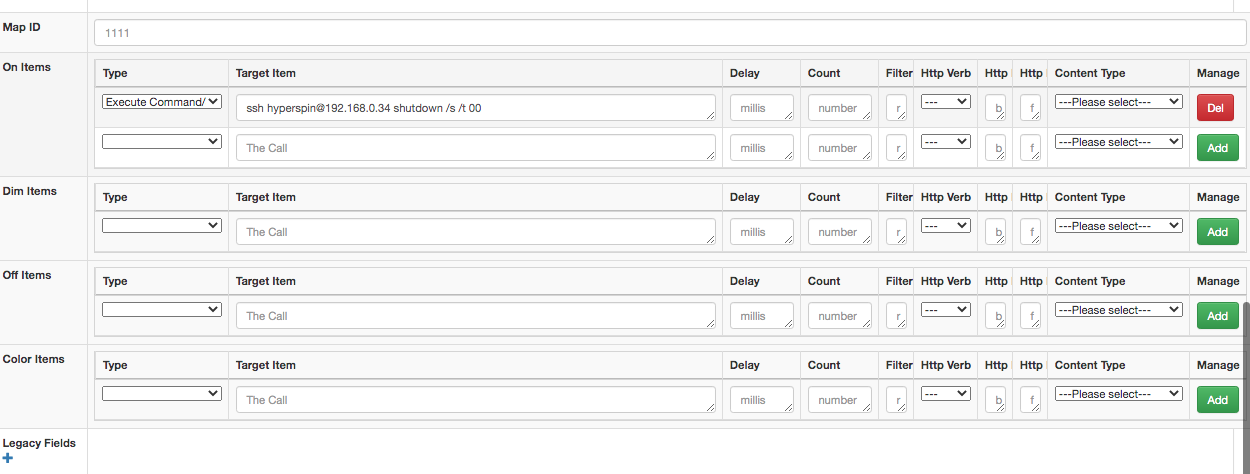
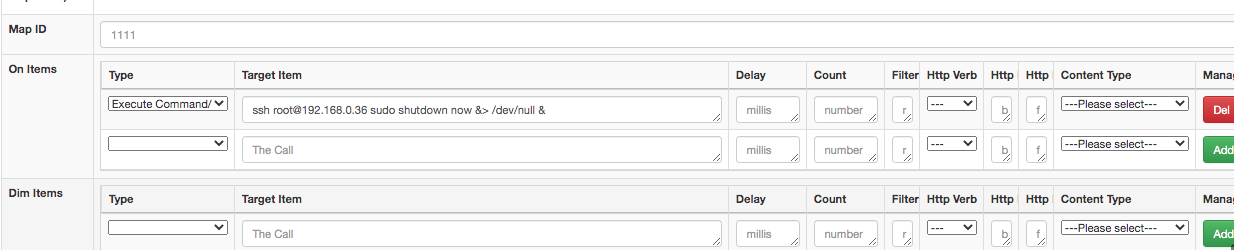
Sorry for this message, but I am cannot figure out how to shutdown my W10 PC and GroovyArcade (Linux) PCs with HA-Bridge using SSH.
I have SSH working for both Linux & W10, public keys are copied and I can login to both over SSH without a password.
I can shutdown the Linux PC using
ssh root@
and the W10 PC using
ssh
or
ssh
I have tried entering these commands in ha-bridge as written above, but they have no effect on the PCs.
The W10 PC displays that an SSH command has been recieved, but the command does not shut it down.
I have also tried executing a local script on the raspberry PI using ha-bridge, but that does not work either.
If I run the script in terminal, it does work though!
Apologies if I have not given the correct, or enough, information, hope someone can help.
Many thanks
SDCHick

 solderchicken
All 2 comments
You will need to preface those commands with a shell execute environment such as sh or bash for linux or cmd.exe or the powershell command for windows.
 bwssytems
on 8 Sep 2020
bwssytems
on 8 Sep 2020
Thank you BWS.
I actually got it to work with the commands above, it was that I hadn't added the keys for ha-bridge root user to target machine.
Works a charm now! Thank you for this software!
PS - I'm using Bitvise SSH Server free edition. Works really well for this task and highly configurable.
solderchicken
on 9 Sep 2020
Related issues
 pattont
·
5Comments
pattont
·
5Comments
 napcs
·
8Comments
napcs
·
8Comments
 JsChiSurf
·
6Comments
JsChiSurf
·
6Comments
 Lorccan
·
4Comments
Lorccan
·
4Comments
 MallocArray
·
3Comments
MallocArray
·
3Comments